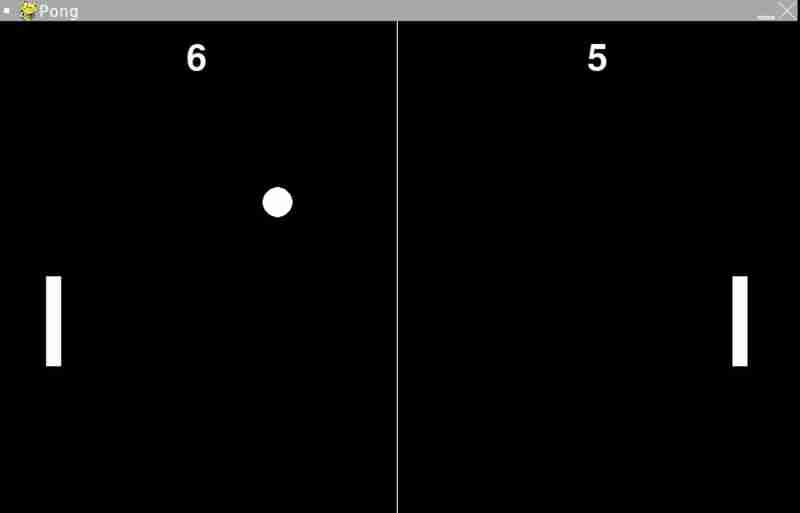
输入
import pygame
import sys
pygame 是我们用来制作游戏的模块。它为我们提供了图形、声音等工具。
sys 是 python 中的一个模块,可以帮助我们与 python 解释器交互。
初始化
pygame.init()
初始化所有 pygame 模块并使其可供使用。
常数
#dimensions
width, height=800,600
#frame rate
fps=60
#the paddles at the side of ping pong
paddle_width, paddle_height=15,90
#the balls radius
ball_radius=15
#the color of the ball and paddle
white=(255, 255, 255)
- 宽度和高度:游戏窗口的尺寸。 800px 为宽度,600px 为高度
- fps:每秒帧数,控制游戏的速度和流畅度。
- paddle_width、paddle_height:桨叶的尺寸。
- ball_radius:球的半径。
- white:白色的 rgb 值,用于球拍、球和文本。
制作屏幕
screen=pygame.display.set_mode((width,height))
pygame.display.set_caption("ping pong")
您将有一个名为ping pong 的窗口,并指定了宽度和高度

立即学习“Python免费学习笔记(深入)”;
桨和球设置
left_paddle=pygame.rect(50, height//2 - paddle_height //2, paddle_width, paddle_height)

right_paddle=pygame.rect(width - 50 - paddle_width, height //2- paddle_height //2, paddle_width, paddle_height)

ball=pygame.rect(width //2 - ball_radius, height //2 - ball_radius, ball_raduis *2, ball_radius *2)
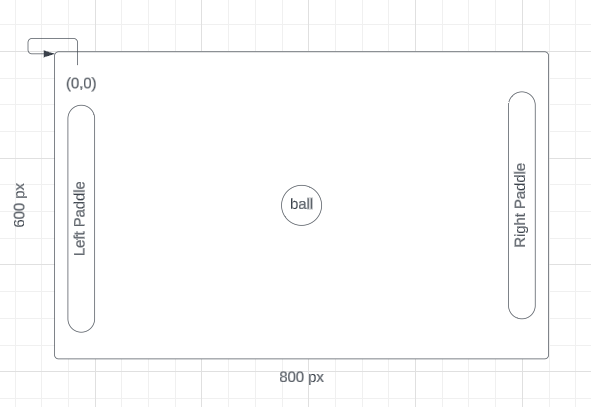
在 pygame 中,屏幕的左上角代表坐标 (0,0)。
- pygame.rect:用于在 pygame 中创建矩形(此处用于桨和球)。
pygame.rect(x, y, width, height)
- left_paddle:位于屏幕左侧附近,垂直居中。
pygame.rect(50, height//2 - paddle_height //2, paddle_width, paddle_height)
首先,我们将左桨定位在距左侧 50px 处。
然后我们执行 height//2 - paddle_height //2 因为如果你只执行 height//2 它看起来就像图片中的样子。它从屏幕上下来。为了使其居中,我们这样做 - paddle_height //2
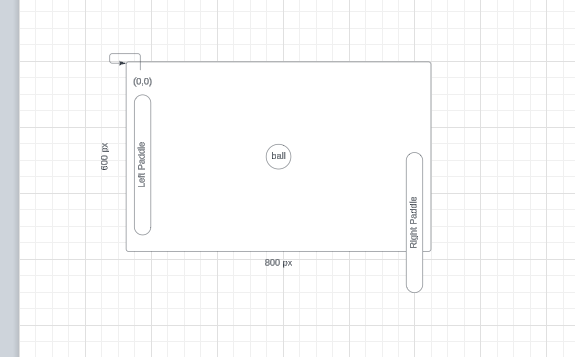
这就是我们为右桨使其居中所做的事情。
- right_paddle:位于屏幕右侧附近,垂直居中。
right_paddle=pygame.rect(width - 50 - paddle_width, height //2- paddle_height //2, paddle_width, paddle_height)
- 球:最初位于屏幕中央。
ball=pygame.rect(width //2 - ball_radius, height //2 - ball_radius, ball_raduis *2, ball_radius *2)
为了使球居中,我们减去半径。
速度
ball_speed_x=7
ball_speed_y=7
paddle_speed=10
ball_speed_x 和 ball_speed_y 控制球的水平和垂直速度。
paddle_speed:控制桨的移动速度。
分数变量
left_score=0
right_score=0
font=pygame.font.sysfont(none,55)
- left_score 和 right_score:跟踪玩家的分数。
- 字体:用于在屏幕上渲染乐谱文本。 none 使用默认字体,55为字体大小。
绘制所有内容的函数
def draw():
   screen.fill((0,0,0)) #fill the screen with black
   pygame.draw.rect(screen, white, left_paddle)
   pygame.draw.rect(screen, white, right_paddle)
   pygame.draw.ellipse(screen, white, ball)
- fill((0, 0, 0)):用黑色填充屏幕(rgb:0, 0, 0)。
- pygame.draw.rect:绘制矩形桨。
- pygame.draw.ellipse:将球绘制为圆形(以矩形球为边界)。
画出中心线
pygame.draw.aaline(screen, white, (width //2, 0), (width //2, height))
- 画一条垂直中心线来划分比赛场地。
抽签分数
   left_text=font.render(str(left_score),true, white)
   screen.blit(left_text, (width // 4 - left_text.get_width() // 2, 20))
   right_text=font.render(str(right_score), true, white)
   screen.blit(right_text, (width * 3 // 4 - right_text.get_width() //2, 20))
渲染双方玩家的分数并将其放置在屏幕上。
更新屏幕
pygame.display.flip()
使用最新更改更新显示。
#main game loop
while true:
让游戏无限期地运行。
for event in pygame.event.get():
   if event.type == pygame.quitt:
      pygame.quit()
      sys.exit()
这将遍历 pygame 中可能发生的所有事件,如果其中一个事件正在关闭窗口,则退出 pygame 并关闭窗口。
桨控制
#paddle controls
keys pygame.key.get_pressed()
if keys [pygame.k_w] and left_paddle.top > 0:
   left_paddle.y-=paddle_speed
if keys [pygame.k_s] and left_paddle.bottom < height:
   left_paddle.y += paddle_speed
if keys [pygame.k_up] and right_paddle.top > 0:
   right_paddle.y -= paddle_speed
if keys [pygame.k_down] and right_paddle.bottom < height:
   right_paddle.y += paddle_speed 66
检测按键:
-
w 和 s:上下移动左桨。
- pygame.k_w 是 w 键
- pygame.k_s 是 s 键
-
向上和向下:上下移动右桨。
- pygame.k_up 是向上键
- pygame.k_down 是向下键
- 包括防止桨移出屏幕的检查。
- left_paddle.top > 0检查桨顶部坐标是否大于 0。检查当您单击 w 时它是否击中屏幕顶部。
- left_paddle.bottom < height 检查桨底部坐标是否大于屏幕高度。检查当您单击 k 时它是否触及屏幕底部。
- right_paddle.top > 0检查桨顶部坐标是否大于 0。检查当您单击向上键时它是否击中屏幕顶部。
- right_paddle.bottom < height 检查桨底部坐标是否大于屏幕高度。检查当您单击向下键时它是否击中屏幕底部。
球运动
   ball.x += ball_speed_x
   ball.y + ball_speed_y
通过将球的速度添加到当前位置来移动球
球与顶壁和底壁碰撞
if ball.top <= 0 or ball.bottom >= height:
   ball_speed_y=-ball_speed_y
如果球击中屏幕顶部或底部,则反转球的垂直方向
球与桨的碰撞
if ball.colliderect(left_paddle) or ball.colliderect(right_paddle):
   ball_speed_x = -ball_speed_x
如果球与球拍碰撞,则反转球的水平方向。
评分
995546471438- 如果球出界,则更新得分。
- 将球重置到中心并反转其方向。
定时
pygame.time.clock().tick (fps)
限制游戏运行速度最高为60帧/秒,确保游戏流畅。
完整代码
import pygame
import sys

pygame.init()

# Constants
WIDTH, HEIGHT = 800, 600
FPS = 60
PADDLE_WIDTH, PADDLE_HEIGHT = 15, 90
BALL_RADIUS = 15
WHITE = (255, 255, 255)

# Setup screen
screen = pygame.display.set_mode((WIDTH, HEIGHT))
pygame.display.set_caption("Pong")

# Paddles and ball setup
left_paddle = pygame.Rect(50, HEIGHT // 2 - PADDLE_HEIGHT // 2, PADDLE_WIDTH, PADDLE_HEIGHT)
right_paddle = pygame.Rect(WIDTH - 50 - PADDLE_WIDTH, HEIGHT // 2 - PADDLE_HEIGHT // 2, PADDLE_WIDTH, PADDLE_HEIGHT)
ball = pygame.Rect(WIDTH // 2 - BALL_RADIUS, HEIGHT // 2 - BALL_RADIUS, BALL_RADIUS * 2, BALL_RADIUS * 2)

# Speeds
ball_speed_x = 7
ball_speed_y = 7
paddle_speed = 10

# Score variables
left_score = 0
right_score = 0
font = pygame.font.SysFont(None, 55)

# Function to draw everything
def draw():
        screen.fill((0, 0, 0))  # Fill screen with black
        pygame.draw.rect(screen, WHITE, left_paddle)
        pygame.draw.rect(screen, WHITE, right_paddle)
        pygame.draw.ellipse(screen, WHITE, ball)

        # Draw the center line
        pygame.draw.aaline(screen, WHITE, (WIDTH // 2, 0), (WIDTH // 2, HEIGHT))

        # Draw scores
        left_text = font.render(str(left_score), True, WHITE)
        screen.blit(left_text, (WIDTH // 4 - left_text.get_width() // 2, 20))
        right_text = font.render(str(right_score), True, WHITE)
        screen.blit(right_text, (WIDTH * 3 // 4 - right_text.get_width() // 2, 20))

        pygame.display.flip()

# Main game loop
while True:
        for event in pygame.event.get():
                if event.type == pygame.QUIT:
                        pygame.quit()
                        sys.exit()

        # Paddle controls
        keys = pygame.key.get_pressed()
        if keys[pygame.K_w] and left_paddle.top > 0:
                left_paddle.y -= paddle_speed
        if keys[pygame.K_s] and left_paddle.bottom < HEIGHT:
                left_paddle.y += paddle_speed
        if keys[pygame.K_UP] and right_paddle.top > 0:
                right_paddle.y -= paddle_speed
        if keys[pygame.K_DOWN] and right_paddle.bottom < HEIGHT:
                right_paddle.y += paddle_speed

        # Ball movement
        ball.x += ball_speed_x
        ball.y += ball_speed_y

        # Ball collision with top and bottom walls
        if ball.top <= 0 or ball.bottom >= HEIGHT:
                ball_speed_y = -ball_speed_y

        # Ball collision with paddles
        if ball.colliderect(left_paddle) or ball.colliderect(right_paddle):
                ball_speed_x = -ball_speed_x

        # Scoring
        if ball.left <= 0:
                right_score += 1
                ball = pygame.Rect(WIDTH // 2 - BALL_RADIUS, HEIGHT // 2 - BALL_RADIUS, BALL_RADIUS * 2, BALL_RADIUS * 2)
                ball_speed_x = -ball_speed_x
        if ball.right >= WIDTH:
                left_score += 1
                ball = pygame.Rect(WIDTH // 2 - BALL_RADIUS, HEIGHT // 2 - BALL_RADIUS, BALL_RADIUS * 2, BALL_RADIUS * 2)
                ball_speed_x = -ball_speed_x

        draw()
        pygame.time.Clock().tick(FPS)