



什么是命令模式?
命令模式是一种行为模式,它将请求封装为独立的对象,从而使您可以将请求作为方法参数传递、对请求进行排队或记录请求,并支持可撤消的操作。
什么时候使用它?
- 当您需要将发出请求的对象与知道如何执行请求的对象解耦时,请使用命令模式。
- 当您想在运行时向对象注入或分配不同的请求时,请使用命令模式。
- 当您需要在应用程序中进行撤消或重做操作时,请使用命令模式。
问题
想象一下,我们正在为远程控制设计 api,用于操作客户端中的电子设备。这里我们有很多供应商课程。
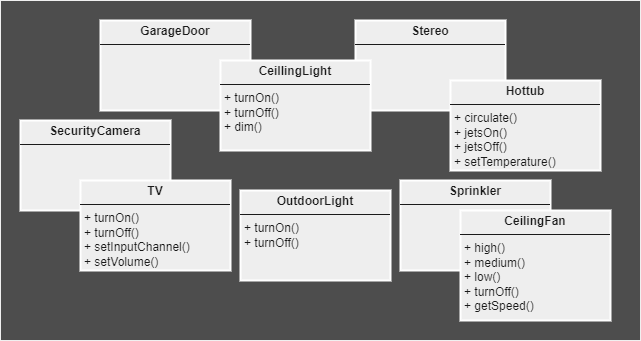
引入通用接口似乎并不有趣,因为我们的 vender 类是多种多样的,并且预计我们会有更多的 vender 类。
此外,遥控器不应包含一组 if 语句,例如 if slot1 == light, then light.turnon(),else if slot1 == tv, then tv.turnon(),因为它是一个糟糕的设计。
解决方案
简单地说,我们希望远程控制知道如何发出通用请求,但不关心特定的供应商类。为了实现这一目标,我们将把我们的关注点分为两类,一类提出请求,另一类实际执行工作以遵守请求。
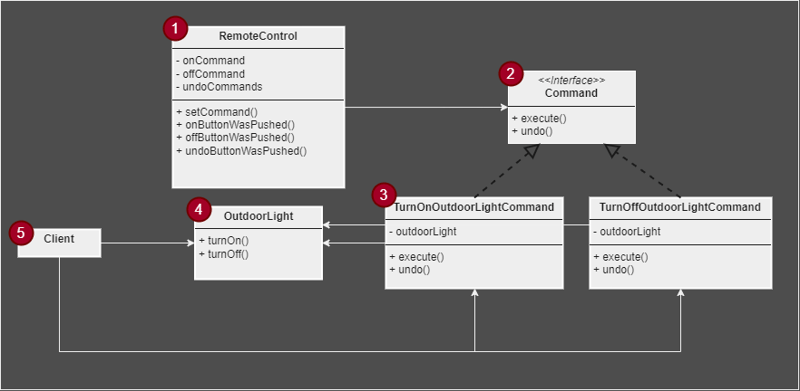
远程控制
这是发出诸如 command.execute() 之类的请求的请求,但不关心如何执行工作。
如果您希望 remotecontrol 有多个插槽(例如,一个用于 outdoorlight,另一个用于 tv),remotecontrol 可以具有命令数组,例如 oncommands[] 和 offcommands[]。 setcommand 方法可以采用一个整数来确定要设置的槽。例如,setcommand(2, tvoncommand, tvoffcommand) 可能会将 tvoncommand 分配给 oncommands[2],将 tvoffcommand 分配给 offcommands[2]。命令
为所有concretecommands提供接口。具体命令
turnonoutdoorlightcommand 对象调用execute() 方法并将“如何打开灯”委托给持有的ourdoorlight 对象。户外灯
这是知道如何执行工作以遵守 remotecontrol 请求的人。客户
client 负责创建 concretecommands 并将它们与相应的 receiver 关联起来。
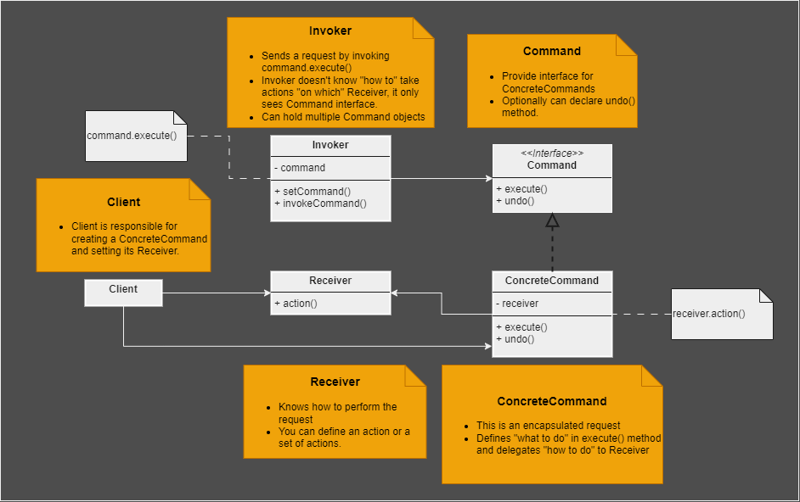
结构
java实现
// receiver
public class outdoorlight {

    public void turnon() {
        system.out.println("outdoor light is on");
    }

    public void turnoff() {
        system.out.println("outdoor light is off");
    }
}
public interface command {

    void execute();

    void undo();
}
// concrete command
public class turnonoutdoorcommand implements command {

    private outdoorlight outdoorlight;

    public turnonoutdoorcommand(outdoorlight outdoorlight) {
        this.outdoorlight = outdoorlight;
    }

    @override
    public void execute() {
        outdoorlight.turnon();
    }

    @override
    public void undo() {
        outdoorlight.turnoff();
    }
}
// concrete command
public class turnoffoutdoorlightcommand implements command {

    outdoorlight outdoorlight;

    public turnoffoutdoorlightcommand(outdoorlight outdoorlight) {
        this.outdoorlight = outdoorlight;
    }

    @override
    public void execute() {
        outdoorlight.turnoff();
    }

    @override
    public void undo() {
        outdoorlight.turnon();
    }
}
// null object
public class nocommand implements command {

    @override
    public void execute() {
    }

    @override
    public void undo() {
    }
}
// invoker
public class remotecontrol {

    private command oncommand;
    private command offcommand;
    public stack<command> undocommands;

    public remotecontrol() {
        oncommand = new nocommand();
        offcommand = new nocommand();
        undocommands = new stack<>();
        undocommands.push(new nocommand());
    }

    public void setcommand(command oncommand, command offcommand) {
        this.oncommand = oncommand;
        this.offcommand = offcommand;
    }

    public void onbuttonwaspushed() {
        oncommand.execute();
        undocommands.push(oncommand);
    }

    public void offbuttonwaspushed() {
        offcommand.execute();
        undocommands.push(offcommand);
    }

    public void undobuttonwaspushed() {
        if (!(undocommands.peek() instanceof nocommand)) {
            command lastcommand = undocommands.pop();
            lastcommand.undo();
        } else {
            system.out.println("undocommands stack is empty!");
        }
    }
}
public class client {

    public static void main(string[] args) {
        outdoorlight outdoorlight = new outdoorlight(); // create a receiver

        // create commands on that receiver
        // these commands are encapsulated requests in other words
        command turnonoutdoorlight = new turnonoutdoorcommand(outdoorlight);
        command turnoffoutdoorlight = new turnoffoutdoorlightcommand(outdoorlight);

        remotecontrol rc = new remotecontrol(); // create an invoker
        // we can pass encapsulated requests to other object
        rc.setcommand(turnonoutdoorlight, turnoffoutdoorlight); // set command on that invoker

        rc.undobuttonwaspushed();
        rc.onbuttonwaspushed();
        rc.offbuttonwaspushed();
        rc.undobuttonwaspushed();
        rc.undobuttonwaspushed();
        rc.undobuttonwaspushed();
    }
}
输出:

undocommands stack is empty!
outdoor light is on
outdoor light is off
outdoor light is on
outdoor light is off
undocommands stack is empty!
nocommand 被称为 null object,这是另一种设计模式。当您没有要返回的含义对象时,它很有用。这里我们使用它作为 invoker 持有的默认命令,这样我们就不需要处理 null。
陷阱
- 客户端需要做很多事情,例如创建concretecommands并设置相应的receiver,创建invoker并在该invoker上设置concretecommands。
宏命令
macrocommand 是命令模式的简单扩展,它允许您使用一个命令来打开灯、电视、空调、咖啡机和播放音乐。
让我们创建一种新的命令来执行一组其他命令。
public class macrocommand implements command {

    command[] commands;

    public macrocommand(command[] commands) {
        this.commands = commands;
    }

    // executes holding commands one at a time
    @override
    public void execute() {
        for (command command : commands) {
            command.execute();
        }
    }
}
就是这样!现在我们准备好使用宏命令了。但在此之前,让我向您展示如何实现可以有多个插槽的 remotecontrol,正如我在“解决方案”部分中提到的。
public class remotecontrol {

    private command[] oncommands;
    private command[] offcommands;

    public remotecontrol() {
        // our remotecontrol has 3 slots
        oncommands = new command[3];
        offcommands = new command[3];

        command nocommand = new nocommand();
        for (int i = 0; i < oncommands.length; i++) {
            oncommands[i] = nocommand;
            offcommands[i] = nocommand;
        }
    }

    public void setcommands(int slot, command oncommand, command offcommand) {
        oncommands[slot] = oncommand;
        offcommands[slot] = offcommand;
    }

    public void onbuttonwaspushed(int slot) {
        oncommands[slot].execute();
    }

    public void offbuttonwaspushed(int slot) {
        offcommands[slot].execute();
    }

    // print slots info in pretty style
    @override
    public string tostring() {
        stringbuilder stringbuilder = new stringbuilder();
        stringbuilder.append("\n------ remote control ------\n");
        for (int i = 0; i < oncommands.length; i++) {
            stringbuilder.append("[slot " + i + "] " + oncommands[i].getclass().getsimplename() +
                    "    " + offcommands[i].getclass().getsimplename() + "\n");
        }
        return stringbuilder.tostring();
    }
}
很简单,用数组来存储多个命令即可。
最后,客户端使用我们的宏命令。为了简单起见,我只创建了两个接收器,light 和 coffeemachine。
public class client {

    public static void main(string[] args) {
        // create receivers
        light light = new light();
        coffeemachine coffeemachine = new coffeemachine();

        // create commands and set corresponding receivers on them
        command lightoncommand = new lightoncommand(light);
        command lightoffcommand = new lightoffcommand(light);
        command coffeemachineoncommand = new coffeemachineon(coffeemachine);
        command coffeemachineoffcommand = new coffeemachineoff(coffeemachine);

        // create arrays of commands
        command[] morningon = {lightoncommand, coffeemachineoncommand};
        command[] morningoff = {lightoffcommand, coffeemachineoffcommand};

        // create macros
        macrocommand morningonmacro = new macrocommand(morningon);
        macrocommand morningoffmacro = new macrocommand(morningoff);

        remotecontrol rc = new remotecontrol();
        rc.setcommands(0, morningonmacro, morningoffmacro);

        system.out.println(rc);

        system.out.println("--- pushing macro on ---");
        rc.onbuttonwaspushed(0);
        system.out.println("\n--- pushing macro off ---");
        rc.offbuttonwaspushed(0);
    }
}
输出:
------ remote control ------
[slot 0] macrocommand    macrocommand
[slot 1] nocommand    nocommand
[slot 2] nocommand    nocommand

--- pushing macro on ---
light is on
coffee machine is on
coffee machine is making a cup of coffee

--- pushing macro off ---
light is off
coffee machine is off
我们的宏命令打开灯并启动咖啡机,咖啡机立即开始冲泡咖啡。请注意,我们可以在 receiver 中定义一组操作,并在 concretecommand 的execute() 方法中使用它们,如“结构”部分中的 uml 图所示。
@Override
    public void execute() {
        coffeeMachine.on();
        coffeeMachine.makeCoffee();
    }
您可以在这里查看所有设计模式的实现。
github 存储库
附注
我是刚开始写科技博客,如果您对我的写作有什么建议,或者有任何困惑的地方,请留言!
感谢您的阅读:)




