



使用 node.js 进行垃圾邮件分类
此项目使用 node.js 和 natural 库创建一个基于 ai 的应用程序,将电子邮件分类为 垃圾邮件 或 非垃圾邮件。该应用程序使用朴素贝叶斯分类器进行垃圾邮件检测,这是文本分类任务的常用算法。
先决条件
开始之前,请确保您已安装以下软件:
- node.js:下载 node.js
- npm (node package manager):npm 附带 node.js 安装。
设置项目的步骤
第 1 步:设置您的项目
- 创建项目文件夹: 打开终端或命令提示符并为您的项目创建一个新文件夹。
   mkdir spam-email-classifier
   cd spam-email-classifier
- 初始化 node.js 项目: 在该文件夹中,运行以下命令来创建 package.json 文件。
npm init -y
第2步:安装依赖项
运行以下命令来安装所需的依赖项:
npm install natural
- natural:提供各种 nlp(自然语言处理)工具的库,包括使用朴素贝叶斯进行分类。
步骤 3:创建垃圾邮件分类器
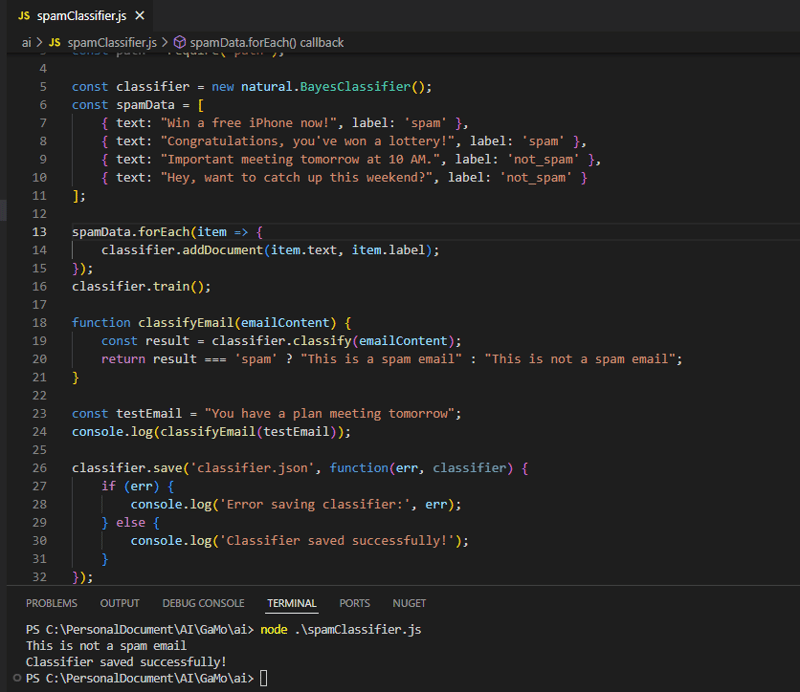
创建一个新的 javascript 文件(例如 spamclassifier.js)并添加以下代码:
const natural = require('natural');

// create a new naive bayes classifier
const classifier = new natural.bayesclassifier();

// sample spam and non-spam data
const spamdata = [
  { text: "congratulations, you've won a $1000 gift card!", label: 'spam' },
  { text: "you are eligible for a free trial, click here to sign up.", label: 'spam' },
  { text: "important meeting tomorrow at 10 am", label: 'not_spam' },
  { text: "let's grab lunch this weekend!", label: 'not_spam' }
];

// add documents to the classifier (training data)
spamdata.foreach(item => {
  classifier.adddocument(item.text, item.label);
});

// train the classifier
classifier.train();

// function to classify an email
function classifyemail(emailcontent) {
  const result = classifier.classify(emailcontent);
  return result === 'spam' ? "this is a spam email" : "this is not a spam email";
}

// example of using the classifier to detect spam
const testemail = "congratulations! you have won a $1000 gift card.";
console.log(classifyemail(testemail)); // output: "this is a spam email"

// save the trained model to a file (optional)
classifier.save('spamclassifier.json', function(err, classifier) {
  if (err) {
    console.log('error saving classifier:', err);
  } else {
    console.log('classifier saved successfully!');
  }
});
第 4 步:运行分类器
要运行分类器,请打开终端并导航到项目文件夹。然后,运行以下命令:
node spamclassifier.js
您应该看到与此类似的输出:
this is a spam email
classifier saved successfully!
第 5 步:加载保存的分类器(可选)
您可以稍后加载分类器模型来对新电子邮件进行分类。以下是加载模型并对新电子邮件进行分类的方法:

const natural = require('natural');

// load the saved classifier
natural.bayesclassifier.load('spamclassifier.json', null, function(err, classifier) {
  if (err) {
    console.log('error loading classifier:', err);
  } else {
    // classify a new email
    const testemail = "you have won a free iphone!";
    console.log(classifier.classify(testemail)); // output: 'spam' or 'not_spam'
  }
});
第 6 步:改进模型(可选)
为了提高垃圾邮件分类器的准确性,您可以:
- 添加更多训练数据:包括更多垃圾邮件和非垃圾邮件样本。
- 尝试不同的算法:如果朴素贝叶斯不足以满足您的需求,请尝试其他分类算法或模型。
- 使用先进技术:实施深度学习或神经网络来执行更复杂的分类任务。
步骤 7:(可选)与电子邮件系统集成
如果您想从应用程序发送或接收电子邮件,您可以使用nodemailer库来发送电子邮件。
- 安装 nodemailer:
npm install nodemailer
- 发送电子邮件(示例):
   const nodemailer = require('nodemailer');

   // Create a transporter for sending emails via Gmail
   const transporter = nodemailer.createTransport({
     service: 'gmail',
     auth: {
       user: 'your-email@gmail.com',
       pass: 'your-email-password',
     },
   });

   // Email options
   const mailOptions = {
     from: 'your-email@gmail.com',
     to: 'recipient@example.com',
     subject: 'Spam Email Alert',
     text: 'This is a spam email alert.',
   };

   // Send the email
   transporter.sendMail(mailOptions, function(err, info) {
     if (err) {
       console.log('Error sending email:', err);
     } else {
       console.log('Email sent:', info.response);
     }
   });
结论
本指南引导您使用 node.js 和 朴素贝叶斯 设置 ai 应用程序,以将电子邮件分类为垃圾邮件或非垃圾邮件。您可以通过以下方式扩展此应用程序:
- 添加更多训练数据以提高准确性。
- 使用更先进的机器学习技术。
- 将分类器集成到 web 应用程序或电子邮件系统中。




