



超链接可以使访问者从一个页面跳转至另外一个页面,或从一个站点跳转至另外一个站点。但是,这种频繁的跳转可能使人们产生焦虑。
To help users browse with confidence, links should be absolutely clear and explicit.
为了方便用户更好的浏览页面,超链接必须绝对的简洁明了。

Principles
法则
1. Text hyperlinks should be clearly distinguishable from normal text.
超链接文字必须与普通的内容文字相区别
2. Any mouseover behaviour should have a highlighting effect.
鼠标移动到超链接上时必须要显示突出效果
3.Hyperlink content should be as short as possible, yet long enough to identify either:
超链接的具体内容必须要言简意赅(短而精):
· Where you'll go [跳转地址]
· What you'll get [希望获取什么内容]
· What you want to happen [希望产生什么效果]
4. Hyperlinks with different targets should be clearly distinguishable.
指向不同目标的超链接必须要清晰可辨
5. Hyperlinks should give an indication of any unanticipated consequences, e.g.:
对点击超链接后会出现的特殊情况加以解释,如:
· Links to files [链接至一个文件]
· Links that open or close windows [点击链接后会打开或关闭窗口]
What do you make a link?
考虑一下制作这个超链接的目的是什么
Hyperlink content example: Amapproved.com
超链接内容举例:Amapproved.com
A site for locating approved Aston Martins, and it's good on the whole. This is the search results screen. Guess how you get from search results to see the details on a particular vehicle? The only link is the vehicle model (in the Vehicle summary column).
这个案例是Aston Martins [阿斯顿·马丁] 汽车的网站。可以这样说,它的整体外观设计堪称经典。这是一个搜索结果显示页面。那么现在,你想象一下,该如何通过搜索结果的方式来查阅有关车辆的详细介绍。这里仅有的超链接就是关于“Vehicle summary column [车辆基本列表]”中的“vehicle model[车辆模型]”。
The first, and biggest problem, is that you can't distinguish the hyperlinks, breaking Principle 1. You don't know where to click to get more information: you have to guess.
首先所面临的最大问题就是,你不能区分那个是超链接。这违反了法则1,即:你不知道该点击那里来获取更多的信息,因此,你必须先考虑这个问题
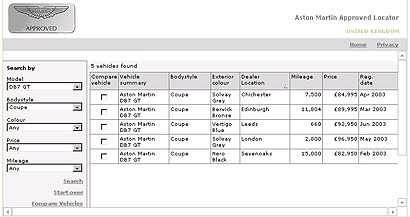
The second problem is: The links look the same although they point to completely different targets (each one is a different used Aston Martin). This breaks Principle 4. Because all the links on this page have the same content (the vehicle model), it's even less obvious that they might be the link.
第二个问题是:尽管这些链接指向完全不同的目标(每个不同的链接都使用了名称“Aston Martin”),但它们看上去几乎一样,这就违反了上述的法则4;再加上所有的链接都包含了相同的内容 (vehicle model [车辆类型]),这就使得超链接更加不明显。
If I click on "Aston Martin DB7 GT", I would expect to get general information about the Aston Martin DB7 GT car. This breaks Principle 3, because the link is not accurately describing what I'll get if I click it.
如果我点击“Aston Martin DB7 GT”这个链接,希望获取关于“Aston Martin DB7 GT”型汽车的大体信息。但是,我发现最终获取的信息和链接的描述存在出入。那么,这就违反了法则3。
What should they do?
网站该如何改进?
The "thing you get" is the information about a particular car. The thing that represents the particular car is the entire table row. There is no other unique identifier for the car (mileage, price etc. aren't necessarily unique). Therefore, the whole row should be the clickable hyperlink. (It would also be helpful if the row changed colour/tone on mouseover).
“thing you get [你所获取的资料]”应该是与一辆汽车相关的信息,这些代表特定车型的信息应该占据整个表格列;同时,因为这里没有包含具体车型信息(如:英里数、价格等)的确认对象,所以,表格的整列必须作为可点击的超链接对象。(如果鼠标移至超链接上能够产生变色效果的话,将更有助于辨认)。
Expressing size in hyperlinks
描述超链接对象的尺寸大小
It's quite common to find computers putting out this kind of information to set user's expectations when linking to a file:
当链接到一个文件时,我们通常会发现超链接上包含一段关于文件大小尺寸的描述,这有助于用户决定自己的意愿(即:是否点击该文件链接)。
如:PDF (46,764 bytes)
Thinking about the user's goals, what they need is to know roughly how long the download will take: will it be a few seconds, or minutes? That's generally as accurate as it needs to be.
好好思考一下用户的目标是什么,通常情况下,他们需要知道下载需要花去多长时间:是几秒钟,还是几分钟?因此,我们应该对其作出尽可能精准的描述。
What should it be?
应该怎样描述上述的文件尺寸呢?
There's no benefit at all in showing more than two significant figures in file sizes. Above should be 47KB. Also, only ever use kilobytes or megabytes for file sizes online. (Good, useful file sizes to 2 significant figures run: 4.7KB, 47KB, 470KB, 4.7MB etc.)
对文件尺寸的描述最好不要超过两位有效数字。上述文件尺寸应该写成47KB。因此,网络上应尽可能地使用千字节(kb)或兆字节(mb)对文件进行描述。(我们推荐的2位数字描述法如下:4.7KB, 47KB, 470KB, 4.7MB等等)
Formatting hyperlinks
对超链接定义格式
If we have to differentiate text hyperlinks from other text, should this be done with colour or formatting such as underlining/emboldening?
如果我们需要在一个文本中区分不同的文字链接,我们应该对超链接的部分使用不同于普通文本的颜色,或者对超链的文字加上下划线,或者加粗。
The de facto convention has been that hyperlinks are rendered in blue with underlines, that they turn red when clicked, and that visited links are purple.
默认的超链接动作对应的颜色变化是:起初,超链接是蓝色的,并带有下划线;当点击时,它会变成红色;访问过的超链接将会以紫色显示。
The most readable way to render most text is black on a white background, and making text hyperlinks blue (#
最常用的增加超链接可读性的方法是:整体页面为黑字白底,文字超链接为蓝色(#
超链接的颜色可以有灰色替代蓝色,带不带有下划线均可。
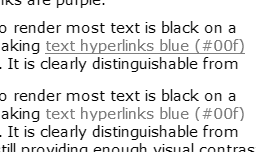
It's appropriate to ask if differentiating by colour alone will work for people who are colourblind. The image above is a screen capture of this page, totally desaturated. It shows that, even without colour, there is sufficient tonal difference between black and blue to make the hyperlink clear. The underlined version is a little bit clearer, but showing underline on hover would serve a similar purpose.
同时你还要考虑到如果仅仅依靠颜色的变化来区分超链接状态的话,那么色盲们可以接受吗?最好是询问一下他们是否能辨别这些颜色。上面的图片是页面截图,从上面的图片中你可以看到,即使不使用超链接的颜色变化效果,仅使用黑色和蓝色也能够很清楚的辨认出超链接。给超链接加上下划线将更有助于用户辨认超链接;或者是当鼠标经过超链接时出现下划线,这样也能达到同样的效果。 Should hypelinks be underlined?
超链接是否需要带有下划线?
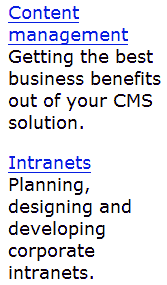
Underlining works okay for occasional inline links.
对于不经常使用的内置超链接可以加上下划线。
It makes the link stand out a little more than colour alone.
通过对超链接使用下划线(与仅对超链接进行颜色变化)更能起到突出超链接的作用。
In this example, the underlining works well to distinguish article titles from the sub-title.
在这个案例中,下划线可以清楚地区分主标题和二级标题。
I think underlining becomes unhelpful when there are numerous inline links in paragraphs, in lists of links, and when there are lots of sets of links on a page.
如果段落中、链接列表中或页面中的超链接过多,那对这些链接使用下划线将起不到任何突出作用。 Here are a couple of examples of collections of hyperlinks, showing the original (underlined) and the same with underlines removed.
下面两组超链接效果的对比。左边的超链接包含下划线,右边则不包含下划线,具体如下:
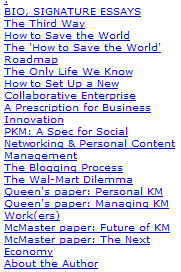
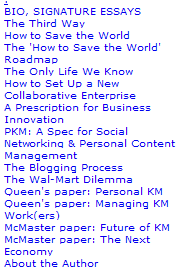
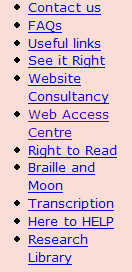
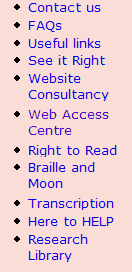
Notice how it's quicker and easier to read the non-underlined blocks of text.
请注意:如果像上面这样的链接列表,那么不使用下划线将更有助于快速、简便地阅读。
In this second example, I have also adjusted the line spacing to make the related words clearer.
在第二个案例中,我还调整了单词之间的间距以使其看上去更加清晰。
Consistency
一致性
It is important that hyperlink formats behave consistently across pages.
还有一点很重要,就是所有页面的超链接格式最好保持一致。
Obviously, where some text links are on different backgrounds, such as in navigation bars, they may need to use special colours or treatments.
很显然,当超链接位于不同的背景时,如:位于导航条内,那么我们将对其使用特别的颜色和效果。
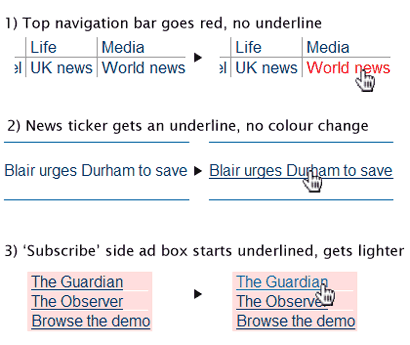
The above snippets are taken from the Guardian Online homepage
上面的片断来自于Guardian Online的首页。
While most links look similar (#036, mainly not underlined, there are several very different styles applied on the hover, when the mouse pointer moves over the active link.
上面的超链接格式看上去基本相同(字体颜色#036,超链接基本上不带下划线,当鼠标经过超链接时产生的效果各不相同)。
The psychological effect is disconcerting: you are left doubting whether all links will do similar things (i.e. go to another page on this site), or whether you might be taken unexpectedly somewhere else. I think that this schizophrenic behaviour weakens the brand experience, as well as diminishing usability.
从心里学角度讲,这样的效果处理会让人感到不安;同时,你会对此留有疑虑:是否所用的链接全是这样(包括其它页面);是否会链接到一个出乎意料的地方。我认为,这种让人感到精神分裂的效果处理方法将削弱用户对该网站品牌的映像,同时,网站的可用性也将大打折扣。
There is no good reason to treat all the hyperlinks differently. The third example also breaks the second principle, because its colour change makes it weaker, less noticeable, which is not 'highlighting'.
我们不可以对所有的超链接都使用不同的效果。上面的第三个案例违反了第二个法则;因为不同的颜色变化使超变得毫无重点,根本起不到突出的作用
Conclusion
结论
On balance, it seems that the predominant convention in the industry is to keep #
总而言之,最具特点的超链接颜色效果变化是:使用 #
I think that this provides the best balance of functionality when applied consistently to inline hyperlinks and grouped hyperlinks.
我认为:对所有的内置超链接和群组超链接使用相同的效果变化能够在其功能性保持最好的平衡。




