


在shell脚本编写中,时常会用到对文件的相关操作,比如增加内容,修改内容,删除部分内容,查看部分内容等,但是上述举例的这些操作一般都是需要在文本编辑器中才能操作,常用的文本编辑器如:gedit、vim、nano等又是交互式文本编辑器,脚本无法自己独立完成,必须有人参与才可以完成。如果这样的话又违背了我们编写脚本的意愿(全部由机器来完成,减少人的工作压力,提升工作效率)。emm…如何才能让这些操作全部脚本自己就搞定,而不需要人的参与,而且又能按照我们的脚本预案来完成呢?
为了解决上述问题,linux为大家提供了一些命令,比如Perl、sed等命令,今天我就着重为大家介绍一下sed命令。
一、sed介绍sed是linux中提供的一个外部命令,它是一个行(流)编辑器,非交互式的对文件内容进行增删改查的操作,使用者只能在命令行输入编辑命令、指定文件名,然后在屏幕上查看输出。它和文本编辑器有本质的区别。
代码语言:javascript代码运行次数:0运行复制<code class="javascript">区别是:文本编辑器: 编辑对象是文件行编辑器:编辑对象是文件中的行</code>
也就是前者一次处理一个文本,而后者是一次处理一个文本中的一行。这个是我们应该弄清楚且必须牢记的,否者可能无法理解sed的运行原理和使用精髓。
sed数据处理原理
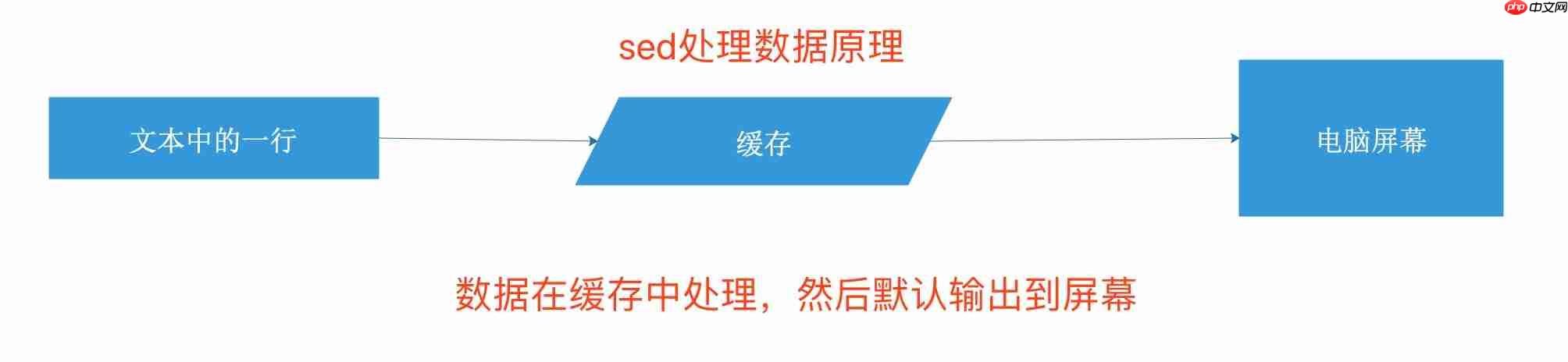
sed 命令语法:
sed [options] ‘{command}[flags]’ [filename]
代码语言:javascript代码运行次数:0运行复制<code class="javascript">#命令选项-e script 将脚本中指定的命令添加到处理输入时执行的命令中 多条件,一行中要有多个操作-f script 将文件中指定的命令添加到处理输入时执行的命令中-n 抑制自动输出-i 编辑文件内容-i.bak 修改时同时创建.bak备份文件。-r 使用扩展的正则表达式! 取反 (跟在模式条件后与shell有所区别)#command 对文件干什么sed常用内部命令a 在匹配后面添加i 在匹配前面添加d 删除s 查找替换 字符串c 更改y 转换 N D P p 打印#flags数字 表示新文本替换的模式g: 表示用新文本替换现有文本的全部实例p: 表示打印原始的内容w filename: 将替换的结果写入文件</code>2.1)sed内部命令说明
演示实例文档
代码语言:javascript代码运行次数:0运行复制<code class="javascript">[root@zutuanxue ~]# cat data11 the quick brown fox jumps over the lazy dog.2 the quick brown fox jumps over the lazy dog.3 the quick brown fox jumps over the lazy dog.4 the quick brown fox jumps over the lazy dog.5 the quick brown fox jumps over the lazy dog.</code>
文件内容增加操作,将数据追加到某个位置之后,使用命令a。
演示案例
代码语言:javascript代码运行次数:0运行复制<code class="javascript">在data1的每行后追加一行新数据内容: append data "haha"[root@zutuanxue ~]# sed 'a\append data "haha"' data11 the quick brown fox jumps over the lazy dog.append data "haha"2 the quick brown fox jumps over the lazy dog.append data "haha"3 the quick brown fox jumps over the lazy dog.append data "haha"4 the quick brown fox jumps over the lazy dog.append data "haha"5 the quick brown fox jumps over the lazy dog.append data "haha"在第二行后新开一行追加数据: append data "haha"[root@zutuanxue ~]# sed '2a\append data "haha"' data11 the quick brown fox jumps over the lazy dog.2 the quick brown fox jumps over the lazy dog.append data "haha"3 the quick brown fox jumps over the lazy dog.4 the quick brown fox jumps over the lazy dog.5 the quick brown fox jumps over the lazy dog.在第二到四行每行后新开一行追加数据: append data "haha"[root@zutuanxue ~]# sed '2,4a\append data "haha"' data11 the quick brown fox jumps over the lazy dog.2 the quick brown fox jumps over the lazy dog.append data "haha"3 the quick brown fox jumps over the lazy dog.append data "haha"4 the quick brown fox jumps over the lazy dog.append data "haha"5 the quick brown fox jumps over the lazy dog.匹配字符串追加: 找到包含"3 the"的行,在其后新开一行追加内容: append data "haha"[root@zutuanxue ~]# sed '/3 the/a\append data "haha"' data11 the quick brown fox jumps over the lazy dog.2 the quick brown fox jumps over the lazy dog.3 the quick brown fox jumps over the lazy dog.append data "haha"4 the quick brown fox jumps over the lazy dog.5 the quick brown fox jumps over the lazy dog.//开启匹配模式 /要匹配的字符串/</code>
文件内容增加操作,将数据插入到某个位置之前,使用命令i。
演示案例
代码语言:javascript代码运行次数:0运行复制<code class="javascript">在data1的每行前插入一行新数据内容: insert data "haha"[root@zutuanxue ~]# sed 'i\insert data "haha"' data1insert data "haha"1 the quick brown fox jumps over the lazy dog.insert data "haha"2 the quick brown fox jumps over the lazy dog.insert data "haha"3 the quick brown fox jumps over the lazy dog.insert data "haha"4 the quick brown fox jumps over the lazy dog.insert data "haha"5 the quick brown fox jumps over the lazy dog.在第二行前新开一行插入数据: insert data "haha"[root@zutuanxue ~]# sed '2i\insert data "haha"' data11 the quick brown fox jumps over the lazy dog.insert data "haha"2 the quick brown fox jumps over the lazy dog.3 the quick brown fox jumps over the lazy dog.4 the quick brown fox jumps over the lazy dog.5 the quick brown fox jumps over the lazy dog.在第二到四行每行前新开一行插入数据: insert data "haha"[root@zutuanxue ~]# sed '2,4i\insert data "haha"' data11 the quick brown fox jumps over the lazy dog.insert data "haha"2 the quick brown fox jumps over the lazy dog.insert data "haha"3 the quick brown fox jumps over the lazy dog.insert data "haha"4 the quick brown fox jumps over the lazy dog.5 the quick brown fox jumps over the lazy dog.匹配字符串插入: 找到包含"3 the"的行,在其前新开一行插入内容: insert data "haha"[root@zutuanxue ~]# sed '/3 the/i\insert data "haha"' data11 the quick brown fox jumps over the lazy dog.2 the quick brown fox jumps over the lazy dog.insert data "haha"3 the quick brown fox jumps over the lazy dog.4 the quick brown fox jumps over the lazy dog.5 the quick brown fox jumps over the lazy dog.</code>
文件内容修改操作–替换,将一行中匹配的内容替换为新的数据,使用命令s。
演示案例
代码语言:javascript代码运行次数:0运行复制<code class="javascript">从标准输出流中做替换,将test替换为text[root@zutuanxue ~]# echo "this is a test" |sed 's/test/text/'this is a text将data1中每行的dog替换为cat[root@zutuanxue ~]# sed 's/dog/cat/' data11 the quick brown fox jumps over the lazy cat.2 the quick brown fox jumps over the lazy cat.3 the quick brown fox jumps over the lazy cat.4 the quick brown fox jumps over the lazy cat.5 the quick brown fox jumps over the lazy cat.将data1中第二行的dog替换为cat[root@zutuanxue ~]# sed '2s/dog/cat/' data11 the quick brown fox jumps over the lazy dog.2 the quick brown fox jumps over the lazy cat.3 the quick brown fox jumps over the lazy dog.4 the quick brown fox jumps over the lazy dog.5 the quick brown fox jumps over the lazy dog.将data1中第二到第四行的dog替换为cat[root@zutuanxue ~]# sed '2,4s/dog/cat/' data11 the quick brown fox jumps over the lazy dog.2 the quick brown fox jumps over the lazy cat.3 the quick brown fox jumps over the lazy cat.4 the quick brown fox jumps over the lazy cat.5 the quick brown fox jumps over the lazy dog.匹配字符串替换:将包含字符串"3 the"的行中的dog替换为cat[root@zutuanxue ~]# sed '/3 the/s/dog/cat/' data11 the quick brown fox jumps over the lazy dog.2 the quick brown fox jumps over the lazy dog.3 the quick brown fox jumps over the lazy cat.4 the quick brown fox jumps over the lazy dog.5 the quick brown fox jumps over the lazy dog.</code>
文件内容修改操作–更改,将一行中匹配的内容替换为新的数据,使用命令c。
演示案例
代码语言:javascript代码运行次数:0运行复制<code class="javascript">将data1文件中的所有行的内容更改为: change data "data"[root@zutuanxue ~]# sed 'c\change data "haha"' data1change data "haha"change data "haha"change data "haha"change data "haha"change data "haha"将data1文件第二行的内容更改为: change data "haha"[root@zutuanxue ~]# sed '2c\change data "haha"' data11 the quick brown fox jumps over the lazy dog.change data "haha"3 the quick brown fox jumps over the lazy dog.4 the quick brown fox jumps over the lazy dog.5 the quick brown fox jumps over the lazy dog.将data1文件中的第二、三、四行的内容更改为:change data "haha"[root@zutuanxue ~]# sed '2,4c\change data "haha"' data11 the quick brown fox jumps over the lazy dog.change data "haha"5 the quick brown fox jumps over the lazy dog.将data1文件中包含"3 the"的行内容更改为: change data "haha"[root@zutuanxue ~]# sed '/3 the/c\change data "data"' data11 the quick brown fox jumps over the lazy dog.2 the quick brown fox jumps over the lazy dog.change data "data"4 the quick brown fox jumps over the lazy dog.5 the quick brown fox jumps over the lazy dog.</code>
文件内容修改操作–字符转换,将一行中匹配的内容替换为新的数据,使用命令y。
演示案例
代码语言:javascript代码运行次数:0运行复制<code class="javascript">将data1中的a b c字符转换为对应的 A B C字符[root@zutuanxue ~]# sed 'y/abc/ABC/' data11 the quiCk Brown fox jumps over the lAzy dog.2 the quiCk Brown fox jumps over the lAzy dog.3 the quiCk Brown fox jumps over the lAzy dog.4 the quiCk Brown fox jumps over the lAzy dog.5 the quiCk Brown fox jumps over the lAzy dog.</code>
文件内容删除,将文件中的指定数据删除,使用命令d。
演示案例
代码语言:javascript代码运行次数:0运行复制<code class="javascript">删除文件data1中的所有数据[root@zutuanxue ~]# sed 'd' data1删除文件data1中的第三行数据[root@zutuanxue ~]# sed '3d' data11 the quick brown fox jumps over the lazy dog.2 the quick brown fox jumps over the lazy dog.4 the quick brown fox jumps over the lazy dog.5 the quick brown fox jumps over the lazy dog.删除文件data1第三到第四行的数据[root@zutuanxue ~]# sed '3,4d' data11 the quick brown fox jumps over the lazy dog.2 the quick brown fox jumps over the lazy dog.5 the quick brown fox jumps over the lazy dog.删除文件data1中包含字符串"3 the"的行[root@zutuanxue ~]# sed '/3 the/d' data11 the quick brown fox jumps over the lazy dog.2 the quick brown fox jumps over the lazy dog.4 the quick brown fox jumps over the lazy dog.5 the quick brown fox jumps over the lazy dog.</code>
文件内容查看,将文件内容输出到屏幕,使用命令p。

演示案例
代码语言:javascript代码运行次数:0运行复制<code class="javascript">打印data1文件内容[root@zutuanxue ~]# sed 'p' data11 the quick brown fox jumps over the lazy dog.1 the quick brown fox jumps over the lazy dog.2 the quick brown fox jumps over the lazy dog.2 the quick brown fox jumps over the lazy dog.3 the quick brown fox jumps over the lazy dog.3 the quick brown fox jumps over the lazy dog.4 the quick brown fox jumps over the lazy dog.4 the quick brown fox jumps over the lazy dog.5 the quick brown fox jumps over the lazy dog.5 the quick brown fox jumps over the lazy dog.打印data1文件第三行的内容[root@zutuanxue ~]# sed '3p' data11 the quick brown fox jumps over the lazy dog.2 the quick brown fox jumps over the lazy dog.3 the quick brown fox jumps over the lazy dog.3 the quick brown fox jumps over the lazy dog.4 the quick brown fox jumps over the lazy dog.5 the quick brown fox jumps over the lazy dog.打印data1文件第二、三、四行内容[root@zutuanxue ~]# sed '2,4p' data11 the quick brown fox jumps over the lazy dog.2 the quick brown fox jumps over the lazy dog.2 the quick brown fox jumps over the lazy dog.3 the quick brown fox jumps over the lazy dog.3 the quick brown fox jumps over the lazy dog.4 the quick brown fox jumps over the lazy dog.4 the quick brown fox jumps over the lazy dog.5 the quick brown fox jumps over the lazy dog.打印data1文件包含字符串"3 the"的行[root@zutuanxue ~]# sed '/3 the/p' data11 the quick brown fox jumps over the lazy dog.2 the quick brown fox jumps over the lazy dog.3 the quick brown fox jumps over the lazy dog.3 the quick brown fox jumps over the lazy dog.4 the quick brown fox jumps over the lazy dog.5 the quick brown fox jumps over the lazy dog. 可以看得出,打印内容是重复的行,原因是打印了指定文件内容一次,又将读入缓存的所有数据打印了一次,所以会看到这样的效果,如果不想看到这样的结果,可以加命令选项-n抑制内存输出即可。</code>2.2)命令选项说明
sed语法 在sed命令中,命令选项是对sed中的命令的增强
在命令行中使用多个命令 -e
代码语言:javascript代码运行次数:0运行复制<code class="javascript">将brown替换为green dog替换为cat[root@zutuanxue ~]# sed -e 's/brown/green/;s/dog/cat/' data11 the quick green fox jumps over the lazy cat.2 the quick green fox jumps over the lazy cat.3 the quick green fox jumps over the lazy cat.4 the quick green fox jumps over the lazy cat.5 the quick green fox jumps over the lazy cat.</code>
从文件读取编辑器命令 -f 适用于日常重复执行的场景
代码语言:javascript代码运行次数:0运行复制<code class="javascript">1)将命令写入文件[root@zutuanxue ~]# vim abcs/brown/green/s/dog/cat/s/fox/elephant/2)使用-f命令选项调用命令文件[root@zutuanxue ~]# sed -f abc data1 1 the quick green elephant jumps over the lazy cat.2 the quick green elephant jumps over the lazy cat.3 the quick green elephant jumps over the lazy cat.4 the quick green elephant jumps over the lazy cat.5 the quick green elephant jumps over the lazy cat.</code>
抑制内存输出 -n
代码语言:javascript代码运行次数:0运行复制<code class="javascript">打印data1文件的第二行到最后一行内容 $最后的意思[root@zutuanxue ~]# sed -n '2,$p' data1 2 the quick brown fox jumps over the lazy dog.3 the quick brown fox jumps over the lazy dog.4 the quick brown fox jumps over the lazy dog.5 the quick brown fox jumps over the lazy dog.</code>
使用正则表达式 -r
代码语言:javascript代码运行次数:0运行复制<code class="javascript">打印data1中以字符串"3 the"开头的行内容[root@zutuanxue ~]# sed -n -r '/^(3 the)/p' data13 the quick brown fox jumps over the lazy dog.</code>
从上述的演示中,大家可以看出,数据处理只是在缓存中完成的,并没有实际修改文件内容,如果需要修改文件内容可以直接使用-i命令选项。在这里我需要说明的是-i是一个不可逆的操作,一旦修改,如果想复原就很困难,几乎不可能,所以建议大家在操作的时候可以备份一下源文件。-i命令选项提供了备份功能,比如参数使用-i.bak,那么在修改源文件的同时会先备份一个以.bak结尾的源文件,然后再进行修改操作。
代码语言:javascript代码运行次数:0运行复制<code class="javascript">1)查看文件列表,没有发现data1.bak[root@zutuanxue ~]# lsabc apache data1 Dobby file node-v10.14.1 Python-3.7.1 soft1 vimset2)执行替换命令并修改文件[root@zutuanxue ~]# sed -i.bak 's/brown/green/' data13)发现文件夹中多了一个data1.bak文件[root@zutuanxue ~]# lsabc data1 Dobby node-v10.14.1 soft1apache data1.bak file Python-3.7.1 vimset4)打印比较一下,发现data1已经被修改,data1.bak是源文件的备份。[root@zutuanxue ~]# cat data11 the quick green fox jumps over the lazy dog.2 the quick green fox jumps over the lazy dog.3 the quick green fox jumps over the lazy dog.4 the quick green fox jumps over the lazy dog.5 the quick green fox jumps over the lazy dog.[root@zutuanxue ~]# cat data1.bak 1 the quick brown fox jumps over the lazy dog.2 the quick brown fox jumps over the lazy dog.3 the quick brown fox jumps over the lazy dog.4 the quick brown fox jumps over the lazy dog.5 the quick brown fox jumps over the lazy dog.</code>2.3)标志
在sed命令中,标志是对sed中的内部命令做补充说明
代码语言:javascript代码运行次数:0运行复制<code class="javascript">演示文档[root@zutuanxue ~]# cat data21 the quick brown fox jumps over the lazy dog . dog2 the quick brown fox jumps over the lazy dog . dog3 the quick brown fox jumps over the lazy dog . dog4 the quick brown fox jumps over the lazy dog . dog5 the quick brown fox jumps over the lazy dog . dog</code>
数字标志:此标志是一个非零正数,默认情况下,执行替换的时候,如果一行中有多个符合的字符串,如果没有标志位定义,那么只会替换第一个字符串,其他的就被忽略掉了,为了能精确替换,可以使用数字位做定义。
代码语言:javascript代码运行次数:0运行复制<code class="javascript">替换一行中的第二处dog为cat[root@zutuanxue ~]# sed 's/dog/cat/2' data21 the quick brown fox jumps over the lazy dog . cat2 the quick brown fox jumps over the lazy dog . cat3 the quick brown fox jumps over the lazy dog . cat4 the quick brown fox jumps over the lazy dog . cat5 the quick brown fox jumps over the lazy dog . cat</code>
g标志:将一行中的所有符合的字符串全部执行替换
代码语言:javascript代码运行次数:0运行复制<code class="javascript">将data1文件中的所有dog替换为cat[root@zutuanxue ~]# sed 's/dog/cat/g' data21 the quick brown fox jumps over the lazy cat . cat2 the quick brown fox jumps over the lazy cat . cat3 the quick brown fox jumps over the lazy cat . cat4 the quick brown fox jumps over the lazy cat . cat5 the quick brown fox jumps over the lazy cat . cat</code>
p标志:打印文本内容,类似于-p命令选项
代码语言:javascript代码运行次数:0运行复制<code class="javascript">[root@zutuanxue ~]# sed '3s/dog/cat/p' data21 the quick brown fox jumps over the lazy dog . dog2 the quick brown fox jumps over the lazy dog . dog3 the quick brown fox jumps over the lazy cat . dog3 the quick brown fox jumps over the lazy cat . dog4 the quick brown fox jumps over the lazy dog . dog5 the quick brown fox jumps over the lazy dog . dog</code>
w filename标志:将修改的内容存入filename文件中
代码语言:javascript代码运行次数:0运行复制<code class="javascript">[root@zutuanxue ~]# sed '3s/dog/cat/w text' data21 the quick brown fox jumps over the lazy dog . dog2 the quick brown fox jumps over the lazy dog . dog3 the quick brown fox jumps over the lazy cat . dog4 the quick brown fox jumps over the lazy dog . dog5 the quick brown fox jumps over the lazy dog . dog可以看出,将修改的第三行内容存在了text文件中[root@zutuanxue ~]# cat text 3 the quick brown fox jumps over the lazy cat . dog</code>三、练习案例
3.1、写一个初始化系统的脚本 案例需求 1)自动修改主机名(如:ip是192.168.0.88,则主机名改为server88.zutuanxue.cc)
a. 更改文件非交互式 sed
/etc/sysconfig/network
b.将本主机的IP截取出来赋值给一个变量ip;再然后将ip变量里以.分割的最后一位赋值给另一个变量ip1
2)自动配置可用的yum源
3)自动关闭防火墙和selinux
代码语言:javascript代码运行次数:0运行复制<code class="javascript">1、关闭防火墙2、关闭selinux3、配置yum源4、ntp时间服务器 5、更新系统软件包</code>
3.2、写一个搭建ftp服务的脚本,要求如下: 案例需求 1)不支持本地用户登录local_enable=NO 2) 匿名用户可以上传 新建 删除 anon_upload_enable=YES anon_mkdir_write_enable=YES 3) 匿名用户限速500KBps anon_max_rate=500000
代码语言:javascript代码运行次数:0运行复制<code class="javascript">仅供参考:#!/bin/bashipaddr=`ifconfig eth0|sed -n '2p'|sed -e 's/.*inet addr:\(.*\) Bcast.*/\1/g'`iptail=`echo $ipaddr|cut -d'.' -f4`ipremote=192.168.1.10#修改主机名hostname server$iptail.zutuanxue.comsed -i "/HOSTNAME/cHOSTNAME=server$iptail.zutuanxue.com" /etc/sysconfig/networkecho "$ipaddr server$iptail.zutuanxue.cc" >>/etc/hosts#关闭防火墙和selinuxservice iptables stopsetenforce 0 >/dev/null 2>&1sed -i '/^SELINUX=/cSELINUX=disabled' /etc/selinux/config#配置yum源(一般是内网源)#test networkping -c 1 $ipremote > /dev/null 2>&1if [ $? -ne 0 ];thenecho "你的网络不通,请先检查你的网络"exit 1elseecho "网络ok."ficat > /etc/yum.repos.d/server.repo << end[server]name=serverbaseurl=ftp://$ipremoteenabled=1gpgcheck=0end#安装软件read -p "请输入需要安装的软件,多个用空格隔开:" softyum -y install $soft &>/dev/null#备份配置文件conf=/etc/vsftpd/vsftpd.conf\cp $conf $conf.default#根据需求修改配置文件sed -ir '/^#|^$/d' $confsed -i '/local_enable/c\local_enable=NO' $confsed -i '$a anon_upload_enable=YES' $confsed -i '$a anon_mkdir_write_enable=YES' $confsed -i '$a anon_other_write_enable=YES' $confsed -i '$a anon_max_rate=512000' $conf#启动服务service vsftpd restart &>/dev/null && echo"vsftpd服务启动成功"#测试验证chmod 777 /var/ftp/pubcp /etc/hosts /var/ftp/pub#测试下载cd /tmplftp $ipaddr <<endcd pubget hostsexitendif [ -f /tmp/hosts ];thenecho "匿名用户下载成功"rm -f /tmp/hostselseecho "匿名用户下载失败"fi#测试上传、创建目录、删除目录等cd /tmplftp $ipaddr << endcd pubmkdir test1mkdir test2put /etc/grouprmdir test2exitendif [ -d /var/ftp/pub/test1 ];then echo "创建目录成功"if [ ! -d /var/ftp/pub/test2 ];then echo "文件删除成功" fielseif [ -f /var/ftp/pub/group ];thenecho "文件上传成功" else echo "上传、创建目录删除目录部ok" fi fi [ -f /var/ftp/pub/group ] && echo "上传文件成功"</code>




