



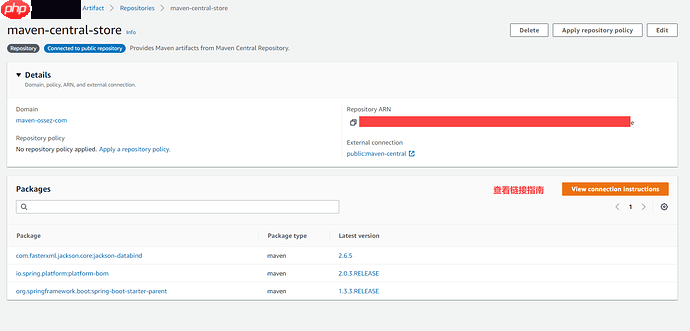
在创建 repositories 后,您将在界面中看到一个选项,允许您查看链接指南。
 CodeArtifact-con-011554×746 54.3 KB
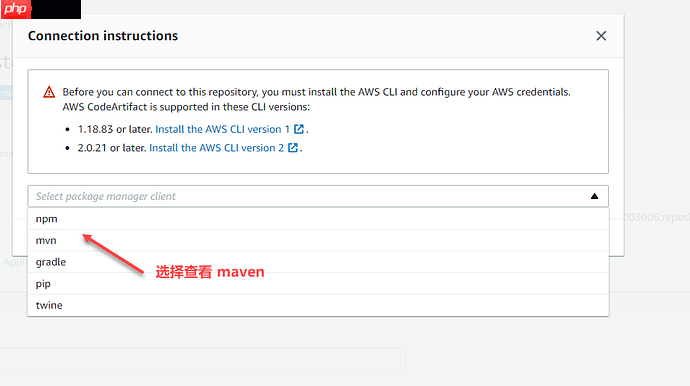
点击此查看链接指南选项,将会弹出一个界面。
在这个弹出界面中,您可以选择使用 mvn。
 CodeArtifact-con-02926×519 30.8 KB
然后界面中会显示配置选项。
首先需要配置 Token。
如果您在 Windows 上直接复制上面的代码是无法运行的,因为这些代码是为 Linux 设计的。

根据官方指南:
• macOS 或 Linux:
代码语言:javascript代码运行次数:0运行复制``javascript export CODEARTIFACT_TOKEN=aws codeartifact get-authorization-token --domain mydomain --domain-owner domain-owner-id --query authorizationToken --output text`
<code>
• Windows(使用默认命令行):
<p>代码语言:javascript代码运行次数:0<svg fill="none" height="16" viewbox="0 0 16 16" width="16" xmlns="<a href="https://www.php.cn/link/c9041cfd2a40932691855abd98fd219a">http://www.w3.org/2000/svg"><path</a> d="M6.66666 10.9999L10.6667 7.99992L6.66666 4.99992V10.9999ZM7.99999 1.33325C4.31999 1.33325 1.33333 4.31992 1.33333 7.99992C1.33333 11.6799 4.31999 14.6666 7.99999 14.6666C11.68 14.6666 14.6667 11.6799 14.6667 7.99992C14.6667 4.31992 11.68 1.33325 7.99999 1.33325ZM7.99999 13.3333C5.05999 13.3333 2.66666 10.9399 2.66666 7.99992C2.66666 5.05992 5.05999 2.66659 7.99999 2.66659C10.94 2.66659 13.3333 5.05992 13.3333 7.99992C13.3333 10.9399 10.94 13.3333 7.99999 13.3333Z" fill="currentcolor"></path></svg>运行<svg fill="none" height="16" viewbox="0 0 16 16" width="16" xmlns="<a href="https://www.php.cn/link/c9041cfd2a40932691855abd98fd219a">http://www.w3.org/2000/svg"><path</a> clip-rule="evenodd" d="M4.5 15.5V3.5H14.5V15.5H4.5ZM12.5 5.5H6.5V13.5H12.5V5.5ZM9.5 2.5H3.5V12.5H1.5V0.5H11.5V2.5H9.5Z" fill="currentcolor" fill-rule="evenodd"></path></svg>复制<code>javascript for /f %i in ('aws codeartifact get-authorization-token --domain my-domain --domain-owner domain-owner-id --query authorizationToken --output text') do set CODEARTIFACT_TOKEN=%i</code></pre><p>• Windows PowerShell:</p><p>代码语言:javascript代码运行次数:0<svg fill="none" height="16" viewbox="0 0 16 16" width="16" xmlns="http://www.w3.org/2000/svg"><path d="M6.66666 10.9999L10.6667 7.99992L6.66666 4.99992V10.9999ZM7.99999 1.33325C4.31999 1.33325 1.33333 4.31992 1.33333 7.99992C1.33333 11.6799 4.31999 14.6666 7.99999 14.6666C11.68 14.6666 14.6667 11.6799 14.6667 7.99992C14.6667 4.31992 11.68 1.33325 7.99999 1.33325ZM7.99999 13.3333C5.05999 13.3333 2.66666 10.9399 2.66666 7.99992C2.66666 5.05992 5.05999 2.66659 7.99999 2.66659C10.94 2.66659 13.3333 5.05992 13.3333 7.99992C13.3333 10.9399 10.94 13.3333 7.99999 13.3333Z" fill="currentcolor"></path></svg>运行<svg fill="none" height="16" viewbox="0 0 16 16" width="16" xmlns="http://www.w3.org/2000/svg"><path clip-rule="evenodd" d="M4.5 15.5V3.5H14.5V15.5H4.5ZM12.5 5.5H6.5V13.5H12.5V5.5ZM9.5 2.5H3.5V12.5H1.5V0.5H11.5V2.5H9.5Z" fill="currentcolor" fill-rule="evenodd"></path></svg>复制</code>javascript
$CODEARTIFACT_TOKEN = aws codeartifact get-authorization-token --domain my-domain --domain-owner domain-owner-id --query authorizationToken --output text</p><pre class="brush:php;toolbar:false;"><code></p><p>您需要将界面中的 <code>--domain</code> 和 <code>--domain-owner</code> 两个参数替换为您配置的参数。</p><p>通过上述命令,您将生成 Token,并将此 token 保存到系统变量中。</p><p>如果一切顺利,您将会在屏幕上看到输出的字符串,这串字符串就是您用于 Maven 登录的 token。</p><p><a href="https://www.php.cn/link/2b4bf71bc3df8c999ad2286bfe5a385f">https://www.php.cn/link/2b4bf71bc3df8c999ad2286bfe5a385f</a></code> 




