


大家好,又见面了,我是你们的朋友全栈君。
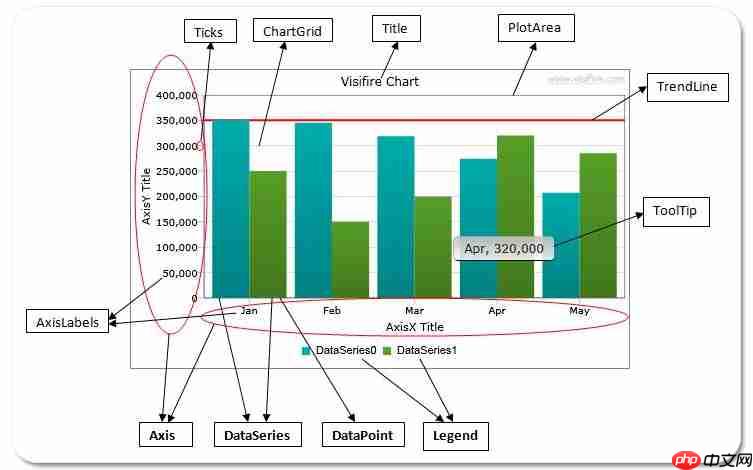
Syntax:
Below is the chart after setting LabelText property:
Modifiers:
Modifier
Description
#AxisXLabel
Returns the axis label value if axis labels is present for that XValue. Otherwise returns XValue.
#Percentage
Returns the percentage value with respect to DataPoints in that series.
#Series
Returns the series name.
#Sum
Returns sum of values in entire chart with same XValue. (Used for stacked charts only)
#XValue
Returns XValue.
#YValue

Returns YValue.
#ZValue
Returns ZValue.
#Open
Returns Open value.
#Close
Returns Close value.
#High
Returns High value.
#Low
Returns Low value.
Remarks:
The above modifiers are applicable for LabelText set in DataPoint or DataSeries only. Modifiers can be used in any combination to display DataPoint specific content. To display the modifier itself use the ‘#’ twice. For example to display “#XValue” as label use LabelText=”##XValue” The default value for LabelText in Pie/Doughnut and Funnel charts is “AxisXLabel, #YValue”. The default value for LabelText in CandleStick and Stock charts is “#Close”. The default value for LabelText in all other charts is “#YValue”. For CandleStick and Stock charts, LabelText can be set as LabelText=”#Open, #Close, #High, #Low, #YValue”. For CandleStick and Stock charts, volume information can be stored in YValue property and can be showed as a LabelText for DataPoints. Note that YValue property is not being used in CandleStick and Stock charts. For Stacked charts, percentage will be calculated from the DataPoints present in each XValue. In other words, percentage will be calculated for stacked DataPoints (in each XValue) from all series. For CandleStick and Stock charts, percentage will be calculated for Closing price in DataPoints.示例:
Chart chart = new Chart(); chart.ScrollingEnabled = true; chart.View3D = false;
Title title = new Title(); title.Text = Title+”血型统计(按月分组)”; chart.Titles.Add(title);
Axis axis = new Axis(); axis.IntervalType = IntervalTypes.Number; axis.Suffix = “月”; axis.Interval = 1; axis.Title = “血型”; chart.AxesX.Add(axis);
Axis yaxis = new Axis(); yaxis.Enabled = true; // 坐标轴类型,可以是primary或secondary,这个属性只能用于Y轴,只有在设置了DataSeries的AxisYType属性后才会启用 yaxis.AxisType = AxisTypes.Primary; chart.AxesY.Add(yaxis);
//血型总共5个种类:A,B,AB,O,未知 string[] bloodType = new string[5] { “A”, “B”, “AB”, “O”, “未知” }; int[] months = new int[12] {1,2,3,4,5,6,7,8,9,10,11,12}; for (Int32 j = 0; j
string blood=bloodType[j]; dataSeries.Name = blood; dataSeries.RenderAs = RenderAs.Column; dataSeries.ShowInLegend = true; dataSeries.XValueType = ChartValueTypes.Numeric; dataSeries.ToolTipText = “#Series型血,袋数:#YValue,#AxisXLabel”;
DataPoint dataPoint; for (int i = 0; i
int count = 0; if (j == 4) { count = list.Where(a => string.IsNullOrWhiteSpace(a.BloodType) && a.FiltrDate.Month.Equals(month)).Count(); } else { count = list.Where(a => a.BloodType == blood && a.FiltrDate.Month.Equals(month)).Count(); }
if (count > 0) { dataPoint.LabelEnabled = true; dataPoint.LabelStyle = LabelStyles.OutSide; } else { dataPoint.LabelEnabled = false; } dataPoint.YValue=count;
dataSeries.DataPoints.Add(dataPoint); }
chart.Series.Add(dataSeries); } BloodChart.Children.Add(chart);
发布者:全栈程序员栈长,转载请注明出处:https://javaforall.cn/162776.html原文链接:https://javaforall.cn




