



本文介绍了将法语字幕电影转为中文字幕的方法。通过组合paddlehub的法语文本识别和百度云的文本翻译功能,步骤包括逐帧抽取影片为图片,提取含字母区域并识别文本,调用百度翻译得到中文,将中文字幕输出到原图片,最后合成视频文件,并给出了具体代码示例。
☞☞☞AI 智能聊天, 问答助手, AI 智能搜索, 免费无限量使用 DeepSeek R1 模型☜☜☜

法语字幕电影如何转为中文字幕?
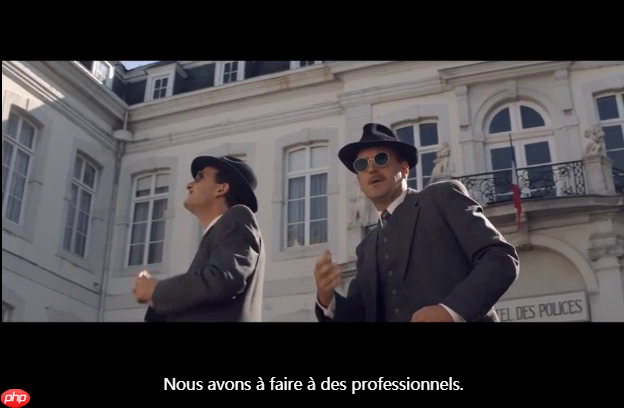
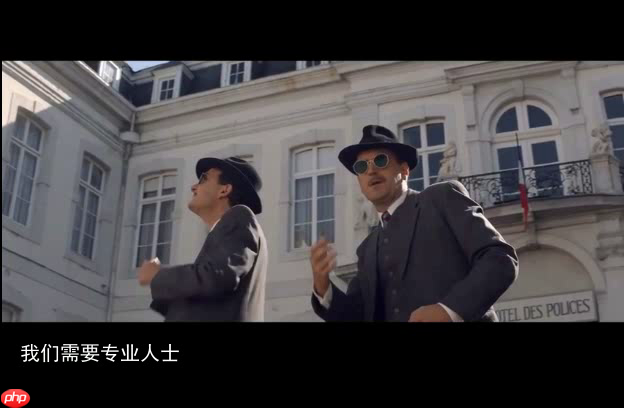
看到有些法语电影视频里只有法语字幕,没有被翻译,俗称“生肉”,那么如何把生肉煮熟呢?发现百度有两个工具组合起来可以做到:paddlehub 提供的法语文本识别和百度云提供的文本翻译功能。于是组合起来试了一下,这个效果:
原图
翻译后
实现思路
本示例演示了将法语字幕电影转为中文字幕的方法,步骤如下:
- 将影片逐帧抽取为图片
- 将含有字母的区域提取出,并使用paddle hub 的法文识别取出文本
- 调用百度翻译服务,得到中文字幕文本
- 将中文字幕输出到原图片上
- 将每一帧处理后的图片合成为视频文件
In [ ]

# 进度条 def process_bar(percent, start_str='', end_str='', total_length=0): bar = ''.join(["="] * int(percent * total_length)) + '' bar = '\r' + start_str +' ['+ bar.ljust(total_length) + ']{:0>4.1f}% '.format(percent*100) + end_str print(bar, end='', flush=True) process_bar(75/100, start_str='f_name', end_str='', total_length=50)f_name [===================================== ]75.0%
In [ ]
#由于PaddleHub升级比较快,建议大家直接升级到最新版本的PaddleHub,无需指定版本升级 !pip install paddlehub --upgrade -i https://pypi.tuna.tsinghua.edu.cn/simple #该Module依赖于第三方库shapely、pyclipper,使用该Module之前,请先安装shapely、pyclipper !pip install shapely -i https://pypi.tuna.tsinghua.edu.cn/simple !pip install pyclipper -i https://pypi.tuna.tsinghua.edu.cn/simple #安装 法语识别预训练模型 !hub install french_ocr_db_crnn_mobile==1.0.0 #安装视频处理库 !pip install moviepy -i https://pypi.tuna.tsinghua.edu.cn/simple
In [ ]
from PIL import Image import numpy as np import os import cv2 import matplotlib.pyplot as plt import matplotlib.image as mpimg import paddlehub as hub import cv2 ocr = hub.Module(name="french_ocr_db_crnn_mobile") #result = ocr.recognize_text(images=[cv2.imread('/PATH/TO/IMAGE')])[2021-03-25 19:27:36,079] [ WARNING] - The _initialize method in HubModule will soon be deprecated, you can use the __init__() to handle the initialization of the object
In [ ]
!ls data/data76619/video-001.mp4
data/data76619/video-001.mp4
In [ ]
from IPython.display import HTML HTML("""<h3>处理前视频</h3><iframe style="width:98%;height: 450px;" src="//player.bilibili.com/player.html?bvid=BV1LX4y1G7ez&cid=186472861&page=1" scrolling="no" border="0" frameborder="no" framespacing="0" allowfullscreen="true" > </iframe>""")<IPython.core.display.HTML object>
使用通用翻译API
使用您的百度账号登录百度翻译开放平台(http://api.fanyi.baidu.com); 注册成为开发者,获得APPID; 进行开发者认证(如仅需标准版可跳过); 开通通用翻译API服务:开通链接 参考技术文档和示例: python Demo
配置文件名为 config.txt ,格式是json,内容举例:
{"appid":"2021009693695","appkey":"Jwo)n2mdwxsAdRfgwp"}
In [ ]
# 加载配置 import json cfg=json.loads(open("config.txt","r").read())In [ ]
# -*- coding: utf-8 -*- # This code shows an example of text translation from English to Simplified-Chinese. # This code runs on Python 2.7.x and Python 3.x. # You may install `requests` to run this code: pip install requests # Please refer to `https://api.fanyi.baidu.com/doc/21` for complete api document import requests import random import json from hashlib import md5 # 调用翻译 def translate_to_cn(query,from_lang='zh'): # Set your own appid/appkey. appid = cfg["appid"] #你的appid appkey = cfg["appkey"] #你的密钥 # For list of language codes, please refer to `https://api.fanyi.baidu.com/doc/21` #from_lang = 'fra' to_lang = 'zh' endpoint = 'http://api.fanyi.baidu.com' path = '/api/trans/vip/translate' url = endpoint + path #query = "La folle histoire de Max et Léon " # Generate salt and sign def make_md5(s, encoding='utf-8'): return md5(s.encode(encoding)).hexdigest() salt = random.randint(32768, 65536) sign = make_md5(appid + query + str(salt) + appkey) # Build request headers = {'Content-Type': 'application/x-www-form-urlencoded'} payload = {'appid': appid, 'q': query, 'from': from_lang, 'to': to_lang, 'salt': salt, 'sign': sign} # Send request r = requests.post(url, params=payload, headers=headers) svr_result = r.json() #svr_result_dic = json.dumps(svr_result, indent=4, ensure_ascii=False) try : tmp = svr_result["trans_result"] if len(tmp)<=0: return "" else: return tmp[-1]["dst"] except Exception: print(r) return "" # 测试一下 rst = translate_to_cn("La folle histoire de Max et Léon ","fra") print(rst)麦克斯和利昂的疯狂故事
视频处理框架
In [ ]
%cd ~ # 视频逐帧处理:输入MP4,输出avi from PIL import Image import numpy as np import os import cv2 import matplotlib.pyplot as plt import matplotlib.image as mpimg def video_process(src_file,dst_path='',proc=lambda x:x,sample=None,bar=True): src_video = cv2.VideoCapture(src_file) f_name=os.path.join(dst_path,src_file.split(os.sep)[-1].split('.')[0]+('.sample_%d'%sample if type(sample)==int else '')+'.avi') frame_size = ( int(src_video.get(3)),int(src_video.get(4))) frame_rate =int(src_video.get(5)) frame_cnt =int(src_video.get(7)) # 进度条 def process_bar(percent, start_str='', end_str='', total_length=0): bar = ''.join(["="] * int(percent * total_length)) + '' bar = '\r' + start_str +' ['+ bar.ljust(total_length) + ']{:0>4.1f}% '.format(percent*100) + end_str print(bar, end='', flush=True) fourcc = cv2.VideoWriter_fourcc(*'XVID') #fourcc = cv2.VideoWriter_fourcc('I','4','2','0') #fourcc = cv2.VideoWriter_fourcc('M','J','P','G') dst_video = cv2.VideoWriter( f_name, fourcc, frame_rate, frame_size , True ) count = 0 while True: flag, frame = src_video.read() if flag: if (type(sample)==int and count%sample==0) or type(sample)!=int: _frm_ = frame _frm_ = cv2.cvtColor(_frm_, cv2.COLOR_BGR2RGB) _frm_ = Image.fromarray(_frm_) _frm_ = proc(_frm_) _frm_ = np.array(_frm_) _frm_ = cv2.cvtColor(_frm_, cv2.COLOR_RGB2BGR) dst_video.write(_frm_) count = count + 1 if bar: process_bar(count/frame_cnt, start_str=f_name, end_str='', total_length=50) else: dst_video.release() src_video.retrieve() if bar: print() return count ## 原样输出 print('processed {} frames in total.'.format( video_process("data/data76619/video-001.mp4",'work') )) ## sample是每过几帧取1帧(注意只有是整数时才有效),有个隐藏的参数bar用于控制是否打印进度 print('processed {} frames in total.'.format( video_process("data/data76619/video-001.mp4",'',proc=lambda x:x,sample=100) ))/home/aistudio work/video-001.avi [==================================================]100.0% processed 1919 frames in total. video-001.sample_100.avi [==================================================]100.0% processed 1919 frames in total.
处理图片
In [116]
from PIL import Image , ImageOps , ImageDraw, ImageFont import time import paddlehub as hub import cv2 ocr = hub.Module(name="french_ocr_db_crnn_mobile") def process_frame_img(img_in): img_w,img_h = img_in.size img_out = Image.new( 'RGB', (img_w,img_h), ( 0, 0, 0 ) ) img_out.paste( img_in,( 0,0,img_w,img_h) ) #裁切,取出字幕位置 pos_Y = 323 #print(img_in.size) # (352, 288) region = (0,pos_Y ,img_w,img_h) cropImg = img_in.crop(region) #生成完整图片 img_txt_in = Image.new( 'RGB', (img_w,img_h), ( 0, 0, 0 ) ) img_txt_in.paste( cropImg,region) #img_mask_2.save('sample2.jpg') #识别为文字 _tmp_ = np.array(img_txt_in) _tmp_ = cv2.cvtColor(_tmp_, cv2.COLOR_RGB2BGR) ocr_result = ocr.recognize_text(images=[_tmp_])#,cv2.imread("work/video/278.png") #是否有文字 if len(ocr_result[0]['data'])<=0: #如果为空,使用原图片 pass elif len(ocr_result[0]['data'][-1]['text'])<=0: #识别长度为0,使用原图片 pass else: #不为空则翻译 time.sleep(1) trans_cn_txt = translate_to_cn(ocr_result[0]['data'][-1]['text'],"fra") #生成字幕 font_size = 20 font = ImageFont.truetype("data/data76619/simhei.ttf", font_size, encoding="unic")#设置字体 back_color = 'black' img_txt_out = Image.new("RGB", ( img_w , img_h - pos_Y ), back_color) img_txt_out_pen = ImageDraw.Draw(img_txt_out) img_txt_out_pen.text((font_size, font_size), trans_cn_txt, 'white', font) #img_txt_out.save('sample3.jpg') #合成到原位置 img_out.paste( img_txt_out ,region ) return img_out[2021-03-25 22:43:37,006] [ WARNING] - The _initialize method in HubModule will soon be deprecated, you can use the __init__() to handle the initialization of the object
In [117]
print('processed {} frames in total.'.format( video_process("data/data76619/video-001.mp4",'',proc=process_frame_img,sample=1) ))[2021-03-25 22:43:49,277] [ WARNING] - The _initialize method in HubModule will soon be deprecated, you can use the __init__() to handle the initialization of the object
video-001.sample_1.avi [==================================================]100.0% processed 1919 frames in total.
In [118]
from IPython.display import HTML HTML("""<h3>处理后视频</h3><iframe style="width:98%;height: 450px;" src="//player.bilibili.com/player.html?bvid=BV1554y1h7im&cid=186472861&page=1" scrolling="no" border="0" frameborder="no" framespacing="0" allowfullscreen="true" > </iframe>""")<IPython.core.display.HTML object>
华丽的分割线
下面是实验用到的
In [ ]
# 视频逐帧存图片文件 import os import cv2 import matplotlib.pyplot as plt import matplotlib.image as mpimg %cd ~ def extract_images(src_video_, dst_dir_): video_ = cv2.VideoCapture(src_video_) count = 0 while True: flag, frame = video_.read() if not flag: break cv2.imwrite(os.path.join(dst_dir_, str(count) + '.png'), frame) #print(os.path.join(dst_dir_, str(count) + '.png')) #print(count) count = count + 1 print('extracted {} frames in total.'.format(count)) src_video = '/home/aistudio/data/data76619/video-001.mp4' dst_dir_ = '/home/aistudio/work/video' extract_images(src_video, dst_dir_)/home/aistudio extracted 1919 frames in total.
In [ ]
%cd ~ os.listdir('/home/aistudio/data/data76619/video-001.mp4')/home/aistudio
['video-001.mp4']
In [ ]
# 以下示例在pil中剪切部分图片 from PIL import Image #im1 = Image.open("work/video/278.png") im1 = Image.open("work/video/1.png") print(im1.size) # (352, 288) region = (0,323,624,408) #裁切图片 cropImg = im1.crop(region) cropImg.save('sample.jpg') img_mask_2 = Image.new( 'RGB', (624, 408), ( 0, 0, 0 ) ) #img_mask_2.paste( cropImg,( 0,323,624 ,85 ) ) img_mask_2.paste( cropImg,( 0,323,624 ,408 ) ) img_mask_2.save('sample2.jpg') import paddlehub as hub import cv2 ocr = hub.Module(name="french_ocr_db_crnn_mobile") result = ocr.recognize_text(images=[cv2.imread('sample2.jpg')])#,cv2.imread("work/video/278.png") print(result)(624, 408)
[2021-03-25 21:12:53,272] [ WARNING]
- The _initialize method in HubModule will soon be deprecated, you can use the __init__() to handle the initialization of the object
[2021-03-25 21:12:53,730] [ WARNING] - The _initialize method in HubModule will soon be deprecated, you can use the __init__() to handle the initialization of the object
[{'save_path': '', 'data': []}]In [ ]
# 中文字体 # 将字体文件复制到matplotlib字体路径 !cp data/data76619/simhei.ttf /opt/conda/envs/python35-paddle120-env/lib/python3.7/site-packages/matplotlib/mpl-data/fonts/ttf/ # 一般只需要将字体文件复制到系统字体目录下即可,但是在aistudio上该路径没有写权限,所以此方法不能用 # !cp simhei.ttf /usr/share/fonts/ # 创建系统字体文件路径 !mkdir .fonts # 复制文件到该路径 !cp data/data76619/simhei.ttf .fonts/ !rm -rf .cache/matplotlib
In [ ]
print(trans_cn_txt) from PIL import Image , ImageOps , ImageDraw, ImageFont font_size = 20 str_out = trans_cn_txt font = ImageFont.truetype("data/data76619/simhei.ttf", font_size, encoding="unic")#设置字体 back_color = 'black' d = Image.new("RGB", (624 ,85), back_color) t = ImageDraw.Draw(d) t.text((font_size, font_size), str_out, 'white', font) #d.save('sample3.jpg') from PIL import Image im1 = Image.open("work/video/278.png") im1.paste( d,( 0,323,624 ,408 ) ) im1.save('sample3.jpg')在过去的几年里
In [1]
<br/>
Looking in indexes: https://pypi.tuna.tsinghua.edu.cn/simple Requirement already satisfied: moviepy in /opt/conda/envs/python35-paddle120-env/lib/python3.7/site-packages (1.0.1) Requirement already satisfied: decorator<5.0,>=4.0.2 in /opt/conda/envs/python35-paddle120-env/lib/python3.7/site-packages (from moviepy) (4.4.0) Requirement already satisfied: imageio<3.0,>=2.5; python_version >= "3.4" in /opt/conda/envs/python35-paddle120-env/lib/python3.7/site-packages (from moviepy) (2.6.1) Requirement already satisfied: imageio-ffmpeg>=0.2.0; python_version >= "3.4" in /opt/conda/envs/python35-paddle120-env/lib/python3.7/site-packages (from moviepy) (0.3.0) Requirement already satisfied: tqdm<5.0,>=4.11.2 in /opt/conda/envs/python35-paddle120-env/lib/python3.7/site-packages (from moviepy) (4.36.1) Requirement already satisfied: numpy in /opt/conda/envs/python35-paddle120-env/lib/python3.7/site-packages (from moviepy) (1.16.4) Requirement already satisfied: requests<3.0,>=2.8.1 in /opt/conda/envs/python35-paddle120-env/lib/python3.7/site-packages (from moviepy) (2.22.0) Requirement already satisfied: proglog<=1.0.0 in /opt/conda/envs/python35-paddle120-env/lib/python3.7/site-packages (from moviepy) (0.1.9) Requirement already satisfied: pillow in /opt/conda/envs/python35-paddle120-env/lib/python3.7/site-packages (from imageio<3.0,>=2.5; python_version >= "3.4"->moviepy) (7.1.2) Requirement already satisfied: urllib3!=1.25.0,!=1.25.1,<1.26,>=1.21.1 in /opt/conda/envs/python35-paddle120-env/lib/python3.7/site-packages (from requests<3.0,>=2.8.1->moviepy) (1.25.6) Requirement already satisfied: chardet<3.1.0,>=3.0.2 in /opt/conda/envs/python35-paddle120-env/lib/python3.7/site-packages (from requests<3.0,>=2.8.1->moviepy) (3.0.4) Requirement already satisfied: certifi>=2017.4.17 in /opt/conda/envs/python35-paddle120-env/lib/python3.7/site-packages (from requests<3.0,>=2.8.1->moviepy) (2019.9.11) Requirement already satisfied: idna<2.9,>=2.5 in /opt/conda/envs/python35-paddle120-env/lib/python3.7/site-packages (from requests<3.0,>=2.8.1->moviepy) (2.8)
In [13]
#from moviepy.editor import AudioFileCLip #audio = AudioFileCLip("data/data76619/video-001.mp4") # 返回音频 from moviepy.editor import VideoFileClip audio = VideoFileClip("data/data76619/video-001.mp4").audio # 返回音频return video.audio video = VideoFileClip("data/data76619/video-001.mp4")# ("video-001.sample_1.avi")# 设置视频的音频 video = video.set_audio(audio)# 保存新的视频文件 video.write_videofile("video-001.audio_1.mp4") !ls -lchunk: 9%|▊ | 122/1412 [00:00<00:02, 632.17it/s, now=None]
Moviepy - Building video video-001.audio_1.mp4. MoviePy - Writing audio in video-001.audio_1TEMP_MPY_wvf_snd.mp3
chunk: 12%|█▏ | 169/1412 [00:00<00:02, 566.89it/s, now=None]
t: 3%|▎ | 54/1920 [00:00<00:03, 493.29it/s, now=None]
MoviePy - Done. Moviepy - Writing video video-001.audio_1.mp4
t: 4%|▎ | 69/1920 [00:00<00:06, 288.91it/s, now=None]
<br/>
Moviepy - Done ! Moviepy - video ready video-001.audio_1.mp4 total 15936 -rw-r--r-- 1 aistudio users 27504 Mar 26 08:37 1709934.ipynb -rw-r--r-- 1 aistudio aistudio 61 Mar 25 21:28 config.txt drwxrwxrwx 3 aistudio users 4096 Mar 26 08:16 data -rw-r--r-- 1 aistudio users 4610545 Mar 26 08:37 video-001.audio_1.mp4 -rw-r--r-- 1 aistudio aistudio 11664928 Mar 25 23:34 video-001.sample_1.avi drwxr-xr-x 4 aistudio aistudio 4096 Mar 25 23:33 work




