



在自动化测试中处理windows弹出框时,通常采用autoit编写脚本进行操作,之前的文章《java+selenium2+autoit实现右键文件另存为功能》中有详细介绍,可以重新学习一下。
上传文件同样可以使用AutoIT生成exe脚本来操作Windows窗体。
Sikuli,意为“上帝之眼”,其官方网站为http://www.sikulix.com/,提供了一种不同的解决方案:通过图片识别来操作Windows弹出框或其他窗口。
其工作原理是在当前页面中识别目标图片,并对其进行点击、输入、等待显示、判断是否存在等操作。
操作流程如下:
1、识别文本输入框,并输入文件名;
2、识别并点击Open按钮。

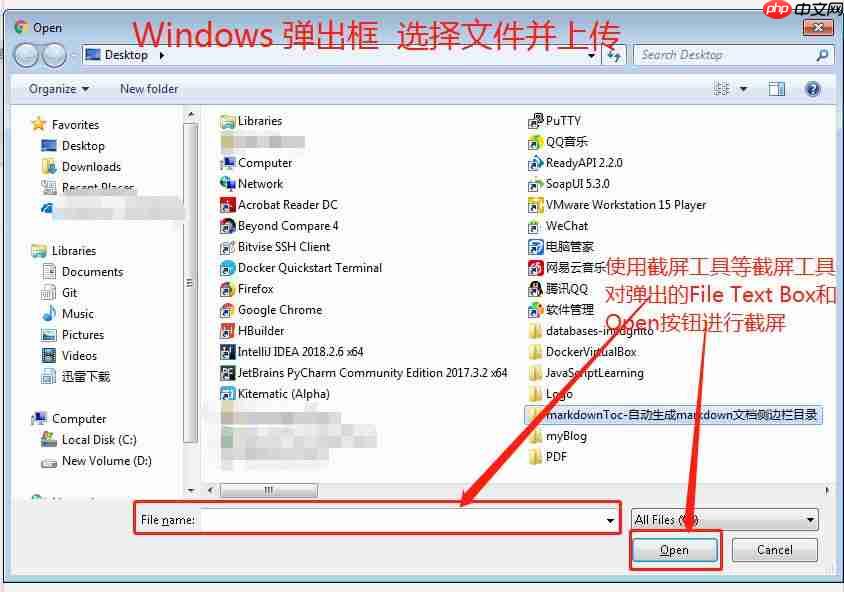 所需依赖包:
sikulixapi 1.1.2

bridj 0.7.0
支持的编程语言包括Java、Python等。
Maven配置如下:
<dependency>
    <groupId>com.sikulix</groupId>
    <artifactId>sikulixapi</artifactId>
    <version>1.1.2</version>
    <exclusions>
        <exclusion>
            <groupId>com.github.vidstige</groupId>
            <artifactId>jadb</artifactId>
        </exclusion>
    </exclusions>
</dependency>
<dependency>
    <groupId>com.nativelibs4java</groupId>
    <artifactId>bridj</artifactId>
    <version>0.7.0</version>
</dependency>
示例代码如下:
package com.xxx.sikuli;

import org.openqa.selenium.By;
import org.openqa.selenium.WebDriver;
import org.sikuli.script.FindFailed;
import org.sikuli.script.Pattern;
import org.sikuli.script.Screen;
import org.openqa.selenium.chrome.ChromeDriver;

public class SikuliDemo {
    public static void main(String[] args) throws FindFailed, Exception {
        // 浏览器版本与Driver版本需对应,否则会报错,无法启动
        System.setProperty("webdriver.chrome.driver", "src/test/resources/driver/chromedriver.exe");
        String filepath = "src/test/resources/";
        String inputFilePath = "src/test/resources/";
        Screen screen = new Screen();
        Pattern fileInputTextBox = new Pattern(filepath + "FileTextBox.png");
        Pattern openButton = new Pattern(filepath + "OpenButton.png");
        WebDriver driver;

        // 打开Chrome浏览器
        driver = new ChromeDriver();
        driver.get("http://demo.guru99.com/test/upload/");

        // 点击Browse按钮并使用Sikuli处理Windows弹出框
        driver.findElement(By.xpath(".//*[@id='uploadfile_0']")).click();
        screen.wait(fileInputTextBox, 20);
        screen.type(fileInputTextBox, fileInputTextBox.getFileURL().toString());
        screen.click(openButton);

        // 关闭浏览器
        driver.close();

        System.out.println("**********1 file has been successfully uploaded.**********");
    }
}
总结:
实际上,Sikuli还可以用于其他图片识别的自动化测试,但它对分辨率有一定的要求,因为它基于像素识别。因此,当目标图片变化较少时,Sikuli是一个不错的选择,如上例中的上传文件文本输入框和Open按钮基本不变。然而,对于经常变化的目标图片,Sikuli就不太适用,因为每次变化都需要重新截图。在这种情况下,使用AutoIT或其他工具会更有效。




