



the winrt api headers for delphi are now available on getit, and you can explore a demo showcasing the use of windows 10 notifications in a vcl win32 application.
The WinRT API headers for Delphi are now accessible on GetIt, providing you with a demo to explore the use of Windows 10 notifications within a VCL Win32 application.
We recently conducted a Windows 10 focused webinar, featuring a Microsoft guest alongside a few of us (myself, David I, Jim McKeeth, and JT) discussing Windows 10 and the capabilities RAD Studio XE8 offers for upcoming Windows versions. If you missed the event, the replay will be available soon. During the webinar, apart from classic demos, I demonstrated a VCL application utilizing Windows 10 notifications, a feature not supported by traditional Win32 APIs but accessible through the new WinRT APIs.
Interested in obtaining the headers for this API and running a working demo? Continue reading to find out how...
The WinRT API headers for Windows 10 are now available on GetIt for all developers using Delphi or RAD Studio XE8 (note that there is currently no direct support for C++). Simply access GetIt in XE8 and select the relevant entry as shown below.
 Please be aware that this code targets the Windows 10 preview, and both the APIs and our header translations may evolve in the coming months. You may need to adjust or clean up your code later, but it's advantageous to start working with WinRT classes in XE8 now.

The WinRT Notification Demo offers an example of a unique feature available only through WinRT: "toast" notifications. While the API is accessible, it isn't encapsulated in ready-to-use components, making the code somewhat complex. I'll highlight the core elements rather than listing the entire code. Our goal is to achieve this:
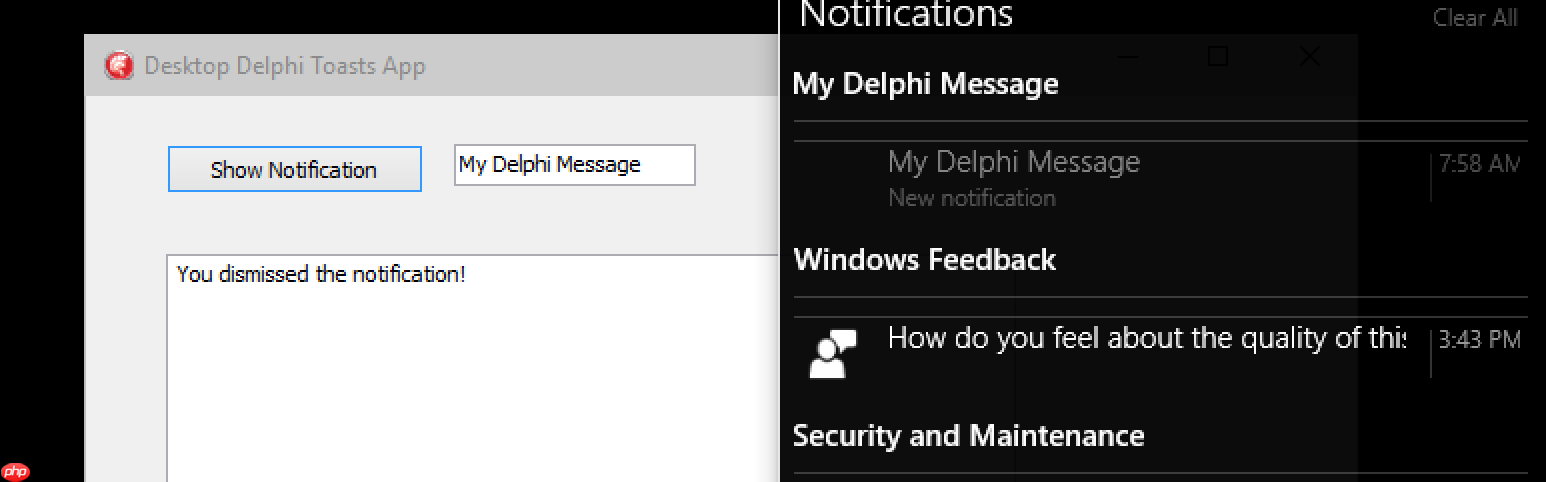 Here's a snippet of the code used to create a notification. As you can see, WinRT classes function similarly to COM objects, sharing a common architecture. Object creation is more intricate than using a CoClass (or class factory):
if Succeeded(RoGetActivationFactory(LString, TGUID.Create('{50AC103F-D235-4598-BBEF-98FE4D1A3AD4}'), LCreated)) then begin LINotificationManagerStatics := LCreated as IToastNotificationManagerStatics; if Succeeded(WindowsCreateString(PWideChar(Edit1.Text), Length(Edit1.Text), LString2)) then begin LToastNotifier := LINotificationManagerStatics.CreateToastNotifier(LString2); LXMLTemplate := LINotificationManagerStatics.GetTemplateContent(ToastTemplateType.ToastText02); if Succeeded(WindowsCreateString(PWideChar(SToastNotification), Length(SToastNotification), LString)) then begin if Succeeded(RoGetActivationFactory(LString, TGUID.Create('{04124124B20-82C6-4229-B109-FD9ED4662B53}'), LCreated)) then LToastFactory := LCreated as IToastNotificationFactory; LToast := LToastFactory.CreateToastNotification(LXMLTemplate); LAccepted := TAcceptedEventHandler.Create; LToast.add_Activated(LAccepted); LToastNotifier.Show(LToast); end;The TAcceptedEventHandler class includes an invoke callback method that logs the acceptance of the notification in the memo. Here's the code:
procedure TAcceptedEventHandler.Invoke(sender: IToastNotification; args: IInspectable);begin Form51.Memo1.Lines.Add ('You clicked on the notification!');end; I acknowledge that referencing the global form directly might not be ideal, but the complexity of the code justifies avoiding additional indirection. Are you interested in trying this out? You can download the full demo at dl.dropboxusercontent.com/u/133855/WinRTCheck.zip. I plan to update it and potentially create more examples covering other new WinRT features.
Windows 10 is on the horizon, promising to be a significant release. Start exploring the Windows 10 Preview now, and use XE8 to experiment with integrating your VCL (and FireMonkey) applications with it.




