



在使用nio加载文件时,在idea中运行没有问题,但打成jar包后在windows和linux下都有问题:代码语言:javascript代码运行次数:0运行复制
<code class="javascript"> public static void main(String[] args) throws Exception{ // SpringApplication.run(MarketCollectApplication.class,args); URI uri = MarketCollectApplication.class.getClassLoader().getResource("conf/sh.txt").toURI(); FileSystem aDefault = FileSystems.getDefault(); System.out.println(aDefault.getClass()); FileSystemProvider provider = FileSystems.getDefault().provider(); System.out.println(provider.getClass()); System.out.println("====================" + uri.getScheme()); List<FileSystemProvider> fileSystemProviders = FileSystemProvider.installedProviders(); fileSystemProviders.forEach(p -> { System.out.println(p.getClass()); }); Path path = Paths.get(uri); }</code>这种情况下在idea中没有问题:代码语言:javascript代码运行次数:0运行复制<code class="javascript">class sun.nio.fs.WindowsFileSystemclass sun.nio.fs.WindowsFileSystemProvider====================fileclass sun.nio.fs.WindowsFileSystemProviderclass com.sun.nio.zipfs.ZipFileSystemProvider</code>但是在打成jar包运行时Path path = Paths.get(uri)这一行会抛出异常:windows环境下:
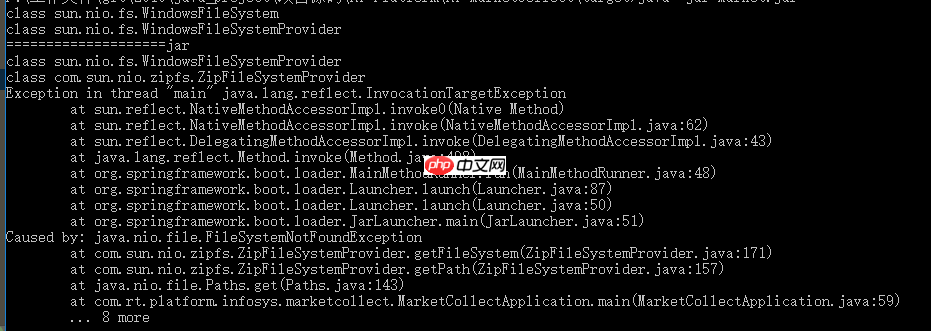
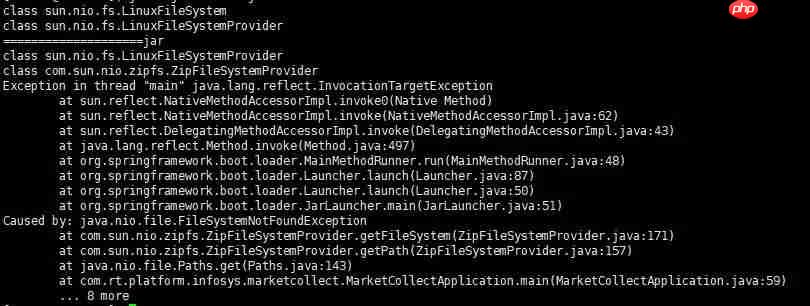
<code class="javascript">public static Path get(URI uri) { String scheme = uri.getScheme(); if (scheme == null) throw new IllegalArgumentException("Missing scheme"); // check for default provider to avoid loading of installed providers if (scheme.equalsIgnoreCase("file")) return FileSystems.getDefault().provider().getPath(uri); // try to find provider for (FileSystemProvider provider: FileSystemProvider.installedProviders()) { if (provider.getScheme().equalsIgnoreCase(scheme)) { return provider.getPath(uri); } } throw new FileSystemNotFoundException("Provider \"" + scheme + "\" not installed"); }</code>uri.getScheme()在idea中是file,在打成jar包后变成了jar。当前缀以file开头时,会使用FileSystems.getDefault().provider()来处理,这个provider在windows环境下是WindowsFileSystemProvider, 在linux环境下是LinuxFileSystemProvider。FileSystemProvider.installedProviders()对应windows中的WindowsFileSystemProvider和ZipFileSystemProvider,对应linux中的LinuxFileSystemProvider和ZipFileSystemProvider。当前缀不以file开头时,会使用FileSystemProvider.installedProviders()中与uri.getScheme()匹配的provider来处理,对应的就是ZipFileSystemProvider。ZipFileSystemProvider对应的FileSystem需要自己创建,使用和创建方式参考:https://docs.oracle.com/javase/8/docs/technotes/guides/io/fsp/zipfilesystemprovider.html解决办法:在Path path = Paths.get(uri)中进行处理代码语言:javascript代码运行次数:0运行复制<code class="javascript"> Path path = null; try{ path = Paths.get(uri); }catch (Exception e){ //@see https://stackoverflow.com/questions/25032716/getting-filesystemnotfoundexception-from-zipfilesystemprovider-when-creating-a-p //@see http://docs.oracle.com/javase/7/docs/technotes/guides/io/fsp/zipfilesystemprovider.html FileSystem zipfs = FileSystems.newFileSystem(uri, env); path = Paths.get(uri); }</code>
或者使用其他办法加载资源文件:

<code class="javascript">byte[] data;try (InputStream in = getClass().getResourceAsStream("/elasticsearch/segmentsIndex.json")) { data = IOUtils.toByteArray(in);}</code>参考:https://stackoverflow.com/questions/25032716/getting-filesystemnotfoundexception-from-zipfilesystemprovider-when-creating-a-p 




