



本文实例介绍了js焦点图片层叠轮播切换滚动效果,分享给大家供大家参考,具体内容如下
效果图:
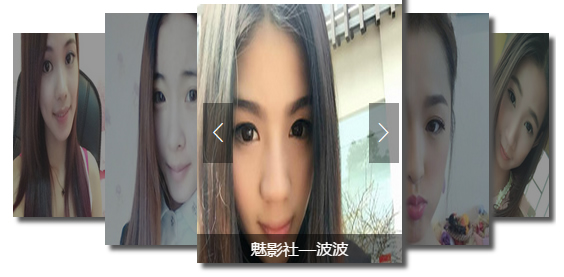
功能描述:
- 自定义图片尺寸;
- 每隔一段时间自动滚动图片;
- 每次动画执行的时候改变图片的位置,宽高以及其它属性也要跟随着变化;
- 鼠标移上图片,显示当前图片的详细信息;
- 点击按钮向前向后滚动;
详细代码:
html代码:

-

主播昵称
-

主播昵称
-
主播昵称
-
主播昵称
-
主播昵称
<
>
js 代码:
define(function(require, exports, module) {
 'use strict';
 var $ = require('lib/jquery/1.11.x/index.js');

 var carousel = {

  _initData:false, //判断动画是否执行完毕

  init: function(options) {
   var t = this;
   t._wapper = options.wapper;
   t._grids = t._wapper.find('li');
   t._gridsWidth = options.imgWidth;
   t._gridsHeight = options.imgHeight;
   t._spacing = options.spacing;

   //取居中图片
   t._middle = t._grids.length % 2 == 0 ? t._grids.length / 2 : parseInt(t._grids.length / 2);

   //存放各图片参数
   t._arr = {
    left: [],
    top: [],
    zIndex: [],
    width: [],
    height: []
   }

   if ( !t._initData ) {
    var interval;
    interval = setInterval(function(){
     $('.previous').click();
    },10000);
   }

   t._largerImages();
   t._reposition();
   t._mouseEnter(t._grids) //鼠标移动上去显示主播昵称
  },
  //初始化定位:
  _largerImages: function() {
   var t = this;

   var front = t._middle;
   var avtive = t._middle;
   var last = t._grids.length;

   t._grids.each( function(i, img) {

    if (i == t._middle) {

     t._grids.eq(i).css({
      zIndex: 99,
      top: 0,
      left: t._spacing.left * i,
      height: t._gridsHeight,
      width: t._gridsWidth
     });

    } else if ( i < t._middle ) {

     t._grids.eq(i).css({
      zIndex: i,
      top: t._spacing.top * front,
      left: t._spacing.left * i,
      height: t._gridsHeight - t._spacing.height * front,
      width: t._gridsWidth - t._spacing.width * front
     });

     front--;

    } else {

     last --;

     t._grids.eq(last).css({
      zIndex: i,
      top: t._spacing.top * avtive,

      left: t._spacing.left * last + t._spacing.width * avtive,
      height: t._gridsHeight - t._spacing.height * avtive,
      width: t._gridsWidth - t._spacing.width * avtive
     });

     avtive --;
    };
   });
  },
  //翻页动画
  _reposition: function() {
   var t = this;

   //把各属性值传到数组里面
   t._grids.each( function(i,img) {
    t._arr.left.push(t._grids.eq(i).position().left);
    t._arr.top.push(t._grids.eq(i).position().top);
    t._arr.width.push(t._grids.eq(i).width());
    t._arr.height.push(t._grids.eq(i).height());
    t._arr.zIndex.push(t._grids.eq(i).css('z-index'));
   });

   //向前翻页
   $('.previous').bind('click',function() {
    if ( !t._initData && t._arr.left.length != 0) {

     t._initData = true;

     //重新获取选择器
     var grids = t._wapper.find('li');

     for (var i = 1; i < grids.length ; i ++) {

      grids.eq(i).animate({
       zIndex: t._arr.zIndex[i - 1],
       left: t._arr.left[i - 1],
       top: t._arr.top[i - 1],
       width: t._arr.width[i - 1],
       height: t._arr.height[i - 1],
      },200,
      function() {
       t._initData = false;
       grids.find('i').addClass('cover');
       grids.eq(t._middle + 1).find('i').removeClass('cover');
      });
     };

     grids.eq(0).animate({
      left: t._arr.left[ grids.length - 1],
      top: t._arr.top[ grids.length - 1],
      width: t._arr.width[ grids.length - 1],
      height: t._arr.height[ grids.length - 1],
      zIndex: t._arr.zIndex[ grids.length - 1]
     },200,
     function(){
      $(this).appendTo(t._wapper);
     });

    }
   });
   //向后翻页
   $('.next').bind('click',function() {
    if ( !t._initData && t._arr.left.length != 0) {

     t._initData = true;

     //重新获取选择器
     var grids = t._wapper.find('li');

     for (var i = 0; i < grids.length - 1; i ++) {
      grids.eq(i).animate({
       left: t._arr.left[i + 1],
        top: t._arr.top[i + 1],
        width: t._arr.width[i + 1],
        height: t._arr.height[i + 1],
        zIndex: t._arr.zIndex[i + 1]
        },200,function() {
        t._initData = false;
       });
     };
     grids.eq(grids.length - 1).animate({
      left: t._arr.left[0],
      top: t._arr.top[0],
      width: t._arr.width[0],
      height: t._arr.height[0],
      zIndex: t._arr.zIndex[0]
     },200,
     function(){
      $(this).prependTo(t._wapper);
      grids.find('i').addClass('cover');
      grids.eq(t._middle - 1).find('i').removeClass('cover');
     });

    }
   });
  },
  //鼠标进入图片效果
  _mouseEnter: function(grids) {
   grids.each(function(i){
    $(this).mouseenter(function() {
     $(this).find('.tab_name').animate({
      bottom:0,opacity: 'show'
     },200);
    });
    $(this).mouseleave(function() {
     $(this).find('.tab_name').animate({
      bottom:-50,opacity: 'hide'
     },200);
    });
   });
  },
 };

 return carousel;
});
以上就是本文的全部内容,希望对大家的学习有所帮助。





