



平常我们用的原生select下拉框,大部分样式没办法修改,导致在不同的浏览器里面会跟设计图的风格大相径庭。所以为了能让它美化起来,就用jq模拟了一个下拉框,可以随意定义样式。原生的下拉框也保留在div里面隐藏着,方便后台开发人员对其进行操作。
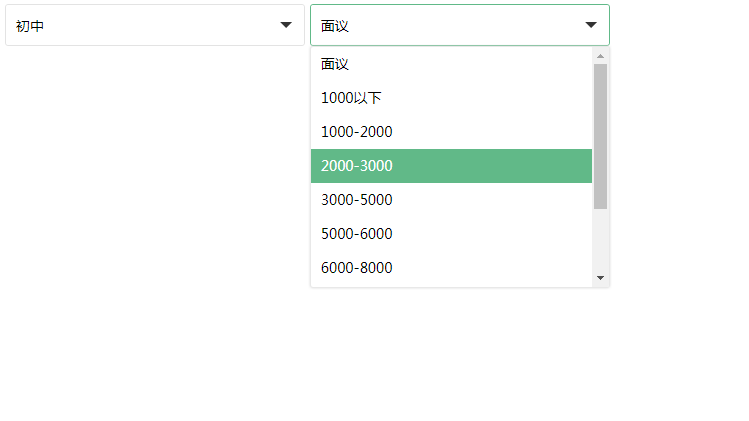
效果图如下:

HTML代码如下:
下拉框美化
不带参数: 初始化语句写了参数: 在div上面写参数: 禁用的样式: 其中一个选项禁用:
CSS样式如下:
@charset "utf-8";
/* 简单reset */
body, ul, li {
  margin: 0;
  padding: 0;
}
body {
  font: 14px/24px Microsoft YaHei;
  color: #333;
}
ul { list-style: none; }
a {
  color: #333;
  outline: none;
  text-decoration: none;
}
table {
  border-collapse: collapse;
  border-spacing: 0;
  text-align: left;
}
/* 布局样式,非必须 */
.wrap {
  width: 600px;
  margin: 100px auto 0;
  padding: 20px;
  background-color: #d3f3dd;
}
.wrap table th, .wrap table td { padding: 8px 2px; }
.wrap table th {
  font-weight: normal;
  text-align: right;
}
/* 下拉框样式 必须 */
.select-style ul {
  list-style: none;
  padding: 0;
  margin: 0;
}
.select-style select { display: none; }
.select-style {
  position: relative;
  display: inline-block;
  font-family: Microsoft YaHei;
  color: #666;
  font-size: 14px;
  text-align: left;
  vertical-align: middle;
  z-index: 50;
}
.select-style.focus { z-index: 51; }
.select-style .slt-wrap {
  display: inline-block;
  width: 200px;
  border: solid 1px #d6d6d6;
  vertical-align: middle;
}
.select-style.focus .slt-wrap { border: solid 1px #53a8df; }
.select-style .slt-title {
  position: relative;
  display: block;
  padding: 0 36px 0 5px;
  line-height: 30px;
  height: 30px;
  text-decoration: none;
  background-color: #fff;
  word-break: break-all;
  color: #666;
  overflow: hidden;
}
.select-style .slt-title .slt-text {
  display: inline-block;
  height: 30px;
 *cursor: pointer;
}
.select-style .slt-title i {
  position: absolute;
  right: 0;
  top: 0;
  display: inline-block;
  width: 30px;
  height: 30px;
  background: url(../images/ico-select.png) 0 0 no-repeat;
  *cursor: pointer;
}
.select-style.focus .slt-title i { background-position: 0 -30px; }
.select-style.disabled .slt-title i {
  background-position: 0 -60px;
  *cursor: default;
}
.select-style .opn-box {
  display: none;
  position: absolute;
  left: 0;
  top: 31px;
  width: 100%;
}
.select-style.up .opn-box {
  top: auto;
  bottom: 31px;
}
.select-style .opn-box .opn-list {
  position: relative;
  _width: 100%;
  max-height: 130px;
  border: 1px solid #d6d6d6;
  background: #fff;
  overflow-y: auto;
  overflow-x: hidden;
}
.select-style.focus .opn-box .opn-list { border-color: #53a8df; }
.select-style .opn-box .opn-list li {
  display: block;
  _width: 100%;
  padding-left: 5px;
  line-height: 26px;
  height: 26px;
  overflow: hidden;
  white-space: nowrap;
  text-overflow: ellipsis;
  cursor: pointer;
}
.select-style .opn-box .opn-list .selected { background: #d4edfe; }
.select-style .opn-box .opn-list li:hover {
  color: #fff;
  background: #65abda;
}
.select-style .opn-box .opn-list li.disabled {
  color: #cacaca;
  background: #f0f0f0;
  cursor: default;
}
.select-style.disabled .slt-wrap { border: 1px solid #d6d6d6; }
.select-style.disabled .slt-title {
  color: #cacaca;
  background-color: #f0f0f0;
  cursor: default;
}
.select-style.disabled .slt-title .slt-text { *cursor: default; }
/* 下拉框样式 结束 */
Jquery代码如下:
/**
* Name : 美化下拉框
**/
(function(jQuery){
$.fn.simSelect = function (o) {
o = $.extend({ //设置默认参数
maxNum: 5, //最大显示5个
width: 200, //默认宽200px。为避免过多的设置宽度,尽量依照项目中最常见的宽度设定css样式。
direction: "down", //向下拉,另一个是up
disabled: false //不可用时为true
},o || {});
return this.each(function(){ //构造开始
if($(this).children(".slt-wrap")){ //去重复
$(this).children(".slt-wrap").remove();
};
var $ts = $(this),
$select = $ts.find("select").eq(0),
wid = parseFloat($ts.attr("width")),
num = parseFloat($ts.attr("max-num")),
$sltWrap = $("").prependTo($ts),
$sltTit = $("").prependTo($sltWrap),
$sltText = $(".slt-text", $sltTit),
$opnBox = $("
").appendTo($sltWrap),
$opnList = $(".opn-list", $opnBox);
$ts.addClass("select-style"); //增加一个class专门作为写css样式用
$select.find("option").each(function(i){ //循环生成li标签
var text = $(this).text(),
$li = $("兼容到IE7+(IE6其实也行,只是选项多于5个下面不会出现滚动条)。
以上就是本文的全部内容,希望对大家的学习有所帮助。




