



1.php示例代码下载
下载地址1:http://pan.baidu.com/s/1nvlhbnV、
下载地址2:https://mp.weixin.qq.com/wiki/home/index.html(开始开发-》接入指南-》PHP示例代码下载)
2.wx_sample.php初始代码


1 php 2 /** 3 * wechat php test 4 */ 5 6 //define your token 7 define("TOKEN", "weixin"); 8 $wechatObj = new wechatCallbackapiTest(); 9 $wechatObj->valid(); 10 11 class wechatCallbackapiTest 12 { 13 public function valid() 14 { 15 $echoStr = $_GET["echostr"]; 16 17 //valid signature , option 18 if($this->checkSignature()){ 19 echo $echoStr; 20 exit; 21 } 22 } 23 24 public function responseMsg() 25 { 26 //get post data, May be due to the different environments 27 $postStr = $GLOBALS["HTTP_RAW_POST_DATA"]; 28 29 //extract post data 30 if (!empty($postStr)){ 31 /* libxml_disable_entity_loader is to prevent XML eXternal Entity Injection, 32 the best way is to check the validity of xml by yourself */ 33 libxml_disable_entity_loader(true); 34 $postObj = simplexml_load_string($postStr, 'SimpleXMLElement', LIBXML_NOCDATA); 35 $fromUsername = $postObj->FromUserName; 36 $toUsername = $postObj->ToUserName; 37 $keyword = trim($postObj->Content); 38 $time = time(); 39 $textTpl = "40 41 42 %s 4344 45 0 46 "; 47 if(!empty( $keyword )) 48 { 49 $msgType = "text"; 50 $contentStr = "Welcome to wechat world!"; 51 $resultStr = sprintf($textTpl, $fromUsername, $toUsername, $time, $msgType, $contentStr); 52 echo $resultStr; 53 }else{ 54 echo "Input something..."; 55 } 56 57 }else { 58 echo ""; 59 exit; 60 } 61 } 62 63 private function checkSignature() 64 { 65 // you must define TOKEN by yourself 66 if (!defined("TOKEN")) { 67 throw new Exception('TOKEN is not defined!'); 68 } 69 70 $signature = $_GET["signature"]; 71 $timestamp = $_GET["timestamp"]; 72 $nonce = $_GET["nonce"]; 73 74 $token = TOKEN; 75 $tmpArr = array($token, $timestamp, $nonce); 76 // use SORT_STRING rule 77 sort($tmpArr, SORT_STRING); 78 $tmpStr = implode( $tmpArr ); 79 $tmpStr = sha1( $tmpStr ); 80 81 if( $tmpStr == $signature ){ 82 return true; 83 }else{ 84 return false; 85 } 86 } 87 } 88 89 ?>
3.调用回复信息方法
在wx_sample.php文件中注释掉$wechatObj->valid();,在其下增加一句“$wechatObj->responseMsg();”。
1 php 2 /** 3 * wechat php test 4 */ 5 6 //define your token 7 define("TOKEN", "weixin"); 8 $wechatObj = new wechatCallbackapiTest(); 9 //$wechatObj->valid();//接口验证 10 $wechatObj->responseMsg();//调用回复消息方法 11 class wechatCallbackapiTest 12 { 13 public function valid() 14 { 15 $echoStr = $_GET["echostr"]; 16 17 //valid signature , option 18 if($this->checkSignature()){ 19 echo $echoStr; 20 exit; 21 } 22 } 23 24 public function responseMsg() 25 { 26 //get post data, May be due to the different environments 27 $postStr = $GLOBALS["HTTP_RAW_POST_DATA"]; 28 29 //extract post data 30 if (!empty($postStr)){ 31 /* libxml_disable_entity_loader is to prevent XML eXternal Entity Injection, 32 the best way is to check the validity of xml by yourself */ 33 libxml_disable_entity_loader(true); 34 $postObj = simplexml_load_string($postStr, 'SimpleXMLElement', LIBXML_NOCDATA); 35 $fromUsername = $postObj->FromUserName; 36 $toUsername = $postObj->ToUserName; 37 $keyword = trim($postObj->Content); 38 $time = time(); 39 $textTpl = "40 41 42 %s 4344 45 0 46 "; 47 if(!empty( $keyword )) 48 { 49 $msgType = "text"; 50 $contentStr = "Welcome to wechat world!"; 51 $resultStr = sprintf($textTpl, $fromUsername, $toUsername, $time, $msgType, $contentStr); 52 echo $resultStr; 53 }else{ 54 echo "Input something..."; 55 } 56 57 }else { 58 echo ""; 59 exit; 60 } 61 } 62 63 private function checkSignature() 64 { 65 // you must define TOKEN by yourself 66 if (!defined("TOKEN")) { 67 throw new Exception('TOKEN is not defined!'); 68 } 69 70 $signature = $_GET["signature"]; 71 $timestamp = $_GET["timestamp"]; 72 $nonce = $_GET["nonce"]; 73 74 $token = TOKEN; 75 $tmpArr = array($token, $timestamp, $nonce); 76 // use SORT_STRING rule 77 sort($tmpArr, SORT_STRING); 78 $tmpStr = implode( $tmpArr ); 79 $tmpStr = sha1( $tmpStr ); 80 81 if( $tmpStr == $signature ){ 82 return true; 83 }else{ 84 return false; 85 } 86 } 87 } 88 89 ?>
4.关键词自动回复和关注回复

CRMEB 多语言开源商城系统
下载
CRMEB打通版是一款全开源支持免费商用的PHP 多语言商城系统;CRMEB技术团队历经6年时间匠心之作!系统采用前后端分离技术,基于TP6+Uni-app框架开发;客户移动端采用uni-app开发,管理后台前端使用iviewUI开发。系统支持微信公众号端、微信小程序端、H5端、PC端多端账号同步,可快速打包生成APP;赋能开发者,减少重复造轮子;系统支持自动检查安装环境一键安装部署,使用简单方便
$keyword保存着用户微信端发来的文本信息。
官方开发者文档:https://mp.weixin.qq.com/wiki/home/index.html(消息管理-》接收消息-接收事件推送-》1.关注/取消关注事件)
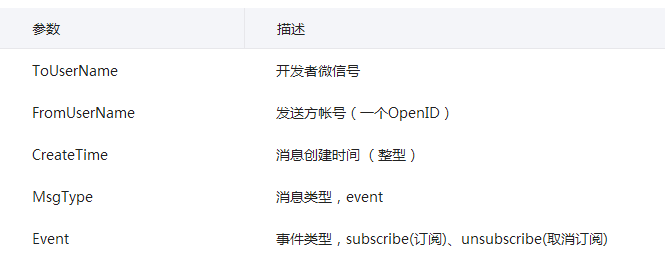
关注事件与一般的文本消息有两处不同,一是MsgType值是event,二是增加了Event值是subscribe。由于官方文档(最初的wx_sample.php)没有提取这个参数,需要我们自己提取。在程序中增加两个变量$msgType和$event。
1 php 2 /** 3 * wechat php test 4 */ 5 6 //define your token 7 define("TOKEN", "weixin"); 8 $wechatObj = new wechatCallbackapiTest(); 9 //$wechatObj->valid();//接口验证 10 $wechatObj->responseMsg();//调用回复消息方法 11 class wechatCallbackapiTest 12 { 13 public function valid() 14 { 15 $echoStr = $_GET["echostr"]; 16 17 //valid signature , option 18 if($this->checkSignature()){ 19 echo $echoStr; 20 exit; 21 } 22 } 23 24 public function responseMsg() 25 { 26 //get post data, May be due to the different environments 27 $postStr = $GLOBALS["HTTP_RAW_POST_DATA"]; 28 29 //extract post data 30 if (!empty($postStr)){ 31 /* libxml_disable_entity_loader is to prevent XML eXternal Entity Injection, 32 the best way is to check the validity of xml by yourself */ 33 libxml_disable_entity_loader(true); 34 $postObj = simplexml_load_string($postStr, 'SimpleXMLElement', LIBXML_NOCDATA); 35 $fromUsername = $postObj->FromUserName; 36 $toUsername = $postObj->ToUserName; 37 $keyword = trim($postObj->Content); 38 $time = time(); 39 $msgType = $postObj->MsgType;//消息类型 40 $event = $postObj->Event;//时间类型,subscribe(订阅)、unsubscribe(取消订阅) 41 $textTpl = "42 43 44 %s 4546 47 0 48 "; 49 50 switch($msgType){ 51 case "event": 52 if($event=="subscribe"){ 53 $contentStr = "Hi,欢迎关注海仙日用百货!"."\n"."回复数字'1',了解店铺地址."."\n"."回复数字'2',了解商品种类."; 54 } 55 break; 56 case "text": 57 switch($keyword){ 58 case "1": 59 $contentStr = "店铺地址:"."\n"."杭州市江干艮山西路233号新东升市场地下室第一排."; 60 break; 61 case "2": 62 $contentStr = "商品种类:"."\n"."杯子、碗、棉签、水桶、垃圾桶、洗碗巾(刷)、拖把、扫把、" 63 ."衣架、粘钩、牙签、垃圾袋、保鲜袋(膜)、剪刀、水果刀、饭盒等."; 64 break; 65 default: 66 $contentStr = "对不起,你的内容我会稍后回复"; 67 } 68 break; 69 } 70 $msgType = "text"; 71 $resultStr = sprintf($textTpl, $fromUsername, $toUsername, $time, $msgType, $contentStr); 72 echo $resultStr; 73 }else { 74 echo ""; 75 exit; 76 } 77 } 78 79 private function checkSignature() 80 { 81 // you must define TOKEN by yourself 82 if (!defined("TOKEN")) { 83 throw new Exception('TOKEN is not defined!'); 84 } 85 86 $signature = $_GET["signature"]; 87 $timestamp = $_GET["timestamp"]; 88 $nonce = $_GET["nonce"]; 89 90 $token = TOKEN; 91 $tmpArr = array($token, $timestamp, $nonce); 92 // use SORT_STRING rule 93 sort($tmpArr, SORT_STRING); 94 $tmpStr = implode( $tmpArr ); 95 $tmpStr = sha1( $tmpStr ); 96 97 if( $tmpStr == $signature ){ 98 return true; 99 }else{ 100 return false; 101 } 102 } 103 } 104 105 106 ?>





