



对于表单,input[type="radio"] 的样式总是不那么友好,在不同的浏览器中表现不一。
为了最大程度的显示出它们的差别,并且为了好看,首先定义了一些样式:
html:
<form action="">
    <div class="sex">
        <div class="female">
            <label for="female">女label>
            <input type="radio" name="sex" id="female">
        div>
        <div class="male">
            <label for="male">男label>
            <input type="radio" name="sex" id="male">
        div>
    div>
form>
css:
body { margin: 0; }
input { padding: 0; margin: 0; border: 0; }
.female, .male {
    position: relative;
    height: 40px;
    line-height: 40px;
    margin-left: 40px;
}
.sex label {
    display: block;
    height: 40px;
    width: 40px;
    line-height: 40px;
    font-size: 20px;
    cursor: pointer;
}
.sex input {
    z-index: 3;
    position: absolute;
    top: 0;
    bottom: 0;
    left: 40px;
    margin: auto;
    display: block;
    width: 30px;
    height: 30px;
    cursor: pointer;
}
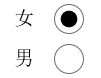
然后在各个浏览器中观察,会发现有很大的差别:
ie:
edge:

opera:

chrome:

firefox:

对于 firefox 浏览器,即便是设置了宽和高,依然是没有效果,input[type="radio"] 的那个圆圈还是初始状态那么大。其它浏览器的表现也不一致,为了达到一致的效果,我们需要做兼容处理。
思路:
1. 将 input[type="radio"] 隐藏, opacity: 0; 置于上层,当我们点击它时,就能正确的响应原本的事件。
2. 自定义一个圆圈,置于下层,模拟原本相似的样式;
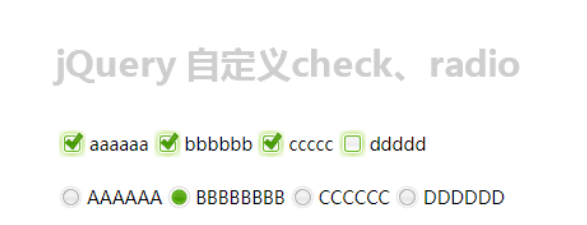
3. 用 js 实现选中 input[type="radio"] 时,在其下层的自定义的元素改变原来的背景颜色。
代码:
html:
<form action="">
    <div class="sex">
        <div class="female">
            <label for="female">女label>
            <input type="radio" name="sex" id="female">
            <span class="female-custom">span>
        div>
        <div class="male">
            <label for="male">男label>
            <input type="radio" name="sex" id="male">
            <span class="male-custom">span>
        div>
    div>
form>
css:
body { margin: 0; }
input { padding: 0; margin: 0; border: 0; }
.female, .male {
    position: relative; /* 设置为相对定位,以便让子元素能绝对定位 */
    height: 40px;
    line-height: 40px;
    margin-left: 40px;
}
.sex label {
    display: block;
    height: 40px;
    width: 40px;
    line-height: 40px;
    font-size: 20px;
    cursor: pointer;
}
.sex input {
    z-index: 3;
    position: absolute;
    top: 0;
    bottom: 0;
    left: 40px;
    margin: auto; /* 这里及以上的定位,可以让该元素竖直居中。(top: 0; bottom: 0;) */
    opacity: 0;
    display: block;
    width: 30px;
    height: 30px;
    cursor: pointer;
}
.sex span {
    position: absolute;
    top: 0;
    bottom: 0;
    left: 40px;
    margin: auto;
    display: block;
    width: 25px;
    height: 25px;
    border: 1px solid #000;
    border-radius: 50%;
    cursor: pointer;
}
.sex span.active {
    background-color: #000;
}
js:
$("#male").click( function () {
    $(this).siblings("span").addClass("active");
    $(this).parents("div").siblings("div").children("span").removeClass("active");
});
$("#female").click( function () {
    $(this).siblings("span").addClass("active");
    $(this).parents("div").siblings("div").children("span").removeClass("active");
});
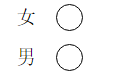
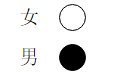
这样处理后,在浏览器中展示效果全部一样了:

扩展:
1. 对于代码中出现的定位,对父元素使用 position: relative; 给子元素使用 position: absolute; top: 0; right: 0; bottom: 0; left: 0; margin: auto; 能实现让子元素相对于父元素居中(满足水平居中和竖直居中)显示。如果只是需要竖直居中,则不需要添加 right: 0; 和 left: 0; 的样式。
2. 有时当我们不容易确定子元素的高度时,可以这样设置:对父元素 position: relative; 对子元素 position: absolute; top: 10px; bottom: 10px; margin: auto; 这样一来,子元素的高度就是父元素的高度减去20px后的值了,同样,top 和 bottom 支持百分数,可扩展性更强。
优化更新:
需求:
1. 有时候我们需要内联的单选样式;
2. 选中的按钮内的小圆圈不需要占满整个外圈的大小。
思路:
1. 让每一个包裹选择的 div 左浮动;
2. 给父元素添加圆形的外边框,子元素设置一个稍小于父元素大小的背景。
代码:
html:
<form action="">
    <div class="fruit">
        <div class="apple">
            <label for="apple">苹果label>
            <input type="radio" name="fruit" id="apple">
            <div class="user-defined">
                <span class="circle">span>
            div>
        div>
        <div class="banana">
            <label for="banana">香蕉label>
            <input type="radio" name="fruit" id="banana">
            <div class="user-defined">
                <span class="circle">span>
            div>
        div>
        <div class="orange">
            <label for="orange">橘子label>
            <input type="radio" name="fruit" id="orange">
            <div class="user-defined">
                <span class="circle">span>
            div>
        div>
    div>
form>
css:
* { box-sizing: border-box; }

body { padding: 50px; }

input { padding: 0; margin: 0; border: 0; }

.fruit:before { content: ""; display: table; }

.fruit:after { content: ""; display: table; clear: both; }

.fruit > div { position: relative; float: left; margin-right: 50px; width: 80px; height: 40px; line-height: 40px; }

.fruit > div:last-child { margin-right: 0; }

.fruit label { display: block; width: 50px; height: 40px; line-height: 40px; cursor: pointer; }

.fruit input { z-index: 3; display: block; opacity: 0; position: absolute; top: 0; bottom: 0; left: 50px; margin: auto; width: 30px; height: 30px; cursor: pointer; }

.fruit .user-defined { z-index: 2; position: absolute; top: 0; bottom: 0; left: 50px; margin: auto; width: 30px; height: 30px; border: 1px solid #000; border-radius: 50%; cursor: pointer; }

.fruit .user-defined span.circle  { display: block; width: 24px; height: 24px; margin-top: 2px; margin-left: 2px; background-color: transparent; border-radius: 50%; }

.fruit .user-defined span.active  { background-color: #000; }
js:
$("input").click(function() {
    $(this).siblings("div").children("span").addClass("active");
    $(this).parents("div").siblings("div").find("span").removeClass("active");
});
效果显示如下:




