



本文为大家分享了一个简单的鼠标模拟案例,供大家参考,具体实现内容如下
如何实现捕抓鼠标事件,当鼠标滑动时,获取当前鼠标的坐标,接着在一个透明区域里绑定捕抓的位移,这样就能在模拟的透明区域里实现鼠标滑动的模型。
效果图:
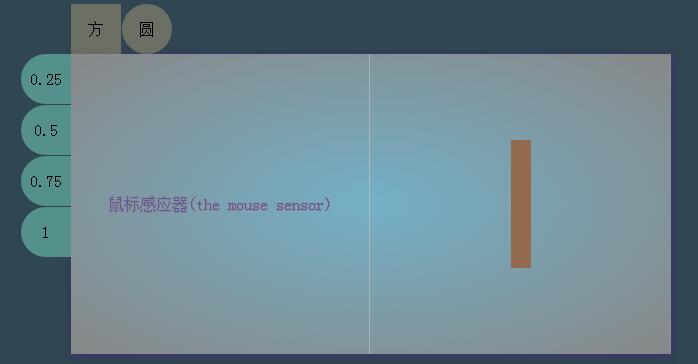
HTML代码:

the mouse 默认 圆0.25 0.5 0.75 1鼠标感应器(the mouse sensor)
CSS代码:
* {
 margin: 0;
 padding: 0;
 box-sizing: border-box;
}
body {
 position: absolute;
 text-align: center;
 height: 100%;
 width: 100%;
}
.main{
 position: relative;
 margin: 0 auto;
 height: 100%;
 background-color: rgb(48, 70, 82)
}
.main .content{
 position:absolute;
 display: inline-block;
 top:50%;
 left:50%;
 margin-left: -300px;
 margin-top: -150px;
 width: 600px;
 height: 300px;
 line-height: 300px;
 /*overflow: hidden;*/
 background: radial-gradient(ellipse farthest-corner, rgb(115, 176, 198) 0%, #888 100%);
 background: -webkit-radial-gradient(ellipse farthest-corner, rgb(115, 176, 198) 0%, #888 100%);
 box-shadow: 2px 3px 8px rgba(67, 50, 124124 ,.6),0px 0px 8px rgba(67, 50, 124124 ,.6);
}
.main .content .content-nav-top{
 display: none;
 position: absolute;
 margin-top: -50px;
 height: 50px;
 width: 300px;
}
.main .content .content-nav-top >span{
 display: block;
 float: left;
 font-size: 16px;
 font-weight: normal;
 margin-right:1px;
 width: 50px;
 height: 50px;
 line-height: 50px;
 background-color: rgba(251, 214, 146,.3);
 box-shadow: 0px 4px 13px rgb(222,222,222,1);
 cursor: pointer;
}
.main .content .content-nav-top >span:nth-child(1){
 border-radius:0 ;
}
.main .content .content-nav-top >span:nth-child(2){
 border-radius:50% ;
}
.main .content .content-nav-top >span:nth-child(3){
 border-radius:0;
}
.main .content .content-nav-top >span:nth-child(4){
 border-radius: 50% ;
}
.main .content .content-nav-left{
 display: none;
 position: absolute;
 margin-left: -50px;
 width: 50px;
 height: 300px;
}
.main .content .content-nav-left >span{
 display: block;
 font-size: 16px;
 font-weight: normal;
 margin-bottom:1px;
 width: 50px;
 height: 50px;
 line-height: 50px;
 background-color: rgb(85, 145, 140);
 box-shadow: 0px 4px 13px rgb(222,222,222,1);
 border-radius:50% 0 0 50% ;
 cursor: pointer;
}
.box{
 position: relative;
 float: left;
 width: 49.9%;
 height: 100%;
 border-right-style: solid;
 border-right-width: 1px;
 border-right-color: rgba(211,211,211,.5);
 color:rgb(99, 84, 168);
 text-shadow: 0px 1px 0px #888,1px 0px 0px #888,0px 0px 1px #888;
 }
.block{
 float: right;
 width: 50%;
 height: 100%;
}
JS代码:
var koringz = (function(){
 var x,
 y,
 getmain,
 getcontent,
 getbox,
 getblock,
 getblock_case,
 getnav_top,
 block_case_margin_top,
 block_case_margin_left,
 block_casetostring1,
 block_casetostring2,
 block_casesubstring1,
 block_casesubstring2,
 istouch;
 getmain = document.querySelector('.main');
 getcontent = getmain.querySelector('.content');
 getbox = getcontent.querySelector('.box');
 getblock = getcontent.querySelector('.block');
 getblock_case = getblock.querySelector('.block_case');
 getnav_top = getcontent.querySelector('.content-nav-top');
 getnav_left = getcontent.querySelector('.content-nav-left');
 function get_box() {
 w_getbox_distance = getbox.offsetWidth;
 h_getbox_distance = getbox.offsetHeight;
 istouch = 'ontouchstart' in window;
 getbox.addEventListener(istouch?'touchmove':'mousemove',mouseevent,false);
 getbox.addEventListener(istouch?'touchmove':'mousemove',nav,false)
 }
 function nav () {
 return new_nav();
 }
 var new_nav = function () {
 getnav_top.style.display = 'block';
 getnav_left.style.display = 'block';
 }
 function move_box() {
 getblock_case.style.width = '0px';
 getblock_case.style.height = '0px';
 block_case_margin_left = getblock_case.style.marginLeft = getblock.offsetWidth/2 + 'px';//子节点
 block_case_margin_top = getblock_case.style.marginTop = getblock.offsetHeight/2 + 'px';
 block_casetostring1 = block_case_margin_left.toString();//值转化为字符串
 block_casetostring2 = block_case_margin_top.toString();
 block_casesubstring1 = block_casetostring1.substring(0,3);
 block_casesubstring2 = block_casetostring2.substring(0,3);
 }
 var mouseevent = function () {
 mouseEvent(event);
 }
 function mouseEvent(e){
 var zore = 0,
  val = 1;
 if(istouch){
  x = e.touches[zore].pageX;
  y = e.touches[zore].pageY;
  e.preventDefault();
 }
 else if(!istouch){
  x = w_getbox_distance/2 != undefined ? e.offsetX:e.layerX;
  y = h_getbox_distance/2 != undefined ? e.offsetY:e.layerY;
 }
 if(val = true){
  getblock_case.style.width = x + 'px';//获得了mouse划过的位置
  getblock_case.style.height = y + 'px';
  getblock_case.style.marginLeft = (block_casesubstring1-x/2) +'px';
  getblock_case.style.marginTop = (block_casesubstring2-y/2) +'px';
  getblock_case.style.backgroundColor = "rgba(147, 106, 77,1)";
 }
 }
 (function (){
  window.onload = function(){
  move_box();
  get_box()
  }
 })()
 var click =function () {
 this.borderradius = function(num) {
  if(typeof num == 'number'){
  if(num == 0){
   getblock_case.style.borderRadius = num;
  }
  else if(num > 0){
   getblock_case.style.borderRadius = num +'%';
  }
  else{
   return false;
  }
  }
 }
 this.opacitas = function (num) {
  if(typeof num == 'number'){
  getblock_case.style.opacity = num;
  }
  else{
  return false;
  }
 }
 }
 var Click = new click();
 return {
 createclick1 :Click.borderradius,
 createclick2 :Click.opacitas
 }
})()
这里的鼠标箭头也可换成自己喜欢的图标,模拟鼠标区域的颜色也可自由变换,模拟区域的效果也可是点状的,也可以是线状的,动画效果等等,这个自由发挥吧。
以上就是针对JavaScript鼠标响应事件进行的详细介绍,希望对大家的学习有所帮助。





