



如果使用多线程处理来提高 windows 窗体应用程序的性能,则你必须确保以线程安全的方式调用控件。
访问 Windows 窗体控件不是本身就线程安全的。如果有两个或两个以上线程操作控件的状态,则可能迫使该控件处于不一致状态。可能出现其他与线程相关的 bug,例如争用条件和死锁。请务必确保以线程安全的方式访问控件。
1.初学者常常遇到的问题
从未使用 Invoke 方法创建控件的线程调用控件是不安全的。下面是一个非线程安全的调用示例。运行时会引发 InvalidOperationException 消息,报错“从并未创建该控件的线程访问该控件 控件名称”。
// This event handler creates a thread that calls a // Windows Forms control in an unsafe way.private void setTextUnsafeBtn_Click(    object sender,
    EventArgs e)
{    this.demoThread =
        new Thread(new ThreadStart(this.ThreadProcUnsafe));    this.demoThread.Start();
}// This method is executed on the worker thread and makes// an unsafe call on the TextBox control.private void ThreadProcUnsafe()
{    this.textBox1.Text = "This text was set unsafely.";
}
2.解决方法
如需对 Windows 窗体控件进行线程安全的调用。
①查询控件的 InvokeRequired 属性。
②若 InvokeRequired 返回 true,则用实际调用控件的委托来调用 Invoke。
③若 InvokeRequired 返回 false,则请直接调用控件。
这里分同步执行委托和异步执行委托。
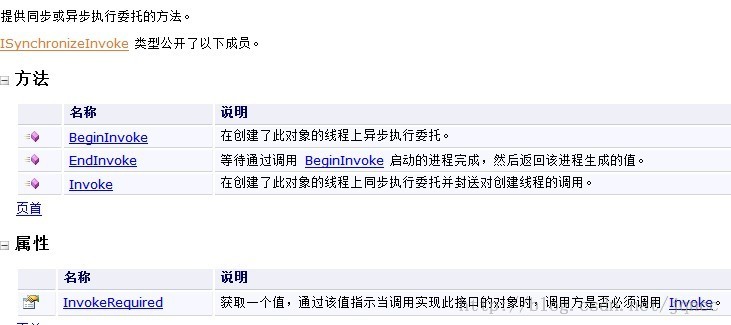
在以下代码示例中,在 ThreadProcSafe 方法中实现了线程安全的调用,该方法由后台线程执行。若 TextBox 控件的 InvokeRequired 返回 true,则 ThreadProcSafe 方法创建一个 SetTextCallback 实例并将其传递到窗体的 Invoke 方法。这导致在创建了 SetText 控件的线程上调用 TextBox 方法,并且在该线程上下文中直接设置 Text 属性。

// This event handler creates a thread that calls a
// Windows Forms control in a thread-safe way.
private void setTextSafeBtn_Click(
object sender,
    EventArgs e)
{    this.demoThread =
        new Thread(new ThreadStart(this.ThreadProcSafe));
this.demoThread.Start();
}// This method is executed on the worker thread and makes
// a thread-safe call on the TextBox control.
private void ThreadProcSafe()
{    this.SetText("This text was set safely.");
}// This delegate enables asynchronous calls for setting
// the text property on a TextBox control.delegate void SetTextCallback(string text);
// This method demonstrates a pattern for making thread-safe
// calls on a Windows Forms control.
//
// If the calling thread is different from the thread that
// created the TextBox control, this method creates a
// SetTextCallback and calls itself asynchronously using the// Invoke method.
//
// If the calling thread is the same as the thread that created
// the TextBox control, the Text property is set directly. private void SetText(string text)
{    // InvokeRequired required compares the thread ID of the
    // calling thread to the thread ID of the creating thread.
    // If these threads are different, it returns true.
    //this.textBox1.InvokeRequired will be replaced by
    //this.InvokeRequired, if want to set many controls'
    //attribute or text.
    if (this.textBox1.InvokeRequired)// or this.InvokeRequired
    {
        SetTextCallback d = new SetTextCallback(SetText);
this.Invoke(d, new object[] { text });
    }    else
    {        this.textBox1.Text = text;
    }
}
3.BackgroundWorker组件
在应用程序中实现多线程的首选方式是使用 BackgroundWorker 组件。 BackgroundWorker 组件为多线程处理使用事件驱动模型。后台线程运行你的 DoWork 事件处理程序,创建了你的控件的线程运行 ProgressChanged 和 RunWorkerCompleted 事件处理程序。你可以从 ProgressChanged 和 RunWorkerCompleted 事件处理器中调用控件。
①创建一种方法来进行你想在后台线程中进行的工作。不要调用由此方法中的主线程所创建的控件。
②创建一种方法来报告后台工作结束后的后台工作结果。 在此方法中可以调用主线程创建的控件。
③将步骤 1 中创建的方法绑定到 DoWork 实例中的 BackgroundWorker 事件,并将步骤 2 中创建的方法绑定到同一实例的 RunWorkerCompleted 事件。
④若要启动后台线程,请调用 RunWorkerAsync 实例的 BackgroundWorker 方法。
在以下代码示例中,DoWork 事件处理程序使用 Sleep 来模拟需要花费一些时间的工作。它不会调用该窗体的 TextBox 控件。TextBox 控件的 Text 属性直接在 RunWorkerCompleted 事件处理程序中设置。
// This BackgroundWorker is used to demonstrate the
// preferred way of performing asynchronous operations.private BackgroundWorker backgroundWorker1;
// This event handler starts the form's // BackgroundWorker by calling RunWorkerAsync.
//
// The Text property of the TextBox control is set
// when the BackgroundWorker raises the RunWorkerCompleted
// event.private void setTextBackgroundWorkerBtn_Click(
object sender,
    EventArgs e)
{    this.backgroundWorker1.RunWorkerAsync();
}// This event handler sets the Text property of the TextBox
// control. It is called on the thread that created the
// TextBox control, so the call is thread-safe.
//
// BackgroundWorker is the preferred way to perform asynchronous
// operations.private void backgroundWorker1_RunWorkerCompleted(
object sender,
    RunWorkerCompletedEventArgs e)
{    this.textBox1.Text =
        "This text was set safely by BackgroundWorker.";
}
也可通过使用 ProgressChanged 事件来报告后台任务的进度。如需包含该事件的示例,请参阅 BackgroundWorker。
以上就是 从0自学C#02--子线程访问主线程(UI线程)控件的内容,更多相关内容请关注PHP中文网(www.php.cn)!




