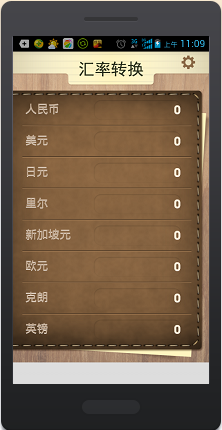
在上一篇中我们完成了汇率计算页面,下面来完成汇率设置页面的显示。
100美元
=
人民币
100日元
=
人民币
100里尔
=
人民币
100新加坡元
=
人民币
100欧元
=
人民币
100克朗
=
人民币
100英镑
=
人民币
下面给出全部界面的源码:
index.html
无标题文档
人民币
美元
日元
里尔
新加坡元
欧元
克朗
英镑
100美元
=
人民币
100日元
=
人民币
100里尔
=
人民币
100新加坡元
=
人民币
100欧元
=
人民币
100克朗
=
人民币
100英镑
=
人民币
style.css
/* CSS Document */
body{
	background-color:#c19e7d;
	font-family:"黑体";
	margin:0px;
	padding:0px;
}

/*
1.text-align:center 设置文本或img标签等一些内联对象(或与之类似的元素)的居中。
2.margin:0 auto 设置块元素(或与之类似的元素)的居中。
*/

.exchangeRates,.setRates{
	width:480px;
	height:100%;
	margin:0 auto;
	font-family:"黑体";
}

.header{
	width:480px;
	height:116px;
	background:url(../images/title.png) no-repeat;
}

.header .right{
	float:right;
	width:80px;
	height:54px;
}
.header .right a{
	float:right;
	width:80px;
	height:54px;
}
.header .right a:hover{
	float:left;
	width:80px;
	height:54px;
	background:url(../images/setting.png) no-repeat;
}

.bg{
	width:480px;
	height:598px;
	background:url(../images/bg.png) no-repeat;
	background-color:#999933;
	overflow:hidden;
}

.bg .list{
	float:left;
	width:480px;
	height:77px;
	background:url(../images/line.png) 0px 64px no-repeat;
}

.bg .list .currency{
	float:left;
	width:150px;
	height:77px;
	text-align:left;
	font-size:28px;
	line-height:50px;
	color:#bea58c;
	padding-left:30px;
}

.bg .list .money{
	float:left;
	width:240px;
	height:77px;
	text-align:right;
	font-weight:bold;
	line-height:50px;
	color:#ffefda;
	padding-top:3px;
}
.bg .list .money input{
	float:right;
	background-color:transparent;
	width:210px;
	height:25px;
	border:0px;
	font-size:30px;
	color:#ffefda;
	font-family:Arial, Helvetica, sans-serif;
	padding-left:6px;
	padding-right:6px;
	text-align:right;
}

.strong{ font-weight:bold}

.footer{
	width:480px;
	height:49px;
	background:url(../images/bottom.png) no-repeat;
}


.bg .list .equal{
	float:left;
	width:20px;
	height:77px;
	text-align:center;
	font-size:30px;
	font-weight:bold;
	line-height:50px;
	color:#ffefda;
}
.bg .list .setRates{
	float:left;
	width:153px;
	height:77px;
	text-align:left;
	padding-top:3px;}
.bg .list .setRates input{
	float:right;
	background-color:transparent;
	width:128px;
	height:28px;
	border:2px solid #be9975;
	background-color:#84613f;
	border-radius:7px;
	font-size:28px;
	color:#ffefda;
	font-family:Arial, Helvetica, sans-serif;
	padding-right:6px;
	text-align:right;
}
.bg .list .flagRight{
	float:left; width:67px;
	 height:77px;
	 text-align:left;
	 padding-left:6px;
	 color:#bea58c;
	 line-height:50px;
	 font-size:22px;}
/*setting*/
.setRates .header{
	width:464px;
	height:116px;
	background:url(../images/setting_title.png) no-repeat;
	padding-left:16px;
}
.setRates .header .back{
	float:left;
	width:93px;
	height:54px;
}
.setRates .header .back a{
	float:left;
	width:93px;
	height:54px;
}
.setRates .header .back a:hover{
	float:left;
	width:93px;
	height:54px;
	background:url(../images/setting_back.png) no-repeat;
}

.f25{ font-size:25px;}
.w100{ width:100px;}

/*解决 jqmobile切换闪屏*/
.ui-page {
	backface-visibility: hidden;
    -webkit-backface-visibility: hidden;
    -moz-backface-visibility: hidden;
}
手机上的运行效果:

立即学习“前端免费学习笔记(深入)”;
以上就是小强的HTML5移动开发之路(46)——汇率计算器【2】的内容,更多相关内容请关注PHP中文网(www.php.cn)!