在系列(3)中我们介绍了请求是如何映射到一个action上的,下一步当然是如何获取到请求中的数据,这就引出了本篇所要讲的内容—数据绑定。
首先看一下都有哪些绑定数据的注解:
1.@RequestParam,绑定单个请求数据,可以是URL中的数据,表单提交的数据或上传的文件;
2.@PathVariable,绑定URL模板变量值;
3.@CookieValue,绑定Cookie数据;
4.@RequestHeader,绑定请求头数据;
5.@ModelAttribute,绑定数据到Model;
6.@SessionAttributes,绑定数据到Session;
7.@RequestBody,用来处理Content-Type不是application/x-www-form-urlencoded编码的内容,例如application/json, application/xml等;
8.@RequestPart,绑定“multipart/data”数据,并可以根据数据类型进项对象转换;
下面我们来看如何使用:
1.@RequestParam:
为了验证文件绑定我们需要先做以下工作:
a.把commons-fileupload-1.3.1.jar和commons-io-2.4.jar两个jar包添加到我们项目。
b.配置我们项目中的springservlet-config.xml文件使之支持文件上传,内容如下:
        1048576


        UTF-8
其中maxUploadSize用于限制上传文件的最大大小,也可以不做设置,这样就代表上传文件的大小木有限制。defaultEncoding用于设置上传文件的编码格式,用于解决上传的文件中文名乱码问题。
下面就看具体如何使用:
添加一个DataBindController,里面有2个paramBind的action分别对应get和post请求:
package com.demo.web.controllers;import javax.servlet.http.HttpServletRequest;import org.springframework.stereotype.Controller;import org.springframework.web.bind.ServletRequestUtils;import org.springframework.web.bind.annotation.RequestMapping;import org.springframework.web.bind.annotation.RequestMethod;import org.springframework.web.bind.annotation.RequestParam;import org.springframework.web.multipart.MultipartFile;import org.springframework.web.multipart.MultipartHttpServletRequest;import org.springframework.web.servlet.ModelAndView;

@Controller
@RequestMapping(value = "/databind")public class DataBindController {

    @RequestMapping(value="/parambind", method = {RequestMethod.GET})    public ModelAndView paramBind(){

        ModelAndView modelAndView = new ModelAndView();
        modelAndView.setViewName("parambind");
        return modelAndView;
    }

    @RequestMapping(value="/parambind", method = {RequestMethod.POST})    public ModelAndView paramBind(HttpServletRequest request, @RequestParam("urlParam") String urlParam, @RequestParam("formParam") String formParam, @RequestParam("formFile") MultipartFile formFile){
        //如果不用注解自动绑定,我们还可以像下面一样手动获取数据
         String urlParam1 = ServletRequestUtils.getStringParameter(request, "urlParam", null);
        String formParam1 = ServletRequestUtils.getStringParameter(request, "formParam", null);
        MultipartFile formFile1 = ((MultipartHttpServletRequest) request).getFile("formFile");

        ModelAndView modelAndView = new ModelAndView();
        modelAndView.addObject("urlParam", urlParam);
        modelAndView.addObject("formParam", formParam);
        modelAndView.addObject("formFileName", formFile.getOriginalFilename());

        modelAndView.addObject("urlParam1", urlParam1);
        modelAndView.addObject("formParam1", formParam1);
        modelAndView.addObject("formFileName1", formFile1.getOriginalFilename());
        modelAndView.setViewName("parambindresult");
        return modelAndView;
    }

}
在views文件夹中添加parambind.jsp和parambindresult.jsp两个视图,内容分别如下:
<%@ page language="java" contentType="text/html; charset=UTF-8"
    pageEncoding="UTF-8"%>Insert title here
<%@ page language="java" contentType="text/html; charset=UTF-8"
    pageEncoding="UTF-8"%>Insert title here
    自动绑定数据:


    ${urlParam}

    ${formParam}

    ${formFileName}


    手动获取数据:


    ${urlParam1}

    ${formParam1}

    ${formFileName1}
运行项目,输入内容,选择上传文件:
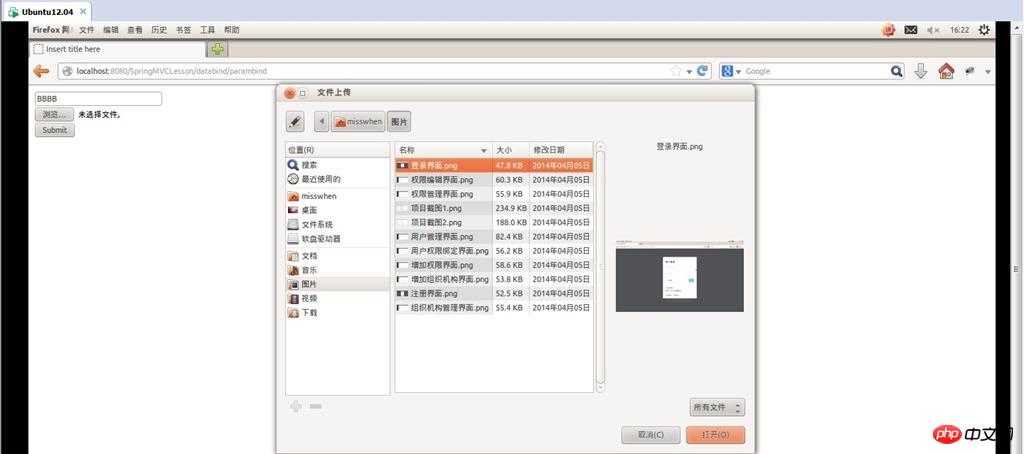
提交查看结果:
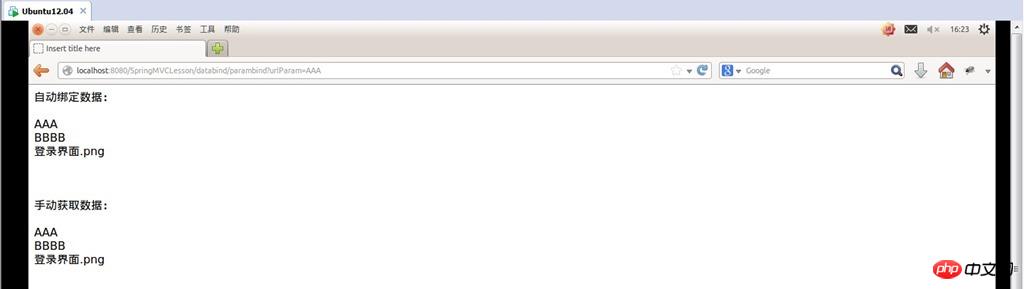
可以看到绑定的数据已经获取到了。
上面我们演示了如何把数据绑定到单个变量,但在实际应用中我们通常需要获取的是model对象,别担心,我们不需要把数据绑定到一个个变量然后在对model赋值,只需要把model加入相应的action参数(这里不需要指定绑定数据的注解)Spring MVC会自动进行数据转换并绑定到model对象上,一切就是这么简单。测试如下:
添加一个AccountModel类作为测试的model:
package com.demo.web.models;public class AccountModel {
    private String username;    private String password;
    public void setUsername(String username){        this.username=username;
    }    public void setPassword(String password){        this.password=password;
    }
    public String getUsername(){        return this.username;
    }    public String getPassword(){        return this.password;
    }
}
在DataBindController里面添加2个modelAutoBind的action分别对应get和post请求:
@RequestMapping(value="/modelautobind", method = {RequestMethod.GET})public String modelAutoBind(HttpServletRequest request, Model model){

    model.addAttribute("accountmodel", new AccountModel());    return "modelautobind";
}

@RequestMapping(value="/modelautobind", method = {RequestMethod.POST})public String modelAutoBind(HttpServletRequest request, Model model, AccountModel accountModel){

    model.addAttribute("accountmodel", accountModel);    return "modelautobindresult";
}
在views文件夹中添加modelautobind.jsp和modelautobindresult.jsp 2个视图用于提交数据和展示提交的数据:
modelautobind.jsp:
<%@ page language="java" contentType="text/html; charset=UTF-8"
    pageEncoding="UTF-8"%><%@ taglib prefix="form" uri="http://www.php.cn/" %>Insert title here

        用户名:

        密 码:
modelautobindresult.jsp :
<%@ page language="java" contentType="text/html; charset=UTF-8"
    pageEncoding="UTF-8"%>Insert title here
    用户名:${accountmodel.username}

    密 码:${accountmodel.password}
运行测试:

用户名 输入AAA 密码 输入BBB,提交:

可以看到结果显示正确,说明自动绑定成功。
注:
1.关于@RequestParam的参数,这是一个@RequestParam的完整写法@RequestParam(value="username", required=true, defaultValue="AAA")。
value表示要绑定请求中参数的名字;
required表示请求中是否必须有这个参数,默认为true这是如果请求中没有要绑定的参数则返回404;
defaultValue表示如果请求中指定的参数值为空时的默认值;
要绑定的参数如果是值类型必须要有值否则抛异常,如果是引用类型则默认为null(Boolean除外,默认为false);
2.在刚才添加的2个action中可以看到返回类型和以前的不一样了由ModelAndView变成了String,这是由于Spring MVC 提供Model、ModelMap、Map让我们可以直接添加渲染视图需要的模型数据,在返回时直接指定对应视图名称就可以了。同时Map是继承于ModelMap的,而Model和ModelMap是继承于ExtendedModelMap的。
3.在刚才添加的视图modelautobind.jsp中可以看到form:form、form:input 等标签,这是Spring MVC提供的表单标签,借助于这些标签我们可以很方便的把模型数据绑定到表单上面(当然你也可以选择继续使用原生的HTML表单标签),要使用Spring MVC只要在视图中添加引用 @ taglib prefix="form" uri="http://www.php.cn/" %>即可,关于Spring MVC表单标签的具体内容会在以后的文章中作介绍。
以上就是springmvc学习系列(4) 之 数据绑定-1的内容,更多相关内容请关注php中文网(www.php.cn)!