最近做项目需要用到图片上传与预览功能,由于是用于手机端,所以研究了下H5的实现方式。
图片预览
首先,解决图片预览问题。在html5中,提供了filereader来读取本地文件,使我们可以实现图片预览功能。
FileReader
属性,所有属性都是只读的:
FileReader.error,读取文件时,出现的DOMError。
FileReader.readyState,读取状态;0,没有数据加载;1,数据正在加载;2,读取已经完成。
-
FileReader.result,文件内容;该属性只在读取操作完成后才有效,并且格式取决于读取时使用的方法。
立即学习“前端免费学习笔记(深入)”;
事件:
FileReader.onabort,读取操作中止。
FileReader.onerror,读取出现错误。
FileReader.onload,读取成功完成后。
FileReader.onloadstart,读取开始。
FileReader.onloadend,读取完成,无论是否读取成功。
 I-Shop购物系统下载
部分功能简介:商品收藏夹功能热门商品最新商品分级价格功能自选风格打印结算页面内部短信箱商品评论增加上一商品,下一商品功能增强商家提示功能友情链接用户在线统计用户来访统计用户来访信息用户积分功能广告设置用户组分类邮件系统后台实现更新用户数据系统图片设置模板管理CSS风格管理申诉内容过滤功能用户注册过滤特征字符IP库管理及来访限制及管理压缩,恢复,备份数据库功能上传文件管理商品类别管理商品添加/修改/
FileReader.onprogress,当读取Blob内容时。
方法:
FileReader.abort()
中止读取。然后readyState变为2。FileReader.readAsArrayBuffer()
将文件读取成ArrayBuffer。FileReader.readAsBinaryString()
读取成二进制字符串。FileReader.readAsDataURL()
读取成DataURL。FileReader.readAsText()
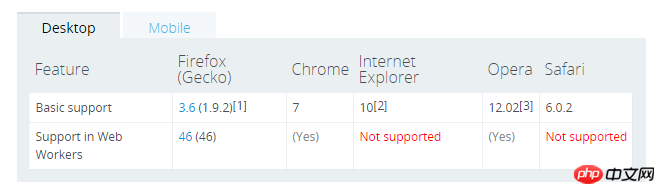
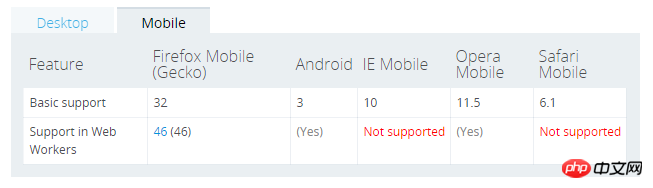
读取成文本。浏览器兼容性如图:
预览功能实现
图片上传预览 @@##@@
效果预览:
上传功能
function upload() {
        var xhr = new XMLHttpRequest();        var progress = document.getElementById("progress")
        progress.style.display = "block";

        xhr.upload.addEventListener("progress", function(e) {
            if (e.lengthComputable) {                var percentage = Math.round((e.loaded * 100) / e.total);
                progress.value = percentage;
            }
        }, false);

        xhr.upload.addEventListener("load", function(e){
              console.log("上传完毕...")
          }, false);

        xhr.open("POST", "upload");
        xhr.overrideMimeType('text/plain; charset=x-user-defined-binary');
        xhr.onreadystatechange = function() {
            if (xhr.readyState == 4 && xhr.status == 200) {
                alert(xhr.responseText); // handle response.
                progress.style.display = "none";
                progress.value = 0;
            }
        };        var file = document.getElementById("imgFile");        var fd = new FormData();
        fd.append(file.files[0].name, file.files[0]);
        xhr.send(fd);
    }