本篇文章主要介绍了用c#来实现一个step控件的方法步骤,具有很好的参考价值。下面跟着小编一起来看下吧
现在很多的javascript控件,非常的不错,其中step就是一个,如下图所示:

那么如何用C#来实现一个step控件呢?
先定义一个StepEntity类来存储步骤条节点的信息:
public class StepEntity
 {
  public string Id { get; set; }
  public string StepName { get; set; }
  public int StepOrder { get; set; }
  public eumStepState StepState { get; set; }
  public string StepDesc { get; set; }
  public object StepTag { get; set; }
  //public Image StepCompletedImage { get; set; }
  //public Image StepDoingImage { get; set; }
  public StepEntity(string id,string stepname,int steporder,string stepdesc, eumStepState stepstate,object tag)
  {
   this.Id = id;
   this.StepName = stepname;
   this.StepOrder = steporder;
   this.StepDesc = stepdesc;
   this.StepTag = tag;
   this.StepState = stepstate;
  }
 }
定义一个名为StepViewer 的用户控件。
public partial class StepViewer : UserControl
 {
  public StepViewer()
  {
   InitializeComponent();
   this.Height = 68;
  }
}
在StepViewer 的用户控件中定义一个ListDataSource的属性,如下:

private List_dataSourceList = null; [Browsable(true), Category("StepViewer")] public List ListDataSource { get { return _dataSourceList; } set { if (_dataSourceList != value) { _dataSourceList = value; Invalidate(); } } }
在此控件的paint方法中,进行步骤条的绘制:
private void StepViewer_Paint(object sender, PaintEventArgs e)
  {
   if(this.ListDataSource!=null)
   {
    int CenterY = this.Height / 2;
    int index = 1;
    int count = ListDataSource.Count;
    int lineWidth = 120;
    int StepNodeWH = 28;
    //this.Width = 32 * count + lineWidth * (count - 1) + 6+300;
    //defalut pen & brush
    e.Graphics.SmoothingMode = System.Drawing.Drawing2D.SmoothingMode.HighQuality;
    Brush brush = new SolidBrush(_Gray);
    Pen p = new Pen(brush, 1f);
    Brush brushNode = new SolidBrush(_DarkGray);
    Pen penNode = new Pen(brushNode, 1f);
    Brush brushNodeCompleted = new SolidBrush(_Blue);
    Pen penNodeCompleted = new Pen(brushNodeCompleted, 1f);
    int initX = 6;
    //string
    Font nFont = new Font("微软雅黑", 12);
    Font stepFont = new Font("微软雅黑", 11,FontStyle.Bold);
    int NodeNameWidth = 0;
    foreach (var item in ListDataSource)
    {
     //round
     Rectangle rec = new Rectangle(initX, CenterY - StepNodeWH / 2, StepNodeWH, StepNodeWH);
     if (CurrentStep == item.StepOrder)
     {
      if (item.StepState == eumStepState.OutTime)
      {
       e.Graphics.DrawEllipse(new Pen(_Red,1f), rec);
       e.Graphics.FillEllipse(new SolidBrush(_Red), rec);
      }
      else
      {
       e.Graphics.DrawEllipse(penNodeCompleted, rec);
       e.Graphics.FillEllipse(brushNodeCompleted, rec);
      }
      //白色字体
      SizeF fTitle = e.Graphics.MeasureString(index.ToString(), stepFont);
      Point pTitle = new Point(initX + StepNodeWH / 2 - (int)Math.Round(fTitle.Width) / 2, CenterY - (int)Math.Round(fTitle.Height / 2));
      e.Graphics.DrawString(index.ToString(), stepFont, Brushes.White, pTitle);
      //nodeName
      SizeF sNode = e.Graphics.MeasureString(item.StepName, nFont);
      Point pNode = new Point(initX + StepNodeWH, CenterY - (int)Math.Round(sNode.Height / 2) + 2);
      e.Graphics.DrawString(item.StepName,new Font( nFont,FontStyle.Bold), brushNode, pNode);
      NodeNameWidth = (int)Math.Round(sNode.Width);
      if (index < count)
      {
       e.Graphics.DrawLine(p, initX + StepNodeWH + NodeNameWidth, CenterY, initX + StepNodeWH + NodeNameWidth + lineWidth, CenterY);
      }
     }
     else if (item.StepOrder < CurrentStep)
     {
      //completed
      e.Graphics.DrawEllipse(penNodeCompleted, rec);
      //image
      RectangleF recRF = new RectangleF(rec.X + 6, rec.Y + 6, rec.Width - 12, rec.Height - 12);
      e.Graphics.DrawImage(ControlsResource.check_lightblue, recRF);
      //nodeName
      SizeF sNode = e.Graphics.MeasureString(item.StepName, nFont);
      Point pNode = new Point(initX + StepNodeWH, CenterY - (int)Math.Round(sNode.Height / 2) + 2);
      e.Graphics.DrawString(item.StepName, nFont, brushNode, pNode);
      NodeNameWidth = (int)Math.Round(sNode.Width);
      if (index < count)
      {
       e.Graphics.DrawLine(penNodeCompleted, initX + StepNodeWH + NodeNameWidth,
       CenterY, initX + StepNodeWH + NodeNameWidth + lineWidth, CenterY);
      }
     }
     else
     {
      e.Graphics.DrawEllipse(p, rec);
      //
      SizeF fTitle = e.Graphics.MeasureString(index.ToString(), stepFont);
      Point pTitle = new Point(initX + StepNodeWH / 2 - (int)Math.Round(fTitle.Width) / 2, CenterY - (int)Math.Round(fTitle.Height / 2));
      e.Graphics.DrawString(index.ToString(), stepFont, brush, pTitle);
      //nodeName
      SizeF sNode = e.Graphics.MeasureString(item.StepName, nFont);
      Point pNode = new Point(initX + StepNodeWH, CenterY - (int)Math.Round(sNode.Height / 2) + 2);
      e.Graphics.DrawString(item.StepName, nFont, brushNode, pNode);
      NodeNameWidth = (int)Math.Round(sNode.Width);
      if (index < count)
      {
       //line
       e.Graphics.DrawLine(p, initX + StepNodeWH + NodeNameWidth, CenterY, initX + StepNodeWH + NodeNameWidth + lineWidth, CenterY);
      }
     }
     //描述信息
     if (item.StepDesc != "")
     {
      Point pNode = new Point(initX + StepNodeWH, CenterY+10);
      e.Graphics.DrawString(item.StepDesc,new Font(nFont.FontFamily,10),brush, pNode);
     }
     index++;
     //8 is space width
     initX = initX + lineWidth + StepNodeWH+ NodeNameWidth+8;
    }
   }
  }
控件的使用:
Listlist = new List (); list.Add(new StepEntity("1", "新开单", 1, "这里是该步骤的描述信息", eumStepState.Completed, null)); list.Add(new StepEntity("2", "主管审批", 2, "这里是该步骤的描述信息", eumStepState.Waiting, null)); list.Add(new StepEntity("3", "总经理审批", 3, "这里是该步骤的描述信息", eumStepState.OutTime, null)); list.Add(new StepEntity("2", "完成", 4, "这里是该步骤的描述信息", eumStepState.Waiting, null)); this.stepViewer1.CurrentStep = 3; this.stepViewer1.ListDataSource = list;

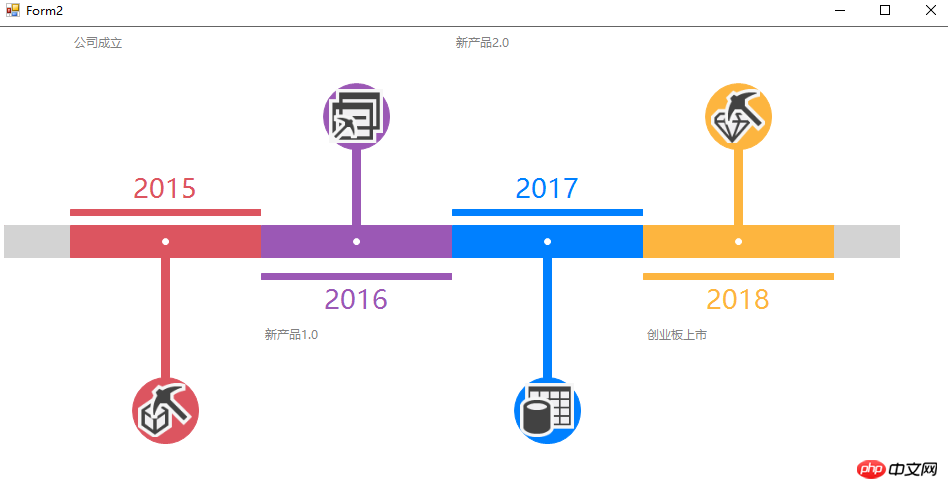
同样的,我们可以实现如下的timeline控件。