



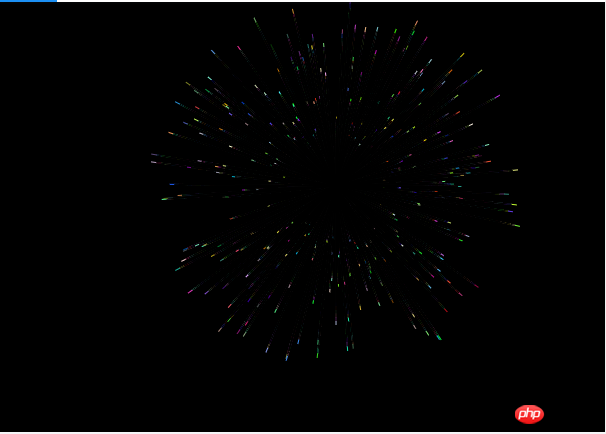
1、效果
2、代码解析
(1)requestAnimationFrame
requestAnimationFrame是浏览器用于定时循环操作的一个接口,类似于setTimeout,主要用途是按帧对网页进行重绘。
设置这个API的目的是为了让各种网页动画效果(DOM动画、Canvas动画、SVG动画、WebGL动画)能够有一个统一的刷新机制,从而节省系统资源,提高系统性能,改善视觉效果。代码中使用这个API,就是告诉浏览器希望执行一个动画,让浏览器在下一个动画帧安排一次网页重绘。
requestAnimationFrame的优势,在于充分利用显示器的刷新机制,比较节省系统资源。显示器有固定的刷新频率(60Hz或75Hz),也就是说,每秒最多只能重绘60次或75次,requestAnimationFrame的基本思想就是与这个刷新频率保持同步,利用这个刷新频率进行页面重绘。此外,使用这个API,一旦页面不处于浏览器的当前标签,就会自动停止刷新。这就节省了CPU、GPU和电力。
不过有一点需要注意,requestAnimationFrame是在主线程上完成。这意味着,如果主线程非常繁忙,requestAnimationFrame的动画效果会大打折扣。
立即学习“前端免费学习笔记(深入)”;
requestAnimationFrame使用一个回调函数作为参数。这个回调函数会在浏览器重绘之前调用。
requestID = window.requestAnimationFrame(callback);
目前,高版本浏览器Firefox 23 / IE 10 / Chrome / Safari)都支持这个方法。可以用下面的方法,检查浏览器是否支持这个API。如果不支持,则自行模拟部署该方法。
window.requestAnimFrame = (function(){
return  window.requestAnimationFrame       ||
              window.webkitRequestAnimationFrame ||
              window.mozRequestAnimationFrame    ||
              window.oRequestAnimationFrame      ||
              window.msRequestAnimationFrame     ||
              function( callback ){
                window.setTimeout(callback, 1000 / 60);
              };
})();
上面的代码按照1秒钟60次(大约每16.7毫秒一次),来模拟requestAnimationFrame。
使用requestAnimationFrame的时候,只需反复调用它即可。
function repeatOften() {  // Do whatever  requestAnimationFrame(repeatOften);
}

requestAnimationFrame(repeatOften);
取消重绘可以用 cancelAnimationFrame。
window.cancelAnimationFrame(requestID);
它的参数是requestAnimationFrame返回的一个代表任务ID的整数值。
(2)准备画版(canvas)
判断浏览器是否支持canvas,并把宽高设置为浏览器窗口大小。
var canvas = document.getElementById("myCanvas");
if (!canvas.getContext) {    return;
}
canvas.width = window.innerWidth;
canvas.height = window.innerHeight;var ctx = canvas.getContext("2d");
(3)烟花对象(FireWork)
烟花效果可以简单地认为是围绕一个点,爆炸产生很多小球向边上扩散。因此需要一个烟花对象,这个对象主要是记录烟花绽放的位置和周围小球的信息。所以我们的烟花对象定义如下。
function FireWork() {
this.x = -1;
this.y = -1;
this.balls = [];
}
那这个对象应该有哪些方法呢?
首先,要创建爆炸产生的小球。
createBalls: function () {
for (var i = 0; i < 300; i++) {
var angle = Math.random() * Math.PI * 2,
radius = getRandom(50, 200);
this.balls.push(new Ball(fwx, fwy, fwx + Math.cos(angle) * radius, fwy + Math.sin(angle) * radius));
        }
    }
注:这里fwx为烟花位置X轴坐标,fwy为烟花位置Y轴坐标,下同。

这里小球的运行长度为 50 到200 的随机值,小球运行轨迹起点为烟花位置,终点在一个圆上随机的一点。
然后,要对烟花进行初始化,主要是确定位置,产生小球。
init: function () {
this.x = getRandom(200, width - 200);
this.y = getRandom(200, height - 200);
        fwx = this.x;
        fwy = this.y;
        this.createBalls();
        drawCount = 0;
        currBallIndex = 0;
}注:这里drawCount为绘制次数,currBallIndex为当前绘制的小球索引。
整个FireWork定义如下。
function FireWork() {
this.x = -1;
this.y = -1;
this.balls = [];
}

FireWork.prototype = {
    init: function () {
    this.x = getRandom(200, width - 200);
    this.y = getRandom(200, height - 200);
        fwx = this.x;
        fwy = this.y;
        this.createBalls();
        drawCount = 0;
        currBallIndex = 0;
    },
    run: function () {
    this.init();
    },
    createBalls: function () {
    for (var i = 0; i < 300; i++) {
    var angle = Math.random() * Math.PI * 2,

  radius = getRandom(50, 200);
this.balls.push(new Ball(fwx, fwy, fwx + Math.cos(angle) * radius, fwy + Math.sin(angle) * radius));
        }
    }
}
(4)爆炸产生的小球对象(Ball)
小球需要知道自己的起点和终点的位置,所以定义如下。
function Ball(bx, by, ex, ey) {    this.bx = bx;//起点X轴坐标
    this.by = by;//起点Y轴坐标
    this.ex = ex;//终点X轴坐标
    this.ey = ey;//终点Y轴坐标}
小球还要能根据当前绘制的次数和总绘制次数计算得到当前坐标和下一次绘制坐标,这两个坐标连接起来的直线就是本次要绘制的内容,所以定义如下。
Ball.prototype = {
    getSpan: function () {
    var xSpan = (this.ex - this.bx) / allDrawCount,
            ySpan = (this.ey - this.by) / allDrawCount;
            return {
            x: xSpan,
            y: ySpan
        };
    },
    currPosition: function () {
    var span = this.getSpan(),
            currX = -1,
            currY = -1;
            if (drawCount < allDrawCount) {
            currX = this.bx + span.x * (drawCount - 1);
            currY = this.by + span.y * (drawCount - 1);
            return {
                x: currX,
                y: currY
            };
        }        return null;
    },
    nextPosition: function () {
    var span = this.getSpan(),
            currX = -1,
            currY = -1;
            if (drawCount < allDrawCount) {
            currX = this.bx + span.x * drawCount;
            currY = this.by + span.y * drawCount;
            return {
                x: currX,
                y: currY
            };
        }        return null;
    }
}(5)全局变量及工具方法
var fwx = -1,                 //烟花位置X轴坐标
    fwy = -1,                 //烟花位置Y轴坐标
    currFW = null,            //烟花实例
    currBallIndex = -1,       //当前正在绘制的小球索引
    drawCount = 0,            //绘制次数
    allDrawCount = 40,        //总共需要的绘制次数
    width = canvas.width,     //画布宽度
    height = canvas.height;   //画布高度
然后还要几个工具方法。
function componentToHex(c) {
var hex = c.toString(16);
return hex.length == 1 ? "0" + hex : hex;
}function rgbToHex(r, g, b) {
return "#" + componentToHex(r) + componentToHex(g) + componentToHex(b);
}function getRandom(minNum, maxNum) {
var iChoices = maxNum - minNum + 1;
return Math.floor(Math.random() * iChoices + minNum);
}
(6)绘制方法
最后还剩一个供 requestAnimationFrame 调用的绘制方法。这个绘制方法就是根据当前的绘制次数,拿到爆炸小球的路径(包含起点和终点的一条线段),然后把上一次绘制的路径擦除。
当一个烟花的效果绘制完成后,进行下一个烟花的绘制。
function drawLine(span) {
if (currFW && currBallIndex !== -1) {
if (drawCount <= allDrawCount) {
            ctx.save();
            drawCount++;
            for (var i = 0, j = currFW.balls.length; i < j; i++) {
            var currBall = currFW.balls[i],
                    beginPoint = currBall.currPosition(),
                    endPoint = currBall.nextPosition();
                    if (beginPoint && endPoint) {
                    console.log(currBallIndex, drawCount, currBall, beginPoint, endPoint);
                    ctx.beginPath();
                    ctx.moveTo(currBall.bx, currBall.by);
                    ctx.lineTo(beginPoint.x, beginPoint.y);
                    ctx.strokeStyle = "#000";
                    ctx.stroke();
                    ctx.beginPath();
                    ctx.moveTo(beginPoint.x, beginPoint.y);
                    ctx.lineTo(endPoint.x, endPoint.y);
                    var r = getRandom(0, 255);
                    var g = getRandom(0, 255);
                    var b = getRandom(0, 255);
                    ctx.strokeStyle = rgbToHex(r, g, b);
                    ctx.stroke();
                } else {
                    ctx.beginPath();
                    ctx.moveTo(currBall.bx, currBall.by);
                    ctx.lineTo(currBall.ex, currBall.ey);
                    ctx.strokeStyle = "#000";
                    ctx.stroke();
                }
            }
            currBallIndex++;
            currBallIndex %= currFW.balls.length;
            ctx.restore();
        } else {
            ctx.clearRect(0, 0, width, height);
            currFW = new FireWork();
            currFW.run();
        }
    }
    requestAnimationFrame(drawLine);
}
这里颜色取的是随机值。
(7)启动绘制
最后就是启动绘制。
currFW = new FireWork();
currFW.run();
requestAnimationFrame(drawLine);
(8)全部代码。
全部代码如下,共160行。
1 (function () {
  2     var requestAnimationFrame = window.requestAnimationFrame ||
  window.mozRequestAnimationFrame ||
  window.webkitRequestAnimationFrame ||
   window.msRequestAnimationFrame ||
   function (callback) {
  3             return window.setTimeout(callback, 1000 / 60);
  4         };
  5     window.requestAnimationFrame = requestAnimationFrame;
  6 })();
  7
  8 var canvas = document.getElementById("myCanvas");
  9 if (!canvas.getContext) {
 10     return;
 11 }
 12 canvas.width = window.innerWidth;
 13 canvas.height = window.innerHeight;
 14
 15 var ctx = canvas.getContext("2d");
 16
 17 var fwx = -1,
 18     fwy = -1,
 19     currFW = null,
 20     currBallIndex = -1,
 21     drawCount = 0,
 22     allDrawCount = 40,
 23     width = canvas.width,
 24     height = canvas.height;
 25
 26 function componentToHex(c) {
 27     var hex = c.toString(16);
 28     return hex.length == 1 ? "0" + hex : hex;
 29 }
 30
 31 function rgbToHex(r, g, b) {
 32     return "#" + componentToHex(r) + componentToHex(g) + componentToHex(b);
 33 }
 34
 35 function getRandom(minNum, maxNum) {
 36     var iChoices = maxNum - minNum + 1;
 37     return Math.floor(Math.random() * iChoices + minNum);
 38 }
 39
 40 function drawLine(span) {
 41     if (currFW && currBallIndex !== -1) {
 42         if (drawCount <= allDrawCount) {
 43             ctx.save();
 44             drawCount++;
 45             for (var i = 0, j = currFW.balls.length; i < j; i++) {
 46                 var currBall = currFW.balls[i],
 47                     beginPoint = currBall.currPosition(),
 48                     endPoint = currBall.nextPosition();
 49                 if (beginPoint && endPoint) {
 50                     console.log(currBallIndex, drawCount, currBall, beginPoint, endPoint);
 51                     ctx.beginPath();
 52                     ctx.moveTo(currBall.bx, currBall.by);
 53                     ctx.lineTo(beginPoint.x, beginPoint.y);
 54                     ctx.strokeStyle = "#000";
 55                     ctx.stroke();
 56                     ctx.beginPath();
 57                     ctx.moveTo(beginPoint.x, beginPoint.y);
 58                     ctx.lineTo(endPoint.x, endPoint.y);
 59                     var r = getRandom(0, 255);
 60                     var g = getRandom(0, 255);
 61                     var b = getRandom(0, 255);
 62                     ctx.strokeStyle = rgbToHex(r, g, b);
 63                     ctx.stroke();
 64                 } else {
 65                     ctx.beginPath();
 66                     ctx.moveTo(currBall.bx, currBall.by);
 67                     ctx.lineTo(currBall.ex, currBall.ey);
 68                     ctx.strokeStyle = "#000";
 69                     ctx.stroke();
 70                 }
 71             }
 72             currBallIndex++;
 73             currBallIndex %= currFW.balls.length;
 74             ctx.restore();
 75         } else {
 76             ctx.clearRect(0, 0, width, height);
 77             currFW = new FireWork();
 78             currFW.run();
 79         }
 80     }
 81     requestAnimationFrame(drawLine);
 82 }
 83
 84 function FireWork() {
 85     this.x = -1;
 86     this.y = -1;
 87     this.balls = [];
 88 }
 89
 90 FireWork.prototype = {
 91     init: function () {
 92         this.x = getRandom(200, width - 200);
 93         this.y = getRandom(200, height - 200);
 94         fwx = this.x;
 95         fwy = this.y;
 96         this.createBalls();
 97         drawCount = 0;
 98         currBallIndex = 0;
 99     },
100     run: function () {
101         this.init();
102     },
103     createBalls: function () {
104         for (var i = 0; i < 300; i++) {
105             var angle = Math.random() * Math.PI * 2,
106                 radius = getRandom(50, 200);
107             this.balls.push(new Ball(fwx, fwy, fwx + Math.cos(angle) * radius, fwy + Math.sin(angle) * radius));
108         }
109     }
110 }
111
112 function Ball(bx, by, ex, ey) {
113     this.bx = bx;
114     this.by = by;
115     this.ex = ex;
116     this.ey = ey;
117 }
118
119 Ball.prototype = {
120     getSpan: function () {
121         var xSpan = (this.ex - this.bx) / allDrawCount,
122             ySpan = (this.ey - this.by) / allDrawCount;
123         return {
124124             x: xSpan,
125             y: ySpan
126         };
127     },
128     currPosition: function () {
129         var span = this.getSpan(),
130             currX = -1,
131             currY = -1;
132         if (drawCount < allDrawCount) {
133             currX = this.bx + span.x * (drawCount - 1);
134             currY = this.by + span.y * (drawCount - 1);
135             return {
136                 x: currX,
137                 y: currY
138             };
139         }
140         return null;
141     },
142     nextPosition: function () {
143         var span = this.getSpan(),
144             currX = -1,
145             currY = -1;
146         if (drawCount < allDrawCount) {
147             currX = this.bx + span.x * drawCount;
148             currY = this.by + span.y * drawCount;
149             return {
150                 x: currX,
151                 y: currY
152             };
153         }
154         return null;
155     }
156 }
157
158 currFW = new FireWork();
159 currFW.run();
160 requestAnimationFrame(drawLine);
欢迎讨论。




