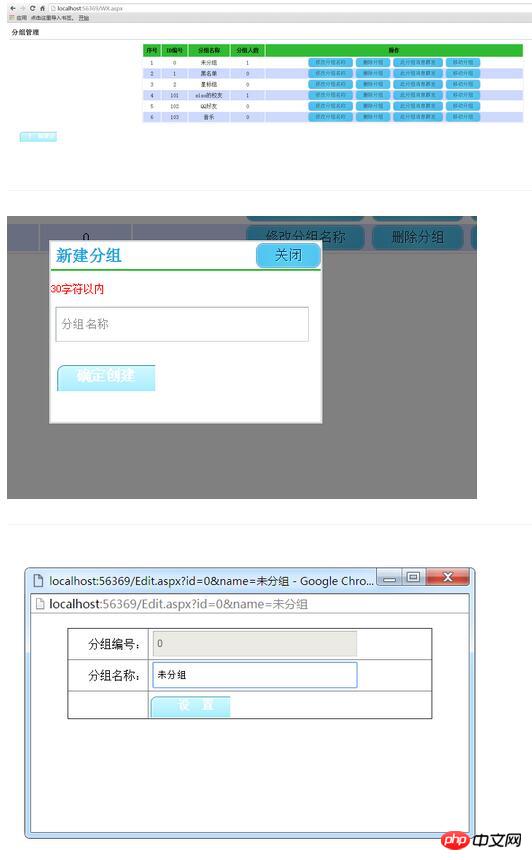
model层实体类:
 public class UserList
  {
    public string total { get; set; }
    public string count { get; set; }
    public userlistopenid data { get; set; }
    public string next_openid { get; set; }
  }
public class userlistopenid
{
public List openid { get; set; }
} public class WxGroupsInfo
{
public string Group_ID { get; set; }//分组编号
public string Group_Name { get; set; }//分组名称
public string Group_Count { get; set; }//分组人数
}WX.aspx内容:
<%@ Page Language="C#" AutoEventWireup="true" CodeBehind="WX.aspx.cs" Inherits="test.WX" %>
WX.aspx.cs代码:
public partial class WX : System.Web.UI.Page
  {
    protected void Page_Load(object sender, EventArgs e)
    {
      BindGroupList();
      this.DataBind();
    }


    private void BindGroupList()
    {
      WeiXinServer wxs = new WeiXinServer();

      //从缓存读取accesstoken
      string Access_token = Cache["Access_token"] as string;

      if (Access_token == null)
      {
        //如果为空,重新获取
        Access_token = wxs.GetAccessToken();
        //设置缓存的数据7000秒后过期
        Cache.Insert("Access_token", Access_token, null, DateTime.Now.AddSeconds(7000),
          System.Web.Caching.Cache.NoSlidingExpiration);
      }

      string Access_tokento = Access_token.Substring(17, Access_token.Length - 37);

      string jsonres = "";

      string content = Cache["AllGroups_content"] as string;

      if (content == null)
      {
        jsonres = "https://api.weixin.qq.com/cgi-bin/groups/get?access_token=" + Access_tokento;

        HttpWebRequest myRequest = (HttpWebRequest) WebRequest.Create(jsonres);
        myRequest.Method = "GET";
        HttpWebResponse myResponse = (HttpWebResponse) myRequest.GetResponse();
        StreamReader reader = new StreamReader(myResponse.GetResponseStream(), Encoding.UTF8);
        content = reader.ReadToEnd();
        reader.Close();

        //设置缓存的数据7000秒后过期
        Cache.Insert("AllGroups_content", content, null, DateTime.Now.AddSeconds(7000),
          System.Web.Caching.Cache.NoSlidingExpiration);
      }

      //使用前需要引用Newtonsoft.json文件
      JObject jsonObj = JObject.Parse(content);


      int groupsnum = jsonObj["groups"].Count();


      List wxgrouplist = new List();

      for (int i = 0; i < groupsnum; i++)
      {
        WxGroupsInfo wginfo = new WxGroupsInfo();

        wginfo.Group_ID = jsonObj["groups"][i]["id"].ToString();

        wginfo.Group_Name = jsonObj["groups"][i]["name"].ToString();

        wginfo.Group_Count = jsonObj["groups"][i]["count"].ToString();

        wxgrouplist.Add(wginfo);
      }

      this.RepeaterGroupList.DataSource = wxgrouplist;
      this.RepeaterGroupList.DataBind();
    }


    ///
    /// 绑定事件
    ///
    ///
    ///
    protected void RepeaterGroupList_ItemDataBound(object sender, RepeaterItemEventArgs e)
    {
      if (e.Item.ItemType == ListItemType.Item || e.Item.ItemType == ListItemType.AlternatingItem)
      {
        Label lbXuHao = e.Item.FindControl("lbXuHao") as Label;

        int num = 1;

        lbXuHao.Text = num.ToString();

        for (int i = 0; i < this.RepeaterGroupList.Items.Count; i++)
        {
          num += 1;
          lbXuHao.Text = num.ToString();
        }


        LinkButton LinkBtnDeleteGroup = e.Item.FindControl("LinkBtnDeleteGroup") as LinkButton;
        LinkButton LinkBtnSendByGroup = e.Item.FindControl("LinkBtnSendByGroup") as LinkButton;

        LinkBtnDeleteGroup.Attributes.Add("OnClick", "return confirm('您确定要删除该分组?删除后该分组内的人员即将恢复到默认分组!')");
        LinkBtnDeleteGroup.Attributes.Add("OnClick", "return confirm('您确定要群发消息到该分组?')");
      }
    }

    ///
    /// 执行事件
    ///
    ///
    ///
    protected void RepeaterGroupList_ItemCommand(object source, RepeaterCommandEventArgs e)
    {
      if (e.CommandName == "DeleteGroups")
      {
        WeiXinServer wxs = new WeiXinServer();
        string res = "";

        //从缓存读取accesstoken
        string Access_token = Cache["Access_token"] as string;

        if (Access_token == null)
        {
          //如果为空,重新获取
          Access_token = wxs.GetAccessToken();

          //设置缓存的数据7000秒后过期
          Cache.Insert("Access_token", Access_token, null, DateTime.Now.AddSeconds(7000),
            System.Web.Caching.Cache.NoSlidingExpiration);
        }

        string Access_tokento = Access_token.Substring(17, Access_token.Length - 37);


        string posturl = "https://api.weixin.qq.com/cgi-bin/groups/delete?access_token=" + Access_tokento;


        //POST数据例子: POST数据例子:{"group":{"id":108}}

        string groupid = e.CommandArgument.ToString();

        string postData = "{\"group\":{\"id\":\"" + groupid + "\"}}";

        res = wxs.GetPage(posturl, postData);

        ScriptManager.RegisterClientScriptBlock(this.Page, this.GetType(), "",
          "alert('删除成功!由于缓存问题,您可能需要重新登录才能看到效果!');location='WxGroupManageList.aspx';", true);
      }

      if (e.CommandName == "SendByGroups")
      {
        WeiXinServer wxs = new WeiXinServer();
        string res = "";

        //从缓存读取accesstoken
        string Access_token = Cache["Access_token"] as string;

        if (Access_token == null)
        {
          //如果为空,重新获取
          Access_token = wxs.GetAccessToken();

          //设置缓存的数据7000秒后过期
          Cache.Insert("Access_token", Access_token, null, DateTime.Now.AddSeconds(7000),
            System.Web.Caching.Cache.NoSlidingExpiration);
        }

        string Access_tokento = Access_token.Substring(17, Access_token.Length - 37);


        string posturl = "https://api.weixin.qq.com/cgi-bin/message/mass/sendall?access_token=" + Access_tokento;

        string groupid = e.CommandArgument.ToString();

        //string postData = "{\"group\":{\"id\":\"" + groupid.ToString() + "\"}}";

        JObject postData = new JObject();
                JObject filter = new JObject();
                filter.Add("is_to_all", false);
                filter.Add("group_id", groupid);

                JObject text = new JObject();
                text.Add("content", "测试内容!");

                postData.Add("filter", filter);
                postData.Add("text", text);
                postData.Add("msgtype", "text");

        res = wxs.GetPage(posturl, postData.ToString());

        ScriptManager.RegisterClientScriptBlock(this.Page, this.GetType(), "",
          "alert('群发成功!由于缓存问题,您可能需要重新登录才能看到效果!');location='WxGroupManageList.aspx';", true);
      }

      if (e.CommandName == "MoveUserToGroup")
      {
        WeiXinServer wxs = new WeiXinServer();
        string res = "";
        string Access_token = Cache["Access_token"] as string;

        if (Access_token == null)
        {
          Access_token = wxs.GetAccessToken();
          Cache.Insert("Access_token", Access_token, null, DateTime.Now.AddSeconds(7000), System.Web.Caching.Cache.NoSlidingExpiration);
        }

        string Access_tokento = Access_token.Substring(17, Access_token.Length - 37);
        string posturl = "https://api.weixin.qq.com/cgi-bin/groups/members/update?access_token=" + Access_tokento;

        string UserListurl = "https://api.weixin.qq.com/cgi-bin/user/get?access_token=" + Access_tokento + "&next_openid=";


        //{"total":2,"count":2,"data":{"openid":["","OPENID1","OPENID2"]},"next_openid":"NEXT_OPENID"}
        res = wxs.GetPage(UserListurl,"");
        UserList userList= JsonConvert.DeserializeObject(res);
        String openid=userList.data.openid.FirstOrDefault();
        int togroup_id = 101;//输入分组ID
        string postData = "{\"openid\":\"" + openid + "\",\"to_groupid\":" + togroup_id + "}";
        res = wxs.GetPage(posturl, postData);

        ScriptManager.RegisterClientScriptBlock(this.Page, this.GetType(), "",
          "alert('移动分组成功!由于缓存问题,您可能需要重新登录才能看到效果!');location='WxGroupManageList.aspx';", true);
      }
    }

    ///
    /// 创建分组
    ///
    ///
    ///
    protected void LinkBtnCreateGroup_Click(object sender, EventArgs e)
    {
      if (this.txtgroupsName.Value.Equals("分组名称"))
      {
        ////
        ScriptManager.RegisterClientScriptBlock(this.Page, this.GetType(), "", "alert('不能为空!')", true);
        this.txtgroupsName.Focus();
        return;
      }


      WeiXinServer wxs = new WeiXinServer();
      string res = "";

      ///从缓存读取accesstoken
      string Access_token = Cache["Access_token"] as string;

      if (Access_token == null)
      {
        //如果为空,重新获取
        Access_token = wxs.GetAccessToken();

        //设置缓存的数据7000秒后过期
        Cache.Insert("Access_token", Access_token, null, DateTime.Now.AddSeconds(7000),
          System.Web.Caching.Cache.NoSlidingExpiration);
      }

      string Access_tokento = Access_token.Substring(17, Access_token.Length - 37);


      string posturl = "https://api.weixin.qq.com/cgi-bin/groups/create?access_token=" + Access_tokento;

      string postData = "{\"group\":{\"name\":\"" + this.txtgroupsName.Value.ToString().Trim() + "\"}}";
      res = wxs.GetPage(posturl, postData);
      ScriptManager.RegisterClientScriptBlock(this.Page, this.GetType(), "",
        "alert('创建成功!如未显示,请退出重新登录即可!');location='WxGroupManageList.aspx';", true);
    }
  }
WeiXinServer.cs代码:
////// 微信服务类 /// public class WeiXinServer { ////// 获取通行证 /// ///public string GetAccessToken() { string url_token = "https://api.weixin.qq.com/cgi-bin/token?grant_type=client_credential&appid=wx3eb5bf1290db2ca0&secret=e6013be0a7338c7d3e02877db116e231"; HttpWebRequest myRequest = (HttpWebRequest) WebRequest.Create(url_token); myRequest.Method = "GET"; HttpWebResponse myResponse = (HttpWebResponse) myRequest.GetResponse(); StreamReader reader = new StreamReader(myResponse.GetResponseStream(), Encoding.UTF8); string content = reader.ReadToEnd(); reader.Close(); return content; } public string GetPage(string p, string postData) { Stream outstream = null; Stream instream = null; StreamReader sr = null; HttpWebResponse response = null; HttpWebRequest request = null; Encoding encoding = Encoding.UTF8; byte[] data = encoding.GetBytes(postData); // 准备请求... try { // 设置参数 request = WebRequest.Create(p) as HttpWebRequest; CookieContainer cookieContainer = new CookieContainer(); request.CookieContainer = cookieContainer; request.AllowAutoRedirect = true; request.Method = "POST"; request.ContentType = "application/x-www-form-urlencoded"; request.ContentLength = data.Length; outstream = request.GetRequestStream(); outstream.Write(data, 0, data.Length); outstream.Close(); //发送请求并获取相应回应数据 response = request.GetResponse() as HttpWebResponse; //直到request.GetResponse()程序才开始向目标网页发送Post请求 instream = response.GetResponseStream(); sr = new StreamReader(instream, encoding); //返回结果网页(html)代码 string content = sr.ReadToEnd(); string err = string.Empty; return content; } catch (Exception ex) { string err = ex.Message; return string.Empty; } } }
Edit.aspx内容:
<%@ Page Language="C#" AutoEventWireup="true" CodeBehind="Edit.aspx.cs" Inherits="test.Edit" %>
Edit.aspx.cs代码:

思乐微信商城微分销系统
下载
思乐微信商城微分销系统是以.net+access/mssql进行开发的微信分销系统。基于微信朋友圈的传播,是打造以分销商为中心的全新微信分销体验。让粉丝实时有效的获取朋友圈流量并快速分享购买分佣。因为是基于微信,所以要在微信上体验才更好。关注我们的微信核心功能:1、自动提示用户关注微信,解决一般程序无关注微信公众号的过程2、只要通过链接进一次,不过好久注册,什么方面注册,只要是用微信注册的,都会算
public partial class Edit : System.Web.UI.Page
{
protected void Page_Load(object sender, EventArgs e)
{
if (!Page.IsPostBack)
{
if (Request.QueryString["id"] != null)
{
string group_id = Request.QueryString["id"].ToString();
string group_name = Request.QueryString["name"].ToString();
this.txtGroupId.Text = group_id.ToString();
this.txtGroupName.Text = group_name.ToString();
this.txtGroupName.Focus();
}
}
}
///
/// 设置
///
///
///
protected void LinkBtnSet_Click(object sender, EventArgs e)
{
if (String.IsNullOrWhiteSpace(this.txtGroupName.Text.ToString().Trim()))
{
ScriptManager.RegisterClientScriptBlock(this.Page, this.GetType(), "", "alert('不能为空!');", true);
this.txtGroupName.Focus();
return;
}
if (this.txtGroupName.Text.Trim().Length > 30)
{
ScriptManager.RegisterClientScriptBlock(this.Page, this.GetType(), "", "alert('组名称应在30个字符之内!');", true);
this.txtGroupName.Focus();
return;
}
WeiXinServer wxs = new WeiXinServer();
string res = "";
//从缓存读取accesstoken
string Access_token = Cache["Access_token"] as string;
if (Access_token == null)
{
//如果为空,重新获取
Access_token = wxs.GetAccessToken();
//设置缓存的数据7000秒后过期
Cache.Insert("Access_token", Access_token, null, DateTime.Now.AddSeconds(7000),
System.Web.Caching.Cache.NoSlidingExpiration);
}
string Access_tokento = Access_token.Substring(17, Access_token.Length - 37);
string posturl = "https://api.weixin.qq.com/cgi-bin/groups/update?access_token=" + Access_tokento;
//POST数据例子:POST数据例子:{"group":{"id":108,"name":"test2_modify2"}}
string postData = "{\"group\":{\"id\":\"" + txtGroupId.Text + "\",\"name\":\"" + this.txtGroupName.Text +
"\"}}";
res = wxs.GetPage(posturl, postData);
//使用Newtonsoft.json
JObject jsonObj = JObject.Parse(res);
//获取返回结果的正确|true|false,
string isright = jsonObj["errcode"].ToString(); //0
string istrueorfalse = jsonObj["errmsg"].ToString(); //ok
if (isright.Equals("0") && istrueorfalse.Equals("ok"))
{
//修改成功之后,刷新父窗体,关闭本页
ScriptManager.RegisterClientScriptBlock(this.Page, this.GetType(), "",
"alert('修改成功!如未正常显示,属缓存问题,请重新登录即可!');window.opener.location.reload();this.close();", true);
}
else
{
ScriptManager.RegisterClientScriptBlock(this.Page, this.GetType(), "", "alert('修改失败!');this.close();",
true);
}
}
}buttonbg.png
结果如图: