


本文主要介绍了webapi实现通讯加密的方法,具有很好的参考价值,下面跟着小编一起来看下吧
一. 场景介绍:
如题如何有效的,最少量的现有代码侵入从而实现客户端与服务器之间的数据交换加密呢?
二. 探究:
1.需求分析
webapi服务端 有如下接口:
public class ApiTestController : ApiController
{
 // GET api//5
 public object Get(int id)
 {
  return "value" + id;
 }
}

ApiTestController
无加密请求
GET /api/apitest?id=10
返回结果
response "value10"
我们想要达到的效果为:
Get /api/apitest?aWQ9MTA=
response InZhbHVlMTAi (解密所得 "value10")
或者更多其它方式加密
2.功能分析
要想对现有代码不做任何修改, 我们都知道所有api controller 初始化在router确定之后, 因此我们应在router之前将GET参数和POST的参数进行加密才行.
看下图 webapi 生命周期:
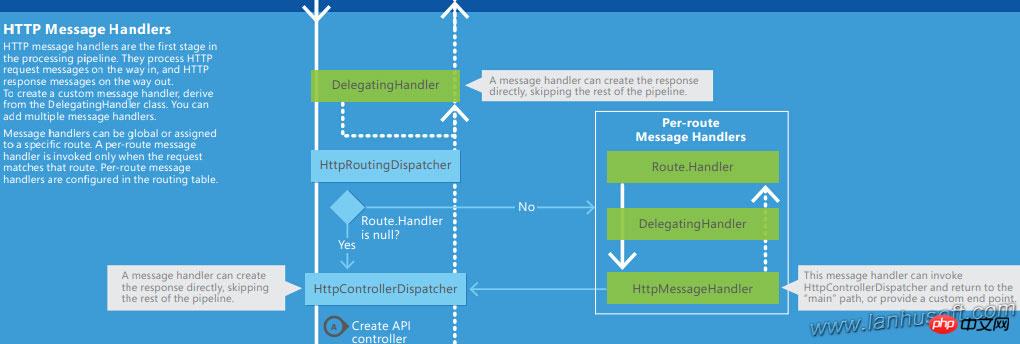
我们看到在 路由routing 之前 有DelegationgHander 层进行消息处理.
因为我们要对每个请求进行参数解密处理,并且又将返回消息进行加密处理, 因此我们 瞄准 MessageProcessingHandler
 //
 // 摘要:
 //  A base type for handlers which only do some small processing of request and/or
 //  response messages.
 public abstract class MessageProcessingHandler : DelegatingHandler
 {
  //
  // 摘要:
  //  Creates an instance of a System.Net.Http.MessageProcessingHandler class.
  protected MessageProcessingHandler();
  //
  // 摘要:
  //  Creates an instance of a System.Net.Http.MessageProcessingHandler class with
  //  a specific inner handler.
  //
  // 参数:
  // innerHandler:
  //  The inner handler which is responsible for processing the HTTP response messages.
  protected MessageProcessingHandler(HttpMessageHandler innerHandler);

  //
  // 摘要:
  //  Performs processing on each request sent to the server.
  //
  // 参数:
  // request:
  //  The HTTP request message to process.
  //
  // cancellationToken:
  //  A cancellation token that can be used by other objects or threads to receive
  //  notice of cancellation.
  //
  // 返回结果:
  //  Returns System.Net.Http.HttpRequestMessage.The HTTP request message that was
  //  processed.
  protected abstract HttpRequestMessage ProcessRequest(HttpRequestMessage request, CancellationToken cancellationToken);
  //
  // 摘要:
  //  Perform processing on each response from the server.
  //
  // 参数:
  // response:
  //  The HTTP response message to process.
  //
  // cancellationToken:
  //  A cancellation token that can be used by other objects or threads to receive
  //  notice of cancellation.
  //
  // 返回结果:
  //  Returns System.Net.Http.HttpResponseMessage.The HTTP response message that was
  //  processed.
  protected abstract HttpResponseMessage ProcessResponse(HttpResponseMessage response, CancellationToken cancellationToken);
  //
  // 摘要:
  //  Sends an HTTP request to the inner handler to send to the server as an asynchronous
  //  operation.
  //
  // 参数:
  // request:
  //  The HTTP request message to send to the server.
  //
  // cancellationToken:
  //  A cancellation token that can be used by other objects or threads to receive
  //  notice of cancellation.
  //
  // 返回结果:
  //  Returns System.Threading.Tasks.Task`1.The task object representing the asynchronous
  //  operation.
  //
  // 异常:
  // T:System.ArgumentNullException:
  //  The request was null.
  protected internal sealed override Task SendAsync(HttpRequestMessage request, CancellationToken cancellationToken);
 }

MessageProcessingHandler
三. 实践:
现在我们将来 先实现2个版本的通讯加密解密功能,定为 版本1.0 base64加密, 版本1.1 Des加密

AJAX即“Asynchronous Javascript And XML”(异步JavaScript和XML),是指一种创建交互式网页应用的网页开发技术。它不是新的编程语言,而是一种使用现有标准的新方法,最大的优点是在不重新加载整个页面的情况下,可以与服务器交换数据并更新部分网页内容,不需要任何浏览器插件,但需要用户允许JavaScript在浏览器上执行。《php中级教程之ajax技术》带你快速
////// 加密解密接口 /// public interface IMessageEnCryption { ////// 加密 /// /// ///string Encode(string content); /// /// 解密 /// /// ///string Decode(string content); } IMessageEnCryption
编写版本1.0 base64加密解密
////// 加解密 只做 base64 /// public class MessageEncryptionVersion1_0 : IMessageEnCryption { public string Decode(string content) { return content?.DecryptBase64(); } public string Encode(string content) { return content.EncryptBase64(); } } MessageEncryptionVersion1_0
编写版本1.1 des加密解密
////// 数据加解密 des /// public class MessageEncryptionVersion1_1 : IMessageEnCryption { public static readonly string KEY = "fHil/4]0"; public string Decode(string content) { return content.DecryptDES(KEY); } public string Encode(string content) { return content.EncryptDES(KEY); } } MessageEncryptionVersion1_1
附上加密解密的基本的一个封装类
public static class EncrypExtends
 {
  //默认密钥向量
  private static byte[] Keys = { 0x12, 0x34, 0x56, 0x78, 0x90, 0xAB, 0xCD, 0xEF };
  internal static string Key = "*@&$(@#H";

  ////
  /// DES加密字符串
  ///
  /// 待加密的字符串
  /// 加密密钥,要求为8位
  /// 加密成功返回加密后的字符串,失败返回源串
  public static string EncryptDES(this string encryptString, string encryptKey)
  {
   try
   {
    byte[] rgbKey = Encoding.UTF8.GetBytes(encryptKey.Substring(0, 8));
    byte[] rgbIV = Keys;
    byte[] inputByteArray = Encoding.UTF8.GetBytes(encryptString);
    DESCryptoServiceProvider dCSP = new DESCryptoServiceProvider();
    MemoryStream mStream = new MemoryStream();
    CryptoStream cStream = new CryptoStream(mStream, dCSP.CreateEncryptor(rgbKey, rgbIV), CryptoStreamMode.Write);
    cStream.Write(inputByteArray, 0, inputByteArray.Length);
    cStream.FlushFinalBlock();
    return Convert.ToBase64String(mStream.ToArray());
   }
   catch
   {
    return encryptString;
   }
  }
  ////
  /// DES解密字符串
  ///
  /// 待解密的字符串
  /// 解密密钥,要求为8位,和加密密钥相同
  /// 解密成功返回解密后的字符串,失败返源串
  public static string DecryptDES(this string decryptString, string key)
  {
   try
   {
    byte[] rgbKey = Encoding.UTF8.GetBytes(key.Substring(0, 8));
    byte[] rgbIV = Keys;
    byte[] inputByteArray = Convert.FromBase64String(decryptString);
    DESCryptoServiceProvider DCSP = new DESCryptoServiceProvider();
    MemoryStream mStream = new MemoryStream();
    CryptoStream cStream = new CryptoStream(mStream, DCSP.CreateDecryptor(rgbKey, rgbIV), CryptoStreamMode.Write);
    cStream.Write(inputByteArray, 0, inputByteArray.Length);
    cStream.FlushFinalBlock();
    return Encoding.UTF8.GetString(mStream.ToArray());
   }
   catch
   {
    return decryptString;
   }
  }
  public static string EncryptBase64(this string encryptString)
  {
   return Convert.ToBase64String(Encoding.UTF8.GetBytes(encryptString));
  }
  public static string DecryptBase64(this string encryptString)
  {
   return Encoding.UTF8.GetString(Convert.FromBase64String(encryptString));
  }
  public static string DecodeUrl(this string cryptString)
  {
   return System.Web.HttpUtility.UrlDecode(cryptString);
  }
  public static string EncodeUrl(this string cryptString)
  {
   return System.Web.HttpUtility.UrlEncode(cryptString);
  }
 }

EncrypExtends
OK! 到此我们前题工作已经完成了80%,开始进行HTTP请求的 消息进和出的加密解密功能的实现.
我们暂时将加密的版本信息定义为 HTTP header头中 以 api_version 的value 来判别分别是用何种方式加密解密
header例:
api_version: 1.0
api_version: 1.1
////// API消息请求处理 /// public class JoyMessageHandler : MessageProcessingHandler { ////// 接收到request时 处理 /// /// /// ///protected override HttpRequestMessage ProcessRequest(HttpRequestMessage request, CancellationToken cancellationToken) { if (request.Content.IsMimeMultipartContent()) return request; // 获取请求头中 api_version版本号 var ver = System.Web.HttpContext.Current.Request.Headers.GetValues("api_version")?.FirstOrDefault(); // 根据api_version版本号获取加密对象, 如果为null 则不需要加密 var encrypt = MessageEncryptionCreator.GetInstance(ver); if (encrypt != null) { // 读取请求body中的数据 string baseContent = request.Content.ReadAsStringAsync().Result; // 获取加密的信息 // 兼容 body: 加密数据 和 body: code=加密数据 baseContent = baseContent.Match("(code=)*(? [\\S]+)", 2); // URL解码数据 baseContent = baseContent.DecodeUrl(); // 用加密对象解密数据 baseContent = encrypt.Decode(baseContent); string baseQuery = string.Empty; if (!request.RequestUri.Query.IsNullOrEmpty()) { // 同 body // 读取请求 url query数据 baseQuery = request.RequestUri.Query.Substring(1); baseQuery = baseQuery.Match("(code=)*(?[\\S]+)", 2); baseQuery = baseQuery.DecodeUrl(); baseQuery = encrypt.Decode(baseQuery); } // 将解密后的 URL 重置URL请求 request.RequestUri = new Uri($"{request.RequestUri.AbsoluteUri.Split('?')[0]}?{baseQuery}"); // 将解密后的BODY数据 重置 request.Content = new StringContent(baseContent); } return request; } ////// 处理将要向客户端response时 /// /// /// ///protected override HttpResponseMessage ProcessResponse(HttpResponseMessage response, CancellationToken cancellationToken) { //var isMediaType = response.Content.Headers.ContentType.MediaType.Equals(mediaTypeName, StringComparison.OrdinalIgnoreCase); var ver = System.Web.HttpContext.Current.Request.Headers.GetValues("api_version")?.FirstOrDefault(); var encrypt = MessageEncryptionCreator.GetInstance(ver); if (encrypt != null) { if (response.StatusCode == HttpStatusCode.OK) { var result = response.Content.ReadAsStringAsync().Result; // 返回消息 进行加密 var encodeResult = encrypt.Encode(result); response.Content = new StringContent(encodeResult); } } return response; } } JoyMessageHandler
最后在 webapiconfig 中将我们的消息处理添加到容器中
public static class WebApiConfig
 {
  public static void Register(HttpConfiguration config)
  {
   // Web API 配置和服务
   // 将 Web API 配置为仅使用不记名令牌身份验证。
   config.SuppressDefaultHostAuthentication();
   config.Filters.Add(new HostAuthenticationFilter(OAuthDefaults.AuthenticationType));
   // Web API 路由
   config.MapHttpAttributeRoutes();
   config.Routes.MapHttpRoute(
    name: "DefaultApi",
    routeTemplate: "api/{controller}/{id}",
    defaults: new { id = RouteParameter.Optional }
   );
   // 添加自定义消息处理
   config.MessageHandlers.Add(new JoyMessageHandler());
  }
 }

WebApiConfig
编写单元测试:
[TestMethod()]
  public void GetTest()
  {
   var id = 10;
   var resultSuccess = $"\"value{id}\"";
   //不加密
   Trace.WriteLine($"without encryption.");
   var url = $"api/ApiTest?id={id}";
   Trace.WriteLine($"get url : {url}");
   var response = http.GetAsync(url).Result;
   var result = response.Content.ReadAsStringAsync().Result;
   Assert.AreEqual(result, resultSuccess);
   Trace.WriteLine($"result : {result}");
   //使用 方案1加密
   Trace.WriteLine($"encryption case one.");
   url = $"api/ApiTest?code=" + $"id={id}".EncryptBase64().EncodeUrl();
   Trace.WriteLine($"get url : {url}");
   http.DefaultRequestHeaders.Clear();
   http.DefaultRequestHeaders.Add("api_version", "1.0");
   response = http.GetAsync(url).Result;
   result = response.Content.ReadAsStringAsync().Result;
   Trace.WriteLine($"result : {result}");
   result = result.DecryptBase64();
   Trace.WriteLine($"DecryptBase64 : {result}");
   Assert.AreEqual(result, resultSuccess);
   //使用 方案2 加密通讯
   Trace.WriteLine($"encryption case one.");
   url = $"api/ApiTest?code=" + $"id={id}".EncryptDES(MessageEncryptionVersion1_1.KEY).EncodeUrl();
   Trace.WriteLine($"get url : {url}");
   http.DefaultRequestHeaders.Clear();
   http.DefaultRequestHeaders.Add("api_version", "1.1");
   response = http.GetAsync(url).Result;
   result = response.Content.ReadAsStringAsync().Result;
   Trace.WriteLine($"result : {result}");
   result = result.DecryptDES(MessageEncryptionVersion1_1.KEY);
   Trace.WriteLine($"DecryptBase64 : {result}");
   Assert.AreEqual(result, resultSuccess);
  }

ApiTestControllerTests
至此为止功能实现完毕..
四.思想延伸
要想更加安全的方案,可以将给每位用户生成不同的 private key , 利用AES加密解密
【相关推荐】




