



不断更新中
预览
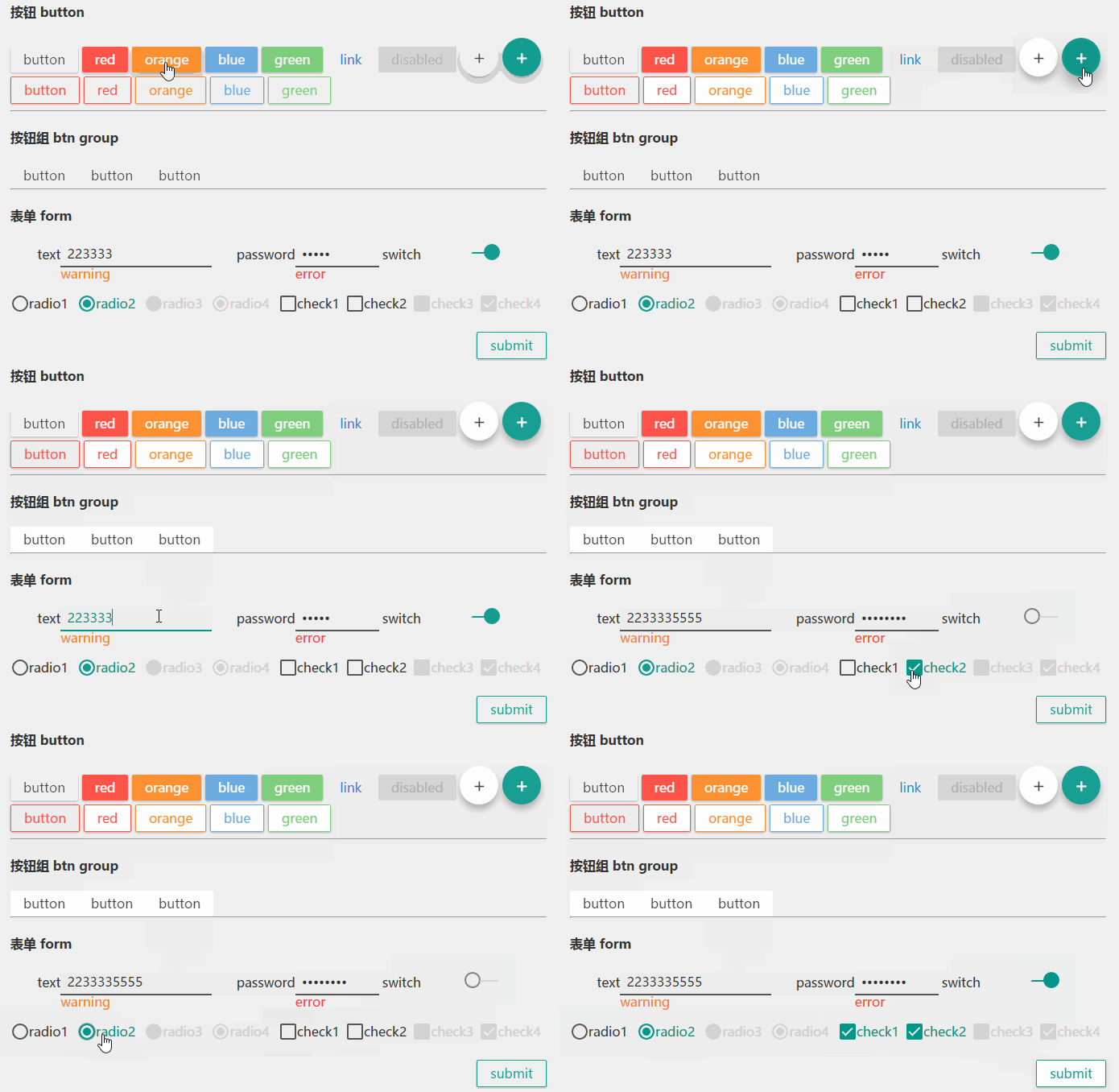
这是一个正在完善的css文件,是对原生组件基于标签属性做了美化,对datepicker,select等无法用css实现的暂不考虑在本文内。
按钮 Button
初始按钮
描边按钮
禁用按钮
上浮按钮
按钮组
表单Form
文本输入
开关
单选
多选
部分样式
article,
aside,
details,
figcaption,
figure,
footer,
header,
hgroup,
main,
menu,
nav,
section,
summary {
    display: block
}

audio,
canvas,
progress,
video {
    display: inline-block;
    vertical-align: baseline
}

audio:not([controls]) {
    display: none;
    height: 0
}

[hidden],
template {
    display: none
}

li {
    list-style: none
}

a {
    background-color: transparent
}

a:active,
a:hover {
    outline: 0
}

abbr[title] {
    border-bottom: 1px dotted
}

b,
strong {
    font-weight: 700
}

dfn {
    font-style: italic
}

h1 {
    font-size: 2em;
    margin: .67em 0
}

mark {
    background: #ff0;
    color: #000
}

small {
    font-size: 80%
}

sub,
sup {
    font-size: 75%;
    line-height: 0;
    position: relative;
    vertical-align: baseline
}

sup {
    top: -.5em
}

sub {
    bottom: -.25em
}

img {
    border: 0
}

svg:not(:root) {
    overflow: hidden
}

figure {
    margin: 1em 40px
}

hr {
    box-sizing: content-box;
    height: 0
}

pre {
    overflow: auto
}

code,
kbd,
pre,
samp {
    font-family: monospace, monospace;
    font-size: 1em
}

button,
input,
optgroup,
select,
textarea {
    color: inherit;
    font: inherit;
    margin: 0
}

button {
    overflow: visible
}

button,
select {
    text-transform: none
}

button,
html input[type=button],
input[type=reset],
input[type=submit] {
    -webkit-appearance: button;
    cursor: pointer
}

button[disabled],
html input[disabled] {
    cursor: default
}

button::-moz-focus-inner,
input::-moz-focus-inner {
    border: 0;
    padding: 0
}

input {
    line-height: normal
}

input[type=checkbox],
input[type=radio] {
    box-sizing: border-box;
    padding: 0
}

input[type=number]::-webkit-inner-spin-button,
input[type=number]::-webkit-outer-spin-button {
    height: auto
}

input[type=search] {
    -webkit-appearance: textfield;
    box-sizing: content-box
}

input[type=search]::-webkit-search-cancel-button,
input[type=search]::-webkit-search-decoration {
    -webkit-appearance: none
}

fieldset {
    border: 1px solid silver;
    margin: 0 2px;
    padding: .35em .625em .75em
}

legend {
    border: 0;
    padding: 0
}

textarea {
    overflow: auto
}

optgroup {
    font-weight: 700
}

table {
    border-collapse: collapse;
    border-spacing: 0
}

td,
th {
    padding: 0
}

/*html*/
html {
    font-family: sans-serif;
    -ms-text-size-adjust: 100%;
    -webkit-text-size-adjust: 100%
}
/*body*/
body{
    margin: 0;
    background-color: rgb(238,238,238);
    font-size:16px;
    padding: 20px;
    -webkit-box-sizing: border-box;
    box-sizing: border-box;
    font-family: "Microsoft YaHei";
    color:#333;
    text-shadow: 0 0 0.1px rgba(0,0,0,0.2);
}
/*button*/
    button {
        opacity: 0.9;
        line-height: 1rem;
        padding:  0.5rem 1rem;
        border: none;
        outline: none;
      background-color: white;
      text-decoration: none;
      position: relative;
      border-radius:2px;
      box-shadow:0 1px 3px darkgray;
      transition: box-shadow 0.5s ease-out;
    }
 button::before{
      content: '';
    display:block;
      position: absolute;
      left: 50%;
      top: 50%;
      border-radius: 10%/40%;
      -webkit-transform: translate(-50%, -50%) ;
      transform: translate(-50%, -50%) ;
      height: 100%;
      width: 100%;
      z-index: -1;
      -webkit-transition: all 0.5s cubic-bezier(0.23, 0.95, 0.56, 1);
      transition: all 0.5s cubic-bezier(0.23, 0.95, 0.56, 1);
  }
  button:hover{
    box-shadow:0 6px 16px darkgray;
      transition: all 0.8s ease-out;
  }
button:active{
 opacity: 1;
      -webkit-transition: all 0.5s ease-out;
      transition: all 0.3s ease-out;
}
  button:active::before{
      width: 0;
      height: 100%;
      border-radius: 0;
      background-color: rgba(0,0,0,.4);
      -webkit-transition: all 0.01s ease-out;
      transition: all 0.01s ease-out;
  }
button.link{
    background:none;
    color:#0275d8;
    box-shadow: none;
}
button[disabled]{
    background-color:lightgray;
    color:darkgray;
    cursor:not-allowed;
    box-shadow: none;
}
.circle{
    border-radius: 100%;
}
button.circle{
    padding: 0;
    width: 3rem;height: 3rem;font-size: 1.5rem;
      box-shadow:0 6px 12px darkgray;

}
button.circle:hover{
      box-shadow:0 12px 24px darkgray;
}
 button.circle::before{
      content: '';
    display:block;
      position: absolute;
      left: 50%;
      top: 50%;
      border-radius: 100%;
      -webkit-transform: translate(-50%, -50%) ;
      transform: translate(-50%, -50%) ;
      height: 100%;
      width: 100%;
      z-index: -1;
      -webkit-transition: all 0.5s cubic-bezier(0.23, 0.95, 0.56, 1);
      transition: all 0.5s cubic-bezier(0.23, 0.95, 0.56, 1);
  }
  button.circle:active::before{
      width: 0;
      height: 0;
      border-radius: 100%;
      background-color: rgba(0,0,0,.4);
      -webkit-transition: all 0.01s ease-out;
      transition: all 0.01s ease-out;
  }

/*form*/
input[type=text],
input[type=password],
input[type=number]{
    padding: 0;
    border:none;
    text-indent: 0.5em;
    background: none;
    outline: none;
    border-bottom:2px solid #555;
    line-height: 32px;
        height: 32px;
    box-sizing: border-box;
}
input[type=text]:focus,
input[type=password]:focus,
input[type=number]:focus{
    border-bottom-color: rgb(0,150,136);
    color: rgb(0,150,136);
}
input[type=checkbox],input[type=radio]{
    display: none;
}
input[type=checkbox]+label,input[type=radio]+label{
    line-height: 1em;
    text-indent: 1.2em;
    width: 1em;
    height: 1em;
    margin: 0.2em 0.1em;
    border: 2px solid #555;
    border-radius: 2px;
    padding: 0px;
    display: inline-block;
    position: relative;
    cursor: pointer;
}
input[type=radio]+label{
    border-radius: 1em;
}
input[type=checkbox]:checked+label,input[type=radio]:checked+label{
    border-color:  rgb(0,150,136);
}


input[type=checkbox]:checked + label:after{
    content: '';
    display: block;
    width: 0.7em;
    height: 0.3em;
    margin: 0.2em 0.1em;
    top: 0;
    left: 0;
    transform:rotate(-45deg);
    -moz-transform:rotate(-45deg);
    -webkit-transform:rotate(-45deg);
    position: absolute;
    border-left: 0.15em solid rgb(238,238,238);
    border-bottom: 0.15em solid rgb(238,238,238);
}
input[type=radio]:checked + label{
    background: rgb(0,150,136);
    box-shadow: 0 0 0 3px rgb(238,238,238) inset;
}

input[type=checkbox] + label:before,input[type=radio] + label:before{
      content: '';
    display:block;
      position: absolute;
      left: 50%;
      top: 50%;
      border-radius: 100%;
      -webkit-transform: translate(-50%, -50%) ;
      transform: translate(-50%, -50%) ;
      height: 4em;
      width: 4em;
      z-index: -1;
      -webkit-transition: all 0.5s cubic-bezier(0.23, 0.95, 0.56, 1);
      transition: all 0.5s cubic-bezier(0.23, 0.95, 0.56, 1);

}

  input[type=checkbox]+ label:active::before,input[type=radio]+ label:active::before{
      width: 0;
      height: 0;
      border-radius: 100%;
      background-color: rgb(0,150,136);
      -webkit-transition: all 0.01s ease-out;
      transition: all 0.01s ease-out;
  }
  input[type=checkbox]:checked+ label:active::before,input[type=radio]:checked+ label:active::before{
      background-color: gray;
  }


input[type=checkbox]:checked + label,input[type=radio]:checked + label {
    background-color: rgb(0,150,136);
    color: rgb(0,150,136);
}

input[type=checkbox] + label:active, input[type=checkbox]:checked + label:active,input[type=radio] + label:active, input[type=radio]:checked + label:active {
    background-color:  rgb(0,150,136);
}
 input[type=checkbox]:disabled + label, input[type=radio]:disabled + label{
     border-color:lightgray;color:lightgray;background-color: lightgray;pointer-events: none;
 }


 input[type=checkbox].switch+label{
    left :0;
    border-radius: 1em;
    border-color:gray;
 }
 input[type=checkbox]:checked.switch+label{
    left:1.5em;
    border-color:rgb(0,150,136);
 }
 input[type=checkbox].switch+label:after{
     content: "";
     position: absolute;
     display: block;
     margin-top: 50%;
    border-bottom: 2px solid lightgray;
    width: 1.4em;
    height: 0;
    transform:rotate(0deg);
    -moz-transform:rotate(0deg);
    -webkit-transform:rotate(0deg);
    margin-left :1.1em;
 }
 input[type=checkbox]:checked.switch+label:after{
    border-bottom: 2px solid rgb(0,150,136);
    margin-left :-1.1em;
 }

nav.btn-group{
    border-radius: 2px;overflow: hidden;float: left;
}
 nav.btn-group button{
    float: left;border-radius: 0;
    box-shadow: none;
 }
   nav.btn-group button:hover{
    box-shadow: none;
   }
  nav.btn-group button:hover::after{
      content: "";
    display: block;
    position: absolute;
    width: 100%;
    height: 100%;
    top: 0;
    left: 0;
    background: rgba(0, 0, 0, 0.11);
}

nav.menu{
    height: 3rem;padding: 0 1em;background: white;
}
nav.menu>ul{
    padding: 0 1em;margin:0;line-height: 3rem;float: left;
}
mav.menu>ul>li{
    display: block;

}

.b-red{border: 1px solid #d9534f;color:#d9534f;}
.b-orange{border: 1px solid #ec971f;color:#ec971f;}
.b-blue{border: 1px solid #5CA3DE;color:#5CA3DE;}
.b-green{border: 1px solid #71CA71;color:#71CA71;}
.b-navy { border: 1px solid  #001f3f;color: #001f3f;}
.b-aqua { border: 1px solid  #7fdbff;color: #7fdbff;}
.b-teal { border: 1px solid  rgb(0,150,136);color: rgb(0,150,136);}
.b-olive { border: 1px solid  #3d9970;color: #3d9970;}
.b-lime { border: 1px solid  #01ff70;color: #01ff70; }
.b-yellow { border: 1px solid  #ffdc00;color: #ffdc00; }
.b-orange { border: 1px solid  #ff851b;color: #ff851b; }
.b-red { border: 1px solid  #ff4136;color: #ff4136; }
.b-fuchsia { border: 1px solid  #f012be;color: #f012be; }
.b-purple { border: 1px solid  #b10dc9;color: #b10dc9; }
.b-maroon { border: 1px solid  #85144b;color: #85144b; }
.b-white { border: 1px solid  #ffffff;color: #ffffff; }
.b-gray { border: 1px solid  #aaaaaa;color: #aaaaaa; }
.b-silver { border: 1px solid  #dddddd;color: #dddddd; }
.b-black { border: 1px solid  #111111;color: #111111; }

.bk-n{background: none;}
.bs-n{box-shadow: none;}

.red{background-color:#d9534f;color:white;}
.orange{background-color:#ec971f;color:white;}
.blue{background-color:#5CA3DE;color:white;}
.green{background-color:#71CA71;color:white;}
.navy { background-color: #001f3f; color:white;}
.aqua { background-color: #7fdbff;color:white; }
.teal { background-color: rgb(0,150,136); color:white;}
.olive { background-color: #3d9970; color:white;}
.lime { background-color: #01ff70; }
.yellow { background-color: #ffdc00; }
.orange { background-color: #ff851b; }
.red { background-color: #ff4136; }
.fuchsia { background-color: #f012be; }
.purple { background-color: #b10dc9; }
.maroon { background-color: #85144b; }
.white { background-color: #ffffff; }
.gray { background-color: #aaaaaa; }
.silver { background-color: #dddddd; }
.black { background-color: #111111; }

.c-red{color:#d9534f;}
.c-orange{color:#ec971f;}
.c-blue{color:#5CA3DE;}
.c-green{color:#71CA71;}
.c-navy { color: #001f3f; }
.c-aqua { color: #7fdbff; }
.c-teal { color: rgb(0,150,136); }
.c-olive { color: #3d9970; }
.c-lime { color: #01ff70; }
.c-yellow { color: #ffdc00; }
.c-orange { color: #ff851b; }
.c-red { color: #ff4136; }
.c-fuchsia { color: #f012be; }
.c-purple { color: #b10dc9; }
.c-maroon { color: #85144b; }
.c-white { color: #ffffff; }
.c-gray { color: #aaaaaa; }
.c-silver { color: #dddddd; }
.c-black { color: #111111; }

.fl,.fl *{display:block;float: left;clear: none;}
.fl-l{float: left}
.fl-r{float: right}
.fl-n{float:none}
.w-1 {width: 4.166666667%}
.w-2 {width: 8.333333333%}
.w-3 {width: 12.5%}
.w-4 {width: 16.66666667%}
.w-5 {width: 20.83333333%}
.w-6 {width: 25%}
.w-7 {width: 29.16666667%}
.w-8 {width: 33.33333333%}
.w-9 {width: 37.5%}
.w-10 {width: 41.66666667%}
.w-11 {width: 45.83333333%}
.w-12 {width: 50%}
.w-13 {width: 54.16666667%}
.w-14 {width: 58.33333333%}
.w-15 {width: 62.5%}
.w-16 {width: 66.66666667%}
.w-17 {width: 70.83333333%}
.w-18 {width: 75%}
.w-19 {width: 79.16666667%}
.w-20 {width: 83.33333333%}
.w-21 {width: 87.5%}
.w-22 {width: 91.66666667%}
.w-23 {width: 95.83333333%}
.w-24 {width: 100%}

.h-1 {height: 16px;line-height: 16px;}
.h-2 {height: 28px;line-height: 28px;}
.h-3 {height: 32px;line-height: 32px;}
.h-4 {height: 48px}
.h-5 {height: 64px}
.h-6 {height: 80px}
.h-7 {height: 96px}

.t-l{text-align: left}
.t-c{text-align: center}
.t-r{text-align: right}

.f,.f *{display: flex}
.f-1    {flex:1}
.f-2    {flex:2}
.f-3    {flex:3}
.f-4    {flex:4}
.f-5    {flex:5}
.f-6    {flex:6}
.f-7    {flex:7}
.f-8    {flex:8}
.f-9    {flex:9}
.f-10{flex:10}
.f-11{flex:11}
.f-12{flex:12}
.f-13{flex:13}
.f-14{flex:14}
.f-15{flex:15}
.f-16{flex:16}
.f-17{flex:17}
.f-18{flex:18}
.f-19{flex:19}
.f-20{flex:20}
.f-21{flex:21}
.f-22{flex:22}
.f-23{flex:23}
.f-24{flex:24}
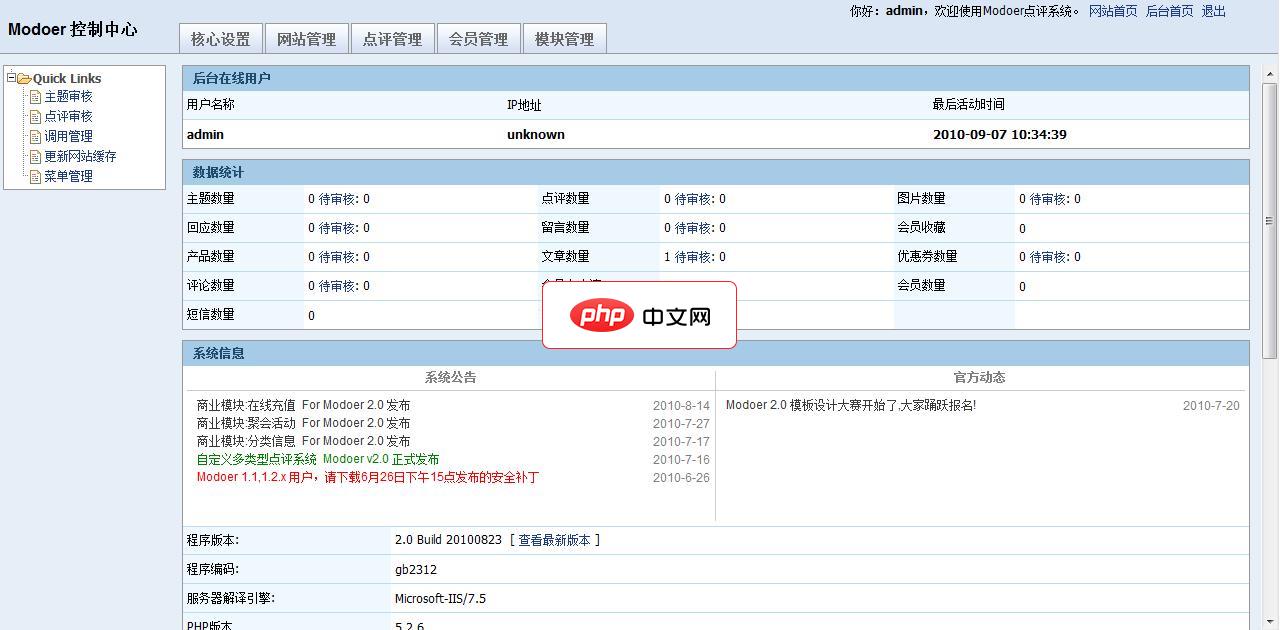
Modoer多功能点评系统2.5 精华版 Build 20110710 UTF8
下载
Modoer 是一款以本地分享,多功能的点评网站管理系统。采用 PHP+MYSQL 开发设计,开放全部源代码。因具有非凡的访问速度和卓越的负载能力而深受国内外朋友的喜爱,不局限于商铺类点评,真正实现了多类型的点评,可以让您的网站点评任何事与物,同时增加产品模块,也更好的网站产品在网站上展示。Modoer点评系统 2.5 Build 20110710更新列表1.同步 旗舰版系统框架2.增加 限制图片




