


基于javase形式的rest服务
-
创建项目
我们首选使用 archetypeGroupId 为 org.glassfish.jersey.archetypes 的原型,archetypeArtifactId为 jersey-quickstart-grizzly2 的原型,创建REST服务项目,使用IDEA创建项目如下:
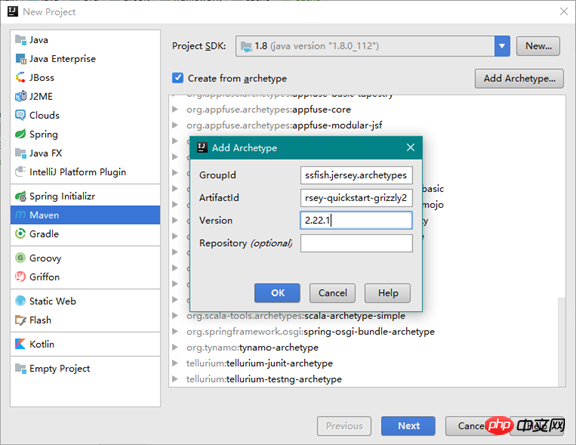
点击OK后,使用该原始模型创建项目。
-
运行服务
项目创建好后,原始模型已经默认创建了一个REST服务,我们可以直接启动REST服务,进入项目的根目录,执行如下命令构建和启动服务:
mvnpackage
mvnexec:java
会启动REST服务,可以随时通过回车键停止服务,输出如下:
六月 19, 2017 11:12:23 下午 org.glassfish.grizzly.http.server.NetworkListener start
信息: Started listener bound to [localhost:8080]
六月 19, 2017 11:12:23 下午 org.glassfish.grizzly.http.server.HttpServer start
信息: [HttpServer] Started.
Jersey app started with WADL available at http://localhost:8080/myapp/application.wadl
Hit enter to stop it…
还提供了WADL,通过访问application.wadl可以获取当前REST服务公布的接口:
base="http://localhost:8080/myapp/"> path="myresource"> id="getIt"name="GET"> mediaType="text/plain"/>  Destoon B2B网站下载
Destoon B2B网站管理系统是一套完善的B2B(电子商务)行业门户解决方案。系统基于PHP+MySQL开发,采用B/S架构,模板与程序分离,源码开放。模型化的开发思路,可扩展或删除任何功能;创新的缓存技术与数据库设计,可负载千万级别数据容量及访问。 系统特性1、跨平台。支持Linux/Unix/Windows服务器,支持Apache/IIS/Zeus等2、跨浏览器。基于最新Web标准构建,在
-
访问服务
可以直接访问http://localhost:8080/myapp/myresource就可以访问REST服务,直接访问REST服务,会输出 Got it! 。
-
项目说明
启动服务的命令mvnexec:java,该命令实际调用了exec-maven-plugin 插件定义的一个值为 java 的 goal ,用以触发mainClass中的main函数,插件配置如下:
org.codehaus.mojo exec-maven-plugin 1.2.1 java org.drsoft.rest.Main REST服务类为MyResource,其@Path 中定义了资源路径,@GET中定义了GET方法getIt(),@Produces中定义了响应的类型为普通字符串,示例代码如下:
@Path("myresource")
public class MyResource {
@GET
@Produces(MediaType.TEXT_PLAIN)
public String getIt() {
return"Got it!";
}
}
REST服务的单元测试类MyResourceTest,在单元测试类中,在执行单元测试前需要启动服务,并使用JerseyClient中定义的方法来调用REST服务,示例代码如下:
public class MyResourceTest {
private HttpServer server;
private WebTarget target;
@Before
publicvoidsetUp() throws Exception {
// start the server
server = Main.startServer();
// create the client
Client c = ClientBuilder.newClient();
// uncomment the following line if you want to enable
// support for JSON in the client (you also have to uncomment
// dependency on jersey-media-json module in pom.xml and Main.startServer())
// --
// c.configuration().enable(new org.glassfish.jersey.media.json.JsonJaxbFeature());
target = c.target(Main.BASE_URI);
}
@After
publicvoidtearDown() throws Exception {
server.stop();
}
@Test
publicvoidtestGetIt() {
String responseMsg = target.path("myresource").request().get(String.class);
assertEquals("Got it!", responseMsg);
}
}
基于Servlet容器服务
-
创建项目
我们首选使用 archetypeGroupId 为 org.glassfish.jersey.archetypes 的原型,archetypeArtifactId为 jersey-quickstart-webapp的原型,创建REST服务项目,使用IDEA创建项目如下:
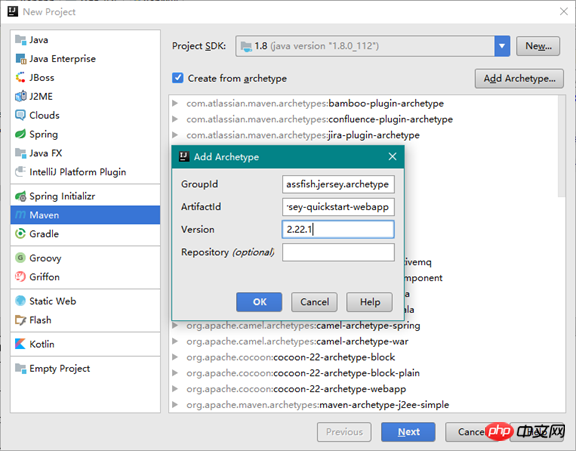
-
运行服务
由于这个是Web项目,没有main函数,因此必须部署到Servlet容器中,才能将其运行,我们需要配置Tomcat,IDEA的配置如下:
-
点击Run菜单的EditConfiguration,在打开的窗体中增加Tomcat服务配置,指定Tomcat的安装目录,并设置当前站点的部署的虚拟目录名称,如下:
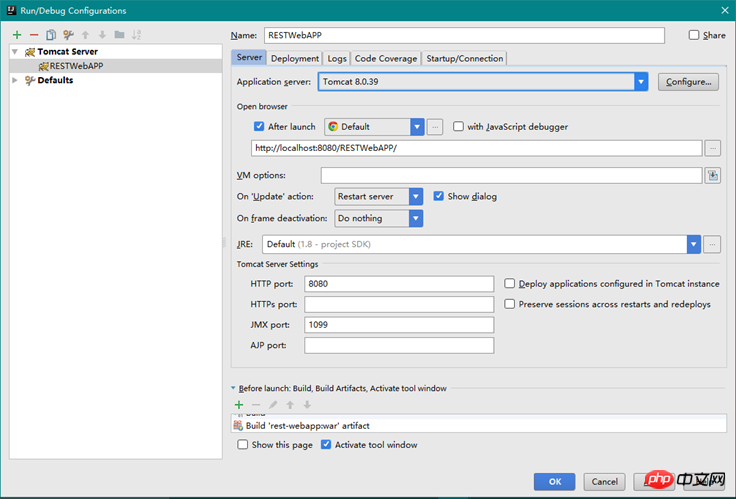
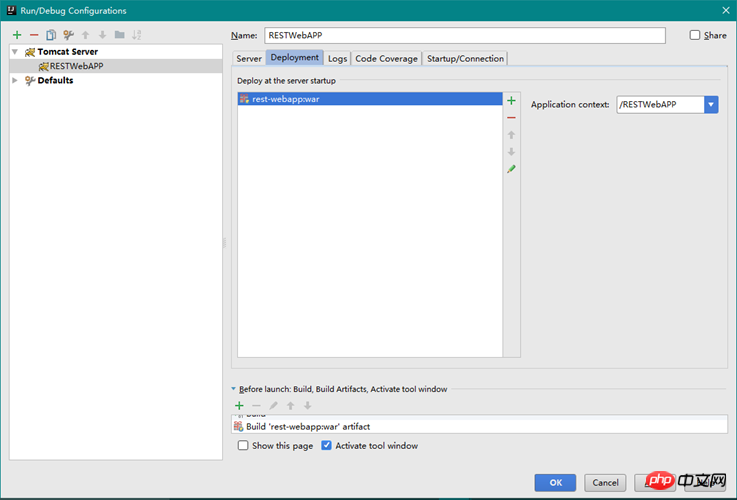
点击OK后,就配置好Servlet容器,可以运行服务了
-
访问服务
服务启动后,我们可以访问http://localhost:8080/RESTWebAPP/webapi/myresource来调用REST服务,会输出Got it!
-
项目说明
Web根目录的名称为webapp,默认的Servlet容器版本为2.5,并且配置了WEB-INF/web.xml文件来配置REST服务,web.xml配置如下:
version="1.0"encoding="UTF-8"?>
version="2.5"xmlns="http://java.sun.com/xml/ns/javaee" xmlns:xsi="http://www.w3.org/2001/XMLSchema-instance" xsi:schemaLocation="http://java.sun.com/xml/ns/javaee "> Jersey Web Application org.glassfish.jersey.servlet.ServletContainer jersey.config.server.provider.packages org.drsoft.rest 1 Jersey Web Application /webapi/*


0


0
创建Jersey REST 服务,基于Maven

巴扎黑
发布时间:2017-06-23 13:58:03
|2005人浏览过
|来源于php中文网
原创
相关文章
Jetty、Jersey与Weld:构建嵌入式Java REST应用
HK2 依赖注入:扩展与自定义绑定注解实现
扩展HK2依赖注入:自定义注解与手动绑定策略
优化HK2依赖注入:如何通过自定义绑定扩展组件扫描与生命周期管理
java框架如何助力企业打造API?
本站声明:本文内容由网友自发贡献,版权归原作者所有,本站不承担相应法律责任。如您发现有涉嫌抄袭侵权的内容,请联系admin@php.cn
热门AI工具


相关专题


2026赚钱平台入口大全
2026年最新赚钱平台入口汇总,涵盖任务众包、内容创作、电商运营、技能变现等多类正规渠道,助你轻松开启副业增收之路。阅读专题下面的文章了解更多详细内容。
76
2026.01.31


无需付费的漫画app大全
想找真正免费又无套路的漫画App?本合集精选多款永久免费、资源丰富、无广告干扰的优质漫画应用,涵盖国漫、日漫、韩漫及经典老番,满足各类阅读需求。阅读专题下面的文章了解更多详细内容。
67
2026.01.31

漫画免费在线观看地址大全
想找免费又资源丰富的漫画网站?本合集精选2025-2026年热门平台,涵盖国漫、日漫、韩漫等多类型作品,支持高清流畅阅读与离线缓存。阅读专题下面的文章了解更多详细内容。
19
2026.01.31
热门下载
相关下载
精品课程
相关推荐
/
热门推荐
/
最新课程




