



最近客串了一把前端,有行复制的功能用 jquery 来实现了。感觉比以前原生js用 createelement 要简单多了,但还是遇到了一些陷阱比如ie7的bug,这里记录下来。先看看 table 的样子:这里3行是一组,按下"copy"连值复制,按下"add"只增加行不复制值。calendar 使用的是 jquery ui 里的 datepicker
下图只是一个简单的demo,没有复杂的样式表:

为了灵活对应不同的表格,提取了一个共通的 js 来处理,作为使用前提:
1. table 必须有 id;
2. 有 id 的 tr 才会被复制;(tr的id从1开始编号)
3. table 内所有id都必须以 xxx_n 编号
function RowCopyUtility(opts) {
  // 表格Id
  this.tableId = opts.tableId;
  // 分组内有多少行
  this.rowGroupNumber = opts.rowGroupNumber;
  // 一组内Button对应的方法Map(key=Button value, value=对应方法名)
  // 所有方法都应以 function (idx) 方式调用
  this.buttonHandlers = opts.buttonHandlers;

  this._countForRowsGroup = -1;
  this._keyForRow = -1;

  this.getTargetRowGroup = function(groupIdx) {

    var rows = [];
    if (groupIdx > 0) {
      for(var i=1; i<this.rowGroupNumber+1; i++) {
        rows[i-1] = $("#row" + i + "_" + groupIdx);
      }
    } else {
      for(var i=0; i<this.rowGroupNumber; i++) {
        rows[i] = $("#" + this.tableId + " tr[id]").eq(i);
      }
    }
    return rows;
  };

  this.addRow = function (groupIdx, needCopyValue) {

    if (this._countForRowsGroup == -1) {
      this._countForRowsGroup = ($("#" + this.tableId + " tr[id]").length - 1)/this.rowGroupNumber;
      this._keyForRow =  parseInt($("#" + this.tableId + " tr[id]:not(#row_add):last").attr("id").split("_")[1]) + 1;
    }

    if (groupIdx == 0) {
      var firstRow = $("#" + this.tableId + " tr[id]:first");
      var currentIdx = firstRow.attr("id").split("_")[1];
      groupIdx = currentIdx;
    }

    var regForId = new RegExp("^(\w+_)" + groupIdx + "$");
    var regForName = new RegExp("^(\w+_)" + groupIdx + "$");
    var regForRadioId = new RegExp("^(\w+_)" + groupIdx + "(.*)$");

    var targetRows = this.getTargetRowGroup(groupIdx);

    // 重要:注意闭包参数的作用域
    var idx = this._keyForRow;

    for(var i=0; i<targetRows.length; i++) {
      // clone target rows
      var cloneRow = targetRows[i].clone(false);
      var newRowId = cloneRow.attr("id").split("_")[0] + "_" + idx;
      cloneRow.attr("id", newRowId);

      var radios = [];
      cloneRow.find("[id]").each(function() {
          var id = $(this).attr("id");
          var oldId = id;
          var name = $(this).attr("name");

          id = id.replace(regForId, "$1" + idx);
          $(this).attr("id", id);

          var newname = name.replace(regForName, "$1" + idx);
          $(this).attr("name", newname);

          if ($(this).hasClass("hasDatepicker")) {
          	  $(this).removeClass("hasDatepicker");
          }

          if ($(this).attr("type") == "checkbox") {
              if($(this).next().attr("for") != "") {
                  $(this).next().attr("for", id);
              }
              if (!needCopyValue) {
            	  $(this).attr("checked", "");
              }
          }
          else if ($(this).attr("type") == "radio") {
              id = id.replace(regForRadioId, "$1" + idx);
              $(this).attr("id", id);

              var radio = new Object();
              radio.id = id;
              radio.oldId = oldId;
              radio.name = name;
              radio.newname = newname;
              // IE7's Bug
              radio.checked = document.getElementById(oldId).checked;
              radios[radios.length] = radio;

              if($(this).next().attr("for") != "") {
                  $(this).next().attr("for", id);
              }

              if (!needCopyValue) {
            	  $(this).attr("checked", "");
              }
          }
          else if ($(this).attr("tagName") == "SELECT") {
	          if (needCopyValue) {
	          	  $(this).val(document.getElementById(oldId).value);
	          }
          }
          else if ($(this).attr("tagName") == "TEXTAREA" ||
                   $(this).attr("type") == "text" ||
                   $(this).attr("type") == "hidden") {
	          if (!needCopyValue) {
	              $(this).val("");
	          }
          }
      });

      // insert into document
      cloneRow.insertBefore("#" + this.tableId + " tr:last");

      // replace name for radio
      for(var n=0; n<radios.length; n++) {
         document.getElementById(radios[n].id).outerHTML =
           document.getElementById(radios[n].id).outerHTML.replace(radios[n].name, radios[n].newname);
         // IE7's Bug
         document.getElementById(radios[n].oldId).checked = radios[n].checked;
      }

      // Event Handler
      var maps = this.buttonHandlers;
      cloneRow.find("input:button").each(function() {
         var value = $(this).attr("value");

         var funcName = maps[value];
         if (funcName != undefined) {
	         var func = null;
	         func = function() { eval(funcName + "(" + idx + ")"); };

	         if (func != null) {
	           $(this).attr("onclick", "");
	           $(this).unbind("click");
	           $(this).attr("onclick", "").click(func);
	         }
         }
      });
    }

    this._countForRowsGroup++;
    this._keyForRow++;

  };


  this.copyRow = function(groupIdx) {
    this.addRow(groupIdx, true);
  };

  this.deleteRow = function(groupIdx) {

    if (this._countForRowsGroup == -1) {
      this._countForRowsGroup = ($("#" + this.tableId + " tr[id]").length - 1)/this.rowGroupNumber;
      this._keyForRow =  parseInt($("#" + this.tableId + " tr[id]:not(#row_add):last").attr("id").split("_")[1]) + 1;
    }

    var allRows = $("#" + this.tableId + " tr[id]");
    var miniRowsCount = this.rowGroupNumber + 1;
    var tbl = $("#" + this.tableId);

    if (allRows.length == miniRowsCount) {
      tbl.find("input:text").each(function() { $(this).val(""); });
      tbl.find("textarea").each(function() { $(this).val(""); });
      tbl.find("input:hidden").each(function() { $(this).val(""); });
      tbl.find("input:radio").each(function() { $(this).attr("checked", ""); });
      tbl.find("input:checkbox").each(function() { $(this).attr("checked", ""); });
      tbl.find("select").each(function() { document.getElementById($(this).attr("id")).selectedIndex = 0; });
      tbl.find(".fg-common-field-errored").each(function() {
        $(this).removeClass("fg-common-field-errored");
      });
      return;
    }

    for(var i=1; i<this.rowGroupNumber+1; i++) {
      tbl.find("#row" + i + "_" + groupIdx).remove();
    }

    this._countForRowsGroup--;
  };

}
实际遇到的问题与解决办法:
1. jQuery 的 Clone() 方法,就算传入 false,元素的事件依然会被复制过来。(IE测试)
2. attr("name", name); 在IE中,不会直接替换掉,而是生成 submitName 保存。在 IE7 里 radio 会因为 name 相同而出现问题。
3. 在大量的匿名方法中,特别要注意闭包封送参数的作用域。
4. IE7里的Bug:在radio被复制时,原来的元素的选择值就没了。因此在复制前保存了复制源的radio属性,加入document之后再次设定:
// replace name for radio
for(var n=0; n<radios.length; n++) {
   document.getElementById(radios[n].id).outerHTML =
     document.getElementById(radios[n].id).outerHTML.replace(radios[n].name, radios[n].newname);
   // IE7's Bug
   document.getElementById(radios[n].oldId).checked = radios[n].checked;
}
5. jQuery里清除事件单独用 attr("onclick", "") 并不好用;后期用 click(function) 绑定的事件用 unbind("click") 可以移除。

if (func != null) {
  $(this).attr("onclick", "");
  $(this).unbind("click");
  $(this).attr("onclick", "").click(func);
}
6. jQuery UI 的 DatePicker 当创建了 datepicker 之后,可以通过 hasClass("hasDatepick") 判断是否存在,否则在复制之后有问题。
(多次复制之后 datepicker settings 会莫名其妙丢失)
7. 其他,剩下就是要注意 jQuery 选择器不要过度使用了,越复杂的表达式效率越低。
顺便推荐看一下:15个值得开发人员关注的jQuery开发技巧和心得
还要说下IE9 的 debug 工具真心不错,提高不少开发效率哦一定要利用。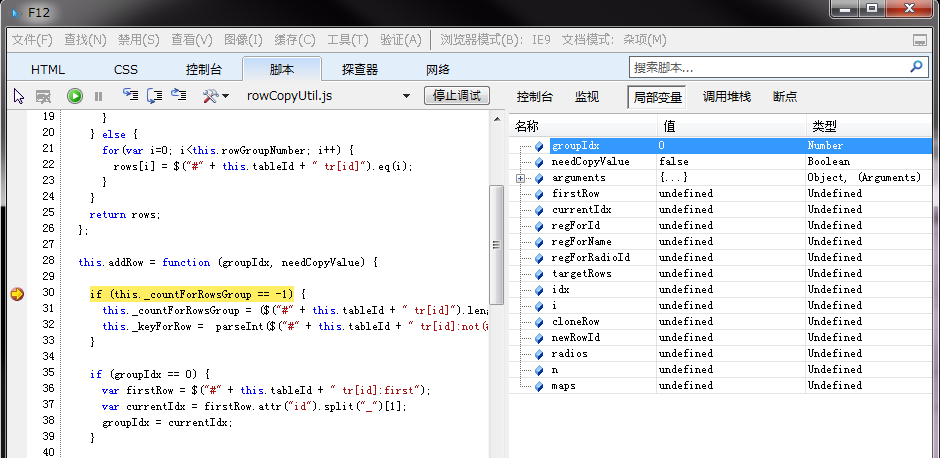
就这些,希望能对大家有帮助。最后附上,测试用的 html:
<html xmlns="http://www.w3.org/1999/xhtml" lang="ja" xml:lang="ja">
<head>
<meta http-equiv="Content-Type" content="text/html; charset=utf-8" />
<meta http-equiv="Pragma" content="no-cache" />
<meta http-equiv="Cache-Control" content="no-cache" />
<meta http-equiv="Expires" content="0" />
<style>
body{font-family:'Open Sans',arial,sans-serif;}
tr{height:30px}
input.button{width:60px}
table.main {
	border-width: 2px;
	border-spacing: 1px;
	border-style: solid;
	border-color: gray;
	border-collapse: collapse;
	background-color: white;
}
table.main th {
	border-width: 1px;
	padding: 5px;
	border-style: inset;
	border-color: gray;
	background-color: #f0f0f0;
	-moz-border-radius: ;
}
table.main td {
	border-width: 1px;
	padding: 5px;
	border-style: inset;
	border-color: gray;
	background-color: white;
	-moz-border-radius: ;
}
</style>

<script type="text/javascript" language="JavaScript" src="jquery.js"></script>
<script type="text/javascript" language="JavaScript" src="jquery-ui.js"></script>
<script type="text/javascript" language="JavaScript" src="rowCopyUtil.js"></script>
<link rel="stylesheet" href="jquery-ui.css" type="text/css" media="all" />
<link type="text/css" href="jqueryCalendarStyle.css" rel="stylesheet" />

<script type="text/javascript" >
 var rowUtil = new RowCopyUtility(
    {
      tableId: "tab1",
      rowGroupNumber: 3,
      buttonHandlers: {"Copy":"copyRows", "Delete":"deleteRows", "calendar":"showDatepicker", "some button":"someButtonClick"}
    }
 );

 function showDatepicker(idx) {
      var textId = "#calendar_" + idx;
      if (!$(textId).hasClass("hasDatepicker")) {
		  var text = $(textId).datepicker({
		    showOn : "calendar",
		    dateFormat : "yy/mm/dd"
		  });
	  }
	  $(textId).datepicker('show');
 }

 function addRows() {
    rowUtil.addRow(0, false);
 }
 function copyRows(idx) {
    rowUtil.copyRow(idx);
 }
 function deleteRows(idx) {
    rowUtil.deleteRow(idx);
 }
 function someButtonClick(idx) {
    alert(idx);
 }
</script>
</head>
<body>
  <table id="tab1" class="main">
    <tr>
       <th>Header1</th>
       <th>Header2</th>
       <th>Header3</th>
       <th>Header4</th>
    </tr>
    <tr id="row1_0">
       <td rowspan="3" >
           <input class="button" type="button" value="Copy" onclick="copyRows(0);" />
           <input class="button" type="button" value="Delete" onclick="deleteRows(0);" />
       </td>
       <td>text:<input type="text" id="text_0" /></td>
       <td>
           <input type="radio" name="radioAB_0" id="radioA_0" value="1" /><label for="radioA_0">Raido_A </label>
           <input type="radio" name="radioAB_0" id="radioB_0" value="2" /><label for="radioB_0">Radio_B </label>
       </td>
       <td>
           <select id="select_0">
              <option value="0">---select---</option>
              <option value="1">select option1</option>
              <option value="2">select option2</option>
           </select>
       </td>
    </tr>
    <tr id="row2_0">
      <td>
          <input type="checkbox" id="checkA_0" /><label for="checkA_0">Check_A </label>
          <input type="checkbox" id="checkB_0" /><label for="checkB_0">Check_B </label>
      </td>
      <td colspan="2">
        <input type="text" id="calendar_0" style="width:90px"/><input type="button" value="calendar" onclick="showDatepicker(0);" />
        <input type="button" value="some button" onclick="someButtonClick(0);" />
      </td>
    </tr>
    <tr id="row3_0">
      <td colspan="3">
        textarea:<textarea id="textarea_0" style="width:100%"></textarea>
      </td>
    </tr>
    <tr id="row_add">
      <td colspan="4">
      	<input class="button" type="button" value="Add" onclick="addRows();" />
      </td>
    </tr>
  </table>
</body>

</html> 




