



产生这个问题的原因是前一段时间面试的时候,面试官问我margin和padding在内联元素上的使用效果,好像没怎么答上来。这两天正好有空写几个demo看看这个问题,发现了几个坑。
先上demo:
样式表
<style type="text/css">
	*{
		padding: 0;
		margin: 0;
	}
	.inline{
		border: 1px solid red;
		padding: 20px;
	}
</style>
html代码1:
<body>
    <span class="inline">span</span>
    <span class="inline">span</span>
    <span class="inline">span</span>
</body>
html代码2
<body>
	<input type="text" class="inline" value="input" />
	<input type="text" class="inline" value="input" />
        <input type="text" class="inline" value="input" />
</body>
请大家分别用同样的样式表运行上面两段代码,会发现一个问题:span的padding-top虽然设置了,但是在浏览器中并没有展现出来,wtf !
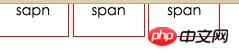

那么问题来了,有人说行内元素不能设置padding-top,但是
1 . span和input 都为行内元素,为什么对input设置的padding-top值有效呢?
2. 祭出w3c文档 http://www.w3.org/TR/2011/REC-CSS2-20110607/box.html#padding-properties
'padding-top', 'padding-right', 'padding-bottom', 'padding-left'
| Value: | <padding-width> | inherit |
| Initial: | 0 |
| Applies to: | all elements except table-row-group, table-header-group, table-footer-group, table-row, table-column-group and table-column |
| Inherited: | no |
| Percentages: | refer to width of containing block |
| Media: | visual |
| Computed value: | the percentage as specified or the absolute length |
padding适用于全部元素。
当给这两个元素设置margin-top时,两者的表现又完全不同。
span对于margin-top无效,而input对于margin-top的设置是完全OK的?为什么?看文档
'margin-top', 'margin-bottom'
Value: <margin-width> | inherit Initial: 0 Applies to: all elements except elements with table display types other than table-caption, table and inline-table Inherited: no Percentages: refer to width of containing block Media: visual Computed value: the percentage as specified or the absolute length
These properties have no effect on non-replaced inline elements.
那么这是为什么呢?重点来了,
span是行内不可替换元素,而input是行内替换元素,第一次听说,哭瞎。
先上文档:
10.6.1 Inline, non-replaced elements
The 'height' property does not apply. The height of the content area should be based on the font, but this specification does not specify how. A UA may, e.g., use the em-box or the maximum ascender and descender of the font. (The latter would ensure that glyphs with parts above or below the em-box still fall within the content area, but leads to differently sized boxes for different fonts; the former would ensure authors can control background styling relative to the 'line-height', but leads to glyphs painting outside their content area.)
Note: level 3 of CSS will probably include a property to select which measure of the font is used for the content height.
The vertical padding, border and margin of an inline, non-replaced box start at the top and bottom of the content area, and has nothing to do with the 'line-height'. But only the 'line-height' is used when calculating the height of the line box.
If more than one font is used (this could happen when glyphs are found in different fonts), the height of the content area is not defined by this specification. However, we suggest that the height is chosen such that the content area is just high enough for either (1) the em-boxes, or (2) the maximum ascenders and descenders, of all the fonts in the element. Note that this may be larger than any of the font sizes involved, depending on the baseline alignment of the fonts.
10.3.2 Inline, replaced elements
A computed value of 'auto' for 'margin-left' or 'margin-right' becomes a used value of '0'.

If 'height' and 'width' both have computed values of 'auto' and the element also has an intrinsic width, then that intrinsic width is the used value of 'width'.
If 'height' and 'width' both have computed values of 'auto' and the element has no intrinsic width, but does have an intrinsic height and intrinsic ratio; or if 'width' has a computed value of 'auto', 'height' has some other computed value, and the element does have an intrinsic ratio; then the used value of 'width' is:
(used height) * (intrinsic ratio)
If 'height' and 'width' both have computed values of 'auto' and the element has an intrinsic ratio but no intrinsic height or width, then the used value of 'width' is undefined in CSS 2.1. However, it is suggested that, if the containing block's width does not itself depend on the replaced element's width, then the used value of 'width' is calculated from the constraint equation used for block-level, non-replaced elements in normal flow.
Otherwise, if 'width' has a computed value of 'auto', and the element has an intrinsic width, then that intrinsic width is the used value of 'width'.
Otherwise, if 'width' has a computed value of 'auto', but none of the conditions above are met, then the used value of 'width' becomes 300px. If 300px is too wide to fit the device, UAs should use the width of the largest rectangle that has a 2:1 ratio and fits the device instead.
注意加粗的内容,可替换元素是具有内部的宽,高,或者宽高比的。
总结:
对于input这种替换元素,margin和padding各方向均有作用,
对于span,a等这些不可替换元素,
padding-left,padding-right均有效果,padding-top无效果。
经评论中@meta-D的提醒,后经验证,padding-bottom无效,只是对border的样式产生了影响。配图请看评论。
margin-right,margin-left均有效果,margin-top,margin-bottom无效果。
4.16更新:
最近在看css权威指南的时候,书上写:非替换元素的内边距,边框和外边距对行内元素及其生成框没有垂直效果;也就是说,他们不会影响行内框的高度。(还是得多看书啊)
总感觉文章写的半吊子,先这样,大家可以看看下面的链接,等我再深入地挖一挖坑。
相关链接(需要楼梯越过高墙):
http://maxdesign.com.au/news/inline/
http://stackoverflow.com/questions/12412468176/what-is-a-non-replaced-inline-element
http://melon.github.io/blog/2015/03/07/inline-replaced-vs-inline-nonreplaced/
http://reference.sitepoint.com/css/replacedelements




