原文地址:点击前往
1 什么是ValueStack
称为值栈,Struts提供的共享数据的数据结构
2 为什么要使用ValueStack
从控制器向浏览器传递数据
存储与请求相关的对象信息(session/application)
3 ValueStack对象的生命周期
请求进入到服务器端后,在内存中就会传创建一个ValueStack对象;当请求处理结束以后,ValueStack对象就会被清除
4 如何访问ValueStack中的数据
利用OGNL表达式获取
利用EL表达式获取
5 在ValueStack中存储数据的区域划分
Contents (栈结构) 利用OGNL或者EL来获取数据
Context (Map结构) 利用 #key 来获取数据
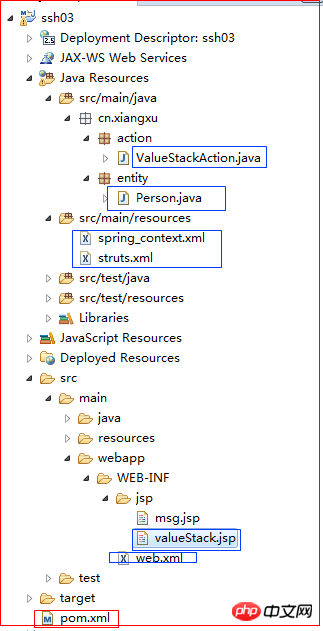
7 案例:从控制器向浏览器传值,展示valueStack区域
7.1 导包
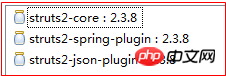


1 <project xmlns="http://maven.apache.org/POM/4.0.0" xmlns:xsi="http://www.w3.org/2001/XMLSchema-instance" xsi:schemaLocation="http://maven.apache.org/POM/4.0.0 "> 2 <modelVersion>4.0.0</modelVersion> 3 <groupId>cn.xiangxu</groupId> 4 <artifactId>ssh03</artifactId> 5 <version>0.0.1-SNAPSHOT</version> 6 <packaging>war</packaging> 7 <dependencies> 8 <dependency> 9 <groupId>org.apache.struts</groupId>10 <artifactId>struts2-core</artifactId>11 <version>2.3.8</version>12 </dependency>13 <dependency>14 <groupId>org.apache.struts</groupId>15 <artifactId>struts2-spring-plugin</artifactId>16 <version>2.3.8</version>17 </dependency>18 <dependency>19 <groupId>org.apache.struts</groupId>20 <artifactId>struts2-json-plugin</artifactId>21 <version>2.3.8</version>22 </dependency>23 </dependencies>24 </project>
7.2 配置文件
7.2.1 spring_context.xml
配置注解扫描


1 <?xml version="1.0" encoding="UTF-8"?> 2 <beans xmlns="http://www.springframework.org/schema/beans" 3 xmlns:xsi="http://www.w3.org/2001/XMLSchema-instance" xmlns:context="http://www.springframework.org/schema/context" 4 xmlns:jdbc="http://www.springframework.org/schema/jdbc" xmlns:jee="http://www.springframework.org/schema/jee" 5 xmlns:tx="http://www.springframework.org/schema/tx" xmlns:aop="http://www.springframework.org/schema/aop" 6 xmlns:mvc="http://www.springframework.org/schema/mvc" xmlns:util="http://www.springframework.org/schema/util" 7 xmlns:jpa="http://www.springframework.org/schema/data/jpa" 8 xsi:schemaLocation=" 9 http://www.springframework.org/schema/beans/spring-beans-3.0.xsd10 http://www.springframework.org/schema/context/spring-context-3.0.xsd11 http://www.springframework.org/schema/jdbc/spring-jdbc-3.0.xsd12 http://www.springframework.org/schema/jee/spring-jee-3.0.xsd13 http://www.springframework.org/schema/tx/spring-tx-3.0.xsd14 http://www.springframework.org/schema/data/jpa/spring-jpa-1.3.xsd15 http://www.springframework.org/schema/aop/spring-aop-3.0.xsd16 http://www.springframework.org/schema/mvc/spring-mvc-3.0.xsd17 http://www.springframework.org/schema/util/spring-util-3.0.xsd">18 19 <!-- 配置组件扫描 -->20 <context:component-scan base-package="cn.xiangxu" />21 22 </beans>
7.2.2 struts.xml
配置访问路径、访问网名、action处理类


1 <?xml version="1.0" encoding="UTF-8"?> 2 3 <!DOCTYPE struts PUBLIC 4 "-//Apache Software Foundation//DTD Struts Configuration 2.3//EN" 5 "http://struts.apache.org/dtds/struts-2.3.dtd"> 6 7 <struts> 8 9 <!-- 测试struts整合spring时用 -->10 <package name="test" namespace="/test" extends="json-default">11 <action name="demo">12 <result>13 /WEB-INF/jsp/msg.jsp14 </result>15 </action>16 </package>17 18 <package name="vs" namespace="/vs" extends="json-default">19 <action name="valueStack" class="valueStackAction" method="valueStaceMethod">20 <result name="success">21 /WEB-INF/jsp/valueStack.jsp22 </result>23 </action>24 </package>25 26 </struts>27 28
7.2.3 web.xml
配置spring监听器
配置spring配置文件位置
配置主控制器


1 <?xml version="1.0" encoding="UTF-8"?> 2 <web-app xmlns:xsi="http://www.w3.org/2001/XMLSchema-instance" xmlns="http://java.sun.com/xml/ns/javaee" xsi:schemaLocation="http://java.sun.com/xml/ns/javaee " version="2.5"> 3 <display-name>ssh03</display-name> 4 <welcome-file-list> 5 <welcome-file>index.html</welcome-file> 6 <welcome-file>index.htm</welcome-file> 7 <welcome-file>index.jsp</welcome-file> 8 <welcome-file>default.html</welcome-file> 9 <welcome-file>default.htm</welcome-file>10 <welcome-file>default.jsp</welcome-file>11 </welcome-file-list>12 13 <!-- 配置spring监听14 目的:容器启动时自动加载一些东西到缓存中 -->15 <listener>16 <listener-class>org.springframework.web.context.ContextLoaderListener</listener-class>17 </listener>18 19 <!-- 配置Spring配置文件的位置 -->20 <context-param>21 <param-name>contextConfigLocation</param-name>22 <param-value>classpath:spring_*.xml</param-value>23 </context-param>24 25 <!-- 配置主控制器和过滤条件 -->26 <filter>27 <filter-name>mvc</filter-name>28 <filter-class>org.apache.struts2.dispatcher.ng.filter.StrutsPrepareAndExecuteFilter</filter-class>29 </filter>30 <filter-mapping>31 <filter-name>mvc</filter-name>32 <url-pattern>/*</url-pattern>33 </filter-mapping>34 35 </web-app>
7.3 编写action处理类


1 package cn.xiangxu.action; 2 3 import org.springframework.context.annotation.Scope; 4 import org.springframework.stereotype.Controller; 5 6 import com.opensymphony.xwork2.ActionContext; 7 import com.opensymphony.xwork2.util.ValueStack; 8 9 import cn.xiangxu.entity.Person;10 11 @Controller12 @Scope("prototype")13 public class ValueStackAction {14 15 private String message;16 17 public String valueStaceMethod() {18 System.out.println("跟valueStack相关的action类");19 20 message = "我是控制类中的属性message";21 22 // 利用工厂方法来获取session对象时就使用下面两行代码23 ActionContext context = ActionContext.getContext();24 context.getSession().put("loginName", "warrior"); // 向session中插入数据25 26 context.getSession().put("password", "123456"); // 向session中插入数据27 28 // 利用上下文对象来获取ValueStack对象29 ValueStack valueStack = context.getValueStack();30 31 Person person = new Person();32 person.setId("333");33 person.setName("fury");34 person.setMessage("hello fury");35 valueStack.push(person); // 将数据插入到对象栈中36 37 return "success";38 }39 40 public String getMessage() {41 return message;42 }43 44 public void setMessage(String message) {45 this.message = message;46 }47 48 }在控制类中需要用到的实体类


1 package cn.xiangxu.entity; 2 3 import java.io.Serializable; 4 5 public class Person implements Serializable { 6 7 private static final long serialVersionUID = -7221161390673280278L; 8 private String id; 9 private String name;10 private String message;11 public Person() {12 super();13 // TODO Auto-generated constructor stub14 }15 public Person(String id, String name, String message) {16 super();17 this.id = id;18 this.name = name;19 this.message = message;20 }21 @Override22 public int hashCode() {23 final int prime = 31;24 int result = 1;25 result = prime * result + ((id == null) ? 0 : id.hashCode());26 return result;27 }28 @Override29 public boolean equals(Object obj) {30 if (this == obj)31 return true;32 if (obj == null)33 return false;34 if (getClass() != obj.getClass())35 return false;36 Person other = (Person) obj;37 if (id == null) {38 if (other.id != null)39 return false;40 } else if (!id.equals(other.id))41 return false;42 return true;43 }44 public String getId() {45 return id;46 }47 public void setId(String id) {48 this.id = id;49 }50 public String getName() {51 return name;52 }53 public void setName(String name) {54 this.name = name;55 }56 public String getMessage() {57 return message;58 }59 public void setMessage(String message) {60 this.message = message;61 }62 @Override63 public String toString() {64 return "Person [id=" + id + ", name=" + name + ", message=" + message + "]";65 }66 67 68 }
7.4 编写jsp页面
7.4.1 利用EL表达式访问ValueStack中的数据的格式
${变量名}
7.4.2 利用OGNL表达式访问ValueStack中的数据的格式
<s:property value="变量名"/>
<s:property value="#session.变量名"/>
注意:为什么访问sesseion中的数据时需要在前面加 #session. 是因为....【自己百度去,或者参见本博客顶端的连接;三少能力有限,讲不清楚】
注意:在读取栈结构中的数据时是从栈顶开始读的,如果有两个变量的名字相同,那么读取到的只会是相对前面的那个变量的值


1 <%@ page language="java" contentType="text/html; charset=utf-8" 2 pageEncoding="utf-8"%> 3 4 <!-- 引入struts2标签库 --> 5 <%@ taglib prefix="s" uri="/struts-tags" %> 6 7 <!DOCTYPE html PUBLIC "-//W3C//DTD HTML 4.01 Transitional//EN" "http://www.w3.org/TR/html4/loose.dtd"> 8 <html> 9 <head>10 <meta http-equiv="Content-Type" content="text/html; charset=utf-8">11 <title>Insert title here</title>12 </head>13 <body>14 <h2>跟valueStack有关的页面</h2>15 <hr /><hr />16 17 <h2>利用EL表达式从valuesStack中获取数据</h2>18 <h3>${message }</h3>19 <hr />20 <h3>${loginName }</h3>21 <hr />22 <h3>${password }</h3>23 <hr /><hr />24 25 <h2>利用OGNL表达式获取valueStack中的数据</h2>26 <h3><s:property value="message"/></h3>27 <hr />28 <h3><s:property value="#session.loginName"/></h3>29 <hr />30 <h3><s:property value="#session.password"/></h3>31 32 <hr /><hr />33 34 <s:debug></s:debug>35 </body>36 </html>7.5 项目结构图