



模板
组件
import { Component, OnInit ,ViewChild, AfterViewInit } from '@angular/core';import {NgForm} from "@angular/forms";import { Router } from '@angular/router';@Component({
  selector: 'app-register',
  templateUrl: './register.component.html',
  styleUrls: ['./register.component.css']
})
export class RegisterComponent implements OnInit {

  ngAfterViewInit(): void {    //订阅表单值改变事件
    this.registerForm.valueChanges.subscribe(data => this.onValueChanged(data));
  }  //找到表单
  @ViewChild('registerForm') registerForm: NgForm;

  formData = {} as any;

  doSubmit(obj: any) {    //表单提交
    console.log(JSON.stringify(obj));
  }

  onValueChanged(data) {
  for (const field in this.formErrors) {
  this.formErrors[field] = '';      //取到表单字段
      const control = this.registerForm.form.get(field);      //表单字段已修改或无效
      if (control && control.dirty && !control.valid) {        //取出对应字段可能的错误信息
        const messages = this.validationMessages[field];        //从errors里取出错误类型,再拼上该错误对应的信息
        for (const key in control.errors) {          this.formErrors[field] += messages[key] + '';
        }
      }

    }

  }  //存储错误信息
  formErrors = {    'email': '',    'passwordGroup.password':'',    'passwordGroup.passwordConfirm':''
  };  //错误对应的提示
  validationMessages = {    'email': {      'required': '邮箱必须填写.',      'pattern': '邮箱格式不对',
    },    'passwordGroup.password':{      'required': '请输入密码',      'minlength': '密码太短',
    },    'passwordGroup.passwordConfirm':{      'required': '请重复输入密码',      'minlength': '密码太短',      'passwordNEQ':'两次输入密码不同',      'passwordInValid':''
    },

  };

  constructor(private router : Router) { }

  ngOnInit() {
  }

  gotoLogin(){    this.router.navigate(['user/login']);
  }

  recoverPwd(){    this.router.navigate(['/user/recover/pwd']);
  }
}
自定义校验器:repeat-password
import {Directive, Input, OnChanges, SimpleChanges} from '@angular/core';import {NG_VALIDATORS, FormControl, Validator, AbstractControl, ValidatorFn, NgModel} from "@angular/forms";@Directive({
  selector: '[repeatPassword]',
  providers: [{provide: NG_VALIDATORS, useExisting: RepeatPasswordDirective, multi: true}]
})
export class RepeatPasswordDirective implements Validator,OnChanges {

  /**
   * 校验方法
   * @param c
   * @returns {{[p: string]: any}}
   */
  validate(c: AbstractControl): {[p: string]: any} {
  return verifyPassword(c,this.repeatPassword.control);
  }

  ngOnChanges(changes: SimpleChanges): void {
  this.repeatPassword=changes['repeatPassword'].currentValue;
  }  /**
   * 通过属性传入另一个input标签的model
   * 名称与选择器一致,就不需要在使用的时候加额外的属性传入
   */
  @Input() repeatPassword:NgModel;

  constructor() { }


}/**
 * 导出校验方法,供响应式表单使用
 * @param passwordController
 * @returns {(currentControl:AbstractControl)=>{[p: string]: any}}
 */export function repeatPassword(passwordController:FormControl):ValidatorFn {  return (currentControl: AbstractControl): {[key: string]: any} => {    return verifyPassword(currentControl,passwordController);
  };
}

function verifyPassword(currentControl: AbstractControl,passwordController:FormControl):{[key: string]: any} {    if(!passwordController.valid) {
      console.log("密码1无效");      return {passwordInValid:{'errorMsg':''}}
    }    if((!currentControl.untouched||currentControl.dirty)&&passwordController.value!=currentControl.value) {      return {passwordNEQ:{'errorMsg':'两次密码输入不一致!'}}
    }
}
注意: 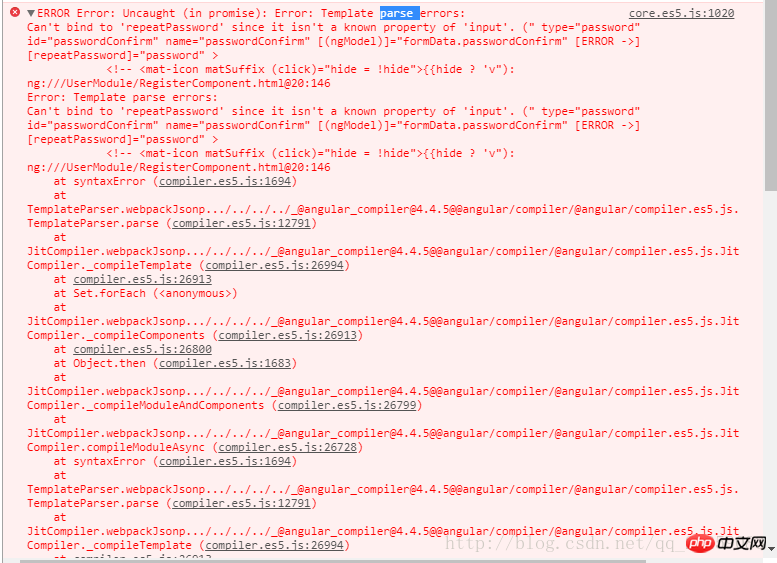
出现上图错误是因为创建指令时使用:ng g directive repeatPassword
命令,自动添加了前缀app

LOVESTUdio多校园网络店铺
下载
主要更新介绍: 完美整合Discuz!论坛,实现一站式登陆、退出、注册; 同步所有会员资料; 新增购物车功能,商品购买更加方便、快捷; 新增部分快捷菜单,网站访问更加方便; 限制首页商品、店铺标题显示长度; 修正会员后台管理不能更改密码的错误; 完善商品显示页面所有功能链接; 修正后台标签管理部分错误; 修正前台学校列表不按后台顺序显示的错误; 修正搜索功能中学校名称过长导致显示紊乱的现象; 修正
@Directive({
selector: '[appRepeatPassword]',
providers: [{provide: NG_VALIDATORS,
useExisting: RepeatPasswordDirective,
multi: true}]
})
改为repeatPassword即可 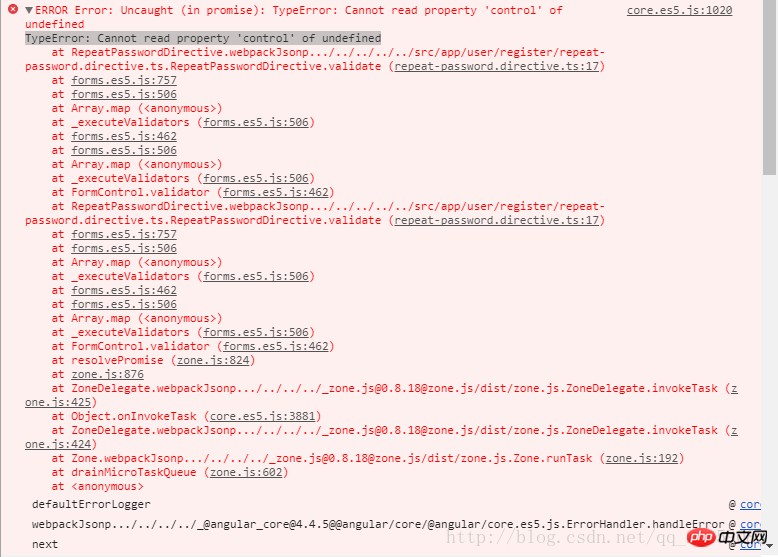
出现上图错误是由于
使用的字段是password,(不知道怎么描述)却是#password1。
改为#password即可




