



这次给大家带来springmvc+angularjs应如何使用,springmvc+angularjs使用的注意事项有哪些,下面就是实战案例,一起来看一下。
前端框架分段繁杂,框架本身也是日新月异,但是不免还是有很多好的框架,例如jQuery,但是jQuery本身的很多类库有比较杂乱,AngularJs和jQuery都作为前端框架,都有自己适合的场景,本文主要讲解AngularJs和SpringMvc的整合,代码来自于GitHub,自己下载下来看了一下,写点自己对于整合的理解。
目录
1.为什么使用AngularJs
2.SpringMvc和AngularJs整合使用
3.总结
一、为什么要使用AngulaJs
AngularJS通过为开发者呈现一个更高层次的抽象来简化应用的开发。如同其他的抽象技术一样,这也会损失一部分灵活性。换句话说,并不是所有的应用都适合用AngularJS来做。AngularJS主要考虑的是构建CRUD应用。幸运的是,至少90%的WEB应用都是CRUD应用。
二、SpringMvc和AngularJs整合使用
项目结构
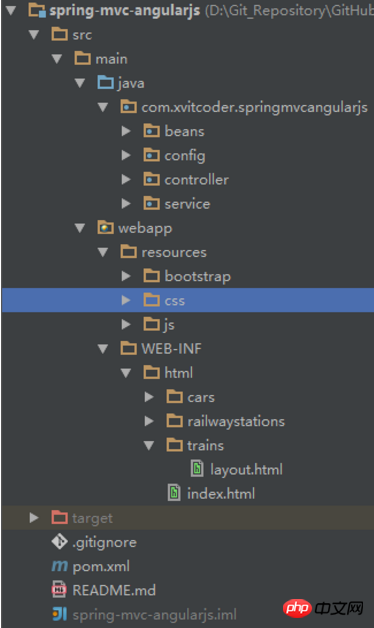
使用JavaConfig配置Spring
使用thymeleaf作为模板代替JSP
使用AngularJs
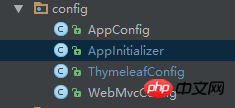
使用JavaConfig配置Spring
public class AppInitializer implements WebApplicationInitializer {
        public void onStartup(ServletContext servletContext) throws ServletException {
        AnnotationConfigWebApplicationContext rootContext = new AnnotationConfigWebApplicationContext();
        rootContext.register(AppConfig.class);
        servletContext.addListener(new ContextLoaderListener(rootContext));
        AnnotationConfigWebApplicationContext dispatcherContext = new AnnotationConfigWebApplicationContext();
        dispatcherContext.register(WebMvcConfig.class);
 ServletRegistration.Dynamic dispatcher = servletContext.addServlet("dispatcher", new DispatcherServlet(dispatcherContext));
        dispatcher.setLoadOnStartup(1);
        dispatcher.addMapping("/");
    }
}
这个配置类是用来代替web.xml文件的,主要是注册监听器,Web的相关配置
包含了AppConfig和WebMvcConfig两个类
@Configuration@EnableWebMvc@ComponentScan(basePackages = "com.xvitcoder.springmvcangularjs")@Import({ThymeleafConfig.class})public class WebMvcConfig extends WebMvcConfigurerAdapter {    @Override
    public void configureDefaultServletHandling(DefaultServletHandlerConfigurer configurer) {
        configurer.enable();
    }    @Override
    public void addResourceHandlers(final ResourceHandlerRegistry registry) {
        registry.addResourceHandler("/resources/**").addResourceLocations("/resources/");
    }    @Override
    public void configureMessageConverters(List<HttpMessageConverter<?>> converters) {
        converters.add(new MappingJackson2HttpMessageConverter());        super.configureMessageConverters(converters);
    }
}
继承了WebMvcConfigurerAdapter
重写了三个方法,分别配置了Handler,资源拦截和Converter

@Configurationpublic class ThymeleafConfig {    @Bean
    public ServletContextTemplateResolver templateResolver() {
        ServletContextTemplateResolver resolver = new ServletContextTemplateResolver();
        resolver.setPrefix("/WEB-INF/html/");
        resolver.setSuffix(".html");
        resolver.setTemplateMode("HTML5");
        resolver.setCacheable(false);        return resolver;
    }    @Bean
    public SpringTemplateEngine templateEngine() {
        SpringTemplateEngine engine = new SpringTemplateEngine();
        engine.setTemplateResolver(templateResolver());        return engine;
    }    @Bean
    public ThymeleafViewResolver thymeleafViewResolver() {
        ThymeleafViewResolver resolver = new ThymeleafViewResolver();
        resolver.setTemplateEngine(templateEngine());        return resolver;
    }
}
这里配置Thymeleaf模板
AngularJs的使用
项目结构
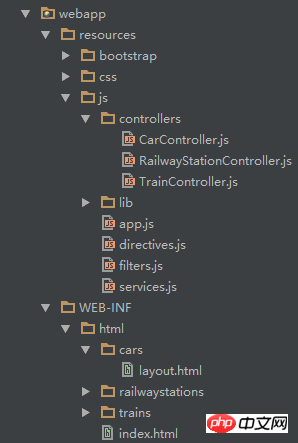
重点解释下这里面的东西,在IndexController中默认会将页面跳转到index.html页面,index.html页面时这样的:
<!doctype html><html lang="en" ng-app="AngularSpringApp"><head>
    <meta charset="utf-8"/>
    <title>Service App</title>
    <link rel="stylesheet" href="resources/css/app.css"/>
    <link rel="stylesheet" href="resources/bootstrap/css/bootstrap.min.css" /></head><body><div id="wrapper">
    <ul class="menu">
        <li><a href="#/cars">Cars</a></li>
        <li><a href="#/trains">Trains</a></li>
        <li><a href="#/railwaystations">Railway Station</a></li>
    </ul>
    <hr class="" />
    <div ng-view=""></div></div><script src="resources/js/lib/angular/angular.js"></script><script src="resources/js/app.js"></script><script src="resources/js/services.js"></script><script src="resources/js/controllers/RailwayStationController.js"></script><script src="resources/js/controllers/CarController.js"></script><script src="resources/js/controllers/TrainController.js"></script><script src="resources/js/filters.js"></script><script src="resources/js/directives.js"></script></body>
这里引入了很多js文件
注意<html ng-app="AngularSpringApp">
这是AngularJs的执行流程:从index.html开始,找到app.js文件,从app.js文件中根据路径找到相应的controller.js文件,controller.js文件将从后台获得数据返回到相应的html页面进行展示
模块是angularJs很重要的概念
var AngularSpringApp = {};
var App = angular.module('AngularSpringApp', ['AngularSpringApp.filters', 'AngularSpringApp.services', 'AngularSpringApp.directives']);// Declare app level module which depends on filters, and servicesApp.config(['$routeProvider', function ($routeProvider) {
    $routeProvider.when('/cars', {        templateUrl: 'cars/layout',        controller: CarController
    });
    $routeProvider.when('/trains', {        templateUrl: 'trains/layout',        controller: TrainController
    });
    $routeProvider.when('/railwaystations', {        templateUrl: 'railwaystations/layout',        controller: RailwayStationController
    });
    $routeProvider.otherwise({redirectTo: '/cars'});
}]);
根据路径找到相应的controller和template模板
var CarController = function($scope, $http) {
    $scope.fetchCarsList = function() {
        $http.get('cars/carlist.json').success(function(carList){
            $scope.cars = carList;
        });
    };
    $scope.addNewCar = function(newCar) {
        $http.post('cars/addCar/' + newCar).success(function() {
            $scope.fetchCarsList();
        });
        $scope.carName = '';
    };
    $scope.removeCar = function(car) {
        $http.delete('cars/removeCar/' + car).success(function() {
            $scope.fetchCarsList();
        });
    };
    $scope.removeAllCars = function() {
        $http.delete('cars/removeAllCars').success(function() {
            $scope.fetchCarsList();
        });
    };
    $scope.fetchCarsList();
};
使用$http服务向后台发送ajax请求,获取数据
<div class="input-append">
    <input style="width:358px; margin-left: 100px;" class="span2" type="text" ng-model="carName" required="required" min="1" />
    <button class="btn btn-primary" ng-disabled="!carName" ng-click="addNewCar(carName)">Add Car</button></div><h3 style="margin-left:100px;">Car List</h3><div class="alert alert-info" style="width:400px;margin-left:100px;" ng-show="cars.length == 0">
    No cars found</div><table class="table table-bordered table-striped" style="width:450px; margin-left: 100px;" ng-show="cars.length > 0">
    <thead>
        <tr>
            <th style="text-align: center; width: 25px;">Action</th>
            <th style="text-align: center;">Car Name</th>
        </tr>
    </thead>
    <tbody>
        <tr ng-repeat="car in cars">
            <td  style="width:70px;text-align:center;"><button class="btn btn-mini btn-danger" ng-click="removeCar(car)">Remove</button></td>
            <td>{{car}}</td>
        </tr>
    </tbody></table><button style="margin-left:100px;" class="btn btn-danger"  ng-show="cars.length > 1" ng-click="removeAllCars()">Remove All Cars</button>
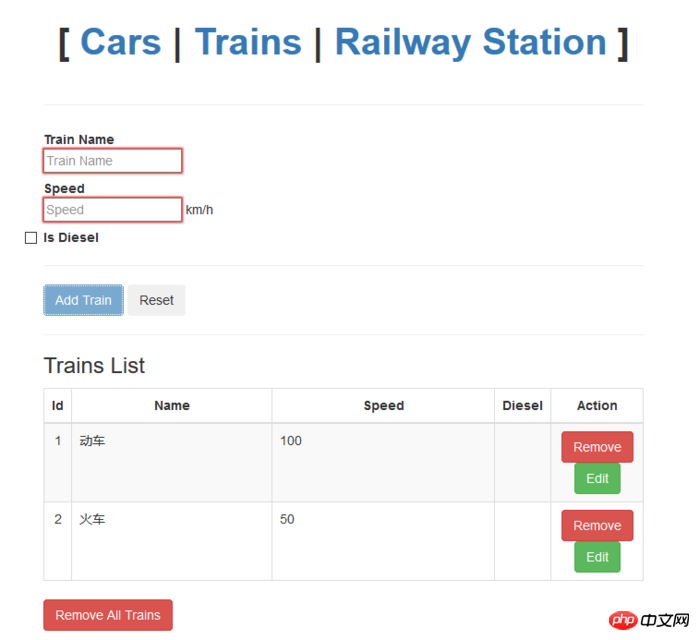
使用相应的标签接收数据和控制显示等操作
三、 总结
界面有点朴素,但是无法掩饰AngularJs带来的这种方便快捷的操作,我们不需要在过度关注DOM操作,这种从前端引入后端的思想也是一次创新,目前我也只是懂点皮毛,很多理念和用法也不会使用,这篇文章算是给AngularJs开个头。
相信看了这些案例你已经掌握了方法,更多精彩请关注php中文网其它相关文章!
相关阅读:




