本文主要和大家分享js绘制抛物线代码,我们先和大大家展示效果图,具体方法大家来一起看代码吧,希望能帮助到大家。
效果图: 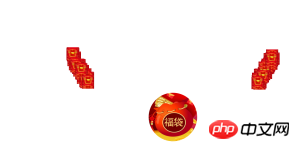
<!DOCTYPE HTML><html><head>
    <meta charset="utf-8">
    <title>抛物线运动效果</title>
    <style type="text/css">
        body {            overflow: hidden;        }
        .boll {            width: 50px;            height: 50px;            position: absolute;            top: 55%;            left: 55%;            background: url("redpack_show.jpg");            background-size: contain;        }
        .red-bag {            position: absolute;            left: 50%;            top:50%;            width: 200px;            height: 200px;            border-radius: 50%;            background: url("red_bag.png") no-repeat;            background-size: contain;            z-index:10;        }
    </style>
    <script type="text/javascript" src="jquery-2.1.4.js"></script>
    <script type="text/javascript" src="parabola.js"></script></head><body><p class="btns" style="margin-top:20px">
    <a href="http://www.css88.com/archives/5355" target="_blank">回到JavaScript实现的抛物线运动效果</a></p><p class="btns" style="margin-top:20px">
    <a href="#" class="btnA btn-danger" id="run" rel="popover" title="A Title" >run</a></p><p class="red-bag"></p><p id="target" class="target"></p><!--<p class="boll boll1"></p>--><script type="text/javascript">
    for(let i=1;i<80;i++){
        $("body").append(`<p class='boll boll${i}'></p>`);
        let bool = "bool"+i;
        createSingle(bool,i);
//        console.log(i)
    }
    function createSingle(bool,i) {
        let left = i%2 == 0 ? (-getRandom(500,600)):(getRandom(500,600));
        let top = i%2 == 0? (getRandom(200,250)):(getRandom(200,250));
//        console.log(getRandom(0.005,0.01));
        bool = new Parabola({
            el: ".boll"+i,
            offset: [left, top],
            curvature: 0.005,
            duration: 3000,
            callback:function(){
//                alert("完成后回调")
            },
            stepCallback:function(x,y){
//                console.log(x,y);
//                $("<p>").appendTo("body").css({
//                    "position": "absolute",
//                    "top": this.elOriginalTop + y,
//                    "left":this.elOriginalLeft + x,
//                    "background-color":"rgba(244,21,50,.5)",
//                    "width":"2px",
//                    "height":"2px",
//                    "border-radius": "2px"
//                });
            }
        });
        $("#run").click(function (event) {
            event.preventDefault();
            bool.start();
        });
    }
    function getRandom(min,max) {
        return Math.random()*(max-min)+min;
    }

    //    $("#reset").click(function (event) {
    //        event.preventDefault();
    //        bool.reset()
    //    });
    //    $("#run").click(function (event) {
    //        event.preventDefault();
    //        bool.start();
    //    });
    //    $("#stop").click(function (event) {
    //        event.preventDefault();
    //        bool.stop();
    //    });
    //    $("#setOptions").click(function (event) {
    //        event.preventDefault();
    //        bool.setOptions({
    //            targetEl: $("#target"),
    //            curvature: 0.001,
    //            duration: 1000
    //        });
    //    });</script></body></html>
(function () { var _$ = function (_this) { return _this.constructor == jQuery ? _this : $(_this);
};// 获取当前时间
function now() { return +new Date();
}// 转化为整数
function toInteger(text) {
text = parseInt(text); return isFinite(text) ? text : 0;
} var Parabola = function (options) { this.initialize(options);
};
Parabola.prototype = {
constructor: Parabola, /**
* 初始化
* @classDescription 初始化
* @param {Object} options 插件配置 .
*/
initialize: function (options) { this.options = this.options || this.getOptions(options); var ops = this.options; if (!this.options.el) { return;
} this.$el = _$(ops.el); this.timerId = null; this.elOriginalLeft = toInteger(this.$el.css("left")); this.elOriginalTop = toInteger(this.$el.css("top")); // this.driftX X轴的偏移总量
//this.driftY Y轴的偏移总量
if (ops.targetEl) { this.driftX = toInteger(_$(ops.targetEl).css("left")) - this.elOriginalLeft; this.driftY = toInteger(_$(ops.targetEl).css("top")) - this.elOriginalTop;
} else { this.driftX = ops.offset[0]; this.driftY = ops.offset[1];
} this.duration = ops.duration; // 处理公式常量
this.curvature = ops.curvature; // 根据两点坐标以及曲率确定运动曲线函数(也就是确定a, b的值)
//a=this.curvature
/* 公式: y = a*x*x + b*x + c;
*/
/*
* 因为经过(0, 0), 因此c = 0
* 于是:
* y = a * x*x + b*x;
* y1 = a * x1*x1 + b*x1;
* y2 = a * x2*x2 + b*x2;
* 利用第二个坐标:
* b = (y2+ a*x2*x2) / x2
*/
// 于是
this.b = ( this.driftY - this.curvature * this.driftX * this.driftX ) / this.driftX; //自动开始
if (ops.autostart) { this.start();
}
}, /**
* 初始化 配置参数 返回参数MAP
* @param {Object} options 插件配置 .
* @return {Object} 配置参数
*/
getOptions: function (options) { if (typeof options !== "object") {
options = {};
}
options = $.extend({}, defaultSetting, _$(options.el).data(), (this.options || {}), options); return options;
}, /**
* 定位
* @param {Number} x x坐标 .
* @param {Object} y y坐标 .
* @return {Object} this
*/
domove: function (x, y) { this.$el.css({
position: "absolute",
left: this.elOriginalLeft + x,
top: this.elOriginalTop + y
}); return this;
}, /**
* 每一步执行
* @param {Data} now 当前时间 .
* @return {Object} this
*/
step: function (now) { var ops = this.options; var x, y; if (now > this.end) { // 运行结束
x = this.driftX;
y = this.driftY; this.domove(x, y); this.stop(); if (typeof ops.callback === 'function') {
ops.callback.call(this);
}
} else { //x 每一步的X轴的位置
x = this.driftX * ((now - this.begin) / this.duration); //每一步的Y轴的位置y = a*x*x + b*x + c; c==0;
y = this.curvature * x * x + this.b * x; this.domove(x, y); if (typeof ops.stepCallback === 'function') {
ops.stepCallback.call(this,x,y);
}
} return this;
}, /**
* 设置options
* @param {Object} options 当前时间 .
*/
setOptions: function (options) { this.reset(); if (typeof options !== "object") {
options = {};
} this.options = $.extend(this.options,options); this.initialize(this.options); return this;
}, /**
* 开始
*/
start: function () { var self = this; // 设置起止时间
this.begin = now(); this.end = this.begin + this.duration; if (this.driftX === 0 && this.driftY === 0) { // 原地踏步就别浪费性能了
return;
} /*timers.push(this);
Timer.start();*/
if (!!this.timerId) {
clearInterval(this.timerId); this.stop();
} this.timerId = setInterval(function () { var t = now();
self.step(t);
}, 13); return this;
}, /**
* 重置
*/
reset: function (x, y) { this.stop();
x = x ? x : 0;
y = y ? y : 0; this.domove(x, y); return this;
}, /**
* 停止
*/
stop: function () { if (!!this.timerId) {
clearInterval(this.timerId);
} return this;
}
}; var defaultSetting = {
el: null, //偏移位置
offset: [0, 0], //终点元素,这时就会自动获取该元素的left、top,设置了这个参数,offset将失效
targetEl: null, //运动的时间,默认500毫秒
duration: 500, //抛物线曲率,就是弯曲的程度,越接近于0越像直线,默认0.001
curvature: 0.001, //运动后执行的回调函数
callback: null, // 是否自动开始,默认为false
autostart: false, //运动过程中执行的回调函数
stepCallback: null
};
window.Parabola = Parabola;
})();相关推荐: