



在SVG发展到今天,已经在互联网上进行了各式各样的运用,当然也就包括进度条以及进度球的制作,制作这个类型的动画交互该如何制作呢?接下来就带大家来揭秘吧!
1. 兴趣引导 > 最终效果 - SVG进度球:
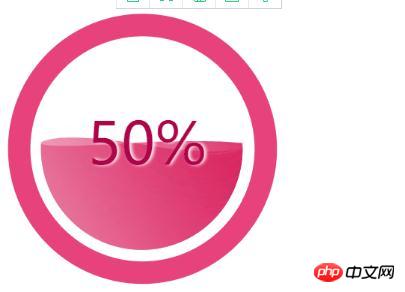
2. html(包含svg)结构
<!DOCTYPE html>
<html>
<head>
	<meta charset="utf-8">
	<title></title>
	<style type="text/css">
		.perText{font-size:58pt;font-family:Arial Rounded MT Bold;fill:#AD054A;text-anchor:middle;dominant-baseline: middle;text-shadow: 3px 0 6px #fff;transform:translate3d(6px,0,0);}
	</style>
</head>
<body>
<svg xmlns="http://www.w3.org/2000/svg" x="0px" y="0px" width="384.415px" height="383.232px" viewBox="0 0 384.415 383.232" >
	<circle style="fill:#E8427D;" cx="192.668" cy="195.399" r="180"/>
	<circle style="fill:#FFFFFF;" cx="192.668" cy="195.399" r="150"/>
	<circle style="display:none;fill:none;stroke:#000000;stroke-miterlimit:10;" cx="796.667" cy="-58.434" r="140.123"/>
	<path style="fill:none;" d="M656.667,8386.899"/>
	<path style="fill:none;" d="M656.667-7996.101"/>
	<g>

		<!-- 定义变量 -->
		<defs>
			<circle id="SVGID_1_" cx="191.668" cy="195.069" r="135" fill="red"/>
		</defs>
		<clipPath id="SVGID_2_">
			<use xlink:href="#SVGID_1_"  style="overflow:visible;" cx="191.668" cy="295.069" />
		</clipPath>
		<linearGradient id="SVGID_3_" gradientUnits="userSpaceOnUse" x1="431.4199" y1="221.6279" x2="-31.4133" y2="488.8449">
			<stop  offset="0" style="stop-color:#DA1654"/>
			<stop  offset="0.6452" style="stop-color:#E1457C;stop-opacity:0.4731"/>
			<stop  offset="1" style="stop-color:#F7F8F8;stop-opacity:0.3"/>
		</linearGradient>
		<linearGradient id="SVGID_4_" gradientUnits="userSpaceOnUse" x1="462.0762" y1="286.5215" x2="-63.9186" y2="590.2048">
			<stop  offset="0" style="stop-color:#F7F8F8;stop-opacity:0.3"/>
			<stop  offset="0.5" style="stop-color:#E1457C;stop-opacity:0.4731"/>
			<stop  offset="0.871" style="stop-color:#DA1654"/>
		</linearGradient>

		<!-- clip-path:url(#SVGID_2_) -->
		<g class="group" id='pathGroup' style="clip-path:url(#SVGID_2_)">
			<!--<path class="bgPath bgPath_01" style="fill:url(#SVGID_3_);" id="bgPathOne">
					<animate
						dur="5s"
						attributeName="d"
						attributeType="XML"
						repeatCount="indefinite"
						values=""
						calcMode="linear"
						keyTimes="0;.6;1"></animate>
			</path> -->
			<path class="bgPath bgPath_02" style="fill:url(#SVGID_3_);" d="">
				<animate
						dur="5s"
						attributeName="d"
						attributeType="XML"
						repeatCount="indefinite"
						values=""
						calcMode="linear"
						keyTimes="0;.3;1"></animate>
			</path>-->
		</g>

		<text x='192.668' y='195.399' class="perText">50%</text>
	</g>
</svg>
</body>
</html>
3. javascript计算path路径,控制svg动画
class svgPercent
{

	constructor({y1,y2,group,text})
	{
		this.y1 = y1 ? y1 : 0;
		this.y2 = y2 ? y2 : 0;
		this.group = group;
		this.xmlns = 'http://www.w3.org/2000/svg';
		this.textBox = text;
		this.currentPercentText = '0%';

		//初始 进度球
		this.init();
	}

	init()
	{
		//1.获取路径数据
		this.getSvgPathData(this.y1,this.y2);

		//2.根据数据绘制路径
		this.createPath();

		//3.设置百分比
		this.setPercentText();

		//4.模拟进度增长的情况
		this.changePathShape();

	}

	initChangeShape()
	{
		//1.获取路径数据
		this.getSvgPathData(this.y1,this.y2);

		//2. 设置路径形状改变
		this.setPaths();
	}

	//获取路径数据
	getSvgPathData(y,y2)
	{
		this.d1=`M327.898,${225.235+y}c3.086,${-11.496+y},4.74,${-11.496+y},4.74,${-36.167+y}c0,${0+y},-31.712,${-28.628+y},-140.67,${-2+y}c-120.71,${29.5+y},-125.21,${11+y}-140.67,${0.35+y}c0.032,${13.105+y},1.862,${25.787+y},5.247,${37.817+y}h-90.043 v390 h467 v-390 H327.898 z`;

		this.a1=`M 327.898,${225.235+y}c 3.086,${-11.496+y},4.74,${-23.611+y},4.74,${-36.167+y}c 0,${0+y},-23.971,${54.165+y},-140.67,${-2+y}c-111.97,${-53.888+y}-135.301,${-9.835+y}-140.67,${0.35+y}c 0.032,${13.105+y},1.862,${25.787+y},5.247,${37.817+y}h-90.043 v390 h 467 v-390 H 327.898 z`;

		this.d2 = `M 327.898,${237.031+y2}c 3.086,${-14.234+y2},4.74,${-29.236+y2},4.74,${-44.785+y2}c 0,${0+y2}-30.305,${36.653+y2}-140.67,${-2.477+y2}c-118.866,${-42.144+y2}-134.529,${-9.191+y2}-140.67,${0.434+y2}c 0.032,${16.229+y2},1.862,${31.933+y2},5.247,${46.828+y2}h-90.043 v 405.865 h 467 V ${237.031+y2} H 327.898 z`;

		this.a2 = `M 327.898,${237.031+y2}c 3.086,${-14.234+y2},4.74,${-29.236+y2},4.74,${-44.785+y2}c 0,${0+y2}-56.638,${-36.347+y2}-140.67,${-2.477+y2}C 74.997,${236.916+y2},63,${199.232+y2},51.299,${190.203+y2}c 0.032,${16.229+y2},1.862,${31.933+y2},5.247,${46.828+y2}h-90.043 v 405.865 h 467 V ${237.031+y2} H 327.898 z`;
	}

	//创建path路径
	createPath(group)
	{
		this.pathOne = document.createElementNS(this.xmlns,'path');
		this.animate = document.createElementNS(this.xmlns,'animate');
		this.pathOne.setAttribute('style','fill:url(#SVGID_3_)');
		this.pathOne.setAttribute('d',this.d1);
		this.animate.setAttribute('dur','5s');
		this.animate.setAttribute('attributeName','d');
		this.animate.setAttribute('attributeType','XML');
		this.animate.setAttribute('repeatCount','indefinite');
		this.animate.setAttribute('keyTimes','0;0.55;1');
		this.animate.setAttribute('values',this.d1+';'+this.a1+';'+this.d1);
		this.pathOne.appendChild(this.animate);
		this.group.appendChild(this.pathOne);

		this.pathTwo = document.createElementNS(this.xmlns,'path');
		this.animate2 = document.createElementNS(this.xmlns,'animate');
		this.pathTwo.setAttribute('style','fill:url(#SVGID_3_)');
		this.pathTwo.setAttribute('d',this.d2);
		this.animate2.setAttribute('dur','5s');
		this.animate2.setAttribute('attributeName','d');
		this.animate2.setAttribute('attributeType','XML');
		this.animate2.setAttribute('repeatCount','indefinite');
		this.animate2.setAttribute('keyTimes','0;0.55;1');
		this.animate2.setAttribute('values',this.d2+';'+this.a2+';'+this.d2);
		this.pathTwo.appendChild(this.animate2);
		this.group.appendChild(this.pathTwo);
	}

	//设置path路径
	setPaths()
	{
		this.pathOne.setAttribute('d',this.d1);
		this.pathTwo.setAttribute('d',this.d2);
		this.animate.setAttribute('values',this.d1+';'+this.a1+';'+this.d1);
		this.animate2.setAttribute('values',this.d2+';'+this.a2+';'+this.d2);
	}

	//设置百分比文字
	setPercentText(val)
	{
		let vals = val ? val : this.currentPercentText;
		this.textBox.textContent = vals;
	}

	//改变路径形状
	changePathShape()
	{
		let dis = 0.3;
		let percent = '';
		let p = '';
		let start = this.y1;
		let end = -50;

		let This = this;
		function step()
		{
			This.y1 -= dis;
			This.y2 -= dis;

			This.initChangeShape();
			percent = parseInt((Math.abs(This.y1 - start) / Math.abs(end-start))*100);
			p = percent + '%';
			This.setPercentText(p);

			if(percent < 50){
				requestAnimationFrame(step);
			}
		}

		requestAnimationFrame(step);
	}
}

// 初始化配置参数调用
let obj = {
	y1: 50,
	y2: 50,
	group: document.querySelector('#pathGroup'),
	text: document.querySelector('.perText')
}

new svgPercent(obj);
4. 总结:
(1) 通过animate控制path的d属性 (注意,有坑,values至少三组值 values="原来的值 ; 要变化到的值 ; 原来的值")
(2) 通过js控制用到了path的d属性(注意,有坑,拼接字符串的时候,末尾不能有分号,会报错;在拼接values值的时候 需要单独加分号)

立即学习“Java免费学习笔记(深入)”;
(3)clipPath的标签的运用,是这个案例实现滚动波纹从下到上的一个核心 。





