



这次给大家带来jQuery+Ajax判断输入的验证码是否通过,jQuery+Ajax判断输入验证码是否通过的注意事项有哪些,下面就是实战案例,一起来看一下。
废话不多说了,直接给大家贴代码了,具体代码如下所示:
<script src="js/j.js"></script>
<script>
$(document).ready(function(e) {
 $('#yes').hide();
 $('#no').hide();
  $('input[name=gcode]').keyup(function(){
   if($(this).val().length==4){
  $.post('gbook.php',{cc:$('input[name=gcode]').val()},function(msg){

   if(msg=='yes'){
    $('#no').hide();
    $('#yes').show();
   }else{
    $('#yes').hide();
    $("#no").show();
   }
  });
  }
 });
});
</script>
首先引入jquery
.sl-error-verifycode {
 background-image: url("images/icons.png");
 background-position: -26px 0;
 background-repeat: no-repeat;
 display: block;
 font-size: 18px;
 height: 23px;
 line-height: 20px;
 margin-left: 180px;
 margin-top: -25px;
 position: relative;
 text-align: center;
 width: 20px;
 z-index: 2;
}
.sl-correct-verifycode {
 background-image: url("images/icons.png");
 background-position: -50px 0;
 background-repeat: no-repeat;
 display: block;
 font-size: 18px;
 height: 23px;
 line-height: 20px;
 margin-left: 180px;
 margin-top: -25px;
 position: relative;
 text-align: center;
 width: 20px;
 z-index: 2;
}
验证码的html 代码
<tr>
  <td height="40" align="right">验证码:</td>
  <td height="40"><span class="addred">*</span></td>
  <td height="40">
  <input type="text" name="gcode" id="textfield7" class="txtlist">
<span id="yes" class="sl-correct-verifycode"></span><span id="no" class="sl-error-verifycode"></span>
  <img style="float:right; margin-top:-25px; margin-right:300px;" align="middle" src="inc/cc.php" onClick="this.src='inc/cc.php?'+new Date" title="点击换一张图片" width="100px"></td>
 </tr>
gbook.php
<?php
session_start();
if(isset($_POST['cc'])){
 $cc = strtolower($_POST['cc']);
 $ss = strtolower($_SESSION['code']);
 if($cc==$ss){
   echo "yes";
 }else{
   echo "no";
 }
}
注意图片一定要引入
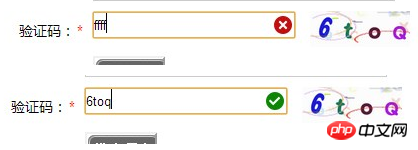
相信看了本文案例你已经掌握了方法,更多精彩请关注php中文网其它相关文章!
推荐阅读:





