0

0

php权限管理

墨辰丷

墨辰丷

发布时间:2018-05-15 09:42:09

|

10312人浏览过

|

来源于php中文网

原创

本篇文章主要介绍php中的权限管理,感兴趣的朋友了解下,希望可以帮到大家。

php-人员权限管理(RBAC)

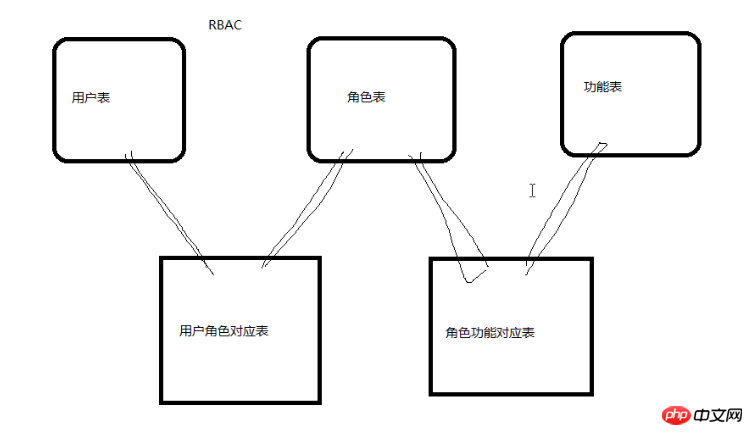
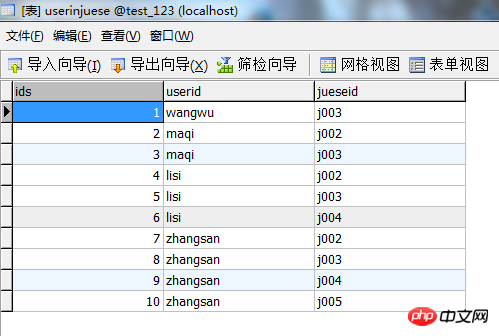
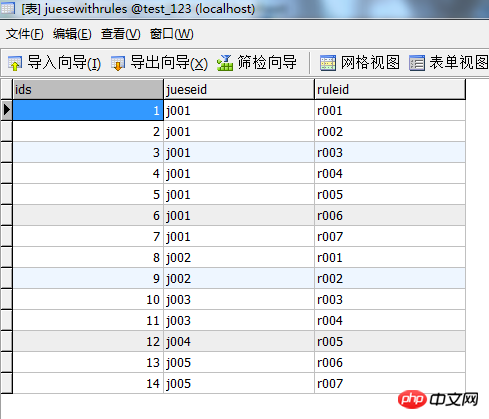
权限管理可以想做vip的功能,普通用户和vip用户的功能是不一样的,大致会用到五张表:用户表、角色表、功能表,还有他们之间互相关联的表:用户与角色表、角色与功能表

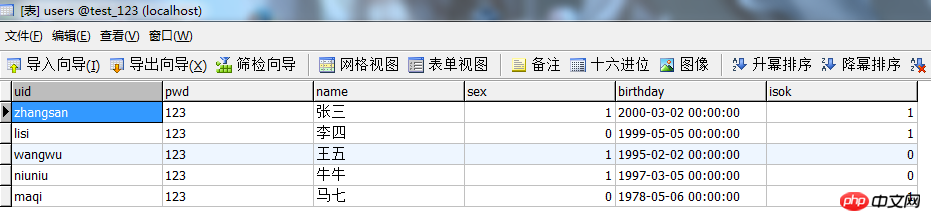
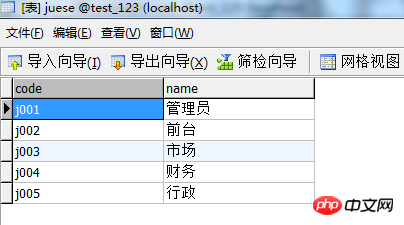
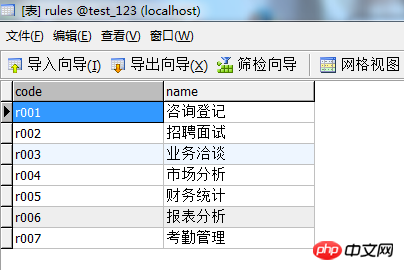
我用到的五张表如下:


一.首先写的是管理员页面

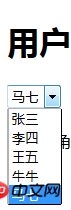
1.用下拉列表显示用户名


1

2

3

4

5

6

7

8

9

10

11

12

13

14


<p></p>

    <select id="</code"><code class="php string" style="margin:0px!important; padding:0px!important; background:none!important; border:0px!important; bottom:auto!important; float:none!important; height:auto!important; left:auto!important; line-height:1.8em!important; outline:0px!important; overflow:visible!important; position:static!important; right:auto!important; top:auto!important; vertical-align:baseline!important; width:auto!important; font-family:Consolas," bitstream vera sans mono new min-height:auto color:blue>"user">

    <?php

    require"../DBDA.class.php";

    $db new DBDA();

    $sql "select * from users";

    $arr $db->query($sql,1);

    foreach($arr as $v)

    {

        echo"<option value="'{$v[0]}'">{$v[2]}</option>";

    }

    ?>


立即学习PHP免费学习笔记(深入)”;


2.因为上面已经造了新对象,所以在显示角色名时直接从SQL语句开始写


1

2

3

4

5

6

7

8

9

10

11


<p>请选择角色:</p><div class="aritcle_card flexRow"> <div class="artcardd flexRow"> <a class="aritcle_card_img" href="/xiazai/code/11227" title="商城购物系统"><img src="https://img.php.cn/upload/webcode/000/000/010/176541481284803.png" alt="商城购物系统" onerror="this.onerror='';this.src='/static/lhimages/moren/morentu.png'" ></a> <div class="aritcle_card_info flexColumn"> <a href="/xiazai/code/11227" title="商城购物系统">商城购物系统</a> <p>商城购物系统是一个以php+MySQL进行开发的可塑性极强的电子商品平台;商城购物系统可自定义商品栏目内容,包含分销功能,分销管理、分销订单提成完整功能,商品加购物车、商品支付、商品发货等一系列流程,包括pc端和手机H5端。</p> </div> <a href="/xiazai/code/11227" title="商城购物系统" class="aritcle_card_btn flexRow flexcenter"><b></b><span>下载</span> </a> </div> </div>

    <?php

    $sql "select * from juese";

    $arr $db->query($sql,1);

    foreach($arr as $v)

    {

        echo "<input type="'checkbox'" class="'ck'" value="'{$v[0]}'/">{$v[1]}";

    }

    ?>

<br>

立即学习PHP免费学习笔记(深入)”;


3.为了修改权限加一个确认保存按钮


1


<input type="</code"><code class="php string" style="margin:0px!important; padding:0px!important; background:none!important; border:0px!important; bottom:auto!important; float:none!important; height:auto!important; left:auto!important; line-height:1.8em!important; outline:0px!important; overflow:visible!important; position:static!important; right:auto!important; top:auto!important; vertical-align:baseline!important; width:auto!important; font-family:Consolas," bitstream vera sans mono new min-height:auto color:blue>"button" value="保存" id="baocun" />

立即学习PHP免费学习笔记(深入)”;


4.这样,再考虑怎么让数据库中用户本有的角色显示出来,那就是要用到下拉列表和复选框的值了

可以把它写入方法里,然后调用这个方法


1

2

3

4

5

6

7

8

9

10

11

12

13

14

15

16

17

18

19

20

21

22

23

24


function Xuan()

{

    var uid = $("#user").val();

    $.ajax({

            url:"chuli.php",

            data:{uid:uid},

            type:"POST",

            dataType:"TEXT",

            success: function(data){

                    var js = data.trim().split("|");

                    var ck = $(".ck");

                    ck.prop("checked",false);

                    for(var i=0;i<ck.length></ck.length>

                    {

                        var v = ck.eq(i).val();

                        if(js.indexOf(v)>=0)

                        {

                            ck.eq(i).prop("checked",true);

                        }

                    }

                }


        })

}

立即学习PHP免费学习笔记(深入)”;

 5.各项值的处理页面


1

2

3

4

5

6


<?php

require"../DBDA.class.php";

$db new DBDA();

$uid $_POST["uid"];

$sql "select jueseid from userinjuese where userid='{$uid}'";

echo $db->strquery($sql);

立即学习PHP免费学习笔记(深入)”;

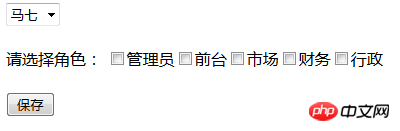
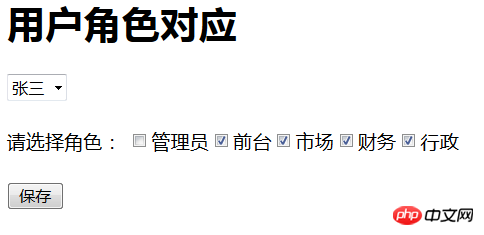
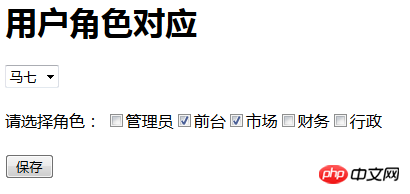
效果如下:

6.最后就是保存修改后的值了,可以直接用全部删除在重新写入的方法来进行值的选择;对保存按钮添加单击事件


1

2

3

4

5

6

7

8

9

10

11

12

13

14

15

16

17

18

19

20

21

22

23

24

25

26

27

28

29


Xuan();


$("#user").change(function(){

        Xuan();

    })

$("#baocun").click(function(){

        var uid = $("#user").val();

        var str = "";

        var ck = $(".ck");

        for(var i=0;i<ck.length></ck.length>

        {

            if(ck.eq(i).prop("checked"))

            {

                str = str + ck.eq(i).val()+",";

            }

        }


    str = str.substr(0,str.length-1);


    $.ajax({

            url:"add.php",

            data:{uid:uid,js:str},

            type:"POST",

            dataType:"TEXT",

            success: function(data){

                    alert("保存成功!");

                }

        })

    })

立即学习PHP免费学习笔记(深入)”;

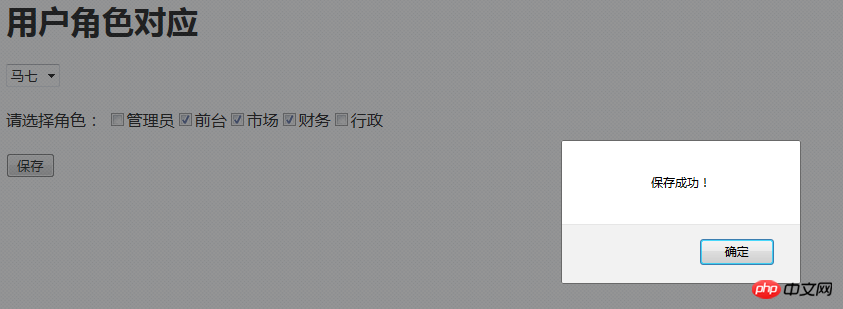
 7.保存的处理页面


1

2

3

4

5

6

7

8

9

10

11

12

13

14

15

16

17

18


<?php

require "../DBDA.class.php";

$db new DBDA();

$uid $_POST["uid"];

$js $_POST["js"];


//清空原有角色

$sql "delete from userinjuese where userid='{$uid}'";

$db->query($sql);


//添加选中的角色

$ajs explode(",",$js);


foreach($ajs as $v)

{

    $sql "insert into userinjuese values('','{$uid}','{$v}')";

    $db->query($sql);

}

立即学习PHP免费学习笔记(深入)”;

 效果如下:


下面代码用来copy用,注意AJAX需要引用Jquery

1.guanli.php


1

2

3

4

5

6

7

8

9

10

11

12

13

14

15

16

17

18

19

20

21

22

23

24

25

26

27

28

29

30

31

32

33

34

35

36

37

38

39

40

41

42

43

44

45

46

47

48

49

50

51

52

53

54

55

56

57

58

59

60

61

62

63

64

65

66

67

68

69

70

71

72

73

74

75

76

77

78

79

80

81

82

83

84

85

86

87

88

89

90

91

92

93

94

95

96

97


/code><code class="php plain" style="margin:0px!important; padding:0px!important; background:none!important; border:0px!important; bottom:auto!important; float:none!important; height:auto!important; left:auto!important; line-height:1.8em!important; outline:0px!important; overflow:visible!important; position:static!important; right:auto!important; top:auto!important; vertical-align:baseline!important; width:auto!important; font-family:Consolas," bitstream vera sans mono new min-height:auto>>

<code class="php plain" style="margin:0px!important; padding:0px!important; background:none!important; border:0px!important; bottom:auto!important; float:none!important; height:auto!important; left:auto!important; line-height:1.8em!important; outline:0px!important; overflow:visible!important; position:static!important; right:auto!important; top:auto!important; vertical-align:baseline!important; width:auto!important; font-family:Consolas," bitstream vera sans mono new min-height:auto>>

<meta http-equiv="</code"> <code class="php string" style="margin:0px!important; padding:0px!important; background:none!important; border:0px!important; bottom:auto!important; float:none!important; height:auto!important; left:auto!important; line-height:1.8em!important; outline:0px!important; overflow:visible!important; position:static!important; right:auto!important; top:auto!important; vertical-align:baseline!important; width:auto!important; font-family:Consolas," bitstream vera sans mono new min-height:auto color:blue>"Content-Type" content="text/html; charset=utf-8" />

<title>无标题文档</title>

<script src="</code"><code class="php string" style="margin:0px!important; padding:0px!important; background:none!important; border:0px!important; bottom:auto!important; float:none!important; height:auto!important; left:auto!important; line-height:1.8em!important; outline:0px!important; overflow:visible!important; position:static!important; right:auto!important; top:auto!important; vertical-align:baseline!important; width:auto!important; font-family:Consolas,"Bitstream Vera Sans Mono","Courier New",Courier,monospace!important; min-height:auto!important; color:blue!important">"../jquery-3.2.0.min.js"</script>>


<h1>用户角色对应</h1>

<p></p>

    <select id="</code"><code class="php string" style="margin:0px!important; padding:0px!important; background:none!important; border:0px!important; bottom:auto!important; float:none!important; height:auto!important; left:auto!important; line-height:1.8em!important; outline:0px!important; overflow:visible!important; position:static!important; right:auto!important; top:auto!important; vertical-align:baseline!important; width:auto!important; font-family:Consolas," bitstream vera sans mono new min-height:auto color:blue>"user">

    <?php

    require"../DBDA.class.php";

    $db new DBDA();

    $sql "select * from users";

    $arr $db->query($sql,1);

    foreach($arr as $v)

    {

        echo"<option value="'{$v[0]}'">{$v[2]}</option>";

    }

    ?>


<br>

<p>请选择角色:</p>

    <?php

    $sql "select * from juese";

    $arr $db->query($sql,1);

    foreach($arr as $v)

    {

        echo "<input type="'checkbox'" class="'ck'" value="'{$v[0]}'/">{$v[1]}";

    }

    ?>

<br>

<input type="</code"><code class="php string" style="margin:0px!important; padding:0px!important; background:none!important; border:0px!important; bottom:auto!important; float:none!important; height:auto!important; left:auto!important; line-height:1.8em!important; outline:0px!important; overflow:visible!important; position:static!important; right:auto!important; top:auto!important; vertical-align:baseline!important; width:auto!important; font-family:Consolas," bitstream vera sans mono new min-height:auto color:blue>"button" value="保存" id="baocun" />


<script type="</code"><code class="php string" style="margin:0px!important; padding:0px!important; background:none!important; border:0px!important; bottom:auto!important; float:none!important; height:auto!important; left:auto!important; line-height:1.8em!important; outline:0px!important; overflow:visible!important; position:static!important; right:auto!important; top:auto!important; vertical-align:baseline!important; width:auto!important; font-family:Consolas,"Bitstream Vera Sans Mono","Courier New",Courier,monospace!important; min-height:auto!important; color:blue!important">"text/javascript"</script>>


Xuan();


$("#user").change(function(){

        Xuan();

    })

$("#baocun").click(function(){

        var uid = $("#user").val();

        var str = "";

        var ck = $(".ck");

        for(var i=0;i<ck.length></ck.length>

        {

            if(ck.eq(i).prop("checked"))

            {

                str = str + ck.eq(i).val()+",";

            }

        }


    str = str.substr(0,str.length-1);


    $.ajax({

            url:"add.php",

            data:{uid:uid,js:str},

            type:"POST",

            dataType:"TEXT",

            success: function(data){

                    alert("保存成功!");

                }

        })

    })


function Xuan()

{

    var uid = $("#user").val();

    $.ajax({

            url:"chuli.php",

            data:{uid:uid},

            type:"POST",

            dataType:"TEXT",

            success: function(data){

                    var js = data.trim().split("|");

                    var ck = $(".ck");

                    ck.prop("checked",false);

                    for(var i=0;i<ck.length></ck.length>

                    {

                        var v = ck.eq(i).val();

                        if(js.indexOf(v)>=0)

                        {

                            ck.eq(i).prop("checked",true);

                        }

                    }

                }


        })

}

立即学习PHP免费学习笔记(深入)”;

 2.chuli.php


1

2

3

4

5

6


<?php

require"../DBDA.class.php";

$db new DBDA();

$uid $_POST["uid"];

$sql "select jueseid from userinjuese where userid='{$uid}'";

echo $db->strquery($sql);

立即学习PHP免费学习笔记(深入)”;

 3.保存的处理页面 add.php


1

2

3

4

5

6

7

8

9

10

11

12

13

14

15

16

17

18


<?php

require "../DBDA.class.php";

$db new DBDA();

$uid $_POST["uid"];

$js $_POST["js"];


//清空原有角色

$sql "delete from userinjuese where userid='{$uid}'";

$db->query($sql);


//添加选中的角色

$ajs explode(",",$js);


foreach($ajs as $v)

{

    $sql "insert into userinjuese values('','{$uid}','{$v}')";

    $db->query($sql);

}

立即学习PHP免费学习笔记(深入)”;


二.完成管理员页面后,下面就是登录页面

1.登录基本页面 login.php


1

2

3

4

5

6

7

8

9

10

11

12

13

14

15

16


/code><code class="php plain" style="margin:0px!important; padding:0px!important; background:none!important; border:0px!important; bottom:auto!important; float:none!important; height:auto!important; left:auto!important; line-height:1.8em!important; outline:0px!important; overflow:visible!important; position:static!important; right:auto!important; top:auto!important; vertical-align:baseline!important; width:auto!important; font-family:Consolas," bitstream vera sans mono new min-height:auto>>

<code class="php plain" style="margin:0px!important; padding:0px!important; background:none!important; border:0px!important; bottom:auto!important; float:none!important; height:auto!important; left:auto!important; line-height:1.8em!important; outline:0px!important; overflow:visible!important; position:static!important; right:auto!important; top:auto!important; vertical-align:baseline!important; width:auto!important; font-family:Consolas," bitstream vera sans mono new min-height:auto>>

<meta http-equiv="</code"> <code class="php string" style="margin:0px!important; padding:0px!important; background:none!important; border:0px!important; bottom:auto!important; float:none!important; height:auto!important; left:auto!important; line-height:1.8em!important; outline:0px!important; overflow:visible!important; position:static!important; right:auto!important; top:auto!important; vertical-align:baseline!important; width:auto!important; font-family:Consolas," bitstream vera sans mono new min-height:auto color:blue>"Content-Type" content="text/html; charset=utf-8" />

<title>无标题文档</title>


<h1>登录界面</h1>

<form action="</code"> <code class="php string" style="margin:0px!important; padding:0px!important; background:none!important; border:0px!important; bottom:auto!important; float:none!important; height:auto!important; left:auto!important; line-height:1.8em!important; outline:0px!important; overflow:visible!important; position:static!important; right:auto!important; top:auto!important; vertical-align:baseline!important; width:auto!important; font-family:Consolas," bitstream vera sans mono new min-height:auto color:blue>"dlchuli.php" method="post">

<p>用户名:<input type="</code"><code class="php string" style="margin:0px!important; padding:0px!important; background:none!important; border:0px!important; bottom:auto!important; float:none!important; height:auto!important; left:auto!important; line-height:1.8em!important; outline:0px!important; overflow:visible!important; position:static!important; right:auto!important; top:auto!important; vertical-align:baseline!important; width:auto!important; font-family:Consolas," bitstream vera sans mono new min-height:auto color:blue>"text" name="uid" />

<p>密码:   <input type="</code"><code class="php string" style="margin:0px!important; padding:0px!important; background:none!important; border:0px!important; bottom:auto!important; float:none!important; height:auto!important; left:auto!important; line-height:1.8em!important; outline:0px!important; overflow:visible!important; position:static!important; right:auto!important; top:auto!important; vertical-align:baseline!important; width:auto!important; font-family:Consolas," bitstream vera sans mono new min-height:auto color:blue>"password" name="pwd" />

<input type="</code"><code class="php string" style="margin:0px!important; padding:0px!important; background:none!important; border:0px!important; bottom:auto!important; float:none!important; height:auto!important; left:auto!important; line-height:1.8em!important; outline:0px!important; overflow:visible!important; position:static!important; right:auto!important; top:auto!important; vertical-align:baseline!important; width:auto!important; font-family:Consolas," bitstream vera sans mono new min-height:auto color:blue>"submit" value="登录" />

立即学习PHP免费学习笔记(深入)”;

 2.登录处理的页面 dlchuli.php


1

2

3

4

5

6

7

8

9

10

11

12

13

14

15

16

17

18

19


<?php

session_start();


require "../DBDA.class.php";

$db new DBDA();

$uid $_POST["uid"];

$pwd $_POST["pwd"];

$sql "select pwd from users where uid='{$uid}'";

$mm $db->strquery($sql);

if($mm==$pwd && !empty($pwd))

{

    $_SESSION["uid"] = $uid;

    header("location:main.php");

}

else

{

    echo"输入的用户名或密码有误!";

}

立即学习PHP免费学习笔记(深入)”;


3.主页面 main.php


1

2

3

4

5

6

7

8

9

10

11

12

13

14

15

16

17

18

19

20

21

22

23

24

25

26

27

28

29

30

31

32

33

34

35

36

37

38

39

40

41

42


/code><code class="php plain" style="margin:0px!important; padding:0px!important; background:none!important; border:0px!important; bottom:auto!important; float:none!important; height:auto!important; left:auto!important; line-height:1.8em!important; outline:0px!important; overflow:visible!important; position:static!important; right:auto!important; top:auto!important; vertical-align:baseline!important; width:auto!important; font-family:Consolas," bitstream vera sans mono new min-height:auto>>

<code class="php plain" style="margin:0px!important; padding:0px!important; background:none!important; border:0px!important; bottom:auto!important; float:none!important; height:auto!important; left:auto!important; line-height:1.8em!important; outline:0px!important; overflow:visible!important; position:static!important; right:auto!important; top:auto!important; vertical-align:baseline!important; width:auto!important; font-family:Consolas," bitstream vera sans mono new min-height:auto>>

<meta http-equiv="</code"> <code class="php string" style="margin:0px!important; padding:0px!important; background:none!important; border:0px!important; bottom:auto!important; float:none!important; height:auto!important; left:auto!important; line-height:1.8em!important; outline:0px!important; overflow:visible!important; position:static!important; right:auto!important; top:auto!important; vertical-align:baseline!important; width:auto!important; font-family:Consolas," bitstream vera sans mono new min-height:auto color:blue>"Content-Type" content="text/html; charset=utf-8" />

<title>无标题文档</title>

<style type="</code"><code class="php string" style="margin:0px!important; padding:0px!important; background:none!important; border:0px!important; bottom:auto!important; float:none!important; height:auto!important; left:auto!important; line-height:1.8em!important; outline:0px!important; overflow:visible!important; position:static!important; right:auto!important; top:auto!important; vertical-align:baseline!important; width:auto!important; font-family:Consolas,"Bitstream Vera Sans Mono","Courier New",Courier,monospace!important; min-height:auto!important; color:blue!important">"text/css"</style>>

.list{ width:100px;

       height:35px;

       border:1px solid #36F;

       margin:0px 2px 0px 2px;

           text-align:center;

       vertical-align:middle;

       line-height:35px;}


<h1>主页面</h1>

<?php

session_start();

$uid ="";

if(empty($_SESSION["uid"]))<code><code class="php keyword" style="margin:0px!important; padding:0px!important; background:none!important; border:0px!important; bottom:auto!important; float:none!important; height:auto!important; left:auto!important; line-height:1.8em!important; outline:0px!important; overflow:visible!important; position:static!important; right:auto!important; top:auto!important; vertical-align:baseline!important; width:auto!important; font-family:Consolas," bitstream vera sans mono new min-height:auto color:rgb>class="php comments">//判断session是否为空

{

    header("location:login.php");<code><code class="php keyword" style="margin:0px!important; padding:0px!important; background:none!important; border:0px!important; bottom:auto!important; float:none!important; height:auto!important; left:auto!important; line-height:1.8em!important; outline:0px!important; overflow:visible!important; position:static!important; right:auto!important; top:auto!important; vertical-align:baseline!important; width:auto!important; font-family:Consolas," bitstream vera sans mono new min-height:auto color:rgb>class="php comments">//空的话就返回登录页面

    exit;

}


$uid $_SESSION["uid"];


require"../DBDA.class.php";

$db new DBDA();

$sql "select * from rules where code in(select distinct ruleid from juesewithrules where jueseid in(select jueseid from userinjuese where userid='{$uid}'))";


$arr $db->query($sql,1);

foreach($arr as $v)

{

    echo "<p code="'{$v[0]}'" class="'list'">{$v[1]}</p>";

}


?>

立即学习PHP免费学习笔记(深入)”;

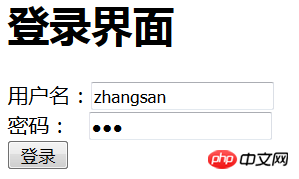
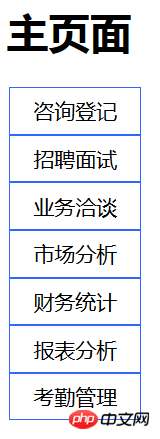
 选择登陆张三显示他的权限,效果如下:

相关推荐:

PHP权限控制的bug详解

PHP权限管理功能实现方法

php权限管理功能的实现方法介绍

相关文章

PHP速学教程(入门到精通)
PHP速学教程(入门到精通)

PHP怎么学习?PHP怎么入门?PHP在哪学?PHP怎么学才快?不用担心,这里为大家提供了PHP速学教程(入门到精通),有需要的小伙伴保存下载就能学习啦!

下载

相关标签:

php

本站声明:本文内容由网友自发贡献,版权归原作者所有,本站不承担相应法律责任。如您发现有涉嫌抄袭侵权的内容,请联系admin@php.cn

热门AI工具

更多
DeepSeek
DeepSeek

幻方量化公司旗下的开源大模型平台

豆包大模型
豆包大模型

字节跳动自主研发的一系列大型语言模型

通义千问
通义千问

阿里巴巴推出的全能AI助手

腾讯元宝
腾讯元宝

腾讯混元平台推出的AI助手

文心一言
文心一言

文心一言是百度开发的AI聊天机器人,通过对话可以生成各种形式的内容。

讯飞写作
讯飞写作

基于讯飞星火大模型的AI写作工具,可以快速生成新闻稿件、品宣文案、工作总结、心得体会等各种文文稿

即梦AI
即梦AI

一站式AI创作平台,免费AI图片和视频生成。

ChatGPT
ChatGPT

最最强大的AI聊天机器人程序,ChatGPT不单是聊天机器人,还能进行撰写邮件、视频脚本、文案、翻译、代码等任务。

相关专题

更多
Golang 测试体系与代码质量保障:工程级可靠性建设

Go语言测试体系与代码质量保障聚焦于构建工程级可靠性系统。本专题深入解析Go的测试工具链(如go test)、单元测试、集成测试及端到端测试实践,结合代码覆盖率分析、静态代码扫描(如go vet)和动态分析工具,建立全链路质量监控机制。通过自动化测试框架、持续集成(CI)流水线配置及代码审查规范,实现测试用例管理、缺陷追踪与质量门禁控制,确保代码健壮性与可维护性,为高可靠性工程系统提供质量保障。

28

2026.02.28

Golang 工程化架构设计:可维护与可演进系统构建

Go语言工程化架构设计专注于构建高可维护性、可演进的企业级系统。本专题深入探讨Go项目的目录结构设计、模块划分、依赖管理等核心架构原则,涵盖微服务架构、领域驱动设计(DDD)在Go中的实践应用。通过实战案例解析接口抽象、错误处理、配置管理、日志监控等关键工程化技术,帮助开发者掌握构建稳定、可扩展Go应用的最佳实践方法。

23

2026.02.28

Golang 性能分析与运行时机制:构建高性能程序

Go语言以其高效的并发模型和优异的性能表现广泛应用于高并发、高性能场景。其运行时机制包括 Goroutine 调度、内存管理、垃圾回收等方面,深入理解这些机制有助于编写更高效稳定的程序。本专题将系统讲解 Golang 的性能分析工具使用、常见性能瓶颈定位及优化策略,并结合实际案例剖析 Go 程序的运行时行为,帮助开发者掌握构建高性能应用的关键技能。

27

2026.02.28

Golang 并发编程模型与工程实践:从语言特性到系统性能

本专题系统讲解 Golang 并发编程模型,从语言级特性出发,深入理解 goroutine、channel 与调度机制。结合工程实践,分析并发设计模式、性能瓶颈与资源控制策略,帮助将并发能力有效转化为稳定、可扩展的系统性能优势。

16

2026.02.27

Golang 高级特性与最佳实践:提升代码艺术

本专题深入剖析 Golang 的高级特性与工程级最佳实践,涵盖并发模型、内存管理、接口设计与错误处理策略。通过真实场景与代码对比,引导从“可运行”走向“高质量”,帮助构建高性能、可扩展、易维护的优雅 Go 代码体系。

18

2026.02.27

Golang 测试与调试专题:确保代码可靠性

本专题聚焦 Golang 的测试与调试体系,系统讲解单元测试、表驱动测试、基准测试与覆盖率分析方法,并深入剖析调试工具与常见问题定位思路。通过实践示例,引导建立可验证、可回归的工程习惯,从而持续提升代码可靠性与可维护性。

2

2026.02.27

漫蛙app官网链接入口
漫蛙app官网链接入口

漫蛙App官网提供多条稳定入口,包括 https://manwa.me、https

164

2026.02.27

deepseek在线提问
deepseek在线提问

本合集汇总了DeepSeek在线提问技巧与免登录使用入口,助你快速上手AI对话、写作、分析等功能。阅读专题下面的文章了解更多详细内容。

8

2026.02.27

AO3官网直接进入
AO3官网直接进入

AO3官网最新入口合集,汇总2026年可用官方及镜像链接,助你快速稳定访问Archive of Our Own平台。阅读专题下面的文章了解更多详细内容。

309

2026.02.27

热门下载

更多
网站特效
/
网站源码
/
网站素材
/
前端模板

精品课程

更多
相关推荐
/
热门推荐
/
最新课程
PHP课程
PHP课程

共137课时 | 12.8万人学习

JavaScript ES5基础线上课程教学

共6课时 | 11.3万人学习

PHP新手语法线上课程教学
PHP新手语法线上课程教学

共13课时 | 1.0万人学习

关于我们 免责申明 举报中心 意见反馈 讲师合作 广告合作 最新更新
php中文网:公益在线php培训,帮助PHP学习者快速成长!
关注服务号 技术交流群
PHP中文网订阅号
每天精选资源文章推送

Copyright 2014-2026 https://www.php.cn/ All Rights Reserved | php.cn | 湘ICP备2023035733号