



这次给大家带来地图搜租房功能实现,地图搜租房功能实现的注意事项有哪些,下面就是实战案例,一起来看一下。
layout: post
title: 半个小时教你写一个毕设之地图搜租房
category: 其他
date: 2018-05-23
tags:
其他
半个小时教你写一个毕设之地图搜租房
首先需要一个Python3环境,怎么准备我就不多说了,实在不会的出门右转看一下廖雪峰老师的博客.
HTML部分
代码来自:高德API+Python解决租房问题,简单改了下加载数据部分
代码路径:/static/index.html
<html>
<head>
    <meta charset="utf-8">
    <meta http-equiv="X-UA-Compatible" content="IE=edge">
    <meta name="viewport" content="initial-scale=1.0, user-scalable=no, width=device-width">
    <title>毕业生租房</title>
    <link rel="stylesheet" href="http://cache.amap.com/lbs/static/main1119.css" />
    <link rel="stylesheet" href="http://cache.amap.com/lbs/static/jquery.range.css" />
    <script src="http://cache.amap.com/lbs/static/jquery-1.9.1.js"></script>
    <script src="http://cache.amap.com/lbs/static/es5.min.js"></script>
    <script src="http://webapi.amap.com/maps?v=1.3&key=22d3816e107f199992666d6412fa0691&plugin=AMap.ArrivalRange,AMap.Scale,AMap.Geocoder,AMap.Transfer,AMap.Autocomplete"></script>
    <script src="http://cache.amap.com/lbs/static/jquery.range.js"></script>
    <style>
    .control-panel {
        position: absolute;
        top: 30px;
        right: 20px;
    }

    .control-entry {
        width: 280px;
        background-color: rgba(119, 136, 153, 0.8);
        font-family: fantasy, sans-serif;
        text-align: left;
        color: white;
        overflow: auto;
        padding: 10px;
        margin-bottom: 10px;
    }

    .control-input {
        margin-left: 120px;
    }

    .control-input input[type="text"] {
        width: 160px;
    }

    .control-panel label {
        float: left;
        width: 120px;
    }

    #transfer-panel {
        position: absolute;
        background-color: white;
        max-height: 80%;
        overflow-y: auto;
        top: 30px;
        left: 20px;
        width: 250px;
    }
    </style>
</head>
<body>
    <p id="container"></p>
    <p class="control-panel">
        <p class="control-entry">
            <label>选择工作地点:</label>
            <p class="control-input">
                <input id="work-location" type="text">
            </p>
        </p>
        <p class="control-entry">
            <label>选择通勤方式:</label>
            <p class="control-input">
                <input type="radio" name="vehicle" value="SUBWAY,BUS" onClick="takeBus(this)" checked/> 公交+地铁
                <input type="radio" name="vehicle" value="SUBWAY" onClick="takeSubway(this)" /> 地铁
            </p>
        </p>
    </p>
    <p id="transfer-panel"></p>
    <script>
    var map = new AMap.Map("container", {
        resizeEnable: true,
        zoomEnable: true,
        center: [116.397428, 39.90923],
        zoom: 11
    });
    var scale = new AMap.Scale();
    map.addControl(scale);
    var arrivalRange = new AMap.ArrivalRange();
    var x, y, t, vehicle = "SUBWAY,BUS";
    var workAddress, workMarker;
    var rentMarkerArray = [];
    var polygonArray = [];
    var amapTransfer;
    var infoWindow = new AMap.InfoWindow({
        offset: new AMap.Pixel(0, -30)
    });
    var auto = new AMap.Autocomplete({
        input: "work-location"
    });

    AMap.event.addListener(auto, "select", workLocationSelected);
    function takeBus(radio) {
        vehicle = radio.value;
        loadWorkLocation()
    }
    function takeSubway(radio) {
        vehicle = radio.value;
        loadWorkLocation()
    }
    function workLocationSelected(e) {
        workAddress = e.poi.name;
        loadWorkLocation();
    }
    function loadWorkMarker(x, y, locationName) {
        workMarker = new AMap.Marker({
            map: map,
            title: locationName,
            icon: 'http://webapi.amap.com/theme/v1.3/markers/n/mark_r.png',
            position: [x, y]
        });
    }
    function loadWorkRange(x, y, t, color, v) {
        arrivalRange.search([x, y], t, function(status, result) {
            if (result.bounds) {
                for (var i = 0; i < result.bounds.length; i++) {
                    var polygon = new AMap.Polygon({
                        map: map,
                        fillColor: color,
                        fillOpacity: "0.4",
                        strokeColor: color,
                        strokeOpacity: "0.8",
                        strokeWeight: 1
                    });
                    polygon.setPath(result.bounds[i]);
                    polygonArray.push(polygon);
                }
            }
        }, {
            policy: v
        });
    }
    function addMarkerByAddress(address, url) {
        var geocoder = new AMap.Geocoder({
            city: "北京",
            radius: 1000
        });
        geocoder.getLocation(address, function(status, result) {
            if (status === "complete" && result.info === 'OK') {
                var geocode = result.geocodes[0];
                rentMarker = new AMap.Marker({
                    map: map,
                    title: address,
                    icon: 'http://webapi.amap.com/theme/v1.3/markers/n/mark_b.png',
                    position: [geocode.location.getLng(), geocode.location.getLat()]
                });
                rentMarkerArray.push(rentMarker);
                rentMarker.content = "<p>房源:<a target = '_blank' href='" + url + "'>" + address + "</a><p>"
                rentMarker.on('click', function(e) {
                    infoWindow.setContent(e.target.content);
                    infoWindow.open(map, e.target.getPosition());
                    if (amapTransfer) amapTransfer.clear();
                    amapTransfer = new AMap.Transfer({
                        map: map,
                        policy: AMap.TransferPolicy.LEAST_TIME,
                        city: "北京市",
                        panel: 'transfer-panel'
                    });
                    amapTransfer.search([{
                        keyword: workAddress
                    }, {
                        keyword: address
                    }], function(status, result) {})
                });
            }
        })
    }
    function delWorkLocation() {
        if (polygonArray) map.remove(polygonArray);
        if (workMarker) map.remove(workMarker);
        polygonArray = [];
    }
    function delRentLocation() {
        if (rentMarkerArray) map.remove(rentMarkerArray);
        rentMarkerArray = [];
    }
    function loadWorkLocation() {
        delWorkLocation();
        var geocoder = new AMap.Geocoder({
            city: "北京",
            radius: 1000
        });
        geocoder.getLocation(workAddress, function(status, result) {
            if (status === "complete" && result.info === 'OK') {
                var geocode = result.geocodes[0];
                x = geocode.location.getLng();
                y = geocode.location.getLat();
                loadWorkMarker(x, y);
                loadWorkRange(x, y, 60, "#3f67a5", vehicle);
                map.setZoomAndCenter(12, [x, y]);
            }
        })
    }
    $(function()
    {
        $.get("/get_houses", function(data) {
            data.forEach(function(element, index) {
                addMarkerByAddress(element.address, element.url);
            });
        });
    })
    </script>
</body>
</html>
Python flask部分
Python3环境,使用安装Flask,pymysql,BeautifulSoup
pip install Flask;
pip install pymysql;
pip install beautifulsoup4;
pip install requests;
然后直接上代码咯.
路径:/app.py
from flask import Flask, request
from flask import jsonify
from flask import render_template
from flask import Response
import requests
from bs4 import BeautifulSoup
import pymysql
app = Flask(name)
@app.route("/get_houses_db/")
def get_houses_db():
    # 从数据库读出来的数据,url为房源url,address为房源定位地址
    houses = []
    # Connect to the database
    connection = pymysql.connect(host='127.0.0.1',
                                 user='root',
                                 password='123',
                                 db='你的数据库名字',
                                 charset='utf8mb4',
                                 cursorclass=pymysql.cursors.DictCursor)
    try:
        with connection.cursor() as cursor:
            # Read a single record
            sql = "SELECT 你的URL字段,你的地址字段 FROM 你的房源数据表 where 1=1;"
            keyword = request.args.get('keyword')
            if keyword is not None:
                sql = sql + "查询字段 like %%s%" % keyword
            cursor.execute(sql)
            houses = cursor.fetchall()
    finally:
        connection.close()
    return jsonify(houses)
@app.route("/get_houses", methods=['POST', 'GET'])
def get_houses():
    # 直接从网页获取数据,url为房源url,address为房源定位地址
    houses = []
    city = request.args.get('city')
    if city is None:
        city = 'bj'
    city_url = 'http://%s.58.com' % city
    for page_num in range(1, 10):
        url = "%s/pinpaigongyu/pn/%d/" % (city_url, page_num)
        headers = {
            'connection': "keep-alive",
            'upgrade-insecure-requests': "1",
            'user-agent': "Mozilla/5.0 (Macintosh; Intel Mac OS X 10_13_4) AppleWebKit/537.36 (KHTML, like Gecko) Chrome/66.0.3359.181 Safari/537.36",
            'accept': "text/html,application/xhtml+xml,application/xml;q=0.9,image/webp,image/apng,*/*;q=0.8",
            'accept-encoding': "gzip, deflate",
            'accept-language': "zh-CN,zh;q=0.9,en;q=0.8,da;q=0.7",
            'cookie': "f=n; f=n; id58=c5/njVsEqPqC7y9vB/RHAg==; 58tj_uuid=ac94c044-cbb8-451c-b6be-974f90197010; new_uv=1; utm_source=; spm=; init_refer=https%253A%252F%252Fcn.bing.com%252F; als=0; f=n; new_session=0; qz_gdt=; Hm_lvt_dcee4f66df28844222ef0479976aabf1=1527032264,1527032267,1527032270,1527032380; Hm_lpvt_dcee4f66df28844222ef0479976aabf1=1527032421; ppStore_fingerprint=3283C76981CCD1090B42ACBBF624A4C9613FE967CDC69C58%EF%BC%BF1527032420843",
            'cache-control': "no-cache",
        }
        response = requests.request("GET", url, headers=headers)
        htmlSoup = BeautifulSoup(response.text, "html.parser")
        ul = htmlSoup.find(attrs={"class": "list"})
        if ul is None:
            continue
        li_list = ul.find_all("li")
        if li_list is None:
            continue
        for li in li_list:
            house = {}
            house['url'] = '%s/%s' % (city_url, li.find("a")['href'])
            house['address'] = li.find("h2").text
            houses.append(house)
    return jsonify(houses)
@app.route('/')
def index():
    return app.send_static_file('index.html')
if name == 'main':
    app.run(port=8888)
# python3 安装flask之后,安装命令pip install Flask
# 运行 python app.py
效果图:
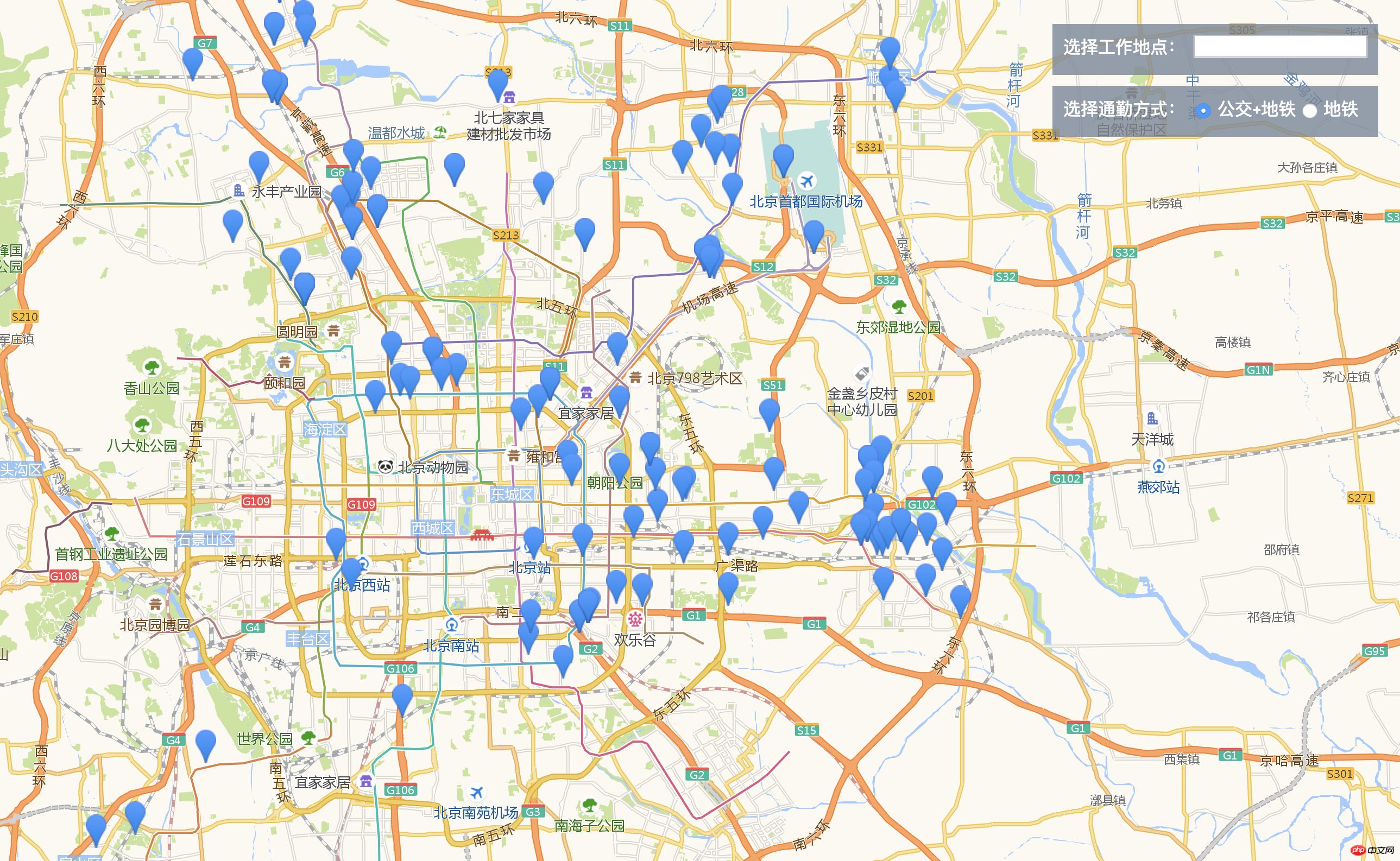
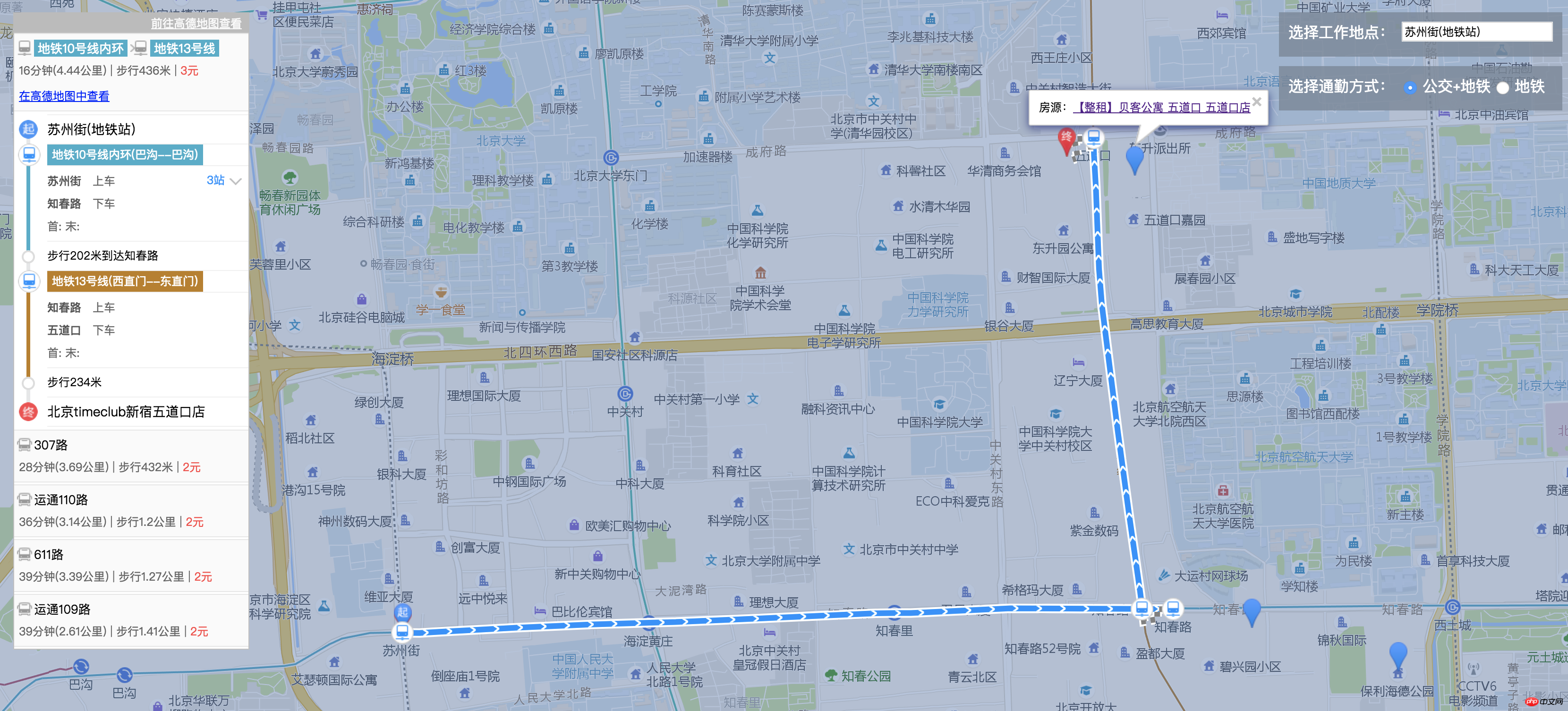
相信看了本文案例你已经掌握了方法,更多精彩请关注php中文网其它相关文章!
推荐阅读:




