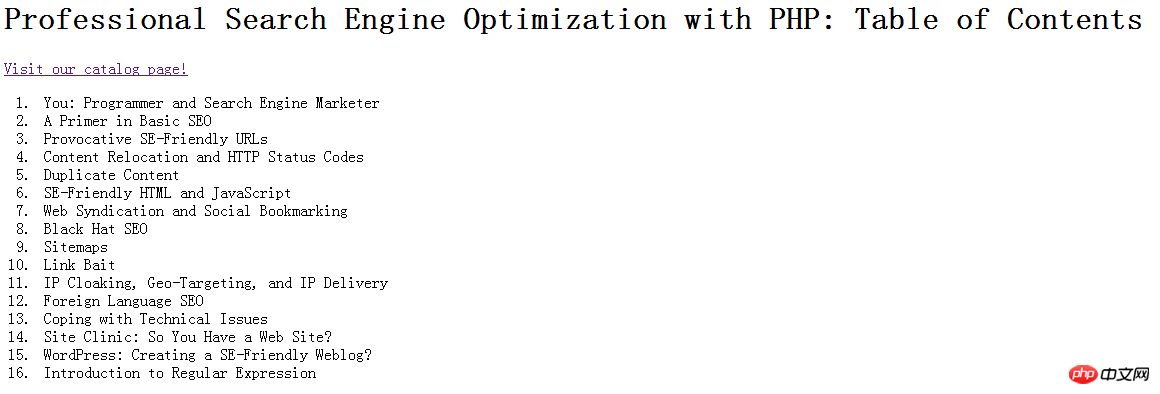
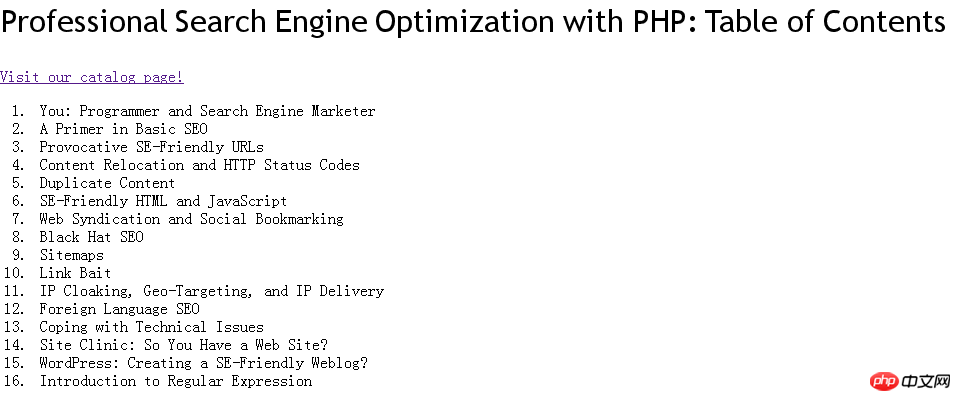
这篇文章主要介绍了使用php+javascript将html元素转换为图片的实例分享,文后结果的截图只能体现出替换的字体,也不能说将静态页面转为图片可以加快加载,只是这种做法比较interesting xd需要的朋友可以参考下
1,准备要素
1)替换字体的js文件
js代码:
function com_stewartspeak_replacement() {
/*
Dynamic Heading Generator
By Stewart Rosenberger
http://www.stewartspeak.com/headings/
This script searches through a web page for specific or general elements
and replaces them with dynamically generated images, in conjunction with
a server-side script.
*/
replaceSelector("h1","dynatext/heading.php",true);//前两个参数需要修改
var testURL = "dynatext/loading.gif" ;//修改为对应的图片路径
var doNotPrintImages = false;
var printerCSS = "replacement-print.css";
var hideFlicker = false;
var hideFlickerCSS = "replacement-screen.css";
var hideFlickerTimeout = 100;//这里可以做相应的修改
/* ---------------------------------------------------------------------------
For basic usage, you should not need to edit anything below this comment.
If you need to further customize this script's abilities, make sure
you're familiar with Javascript. And grab a soda or something.
*/
var items;
var imageLoaded = false;
var documentLoaded = false;
function replaceSelector(selector,url,wordwrap)
{
if(typeof items == "undefined")
items = new Array();
items[items.length] = {selector: selector, url: url, wordwrap: wordwrap};
}
if(hideFlicker)
{
document.write('');
window.flickerCheck = function()
{
if(!imageLoaded)
setStyleSheetState('hide-flicker',false);
};
setTimeout('window.flickerCheck();',hideFlickerTimeout)
}
if(doNotPrintImages)
document.write('');
var test = new Image();
test.onload = function() { imageLoaded = true; if(documentLoaded) replacement(); };
test.src = testURL + "?date=" + (new Date()).getTime();
addLoadHandler(function(){ documentLoaded = true; if(imageLoaded) replacement(); });
function documentLoad()
{
documentLoaded = true;
if(imageLoaded)
replacement();
}
function replacement()
{
for(var i=0;i 0) for(var j=0;j -1)
{
var bits = token.split('#');
var tagName = bits[0];
var id = bits[1];
var element = document.getElementById(id);
if(tagName && element.nodeName.toLowerCase() != tagName)
return new Array();
currentContext = new Array(element);
continue;
}
if(token.indexOf('.') > -1)
{
var bits = token.split('.');
var tagName = bits[0];
var className = bits[1];
if(!tagName)
tagName = '*';
var found = new Array;
var foundCount = 0;
for(var h=0;h -1); };
break;
default :
checkFunction = function(e) { return e.getAttribute(attrName); };
}
currentContext = new Array;
var currentContextIndex = 0;
for(var k=0;k
立即学习“PHP免费学习笔记(深入)”;
2)生成图片的php文件
[]{}-+_-=' ;
$box = @ImageTTFBBox($size,0,$font,$test_chars) ;
return $box[3] ;
}
/*
attempt to create an image containing the error message given.
if this works, the image is sent to the browser. if not, an error
is logged, and passed back to the browser as a 500 code instead.
*/
function fatal_error($message)
{
// send an image
if(function_exists('ImageCreate'))
{
$width = ImageFontWidth(5) * strlen($message) + 10 ;
$height = ImageFontHeight(5) + 10 ;
if($image = ImageCreate($width,$height))
{
$background = ImageColorAllocate($image,255,255,255) ;
$text_color = ImageColorAllocate($image,0,0,0) ;
ImageString($image,5,5,5,$message,$text_color) ;
header('Content-type: image/png') ;
ImagePNG($image) ;
ImageDestroy($image) ;
exit ;
}
}
// send 500 code
header("HTTP/1.0 500 Internal Server Error") ;
print($message) ;
exit ;
}
/*
decode an HTML hex-code into an array of R,G, and B values.
accepts these formats: (case insensitive) #ffffff, ffffff, #fff, fff
*/
function hex_to_rgb($hex)
{
// remove '#'
if(substr($hex,0,1) == '#')
$hex = substr($hex,1) ;
// expand short form ('fff') color
if(strlen($hex) == 3)
{
$hex = substr($hex,0,1) . substr($hex,0,1) .
substr($hex,1,1) . substr($hex,1,1) .
substr($hex,2,1) . substr($hex,2,1) ;
}
if(strlen($hex) != 6)
fatal_error('Error: Invalid color "'.$hex.'"') ;
// convert
$rgb['red'] = hexdec(substr($hex,0,2)) ;
$rgb['green'] = hexdec(substr($hex,2,2)) ;
$rgb['blue'] = hexdec(substr($hex,4,2)) ;
return $rgb ;
}
/*
convert embedded, javascript unicode characters into embedded HTML
entities. (e.g. '%u2018' => '‘'). returns the converted string.
*/
function javascript_to_html($text)
{
$matches = null ;
preg_match_all('/%u([0-9A-F]{4})/i',$text,$matches) ;
if(!empty($matches)) for($i=0;$i
立即学习“PHP免费学习笔记(深入)”;
3)需要的字体
这里将需要的自己放在与js和php文件同在的一个目录下(也可以修改,但是对应文件也要修改)
4)PHP的GD2库
2,实现的html代码
Professional Search Engine Optimization with PHP: Table of Contents
Professional Search Engine Optimization with PHP: Table of Contents
- You: Programmer and Search Engine Marketer
- A Primer in Basic SEO
- Provocative SE-Friendly URLs
- Content Relocation and HTTP Status Codes
- Duplicate Content
- SE-Friendly HTML and JavaScript
- Web Syndication and Social Bookmarking
- Black Hat SEO
- Sitemaps
- Link Bait
- IP Cloaking, Geo-Targeting, and IP Delivery
- Foreign Language SEO
- Coping with Technical Issues
- Site Clinic: So You Have a Web Site?
- WordPress: Creating a SE-Friendly Weblog?
- Introduction to Regular Expression
立即学习“PHP免费学习笔记(深入)”;
3,使用效果前后对比
使用前
使用后
相关推荐:
PHP+JavaScript实现Cookie的读写、交互操作方法详解
立即学习“PHP免费学习笔记(深入)”;