



这次给大家带来关于vue绑定问题解析,vue绑定的注意事项有哪些,下面就是实战案例,一起来看一下。
1、原理
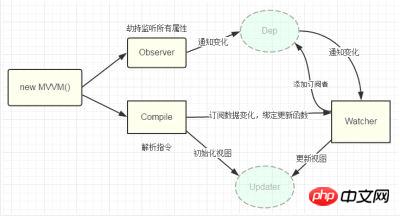
Vue的双向数据绑定的原理相信大家也都十分了解了,主要是通过 Object对象的defineProperty属性,重写data的set和get函数来实现的,这里对原理不做过多描述,主要还是来实现一个实例。为了使代码更加的清晰,这里只会实现最基本的内容,主要实现v-model,v-bind 和v-click三个命令,其他命令也可以自行补充。
添加网上的一张图
2、实现
页面结构很简单,如下
<p id="app">
 <form>
  <input type="text" v-model="number">
  <button type="button" v-click="increment">增加</button>
 </form>
 <h3 v-bind="number"></h3>
 </p>
包含:
1. 一个input,使用v-model指令
2. 一个button,使用v-click指令
3. 一个h3,使用v-bind指令。
我们最后会通过类似于vue的方式来使用我们的双向数据绑定,结合我们的数据结构添加注释
var app = new myVue({
  el:'#app',
  data: {
  number: 0
  },
  methods: {
  increment: function() {
   this.number ++;
  },
  }
 })
首先我们需要定义一个myVue构造函数:
function myVue(options) {
}
为了初始化这个构造函数,给它添加一 个_init属性
function myVue(options) {
 this._init(options);
}
myVue.prototype._init = function (options) {
 this.$options = options; // options 为上面使用时传入的结构体,包括el,data,methods
 this.$el = document.querySelector(options.el); // el是 #app, this.$el是id为app的Element元素
 this.$data = options.data; // this.$data = {number: 0}
 this.$methods = options.methods; // this.$methods = {increment: function(){}}
 }
接下来实现_obverse函数,对data进行处理,重写data的set和get函数
并改造_init函数
myVue.prototype._obverse = function (obj) { // obj = {number: 0}
 var value;
 for (key in obj) { //遍历obj对象
  if (obj.hasOwnProperty(key)) {
  value = obj[key];
  if (typeof value === 'object') { //如果值还是对象,则遍历处理
   this._obverse(value);
  }
  Object.defineProperty(this.$data, key, { //关键
   enumerable: true,
   configurable: true,
   get: function () {
   console.log(`获取${value}`);
   return value;
   },
   set: function (newVal) {
   console.log(`更新${newVal}`);
   if (value !== newVal) {
    value = newVal;
   }
   }
  })
  }
 }
 }
 myVue.prototype._init = function (options) {
 this.$options = options;
 this.$el = document.querySelector(options.el);
 this.$data = options.data;
 this.$methods = options.methods;
 this._obverse(this.$data);
 }
接下来我们写一个指令类Watcher,用来绑定更新函数,实现对DOM元素的更新
function Watcher(name, el, vm, exp, attr) {
 this.name = name;   //指令名称,例如文本节点,该值设为"text"
 this.el = el;    //指令对应的DOM元素
 this.vm = vm;    //指令所属myVue实例
 this.exp = exp;   //指令对应的值,本例如"number"
 this.attr = attr;   //绑定的属性值,本例为"innerHTML"
 this.update();
 }
 Watcher.prototype.update = function () {
 this.el[this.attr] = this.vm.$data[this.exp]; //比如 H3.innerHTML = this.data.number; 当number改变时,会触发这个update函数,保证对应的DOM内容进行了更新。
 }
更新_init函数以及_obverse函数
myVue.prototype._init = function (options) {
 //...
 this._binding = {}; //_binding保存着model与view的映射关系,也就是我们前面定义的Watcher的实例。当model改变时,我们会触发其中的指令类更新,保证view也能实时更新
 //...
 }
 myVue.prototype._obverse = function (obj) {
 //...
  if (obj.hasOwnProperty(key)) {
  this._binding[key] = { // 按照前面的数据,_binding = {number: _directives: []}
   _directives: []
  };
  //...
  var binding = this._binding[key];
  Object.defineProperty(this.$data, key, {
   //...
   set: function (newVal) {
   console.log(`更新${newVal}`);
   if (value !== newVal) {
    value = newVal;
    binding._directives.forEach(function (item) { // 当number改变时,触发_binding[number]._directives 中的绑定的Watcher类的更新
    item.update();
    })
   }
   }
  })
  }
 }
 }
那么如何将view与model进行绑定呢?接下来我们定义一个_compile函数,用来解析我们的指令(v-bind,v-model,v-clickde)等,并在这个过程中对view与model进行绑定。
 myVue.prototype._init = function (options) {
 //...
 this._complie(this.$el);
 }
myVue.prototype._complie = function (root) { root 为 id为app的Element元素,也就是我们的根元素
 var _this = this;
 var nodes = root.children;
 for (var i = 0; i < nodes.length; i++) {
  var node = nodes[i];
  if (node.children.length) { // 对所有元素进行遍历,并进行处理
  this._complie(node);
  }
  if (node.hasAttribute('v-click')) { // 如果有v-click属性,我们监听它的onclick事件,触发increment事件,即number++
  node.onclick = (function () {
   var attrVal = nodes[i].getAttribute('v-click');
   return _this.$methods[attrVal].bind(_this.$data); //bind是使data的作用域与method函数的作用域保持一致
  })();
  }
  if (node.hasAttribute('v-model') && (node.tagName == 'INPUT' || node.tagName == 'TEXTAREA')) { // 如果有v-model属性,并且元素是INPUT或者TEXTAREA,我们监听它的input事件
  node.addEventListener('input', (function(key) {
   var attrVal = node.getAttribute('v-model');
   //_this._binding['number']._directives = [一个Watcher实例]
   // 其中Watcher.prototype.update = function () {
   // node['vaule'] = _this.$data['number']; 这就将node的值保持与number一致
   // }
   _this._binding[attrVal]._directives.push(new Watcher(
   'input',
   node,
   _this,
   attrVal,
   'value'
   ))
   return function() {
   _this.$data[attrVal] = nodes[key].value; // 使number 的值与 node的value保持一致,已经实现了双向绑定
   }
  })(i));
  }
  if (node.hasAttribute('v-bind')) { // 如果有v-bind属性,我们只要使node的值及时更新为data中number的值即可
  var attrVal = node.getAttribute('v-bind');
  _this._binding[attrVal]._directives.push(new Watcher(
   'text',
   node,
   _this,
   attrVal,
   'innerHTML'
  ))
  }
 }
 }
至此,我们已经实现了一个简单vue的双向绑定功能,包括v-bind, v-model, v-click三个指令。效果如下图
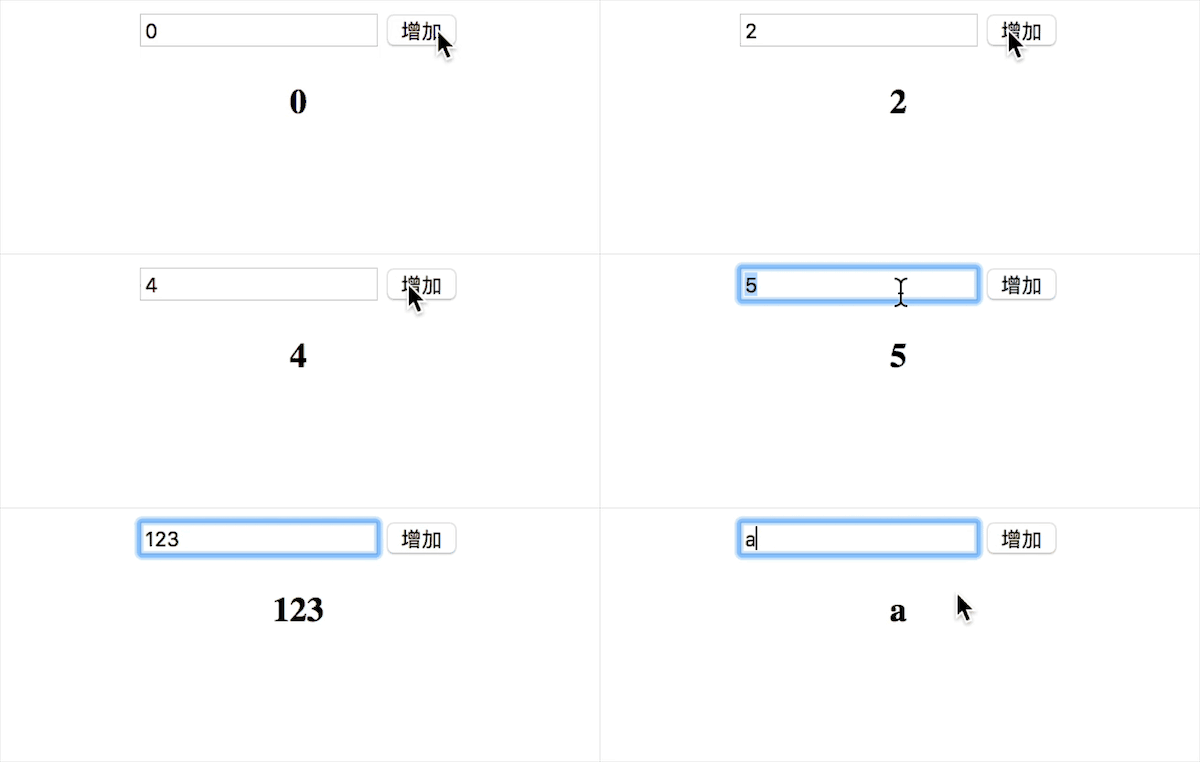
附上全部代码,不到150行
<!DOCTYPE html>
<head>
 <title>myVue</title>
</head>
<style>
 #app {
 text-align: center;
 }
</style>
<body>
 <p id="app">
 <form>
  <input type="text" v-model="number">
  <button type="button" v-click="increment">增加</button>
 </form>
 <h3 v-bind="number"></h3>
 </p>
</body>
<script>
 function myVue(options) {
 this._init(options);
 }
 myVue.prototype._init = function (options) {
 this.$options = options;
 this.$el = document.querySelector(options.el);
 this.$data = options.data;
 this.$methods = options.methods;
 this._binding = {};
 this._obverse(this.$data);
 this._complie(this.$el);
 }
 myVue.prototype._obverse = function (obj) {
 var value;
 for (key in obj) {
  if (obj.hasOwnProperty(key)) {
  this._binding[key] = {
   _directives: []
  };
  value = obj[key];
  if (typeof value === 'object') {
   this._obverse(value);
  }
  var binding = this._binding[key];
  Object.defineProperty(this.$data, key, {
   enumerable: true,
   configurable: true,
   get: function () {
   console.log(`获取${value}`);
   return value;
   },
   set: function (newVal) {
   console.log(`更新${newVal}`);
   if (value !== newVal) {
    value = newVal;
    binding._directives.forEach(function (item) {
    item.update();
    })
   }
   }
  })
  }
 }
 }
 myVue.prototype._complie = function (root) {
 var _this = this;
 var nodes = root.children;
 for (var i = 0; i < nodes.length; i++) {
  var node = nodes[i];
  if (node.children.length) {
  this._complie(node);
  }
  if (node.hasAttribute('v-click')) {
  node.onclick = (function () {
   var attrVal = nodes[i].getAttribute('v-click');
   return _this.$methods[attrVal].bind(_this.$data);
  })();
  }
  if (node.hasAttribute('v-model') && (node.tagName == 'INPUT' || node.tagName == 'TEXTAREA')) {
  node.addEventListener('input', (function(key) {
   var attrVal = node.getAttribute('v-model');
   _this._binding[attrVal]._directives.push(new Watcher(
   'input',
   node,
   _this,
   attrVal,
   'value'
   ))
   return function() {
   _this.$data[attrVal] = nodes[key].value;
   }
  })(i));
  }
  if (node.hasAttribute('v-bind')) {
  var attrVal = node.getAttribute('v-bind');
  _this._binding[attrVal]._directives.push(new Watcher(
   'text',
   node,
   _this,
   attrVal,
   'innerHTML'
  ))
  }
 }
 }
 function Watcher(name, el, vm, exp, attr) {
 this.name = name;   //指令名称,例如文本节点,该值设为"text"
 this.el = el;    //指令对应的DOM元素
 this.vm = vm;    //指令所属myVue实例
 this.exp = exp;   //指令对应的值,本例如"number"
 this.attr = attr;   //绑定的属性值,本例为"innerHTML"
 this.update();
 }
 Watcher.prototype.update = function () {
 this.el[this.attr] = this.vm.$data[this.exp];
 }
 window.onload = function() {
 var app = new myVue({
  el:'#app',
  data: {
  number: 0
  },
  methods: {
  increment: function() {
   this.number ++;
  },
  }
 })
 }
</script>
相信看了本文案例你已经掌握了方法,更多精彩请关注php中文网其它相关文章!
推荐阅读:
newasp框架是一个基于 Classic Asp Vbscript Api 框架。全面支持64位,无需修改应用池32位启用,效率更高。 更新日志: 8月2号 - v2.2.9 修复Str.ToString对GetRows二维数组的解析问题 7月26号 - v2.2.8 修复IIS在前端自定义信息头提交下的跨域访问问题 修复路由对跨域OPTIONS发起提交导致的访问问题 修改web.confi
立即学习“前端免费学习笔记(深入)”;




