



手势解锁是app上常见的解锁方式,相比输入密码方式操作起来要方便许多。这篇文章主要介绍了微信小程序开发教程-手势解锁实例,有兴趣的可以了解一下。
手势解锁是app上常见的解锁方式,相比输入密码方式操作起来要方便许多。下面展示如何基于微信小程序实现手机解锁。最终实现效果如下图:
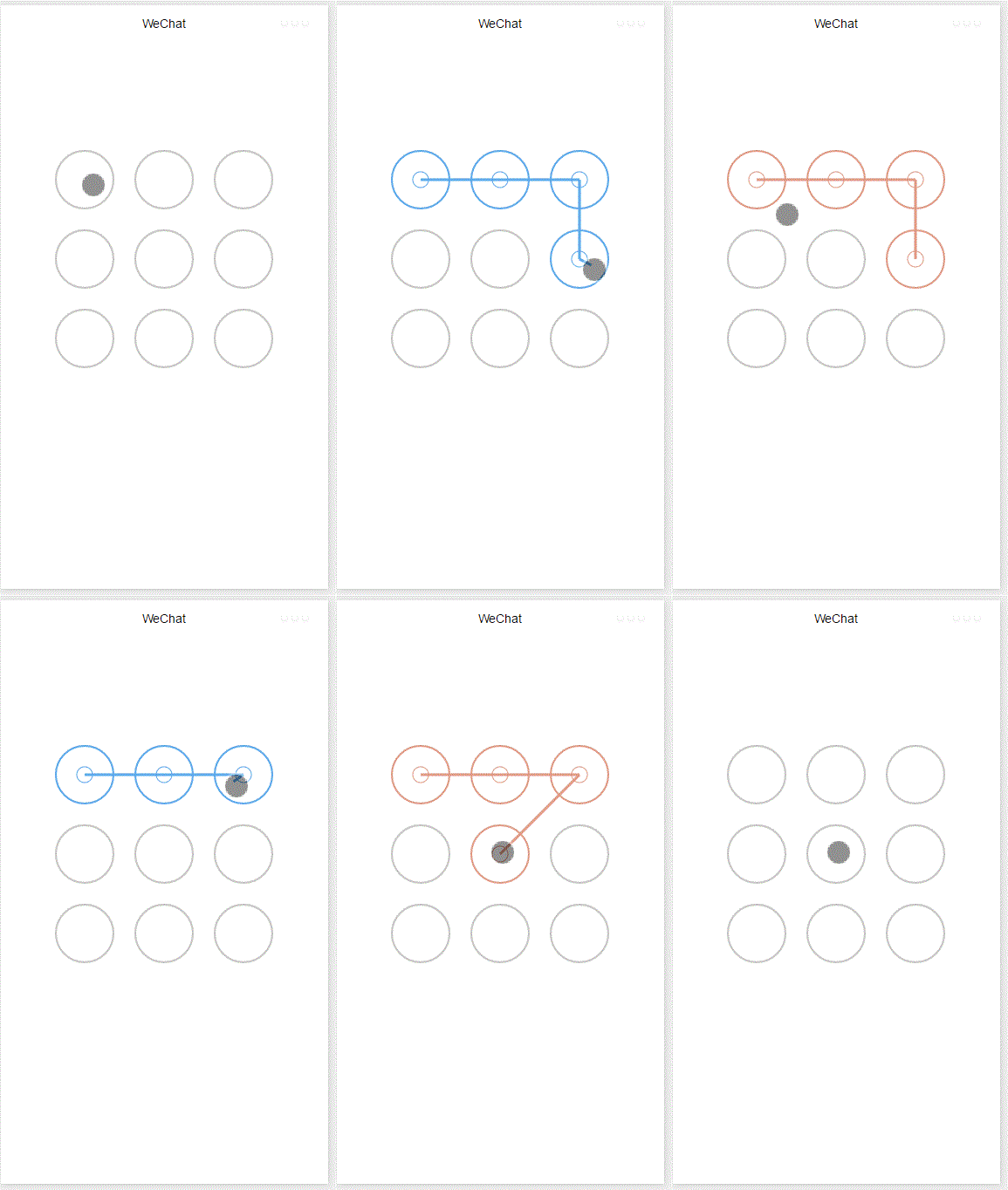
整个功能基于canvas实现,首先添加画布组件,并设定样式
.gesture-lock {
  margin: 100rpx auto;
  width: 300px;
  height: 300px;
  background-color: #ffffff;
}
手势解锁实现代码在gesture_lock.js中(完整源码地址见末尾)。
初始化
  constructor(canvasid, context, cb, opt){
    this.touchPoints = [];
    this.checkPoints = [];
    this.canvasid = canvasid;
    this.ctx = context;
    this.width = opt && opt.width || 300; //画布长度
    this.height = opt && opt.height || 300; //画布宽度
    this.cycleNum = opt && opt.cycleNum || 3;
    this.radius = 0; //触摸点半径
    this.isParamOk = false;
    this.marge = this.margeCircle = 25; //触摸点及触摸点和画布边界间隔
    this.initColor = opt && opt.initColor || '#C5C5C3';
    this.checkColor = opt && opt.checkColor || '#5AA9EC';
    this.errorColor = opt && opt.errorColor || '#e19984';
    this.touchState = "unTouch";
    this.checkParam();
    this.lastCheckPoint = null;
    if (this.isParamOk) {
      // 计算触摸点的半径长度
      this.radius = (this.width - this.marge * 2 - (this.margeCircle * (this.cycleNum - 1))) / (this.cycleNum * 2)
      this.radius = Math.floor(this.radius);
      // 计算每个触摸点的圆心位置
      this.calCircleParams();
    }
    this.onEnd = cb; //滑动手势结束时的回调函数
  }
主要设置一些参数,如canvas的长宽,canvas的context,手势锁的个数(3乘3, 4乘4),手势锁的颜色,手势滑动结束时的回调函数等。并计算出手势锁的半径。
计算每个手势锁的圆心位置
  calCircleParams() {
    let n = this.cycleNum;
    let count = 0;
    for (let i = 0; i < n; i++) {
      for (let j = 0; j < n; j++){
        count++;
        let touchPoint = {
          x: this.marge + i * (this.radius * 2 + this.margeCircle) + this.radius,
          y: this.marge + j * (this.radius * 2 + this.margeCircle) + this.radius,
          index: count,
          check: "uncheck",
        }
        this.touchPoints.push(touchPoint)
      }
    }
  }
绘制手势锁
   for (let i = 0; i < this.touchPoints.length; i++){
      this.drawCircle(this.touchPoints[i].x, this.touchPoints[i].y, this.radius, this.initColor)
   }
   this.ctx.draw(true);
接下来就是识别用户的滑动行为,判断用户划过了哪些圆圈,进而识别出用户的手势。
在touchstart和touchmove事件中检测触发并更新画布
  onTouchStart(e) {
    // 不识别多点触控
    if (e.touches.length > 1){
      this.touchState = "unTouch";
      return;
    }
    this.touchState = "startTouch";
    this.checkTouch(e);
    let point = {x:e.touches[0].x, y:e.touches[0].y};
    this.drawCanvas(this.checkColor, point);
  }

  onTouchMove(e) {
    if (e.touchState === "unTouch") {
      return;
    }
    if (e.touches.length > 1){
      this.touchState = "unTouch";
      return;
    }
    this.checkTouch(e);
    let point = {x:e.touches[0].x, y:e.touches[0].y};
    this.drawCanvas(this.checkColor, point);
  }
检测用户是否划过某个圆圈

我秀秀淘宝客api源码
下载
程序介绍:程序采用.net 2.0进行开发,全自动应用淘客api,自动采集信息,无需,手工更新,源码完全开放。(程序改进 无需填入阿里妈妈淘客API 您只要修改app_code文件下的config.cs文件中的id为你的淘客id即可)针对淘客3/300毫秒的查询限制,系统采用相应的解决方案,可以解决大部分因此限制带来的问题;程序采用全局异常,避免偶尔没考虑到的异常带来的问题;程序源码全部开放,请使
  checkTouch(e) {
    for (let i = 0; i < this.touchPoints.length; i++){
      let point = this.touchPoints[i];
      if (isPointInCycle(e.touches[0].x, e.touches[0].y, point.x, point.y, this.radius)) {
        if (point.check === 'uncheck') {
          this.checkPoints.push(point);
          this.lastCheckPoint = point;
        }
        point.check = "check"
        return;
      }
    }
  }
更新画布
   drawCanvas(color, point) {
    //每次更新之前先清空画布
    this.ctx.clearRect(0, 0, this.width, this.height);
    //使用不同颜色和形式绘制已触发和未触发的锁
    for (let i = 0; i < this.touchPoints.length; i++){
      let point = this.touchPoints[i];
      if (point.check === "check") {
        this.drawCircle(point.x, point.y, this.radius, color);
        this.drawCircleCentre(point.x, point.y, color);
      }
      else {
        this.drawCircle(this.touchPoints[i].x, this.touchPoints[i].y, this.radius, this.initColor)
      }
    }
    //绘制已识别锁之间的线段
    if (this.checkPoints.length > 1) {
       let lastPoint = this.checkPoints[0];
       for (let i = 1; i < this.checkPoints.length; i++) {
         this.drawLine(lastPoint, this.checkPoints[i], color);
         lastPoint = this.checkPoints[i];
       }
    }
    //绘制最后一个识别锁和当前触摸点之间的线段
    if (this.lastCheckPoint && point) {
      this.drawLine(this.lastCheckPoint, point, color);
    }
    this.ctx.draw(true);
  }
当用户滑动结束时调用回调函数并传递识别出的手势
  onTouchEnd(e) {
    typeof this.onEnd === 'function' && this.onEnd(this.checkPoints, false);
  }

  onTouchCancel(e) {
    typeof this.onEnd === 'function' && this.onEnd(this.checkPoints, true);
  }
重置和显示手势错误
  gestureError() {
    this.drawCanvas(this.errorColor)
  }

  reset() {
    for (let i = 0; i < this.touchPoints.length; i++) {
      this.touchPoints[i].check = 'uncheck';
    }
    this.checkPoints = [];
    this.lastCheckPoint = null;
    this.drawCanvas(this.initColor);
  }
如何调用
在onload方法中创建lock对象并在用户触摸事件中调用相应方法
 onLoad: function () {
  var s = this;
  this.lock = new Lock("id-gesture-lock", wx.createCanvasContext("id-gesture-lock"), function(checkPoints, isCancel) {
   console.log('over');
   s.lock.gestureError();
   setTimeout(function() {
    s.lock.reset();
   }, 1000);
  }, {width:300, height:300})
  this.lock.drawGestureLock();
  console.log('onLoad')
  var that = this
  //调用应用实例的方法获取全局数据
  app.getUserInfo(function(userInfo){
   //更新数据
   that.setData({
    userInfo:userInfo
   })
   that.update()
  })
 },
 onTouchStart: function (e) {
  this.lock.onTouchStart(e);
 },
 onTouchMove: function (e) {
  this.lock.onTouchMove(e);
 },
 onTouchEnd: function (e) {
  this.lock.onTouchEnd(e);
 }
以上就是本文的全部内容,希望对大家的学习有所帮助,更多相关内容请关注PHP中文网!
相关推荐:





