



本篇文章给大家分享的内容是关于php命令行编写shell命令的实例,内容很详细,有需要的朋友可以参考一下,希望可以帮助到你们。
php 可以像java perl python 那样运行,今天发现如果我早早知道这个,或许我不会去学习java 和 python
当年学java不过为了一个程序放在服务器上,不停的跑啊跑,原来 php 也可以。
php -h Usage: php [options] [-f][--] [args...] php [options] -r [--] [args...] php [options] [-B] -R [-E] [--] [args...] php [options] [-B ] -F [-E ] [--] [args...] php [options] -S : [-t docroot] [router] php [options] -- [args...] php [options] -a -a Run as interactive shell -c | Look for php.ini file in this directory -n No configuration (ini) files will be used -d foo[=bar] Define INI entry foo with value 'bar' -e Generate extended information for debugger/profiler -f Parse and execute . -h This help -i PHP information -l Syntax check only (lint) -m Show compiled in modules -r Run PHPwithout using script tags -BRun PHP before processing input lines -R Run PHPfor every input line -FParse and execute for every input line -E Run PHP after processing all input lines -H Hide any passed arguments from external tools. -S : Run with built-in web server. -t Specify document root for built-in web server. -s Output HTML syntax highlighted source. -v Version number -w Output source with stripped comments and whitespace. -z Load Zend extension . args... Arguments passed to script. Use -- args when first argument starts with - or script is read from stdin --ini Show configuration file names --rf Show information about function . --rc Show information about class . --re Show information about extension . --rz Show information about Zend extension . --ri Show configuration for extension .
1.用php命令行的方式执行php脚本,例如/usr/bin/php test.php
立即学习“PHP免费学习笔记(深入)”;
缩写 php test.php
test.php
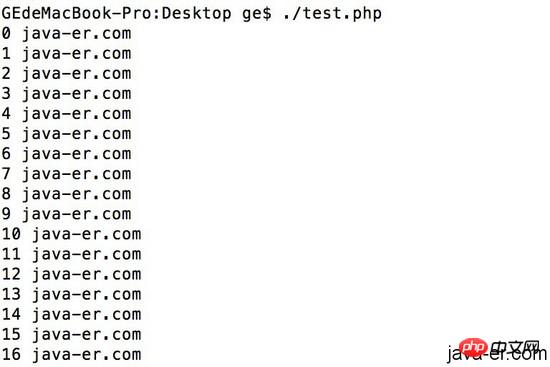
2.脚本开头第一行写上#!/usr/bin/php,然后可以把脚本设为可执行 chmod a+x test.php,之后就可以用命令行的方式直接执行脚本了,例如./test.php
MixPHP3.0.27
下载
MixPHP 是一个 PHP 命令行模式开发框架;基于 Vega 驱动的 HTTP 可以同时支持 Swoole、WorkerMan、FPM、CLI-Server 生态,并且可以无缝切换;V3 是一个高度解耦的版本,整体代码基于多个独立的模块构建,即便用户不使用我们的脚手架,也可以使用这些独立模块,并且全部模块都支持原生开发。例如:你可以只使用 mix/vega 来搭配 laravel orm 使用
#!/usr/bin/php
执行一小时,看看php会不会挂,我希望一个命令行可以跑到天荒地老
#!/usr/bin/php
3. 外部传入参数
#!/usr/bin/php

./test.php

int(1)
array(1) {
 [0]=>
 string(10) "./test.php"
}
./test.php a java php

int(4)
array(4) {
 [0]=>
 string(10) "./test.php"
 [1]=>
 string(1) "a"
 [2]=>
 string(4) "java"
 [3]=>
 string(3) "php"
}
相关推荐:
如何使用php代码实现印章的抠图(代码)




