ul li标签在页面中用得很多,今天这篇文章就和大家分享一个li标签中的小技巧,如何让ul中li水平垂直居中,感兴趣的朋友可以参考一下,希望对你有用。
我们在写轮播图时,底部的小圆点或数字会放在一个ul下li里,这时候一般都要求小圆点或数字垂直居中,今天就写一个简单的li在ul中水平垂直居中。
轮播图一般有两种,左右轮播和上下轮播,对应的ul中的li也分为水平排列和竖直排列,下面就针对这两种情况分别说明。
1、轮播图左右轮播,li水平排列:
 <div class="box">
        <ul>
            <li>1</li>
            <li>2</li>
            <li>3</li>
            <li>4</li>
        </ul>
    </div>
    .box{
        width: 100%;
        height: 200px;
        border: 1px solid red;
        }
    .box ul{
        height: 200px;
        display: flex;
        flex-direction: row;
        justify-content: center;
        }
    .box ul li{
        list-style: none;
        height: 200px;
        line-height: 200px;
        }
效果:


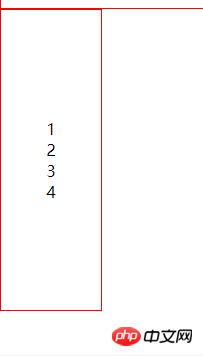
2、轮播图上下轮播,li垂直排列:
  <div class="box1">
        <ul>
            <li>1</li>
            <li>2</li>
            <li>3</li>
            <li>4</li>
        </ul>
    </div>
        .box1{
            width: 100px;
            height: 300px;
            border: 1px solid red;
            }
        .box1 ul{
            height: 300px;
            display: flex;
            flex-direction: column;
            justify-content: center;
            }
        .box1 ul li{
            list-style: none;
            margin: 0 auto;
            }
效果: