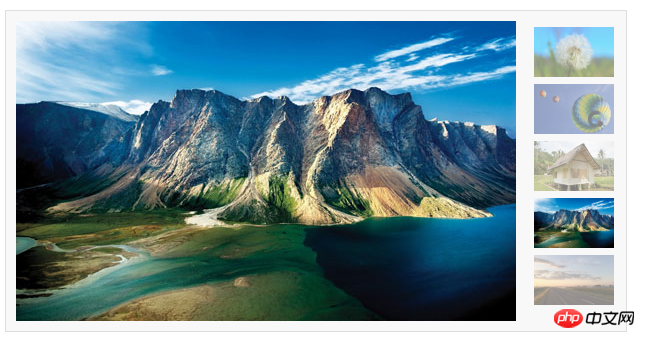
本篇给大家介绍javascript原生带缩略图的图片切换效果,有一定的参考价值,有需要的朋友可以参考一下,希望对你们有所帮助。
左边是banner图,右边是缩略图,当鼠标滑入缩略图时,也会切换图片。
一、这段是html代码,可以直接拷贝,需要自己准备相同大小的banner图,例中图片都是500x300
<!DOCTYPE html><html lang="en"><head>
    <meta charset="UTF-8">
    <meta name="viewport" content="width=device-width, initial-scale=1.0">
    <meta http-equiv="X-UA-Compatible" content="ie=edge">
    <title>图片轮播</title>
    <script src="./js.js"></script>
    <style>
        * {
            margin: 0;
            padding: 0;
            word-break: break-all;
        }
        body {
            background: #FFF;
            color: #333;
            font: 12px/1.6em Helvetica, Arial, sans-serif;
        }
        a {
            color: #0287CA;
            text-decoration: none;
        }
        a:hover {
            text-decoration: underline;
        }
        ul,li {
            list-style: none;
        }

        fieldset,
        img {
            border: none;
        }
        legend {
            display: none;
        }

        em,strong,cite,th {
            font-style: normal;
            font-weight: normal;
        }
        input,textarea,select,button {
            font: 12px Helvetica, Arial, sans-serif;
        }

        table {
            border-collapse: collapse;
        }

        html {
            overflow: -moz-scrollbars-vertical;
        }

        #ifocus {
            width: 620px;
            height: 320px;
            margin: 20px;
            border: 1px solid #DEDEDE;
            background: #F8F8F8;
        }

        #ifocus_pic {
            display: inline;
            position: relative;
            float: left;
            width: 500px;
            height: 300px;
            overflow: hidden;
            margin: 10px 0 0 10px;
        }
        #ifocus_piclist {
            position: absolute;
        }
        #ifocus_piclist li {
            width: 500px;
            height: 300px;
            overflow: hidden;
        }
        #ifocus_piclist img {
            width: 500px;
            height: 300px;
        }
        #ifocus_btn {
            display: inline;
            float: right;
            width: 94px;
            margin: 9px 9px 0 0;
        }
        #ifocus_btn li {
            width: 94px;
            height: 57px;
            cursor: pointer;
            opacity: 0.5;
            -moz-opacity: 0.5;
            filter: alpha(opacity=50);
        }
        #ifocus_btn img {
            width: 80px;
            height: 50px;
            margin: 7px 0 0 11px;
        }

        #ifocus_btn .current {
            /* background: url(i/ifocus_btn_bg.gif) no-repeat; */
            opacity: 1;
            -moz-opacity: 1;
            filter: alpha(opacity=100);
        }
    </style></head><body>
    <p id="ifocus">
        <p id="ifocus_pic">
            <p id="ifocus_piclist" style="left:0; top:0;">
                <ul>
                    <li><a href="#">@@##@@</a></li>
                    <li><a href="#">@@##@@</a></li>
                    <li><a href="#">@@##@@</a></li>
                    <li><a href="#">@@##@@</a></li>
                    <li><a href="#">@@##@@</a></li>
                </ul>
            </p>
        </p>
        <p id="ifocus_btn">
            <ul>
                <li class="current">@@##@@</li>
                <li>@@##@@</li>
                <li>@@##@@</li>
                <li>@@##@@</li>
                <li>@@##@@</li>
            </ul>
        </p>
    </p></body></html>
二、这段是js代码,其中用到了几个经典的js代码。在js中需要修改对应的id名字、图片移动的尺寸等。
function $(id) {    return document.getElementById(id);
}function addLoadEvent(func) {    var oldonload = window.onload;    if (typeof window.onload != 'function') {
        window.onload = func;
    } else {
        window.onload = function () {
            oldonload();
            func();
        }
    }
}function moveElement(elementID, final_x, final_y, interval) {    if (!document.getElementById) return false;    if (!document.getElementById(elementID)) return false;    var elem = document.getElementById(elementID);    if (elem.movement) {
        clearTimeout(elem.movement);
    }    if (!elem.style.left) {
        elem.style.left = "0px";
    }    if (!elem.style.top) {
        elem.style.top = "0px";
    }    var xpos = parseInt(elem.style.left);    var ypos = parseInt(elem.style.top);    if (xpos == final_x && ypos == final_y) {        return true;
    }    if (xpos < final_x) {        var dist = Math.ceil((final_x - xpos) / 10);
        xpos = xpos + dist;
    }    if (xpos > final_x) {        var dist = Math.ceil((xpos - final_x) / 10);
        xpos = xpos - dist;
    }    if (ypos < final_y) {        var dist = Math.ceil((final_y - ypos) / 10);
        ypos = ypos + dist;
    }    if (ypos > final_y) {        var dist = Math.ceil((ypos - final_y) / 10);
        ypos = ypos - dist;
    }
    elem.style.left = xpos + "px";
    elem.style.top = ypos + "px";    var repeat = "moveElement('" + elementID + "'," + final_x + "," + final_y + "," + interval + ")";
    elem.movement = setTimeout(repeat, interval);
}function classNormal(iFocusBtnID) {    var iFocusBtns = $(iFocusBtnID).getElementsByTagName('li');    for (var i = 0; i < iFocusBtns.length; i++) {
        iFocusBtns[i].className = 'normal';
    }
}function classCurrent(iFocusBtnID, n) {    var iFocusBtns = $(iFocusBtnID).getElementsByTagName('li');
    iFocusBtns[n].className = 'current';
}function iFocusChange() {    if (!$('ifocus')) return false;
    $('ifocus').onmouseover = function () {
        atuokey = true
    };
    $('ifocus').onmouseout = function () {
        atuokey = false
    };    var iFocusBtns = $('ifocus_btn').getElementsByTagName('li');    var listLength = iFocusBtns.length;
    iFocusBtns[0].onmouseover = function () {
        moveElement('ifocus_piclist', 0, 0, 5);
        classNormal('ifocus_btn');
        classCurrent('ifocus_btn', 0);
    }    if (listLength >= 2) {
        iFocusBtns[1].onmouseover = function () {
            moveElement('ifocus_piclist', 0, -300, 5);
            classNormal('ifocus_btn');
            classCurrent('ifocus_btn', 1);
        }
    }    if (listLength >= 3) {
        iFocusBtns[2].onmouseover = function () {
            moveElement('ifocus_piclist', 0, -600, 5);
            classNormal('ifocus_btn');
            classCurrent('ifocus_btn', 2);
        }
    }    if (listLength >= 4) {
        iFocusBtns[3].onmouseover = function () {
            moveElement('ifocus_piclist', 0, -900, 5);
            classNormal('ifocus_btn');
            classCurrent('ifocus_btn', 3);
        }
    }    if (listLength >= 5) {
        iFocusBtns[4].onmouseover = function () {
            moveElement('ifocus_piclist', 0, -1200, 5);
            classNormal('ifocus_btn');
            classCurrent('ifocus_btn', 4);
        }
    }
}
setInterval('autoiFocus()', 3000);var atuokey = false;function autoiFocus() {    if (!$('ifocus')) return false;    if (atuokey) return false;    var focusBtnList = $('ifocus_btn').getElementsByTagName('li');    var listLength = focusBtnList.length;    for (var i = 0; i < listLength; i++) {        if (focusBtnList[i].className == 'current') var currentNum = i;
    }    if (currentNum == 0 && listLength != 1) {
        moveElement('ifocus_piclist', 0, -300, 5);
        classNormal('ifocus_btn');
        classCurrent('ifocus_btn', 1);
    }    if (currentNum == 1 && listLength != 2) {
        moveElement('ifocus_piclist', 0, -600, 5);
        classNormal('ifocus_btn');
        classCurrent('ifocus_btn',2);
    }    if (currentNum == 2 && listLength != 3) {
        moveElement('ifocus_piclist', 0, -900, 5);
        classNormal('ifocus_btn');
        classCurrent('ifocus_btn',3);
    }    if (currentNum == 3) {
        moveElement('ifocus_piclist', 0, -1200, 5);
        classNormal('ifocus_btn');
        classCurrent('ifocus_btn', 4);
    }    if (currentNum == 4) {
        moveElement('ifocus_piclist', 0, 0, 5);
        classNormal('ifocus_btn');
        classCurrent('ifocus_btn',0);
    }

}
addLoadEvent(iFocusChange);
效果如下图
总结:以上就是本篇文的全部内容,希望能对大家的学习有所帮助。更多相关教程请访问JavaScript视频教程!
相关推荐:

立即学习“Java免费学习笔记(深入)”;