



在word文档中有一个首字下沉功能,可以在文章的排版时使用,有时能给文章增色不少。那么css可以实现这样的效果吗?本篇文章就给大家介绍css是如何实现首字下沉效果的,让大家可以了解如何用css的伪元素+浮动实现首字下沉效果。有一定的参考价值,有需要的朋友可以参考一下,希望对你们有所帮助。
在css中首字下沉效果都是能过伪元素::first-letter来实现。其实现原理非常的简单,就是把首字font-size值设置较大,然后能过float来实现。
下面我们就通过简单的代码示例来看看css是怎样实现首字下沉效果的。
<!DOCTYPE html>
<html>
	<head>
		<meta charset="UTF-8">
		<title>首字下沉</title>
		<style>
			p::first-letter{
				color: #c69c6d;
				font-size: 2em;
				float:left;
				margin: 0 .2em 0 0;
			}
		</style>
	</head>
	<body>
		<p>这里是测试代码,实现首字下沉。这里是测试代码,实现首字下沉。这里是测试代码,实现首字下沉。这里是测试代码,实现首字下沉。这里是测试代码,实现首字下沉。这里是测试代码,实现首字下沉。</p><div class="aritcle_card flexRow">
                                                        <div class="artcardd flexRow">
                                                                <a class="aritcle_card_img" href="/ai/724" title="文心一言"><img
                                                                                src="https://img.php.cn/upload/ai_manual/000/000/000/175679974557049.png" alt="文心一言"  onerror="this.onerror='';this.src='/static/lhimages/moren/morentu.png'" ></a>
                                                                <div class="aritcle_card_info flexColumn">
                                                                        <a href="/ai/724" title="文心一言">文心一言</a>
                                                                        <p>文心一言是百度开发的AI聊天机器人,通过对话可以生成各种形式的内容。</p>
                                                                </div>
                                                                <a href="/ai/724" title="文心一言" class="aritcle_card_btn flexRow flexcenter"><b></b><span>下载</span> </a>
                                                        </div>
                                                </div><p><span>立即学习</span>“<a href="https://pan.quark.cn/s/cb6835dc7db1" style="text-decoration: underline !important; color: blue; font-weight: bolder;" rel="nofollow" target="_blank">前端免费学习笔记(深入)</a>”;</p>
		<p>这里是测试代码,实现首字下沉。这里是测试代码,实现首字下沉。这里是测试代码,实现首字下沉。这里是测试代码,实现首字下沉。这里是测试代码,实现首字下沉。这里是测试代码,实现首字下沉。</p><p><span>立即学习</span>“<a href="https://pan.quark.cn/s/cb6835dc7db1" style="text-decoration: underline !important; color: blue; font-weight: bolder;" rel="nofollow" target="_blank">前端免费学习笔记(深入)</a>”;</p>
		<p>这里是测试代码,实现首字下沉。这里是测试代码,实现首字下沉。这里是测试代码,实现首字下沉。这里是测试代码,实现首字下沉。这里是测试代码,实现首字下沉。这里是测试代码,实现首字下沉。</p><p><span>立即学习</span>“<a href="https://pan.quark.cn/s/cb6835dc7db1" style="text-decoration: underline !important; color: blue; font-weight: bolder;" rel="nofollow" target="_blank">前端免费学习笔记(深入)</a>”;</p>
	</body>
</html>
效果图:

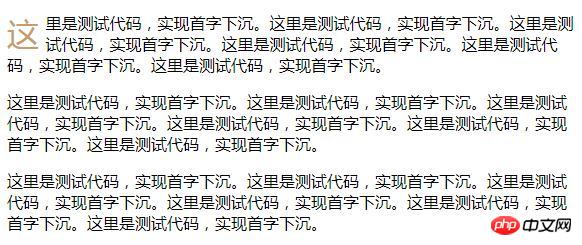
上例中是将所有段落的首字下沉,如果仅需要实现某段的首字下沉效果,那还需要配合其它的选择器来实现。这里我们就来看看首段首字下沉的实现:
<!DOCTYPE html>
<html>
	<head>
		<meta charset="UTF-8">
		<title>首字下沉</title>
		<style>
			p:first-child::first-letter{
				color: #c69c6d;
				font-size: 2em;
				float:left;
				margin: 0 .2em 0 0;
			}
		</style>
	</head>
	<body>
		<p>这里是测试代码,实现首字下沉。这里是测试代码,实现首字下沉。这里是测试代码,实现首字下沉。这里是测试代码,实现首字下沉。这里是测试代码,实现首字下沉。这里是测试代码,实现首字下沉。</p><p><span>立即学习</span>“<a href="https://pan.quark.cn/s/cb6835dc7db1" style="text-decoration: underline !important; color: blue; font-weight: bolder;" rel="nofollow" target="_blank">前端免费学习笔记(深入)</a>”;</p>
		<p>这里是测试代码,实现首字下沉。这里是测试代码,实现首字下沉。这里是测试代码,实现首字下沉。这里是测试代码,实现首字下沉。这里是测试代码,实现首字下沉。这里是测试代码,实现首字下沉。</p><p><span>立即学习</span>“<a href="https://pan.quark.cn/s/cb6835dc7db1" style="text-decoration: underline !important; color: blue; font-weight: bolder;" rel="nofollow" target="_blank">前端免费学习笔记(深入)</a>”;</p>
		<p>这里是测试代码,实现首字下沉。这里是测试代码,实现首字下沉。这里是测试代码,实现首字下沉。这里是测试代码,实现首字下沉。这里是测试代码,实现首字下沉。这里是测试代码,实现首字下沉。</p><p><span>立即学习</span>“<a href="https://pan.quark.cn/s/cb6835dc7db1" style="text-decoration: underline !important; color: blue; font-weight: bolder;" rel="nofollow" target="_blank">前端免费学习笔记(深入)</a>”;</p>
	</body>
</html>
效果图:
总结:以上就是本篇文的全部内容,希望能对大家的学习有所帮助。更多相关教程请访问 CSS基础视频教程!
相关推荐:




