



本篇文章给大家带来的内容是关于python中pika模块的相关问题介绍(附代码),有一定的参考价值,有需要的朋友可以参考一下,希望对你有所帮助。
工作中经常用到rabbitmq,而用的语言主要是python,所以也就经常会用到python中的pika模块,但是这个模块的使用,也给我带了很多问题,这里整理一下关于这个模块我在使用过程的改变历程已经中间碰到一些问题的解决方法
刚开写代码的小菜鸟
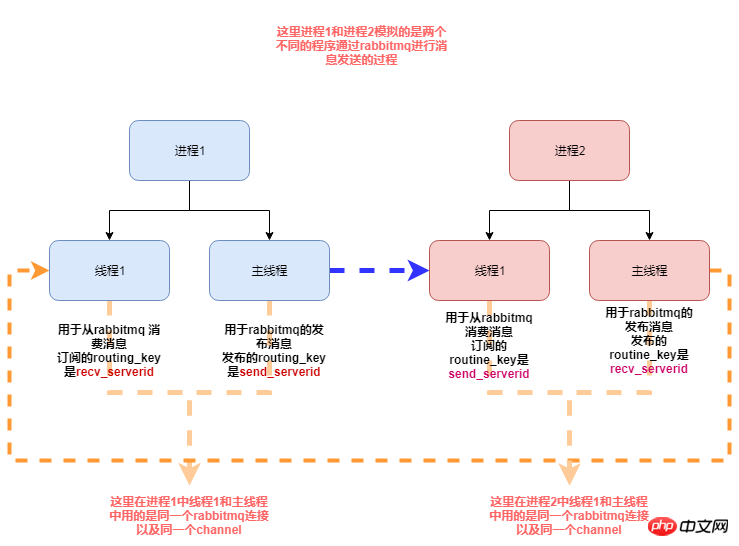
在最开始使用这个rabbitmq的时候,因为本身业务需求,我的程序既需要从rabbitmq消费消息,也需要给rabbitmq发布消息,代码的逻辑图为如下:
立即学习“Python免费学习笔记(深入)”;
下面是我的模拟代码:
#! /usr/bin/env python3
# .-*- coding:utf-8 .-*-
import pika
import time
import threading
import os
import json
import datetime
from multiprocessing import Process

# rabbitmq 配置信息
MQ_CONFIG = {
    "host": "192.168.90.11",
    "port": 5672,
    "vhost": "/",
    "user": "guest",
    "passwd": "guest",
    "exchange": "ex_change",
    "serverid": "eslservice",
    "serverid2": "airservice"
}
class RabbitMQServer(object):
    _instance_lock = threading.Lock()
    def __init__(self, recv_serverid, send_serverid):
        # self.serverid = MQ_CONFIG.get("serverid")
        self.exchange = MQ_CONFIG.get("exchange")
        self.channel = None
        self.connection = None
        self.recv_serverid = recv_serverid
        self.send_serverid = send_serverid

    def reconnect(self):
        if self.connection and not self.connection.is_closed():
            self.connection.close()

        credentials = pika.PlainCredentials(MQ_CONFIG.get("user"), MQ_CONFIG.get("passwd"))
        parameters = pika.ConnectionParameters(MQ_CONFIG.get("host"), MQ_CONFIG.get("port"), MQ_CONFIG.get("vhost"),
                                               credentials)
        self.connection = pika.BlockingConnection(parameters)
        self.channel = self.connection.channel()
        self.channel.exchange_declare(exchange=self.exchange, exchange_type="direct")
        result = self.channel.queue_declare(queue="queue_{0}".format(self.recv_serverid), exclusive=True)
        queue_name = result.method.queue
        self.channel.queue_bind(exchange=self.exchange, queue=queue_name, routing_key=self.recv_serverid)
        self.channel.basic_consume(self.consumer_callback, queue=queue_name, no_ack=False)
    def consumer_callback(self, channel, method, properties, body):
        """
        消费消息
        :param channel:
        :param method:
        :param properties:
        :param body:
        :return:
        """
        channel.basic_ack(delivery_tag=method.delivery_tag)
        process_id = os.getpid()
        print("current process id is {0} body is {1}".format(process_id, body))
    def publish_message(self, to_serverid, message):
        """
        发布消息
        :param to_serverid:
        :param message:
        :return:
        """
        message = dict_to_json(message)
        self.channel.basic_publish(exchange=self.exchange, routing_key=to_serverid, body=message)

    def run(self):
        while True:
            self.channel.start_consuming()
    @classmethod
    def get_instance(cls, *args, **kwargs):
        """
        单例模式
        :return:
        """
        if not hasattr(cls, "_instance"):
            with cls._instance_lock:
                if not hasattr(cls, "_instance"):
                    cls._instance = cls(*args, **kwargs)
        return cls._instance
def process1(recv_serverid, send_serverid):
    """
    用于测试同时订阅和发布消息
    :return:
    """
    # 线程1 用于去 从rabbitmq消费消息
    rabbitmq_server = RabbitMQServer.get_instance(recv_serverid, send_serverid)
    rabbitmq_server.reconnect()
    recv_threading = threading.Thread(target=rabbitmq_server.run)
    recv_threading.start()
    i = 1
    while True:
        # 主线程去发布消息
        message = {"value": i}
        rabbitmq_server.publish_message(rabbitmq_server.send_serverid,message)
        i += 1
        time.sleep(0.01)
class CJsonEncoder(json.JSONEncoder):
    def default(self, obj):
        if isinstance(obj, datetime.datetime):
            return obj.strftime('%Y-%m-%d %H:%M:%S')
        elif isinstance(obj, datetime.date):
            return obj.strftime("%Y-%m-%d")
        else:
            return json.JSONEncoder.default(self, obj)


def dict_to_json(po):
    jsonstr = json.dumps(po, ensure_ascii=False, cls=CJsonEncoder)
    return jsonstr


def json_to_dict(jsonstr):
    if isinstance(jsonstr, bytes):
        jsonstr = jsonstr.decode("utf-8")
    d = json.loads(jsonstr)
    return d


if __name__ == '__main__':
    recv_serverid = MQ_CONFIG.get("serverid")
    send_serverid = MQ_CONFIG.get("serverid2")
    # 进程1 用于模拟模拟程序1
    p = Process(target=process1, args=(recv_serverid, send_serverid, ))
    p.start()

    # 主进程用于模拟程序2
process1(send_serverid, recv_serverid)上面是我的将我的实际代码更改的测试模块,其实就是模拟实际业务中,我的rabbitmq模块既有订阅消息,又有发布消息的时候,同时,订阅消息和发布消息用的同一个rabbitmq连接的同一个channel
但是这段代码运行之后基本没有运行多久就会看到如下错误信息:
Traceback (most recent call last):
  File "/app/python3/lib/python3.6/multiprocessing/process.py", line 258, in _bootstrap
    self.run()
  File "/app/python3/lib/python3.6/multiprocessing/process.py", line 93, in run
    self._target(*self._args, **self._kwargs)
  File "/app/py_code/\udce5\udc85\udcb3\udce4\udcba\udc8erabbitmq\udce9\udc97\udcae\udce9\udca2\udc98/low_rabbitmq.py", line 109, in process1
    rabbitmq_server.publish_message(rabbitmq_server.send_serverid,message)
  File "/app/py_code/\udce5\udc85\udcb3\udce4\udcba\udc8erabbitmq\udce9\udc97\udcae\udce9\udca2\udc98/low_rabbitmq.py", line 76, in publish_message
    self.channel.basic_publish(exchange=self.exchange, routing_key=to_serverid, body=message)
  File "/app/python3/lib/python3.6/site-packages/pika/adapters/blocking_connection.py", line 2120, in basic_publish
    mandatory, immediate)
  File "/app/python3/lib/python3.6/site-packages/pika/adapters/blocking_connection.py", line 2206, in publish
    immediate=immediate)
  File "/app/python3/lib/python3.6/site-packages/pika/channel.py", line 415, in basic_publish
    raise exceptions.ChannelClosed()
pika.exceptions.ChannelClosed


Traceback (most recent call last):
  File "/app/py_code/\udce5\udc85\udcb3\udce4\udcba\udc8erabbitmq\udce9\udc97\udcae\udce9\udca2\udc98/low_rabbitmq.py", line 144, in
    process1(send_serverid, recv_serverid)
  File "/app/py_code/\udce5\udc85\udcb3\udce4\udcba\udc8erabbitmq\udce9\udc97\udcae\udce9\udca2\udc98/low_rabbitmq.py", line 109, in process1
    rabbitmq_server.publish_message(rabbitmq_server.send_serverid,message)
  File "/app/py_code/\udce5\udc85\udcb3\udce4\udcba\udc8erabbitmq\udce9\udc97\udcae\udce9\udca2\udc98/low_rabbitmq.py", line 76, in publish_message
    self.channel.basic_publish(exchange=self.exchange, routing_key=to_serverid, body=message)
  File "/app/python3/lib/python3.6/site-packages/pika/adapters/blocking_connection.py", line 2120, in basic_publish
    mandatory, immediate)
  File "/app/python3/lib/python3.6/site-packages/pika/adapters/blocking_connection.py", line 2206, in publish
    immediate=immediate)
  File "/app/python3/lib/python3.6/site-packages/pika/channel.py", line 415, in basic_publish
    raise exceptions.ChannelClosed()
pika.exceptions.ChannelClosed
Exception in thread Thread-1:
Traceback (most recent call last):
  File "/app/python3/lib/python3.6/threading.py", line 916, in _bootstrap_inner
    self.run()
  File "/app/python3/lib/python3.6/threading.py", line 864, in run
    self._target(*self._args, **self._kwargs)
  File "/app/py_code/\udce5\udc85\udcb3\udce4\udcba\udc8erabbitmq\udce9\udc97\udcae\udce9\udca2\udc98/low_rabbitmq.py", line 80, in run
    self.channel.start_consuming()
  File "/app/python3/lib/python3.6/site-packages/pika/adapters/blocking_connection.py", line 1822, in start_consuming
    self.connection.process_data_events(time_limit=None)
  File "/app/python3/lib/python3.6/site-packages/pika/adapters/blocking_connection.py", line 749, in process_data_events
    self._flush_output(common_terminator)
  File "/app/python3/lib/python3.6/site-packages/pika/adapters/blocking_connection.py", line 477, in _flush_output
    result.reason_text)
pika.exceptions.ConnectionClosed: (505, 'UNEXPECTED_FRAME - expected content header for class 60, got non content header frame instead')
而这个时候你查看rabbitmq服务的日志信息,你会看到两种情况的错误日志如下:
情况一:
=INFO REPORT==== 12-Oct-2018::18:32:37 ===
accepting AMQP connection <0.19439.2> (192.168.90.11:42942 -> 192.168.90.11:5672)

=INFO REPORT==== 12-Oct-2018::18:32:37 ===
accepting AMQP connection <0.19446.2> (192.168.90.11:42946 -> 192.168.90.11:5672)

=ERROR REPORT==== 12-Oct-2018::18:32:38 ===
AMQP connection <0.19446.2> (running), channel 1 - error:
{amqp_error,unexpected_frame,
            "expected content header for class 60, got non content header frame instead",
            'basic.publish'}

=INFO REPORT==== 12-Oct-2018::18:32:38 ===
closing AMQP connection <0.19446.2> (192.168.90.11:42946 -> 192.168.90.11:5672)

=ERROR REPORT==== 12-Oct-2018::18:33:59 ===
AMQP connection <0.19439.2> (running), channel 1 - error:
{amqp_error,unexpected_frame,
            "expected content header for class 60, got non content header frame instead",
            'basic.publish'}

=INFO REPORT==== 12-Oct-2018::18:33:59 ===
closing AMQP connection <0.19439.2> (192.168.90.11:42942 -> 192.168.90.11:5672)
情况二:
=INFO REPORT==== 12-Oct-2018::17:41:28 ===
accepting AMQP connection <0.19045.2> (192.168.90.11:33004 -> 192.168.90.11:5672)
=INFO REPORT==== 12-Oct-2018::17:41:28 ===
accepting AMQP connection <0.19052.2> (192.168.90.11:33008 -> 192.168.90.11:5672)
=ERROR REPORT==== 12-Oct-2018::17:41:29 ===
AMQP connection <0.19045.2> (running), channel 1 - error:
{amqp_error,unexpected_frame,
            "expected content body, got non content body frame instead",
            'basic.publish'}
=INFO REPORT==== 12-Oct-2018::17:41:29 ===
closing AMQP connection <0.19045.2> (192.168.90.11:33004 -> 192.168.90.11:5672)
=ERROR REPORT==== 12-Oct-2018::17:42:23 ===
AMQP connection <0.19052.2> (running), channel 1 - error:
{amqp_error,unexpected_frame,
            "expected method frame, got non method frame instead",none}
=INFO REPORT==== 12-Oct-2018::17:42:23 ===
closing AMQP connection <0.19052.2> (192.168.90.11:33008 -> 192.168.90.11:5672)
对于这种情况我查询了很多资料和文档,都没有找到一个很好的答案,查到关于这个问题的连接有:
https://stackoverflow.com/questions/49154404/pika-threaded-execution-gets-error-505-unexpected-frame
http://rabbitmq.1065348.n5.nabble.com/UNEXPECTED-FRAME-expected-content-header-for-class-60-got-non-content-header-frame-instead-td34981.html
这个问题其他人碰到的也不少,不过查了最后的解决办法基本都是创建两个rabbitmq连接,一个连接用于订阅消息,一个连接用于发布消息,这种情况的时候,就不会出现上述的问题
在这个解决方法之前,我测试了用同一个连接,不同的channel,让订阅消息用一个channel, 发布消息用另外一个channel,但是在测试过程依然会出现上述的错误。
有点写代码能力了
最后我也是选择了用两个连接的方法解决出现上述的问题,现在是一个测试代码例子:
#! /usr/bin/env python3
# .-*- coding:utf-8 .-*-


import pika
import threading
import json
import datetime
import os


from pika.exceptions import ChannelClosed
from pika.exceptions import ConnectionClosed


# rabbitmq 配置信息
MQ_CONFIG = {
    "host": "192.168.90.11",
    "port": 5672,
    "vhost": "/",
    "user": "guest",
    "passwd": "guest",
    "exchange": "ex_change",
    "serverid": "eslservice",
    "serverid2": "airservice"
}


class RabbitMQServer(object):
    _instance_lock = threading.Lock()

    def __init__(self):
        self.recv_serverid = ""
        self.send_serverid = ""
        self.exchange = MQ_CONFIG.get("exchange")
        self.connection = None
        self.channel = None

    def reconnect(self):
        if self.connection and not self.connection.is_closed:
            self.connection.close()

        credentials = pika.PlainCredentials(MQ_CONFIG.get("user"), MQ_CONFIG.get("passwd"))
        parameters = pika.ConnectionParameters(MQ_CONFIG.get("host"), MQ_CONFIG.get("port"), MQ_CONFIG.get("vhost"),
                                               credentials)
        self.connection = pika.BlockingConnection(parameters)

        self.channel = self.connection.channel()
        self.channel.exchange_declare(exchange=self.exchange, exchange_type="direct")

        if isinstance(self, RabbitComsumer):
            result = self.channel.queue_declare(queue="queue_{0}".format(self.recv_serverid), exclusive=True)
            queue_name = result.method.queue
            self.channel.queue_bind(exchange=self.exchange, queue=queue_name, routing_key=self.recv_serverid)
            self.channel.basic_consume(self.consumer_callback, queue=queue_name, no_ack=False)


class RabbitComsumer(RabbitMQServer):

    def __init__(self):
        super(RabbitComsumer, self).__init__()

    def consumer_callback(self, ch, method, properties, body):
        """
        :param ch:
        :param method:
        :param properties:
        :param body:
        :return:
        """
        ch.basic_ack(delivery_tag=method.delivery_tag)
        process_id = threading.current_thread()
        print("current process id is {0} body is {1}".format(process_id, body))

    def start_consumer(self):
        while True:
            self.reconnect()
            self.channel.start_consuming()

    @classmethod
    def run(cls, recv_serverid):
        consumer = cls()
        consumer.recv_serverid = recv_serverid
        consumer.start_consumer()


class RabbitPublisher(RabbitMQServer):

    def __init__(self):
        super(RabbitPublisher, self).__init__()

    def start_publish(self):
        self.reconnect()
        i = 1
        while True:
            message = {"value": i}
            message = dict_to_json(message)
            self.channel.basic_publish(exchange=self.exchange, routing_key=self.send_serverid, body=message)
            i += 1
    @classmethod
    def run(cls, send_serverid):
        publish = cls()
        publish.send_serverid = send_serverid
        publish.start_publish()
class CJsonEncoder(json.JSONEncoder):
    def default(self, obj):
        if isinstance(obj, datetime.datetime):
            return obj.strftime('%Y-%m-%d %H:%M:%S')
        elif isinstance(obj, datetime.date):
            return obj.strftime("%Y-%m-%d")
        else:
            return json.JSONEncoder.default(self, obj)
def dict_to_json(po):
    jsonstr = json.dumps(po, ensure_ascii=False, cls=CJsonEncoder)
    return jsonstr
def json_to_dict(jsonstr):
    if isinstance(jsonstr, bytes):
        jsonstr = jsonstr.decode("utf-8")
    d = json.loads(jsonstr)
    return d

if __name__ == '__main__':
    recv_serverid = MQ_CONFIG.get("serverid")
    send_serverid = MQ_CONFIG.get("serverid2")
    # 这里分别用两个线程去连接和发送
    threading.Thread(target=RabbitComsumer.run, args=(recv_serverid,)).start()
    threading.Thread(target=RabbitPublisher.run, args=(send_serverid,)).start()
    # 这里也是用两个连接去连接和发送,
    threading.Thread(target=RabbitComsumer.run, args=(send_serverid,)).start()
    RabbitPublisher.run(recv_serverid)
上面代码中我分别用了两个连接去订阅和发布消息,同时另外一对订阅发布也是用的两个连接来执行订阅和发布,这样当再次运行程序之后,就不会在出现之前的问题

免费 盛世企业网站管理系统(SnSee)系统完全免费使用,无任何功能模块使用限制,在使用过程中如遇到相关问题可以去官方论坛参与讨论。开源 系统Web代码完全开源,在您使用过程中可以根据自已实际情况加以调整或修改,完全可以满足您的需求。强大且灵活 独创的多语言功能,可以直接在后台自由设定语言版本,其语言版本不限数量,可根据自已需要进行任意设置;系统各模块可在后台自由设置及开启;强大且适用的后台管理支
关于断开重连
上面的代码虽然不会在出现之前的错误,但是这个程序非常脆弱,当rabbitmq服务重启或者断开之后,程序并不会有重连接的机制,所以我们需要为代码添加重连机制,这样即使rabbitmq服务重启了或者
rabbitmq出现异常我们的程序也能进行重连机制
#! /usr/bin/env python3
# .-*- coding:utf-8 .-*-


import pika
import threading
import json
import datetime
import time


from pika.exceptions import ChannelClosed
from pika.exceptions import ConnectionClosed


# rabbitmq 配置信息
MQ_CONFIG = {
    "host": "192.168.90.11",
    "port": 5672,
    "vhost": "/",
    "user": "guest",
    "passwd": "guest",
    "exchange": "ex_change",
    "serverid": "eslservice",
    "serverid2": "airservice"
}


class RabbitMQServer(object):
    _instance_lock = threading.Lock()

    def __init__(self):
        self.recv_serverid = ""
        self.send_serverid = ""
        self.exchange = MQ_CONFIG.get("exchange")
        self.connection = None
        self.channel = None

    def reconnect(self):
        try:

            if self.connection and not self.connection.is_closed:
                self.connection.close()

            credentials = pika.PlainCredentials(MQ_CONFIG.get("user"), MQ_CONFIG.get("passwd"))
            parameters = pika.ConnectionParameters(MQ_CONFIG.get("host"), MQ_CONFIG.get("port"), MQ_CONFIG.get("vhost"),
                                                   credentials)
            self.connection = pika.BlockingConnection(parameters)

            self.channel = self.connection.channel()
            self.channel.exchange_declare(exchange=self.exchange, exchange_type="direct")

            if isinstance(self, RabbitComsumer):
                result = self.channel.queue_declare(queue="queue_{0}".format(self.recv_serverid), exclusive=True)
                queue_name = result.method.queue
                self.channel.queue_bind(exchange=self.exchange, queue=queue_name, routing_key=self.recv_serverid)
                self.channel.basic_consume(self.consumer_callback, queue=queue_name, no_ack=False)
        except Exception as e:
            print(e)


class RabbitComsumer(RabbitMQServer):

    def __init__(self):
        super(RabbitComsumer, self).__init__()

    def consumer_callback(self, ch, method, properties, body):
        """
        :param ch:
        :param method:
        :param properties:
        :param body:
        :return:
        """
        ch.basic_ack(delivery_tag=method.delivery_tag)
        process_id = threading.current_thread()
        print("current process id is {0} body is {1}".format(process_id, body))

    def start_consumer(self):
        while True:
            try:
                self.reconnect()
                self.channel.start_consuming()
            except ConnectionClosed as e:
                self.reconnect()
                time.sleep(2)
            except ChannelClosed as e:
                self.reconnect()
                time.sleep(2)
            except Exception as e:
                self.reconnect()
                time.sleep(2)

    @classmethod
    def run(cls, recv_serverid):
        consumer = cls()
        consumer.recv_serverid = recv_serverid
        consumer.start_consumer()


class RabbitPublisher(RabbitMQServer):

    def __init__(self):
        super(RabbitPublisher, self).__init__()

    def start_publish(self):
        self.reconnect()
        i = 1
        while True:
            message = {"value": i}
            message = dict_to_json(message)
            try:
                self.channel.basic_publish(exchange=self.exchange, routing_key=self.send_serverid, body=message)
                i += 1
            except ConnectionClosed as e:
                self.reconnect()
                time.sleep(2)
            except ChannelClosed as e:
                self.reconnect()
                time.sleep(2)
            except Exception as e:
                self.reconnect()
                time.sleep(2)

    @classmethod
    def run(cls, send_serverid):
        publish = cls()
        publish.send_serverid = send_serverid
        publish.start_publish()


class CJsonEncoder(json.JSONEncoder):
    def default(self, obj):
        if isinstance(obj, datetime.datetime):
            return obj.strftime('%Y-%m-%d %H:%M:%S')
        elif isinstance(obj, datetime.date):
            return obj.strftime("%Y-%m-%d")
        else:
            return json.JSONEncoder.default(self, obj)


def dict_to_json(po):
    jsonstr = json.dumps(po, ensure_ascii=False, cls=CJsonEncoder)
    return jsonstr


def json_to_dict(jsonstr):
    if isinstance(jsonstr, bytes):
        jsonstr = jsonstr.decode("utf-8")
    d = json.loads(jsonstr)
    return d

if __name__ == '__main__':
    recv_serverid = MQ_CONFIG.get("serverid")
    send_serverid = MQ_CONFIG.get("serverid2")
    # 这里分别用两个线程去连接和发送
    threading.Thread(target=RabbitComsumer.run, args=(recv_serverid,)).start()
    threading.Thread(target=RabbitPublisher.run, args=(send_serverid,)).start()
    # 这里也是用两个连接去连接和发送,
    threading.Thread(target=RabbitComsumer.run, args=(send_serverid,)).start()
    RabbitPublisher.run(recv_serverid)
上面的代码运行运行之后即使rabbitmq的服务出问题了,但是当rabbitmq的服务好了之后,我们的程序依然可以重新进行连接,但是上述这种实现方式运行了一段时间之后,因为实际的发布消息的地方的消息是从其他线程或进程中获取的数据,这个时候你可能通过queue队列的方式实现,这个时候你的queue中如果长时间没有数据,在一定时间之后来了数据需要发布出去,这个时候你发现,你的程序会提示连接被rabbitmq 服务端给断开了,但是毕竟你设置了重连机制,当然也可以重连,但是这里想想为啥会出现这种情况,这个时候查看rabbitmq的日志你会发现出现了如下错误:
=ERROR REPORT==== 8-Oct-2018::15:34:19 ===
closing AMQP connection <0.30112.1> (192.168.90.11:54960 -> 192.168.90.11:5672):
{heartbeat_timeout,running}
这是我之前测试环境的日志截取的,可以看到是因为这个错误导致的,后来查看pika连接rabbitmq的连接参数中有这么一个参数
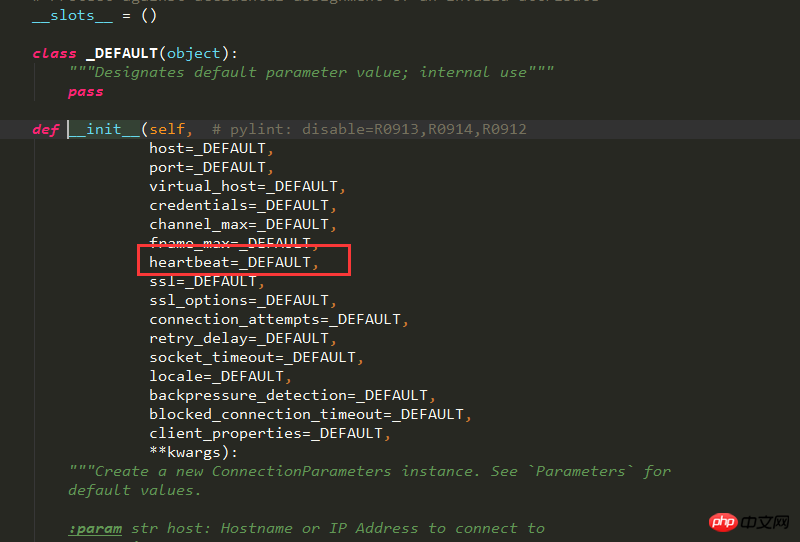
这个参数默认没有设置,那么这个heatbeat的心跳时间,默认是不设置的,如果不设置的话,就是根绝服务端设置的,因为这个心跳时间是和服务端进行协商的结果
当这个参数设置为0的时候则表示不发送心跳,服务端永远不会断开这个连接,所以这里我为了方便我给发布消息的线程的心跳设置为0,并且我这里,我整理通过抓包,看一下服务端和客户端的协商过程
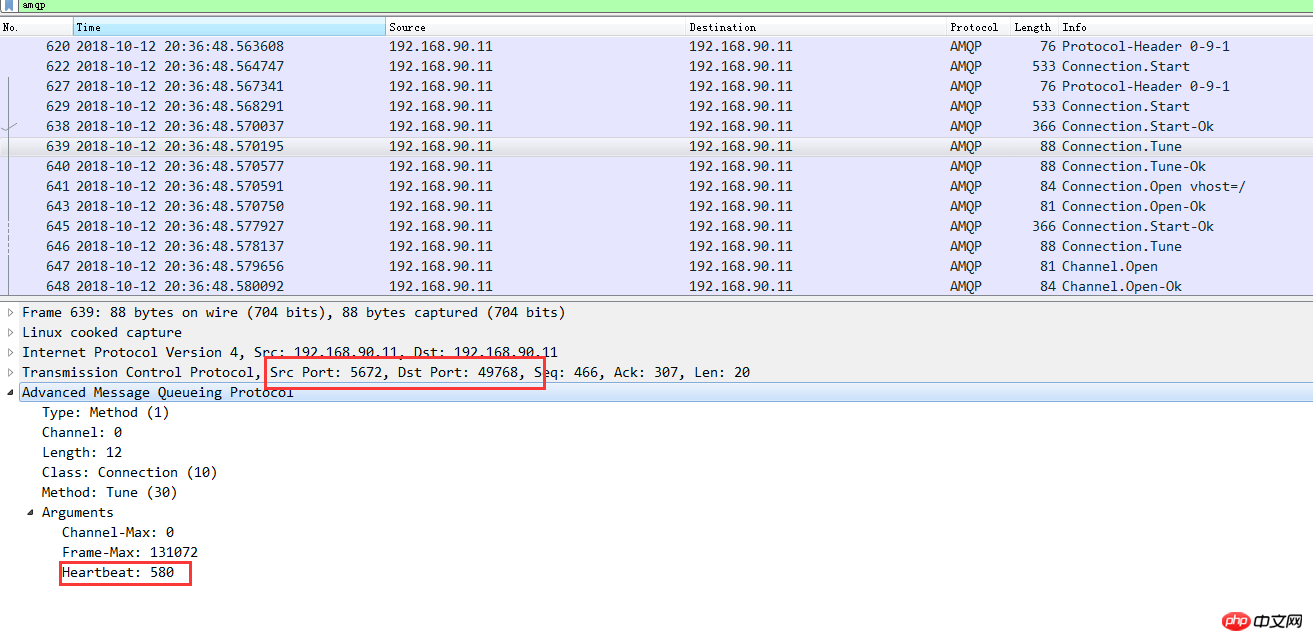
从抓包分析中可以看出服务端和客户端首先协商的是580秒,而客户端回复的是:
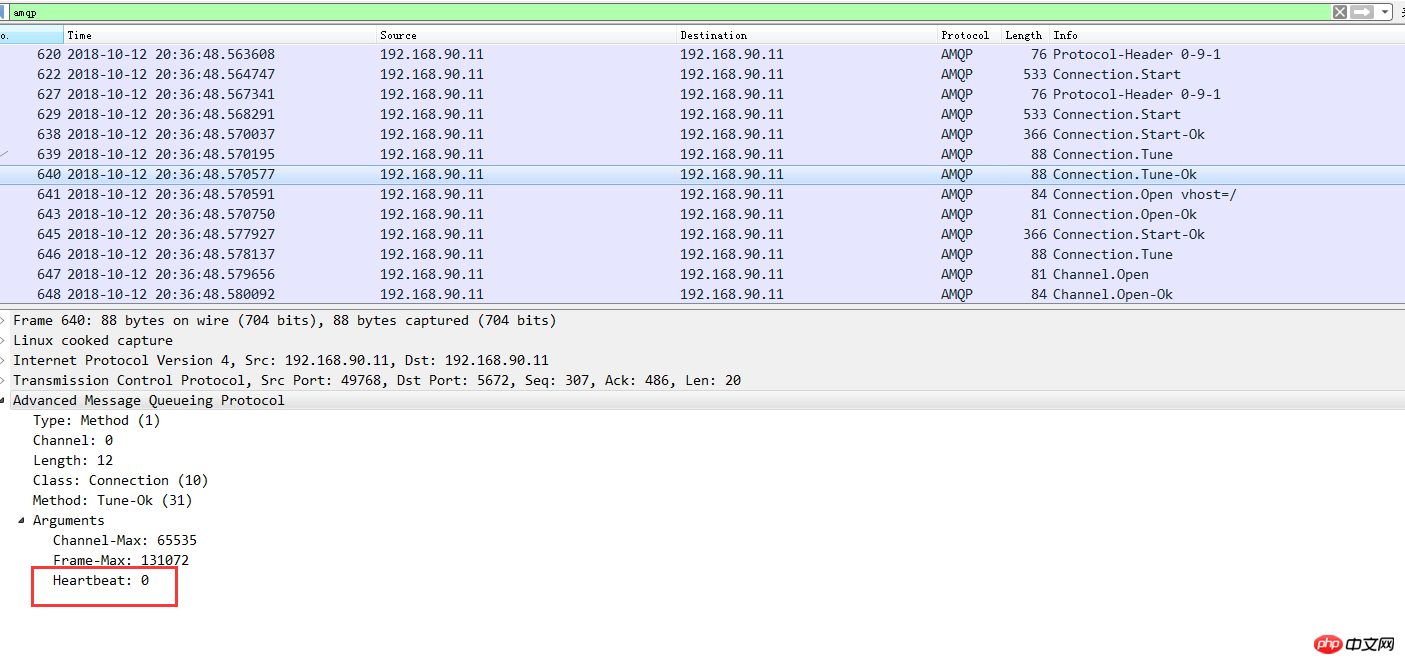
这样这个连接就永远不会断了,但是如果我们不设置heartbeat这个值,再次抓包我们会看到如下
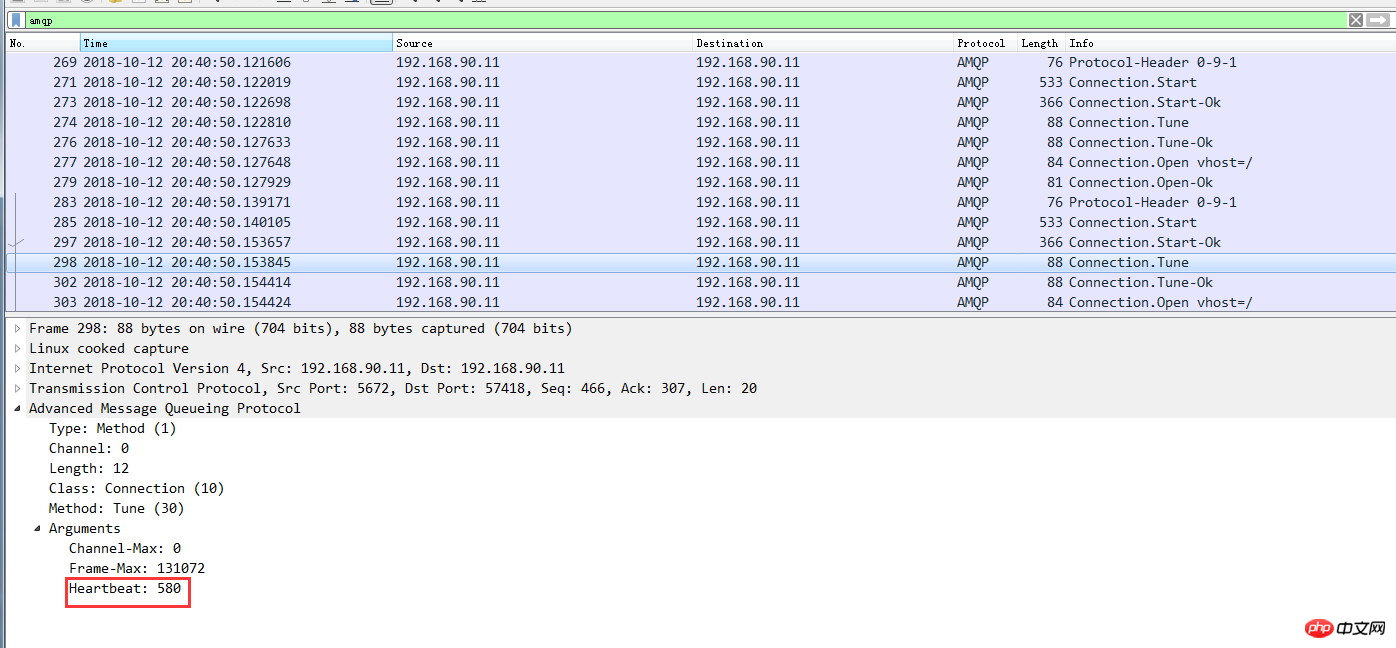
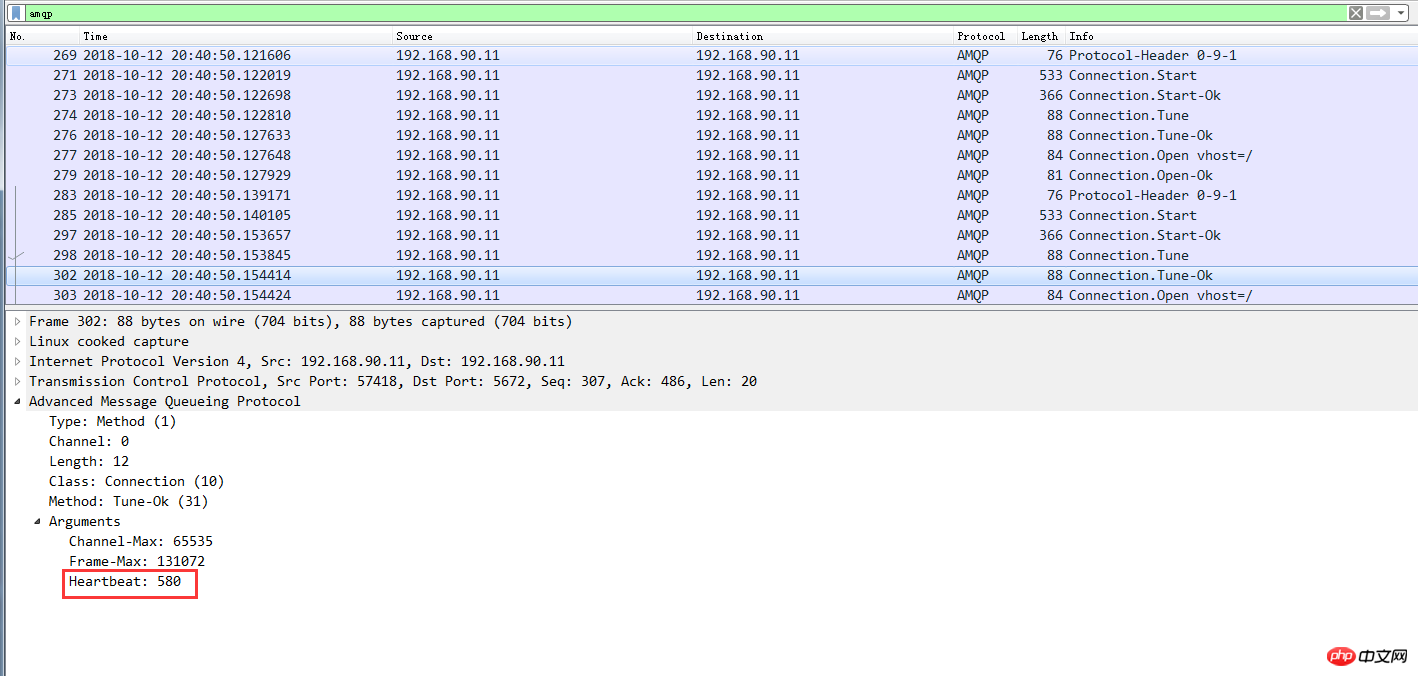
从上图我们可以删除最后服务端和客户端协商的结果就是580,这样当时间到了之后,如果没有数据往来,那么就会出现连接被服务端断开的情况了
特别注意
需要特别注意的是,经过我实际测试python的pika==0.11.2 版本及以下版本设置heartbeat的不生效的,只有0.12.0及以上版本设置才能生效





