



本篇文章给大家带来的内容是关于高手教你如何制作一个简单漂亮的前端聊天界面,有一定的参考价值,有需要的朋友可以参考一下,希望对你有所帮助。
一个简单的前端静态聊天界面,实现了聊天的基本功能,目前后台还没做,接下来还会继续更新后台和完善前台样式并更新。
一.Html代码
<!DOCTYPE html>
<html lang="en">
<head>
    <meta charset="UTF-8">
    <title>chat</title>
    <link rel="stylesheet" href="../css/chat.css" type="text/css">
    <script type="text/javascript" src="../js/chat.js"></script>
</head>
<body>
<p class="all">
    <p class="chat_index">
        <!--banner-->
        <p class="chat_banner">

        </p>

        <p class="chat_body">
            <!--在线列表-->
            <p class="chat_online">
                <!--搜索-->
                <p class="search_online">
                    <form>
                        <input type="text" placeholder="搜索联系人">
                    </form>
                </p>
                <p class="online_friend">
                    <ul>
                        <li>
                            <p class="a_friend">
                                <p class="head_portrait">
                                    <p class="head_text">
                                        黄
                                    </p>
                                </p>
                                <p class="friend">

                                    <p class="name">天狼星</p>
                                    <p class="this_time">4-12-15:10</p>

                                </p>
                            </p>
                        </li>
                        <li>
                            <p class="a_friend">
                                <p class="head_portrait">
                                    <p class="head_text">
                                        黄
                                    </p>
                                </p>
                                <p class="friend">

                                    <p class="name">天狼星</p>
                                    <p class="this_time">4-12-15:10</p>

                                </p>
                            </p>
                        </li>
                        <li>
                            <p class="a_friend">
                                <p class="head_portrait">
                                    <p class="head_text">
                                        黄
                                    </p>
                                </p>
                                <p class="friend">

                                    <p class="name">天狼星</p>
                                    <p class="this_time">4-12-15:10</p>

                                </p>
                            </p>
                        </li>
                        <li>
                            <p class="a_friend">
                                <p class="head_portrait">
                                    <p class="head_text">
                                        黄
                                    </p>
                                </p>
                                <p class="friend">

                                    <p class="name">天狼星</p>
                                    <p class="this_time">4-12-15:10</p>

                                </p>
                            </p>
                        </li>
                    </ul>
                </p>

            </p>
            <!--聊天界面-->
            <p class="chat_main">
                <p class="chat_p">
                    <ul id="chat_ul" class="chat_content">

                    </ul>

                </p>

                <p class="send_message">
                    <form>
                        <input type="text" placeholder="请输入消息" id="send_txt">
                        <input type="button" value="发送" id="send_btn">
                    </form>
                </p>
            </p>
            <!--名片-->
            <p class="chat_namecard">

            </p>
        </p>

    </p>
</p>
</body>
</html>
二.CSS代码
有些需要注意的地方已经标上注释了
* {
    margin: 0;
    padding: 0;
    font-size: 12px;
    font-family: "微软雅黑";
}

.all {
    width: 100%;
    height: 790px;
    /*background-color: #7fa4f2;*/
    background: linear-gradient(to right, #879eee, #ba78dc); /* 标准的语法 */

}

.chat_index {
    width: 1000px;
    height: 600px;
    border: 1px solid black;
    position: relative;
    top: 100px;
    margin: 0 auto;
}

.chat_banner {
    background: linear-gradient(to right, #a41adc, #ee1351, #a41adc); /* 标准的语法 */
    width: 999px;
    height: 50px;
    border: 1px solid blue;
}

.chat_body {
    width: 999px;
    height: 546px;
    border: 1px solid red;
}

.chat_online {
    overflow: hidden;
    float: left;
    height: 546px;
    width: 200px;
    border: 1px solid yellow;
    background-color: white;
}

.search_online {
    text-indent: 2em;
    height: 40px;
    border: 1px solid black;
}

.search_online input[type="text"] {
    outline: none;
    margin: 2px auto;
    height: 30px;
    width: 60%;
    border-radius: 8px;
    text-indent: 2em;
}

.online_friend ul li {

    list-style-type: none;
}

.online_friend ul li {

    height: 60px;
    border-bottom: 1px solid #1c1f21;
    margin-top: 10px;
}

.a_friend {

    /*border: 1px solid #2328ff;*/
    height: 55px;
    background-color: #39fffe;

}

.head_portrait {

    background-color: #b532ff;
    margin: 6px 6px;
    float: left;
    height: 40px;
    width: 40px;
    border: 1px solid orangered;
    border-radius: 50%;
}

.head_text {
    padding: 3px;
    font-size: 22px;
    text-align: center;
    vertical-align: center;
    margin-top: 3px;
}

.friend {

    float: right;
    height: 54px;
    width: 140px;
    /*border: 1px solid rebeccapurple;*/
}

.friend .name {

    margin: 4px 6px;
    float: left;
}

.friend .this_time {
    margin-top: 4px;
    float: right;
}

.chat_main {
    float: left;
    width: 548px;
    height: 546px;
    border: 1px solid seagreen;
    /*background-color: white;*/
    background: url("../img/圣诞.jpg") no-repeat;
    background-size: cover;
}

.send_message {
    width: 548px;
    height: 65px;
    position: absolute;
    bottom: 0px;
    background: linear-gradient(to top, rgba(9, 216, 237, 0.99), #72cad4);
}

.send_message input[type="text"] {
    width: 470px;
    height: 30px;
    margin-top: 16px;
    margin-left: 10px;
    border-radius: 10px 0 0 10px;
    text-indent: 2em;
    outline: none;
    background-color: white;
    border: none;
}

.send_message input[type="button"] {
    border-radius: 0 10px 10px 0;
    width: 35px;
    height: 30px;
    background-color: white;
    border: none;
    margin-left: 0;
    background-color: white;
    border: none;
    outline: none;

}

.send_message input[type="button"]:hover {
    background-color: orangered;
}

.send_message input[type="button"]:active {
    background-color: #879eee;
}

.chat_namecard {
    float: left;
    width: 245px;
    height: 546px;
    border: 1px solid saddlebrown;
    background-color: #f1fea9;
}


.chat_content ul{
list-style-type: none;
}
.chat_content{
    overflow: auto;
    width: 540px;
    /*设置高度滚动条才有效*/
    height: 470px;
}
.chat_content li{
    margin-top: 10px;
    width: 540px;
    clear: both;
    display: block;

}

.chat_content li img{
    margin: 6px 0 0 0;
}

.chat_content li span {
    background: #ffd351;
    padding: 10px;
    border-radius: 10px;
    /*最大宽度不能太长,不然布局会混乱*/
    max-width: 400px;
    border: 1px solid white;
    box-shadow: 0 0 3px #879eee;
    margin: 6px 10px 0 10px;
    overflow: hidden;
}

.chat_content li img {
    width: 40px;
    height: 40px;
    border-radius: 50%;
}

.chat_content li img.imgleft {
 margin-left: 10px;
    float: left;
}

.chat_content li img.imgright {
 margin-right: 10px;
    float: right;
}

.chat_content li span.spanleft {
    float: left;
}

.chat_content li span.spanright {
    float: right;
}
三.JS代码
window.onload = function () {
    var user = ["../img/img_17.jpg"];
    var num = 1;//判断左右
    var portrait_position = 0;
    var now = -1;//左右浮动
    var send_btn = document.getElementById('send_btn');
    var send_txt = document.getElementById('send_txt');
    var chat_ul = document.getElementById('chat_ul');
    var chat_span = chat_ul.getElementsByTagName('span');
    var chat_img = chat_ul.getElementsByTagName('img');
    send_btn.onclick = function () {
        if (send_txt.value == '') {
            alert("请不要惜字如金");
        } else {
            chat_ul.innerHTML += '<li><img src="../img/img_24.jpg"><span>' + send_txt.value + '</span>';
            now++;
            if (num==0) {
                chat_span[now].className = 'spanright';
                chat_img[now].className = 'imgright';
            }
             else {
                chat_span[now].className = 'spanleft';
                chat_img[now].className = 'imgleft';
            }
            send_txt.value = '';
            // 内容过多时,将滚动条放置到最底端
            /*contentcontent.scrollTop = content.scrollHeight;*/
        }
    }


}
num 消息显示在左边还是右边,根据后台请求来操作
四.界面截图
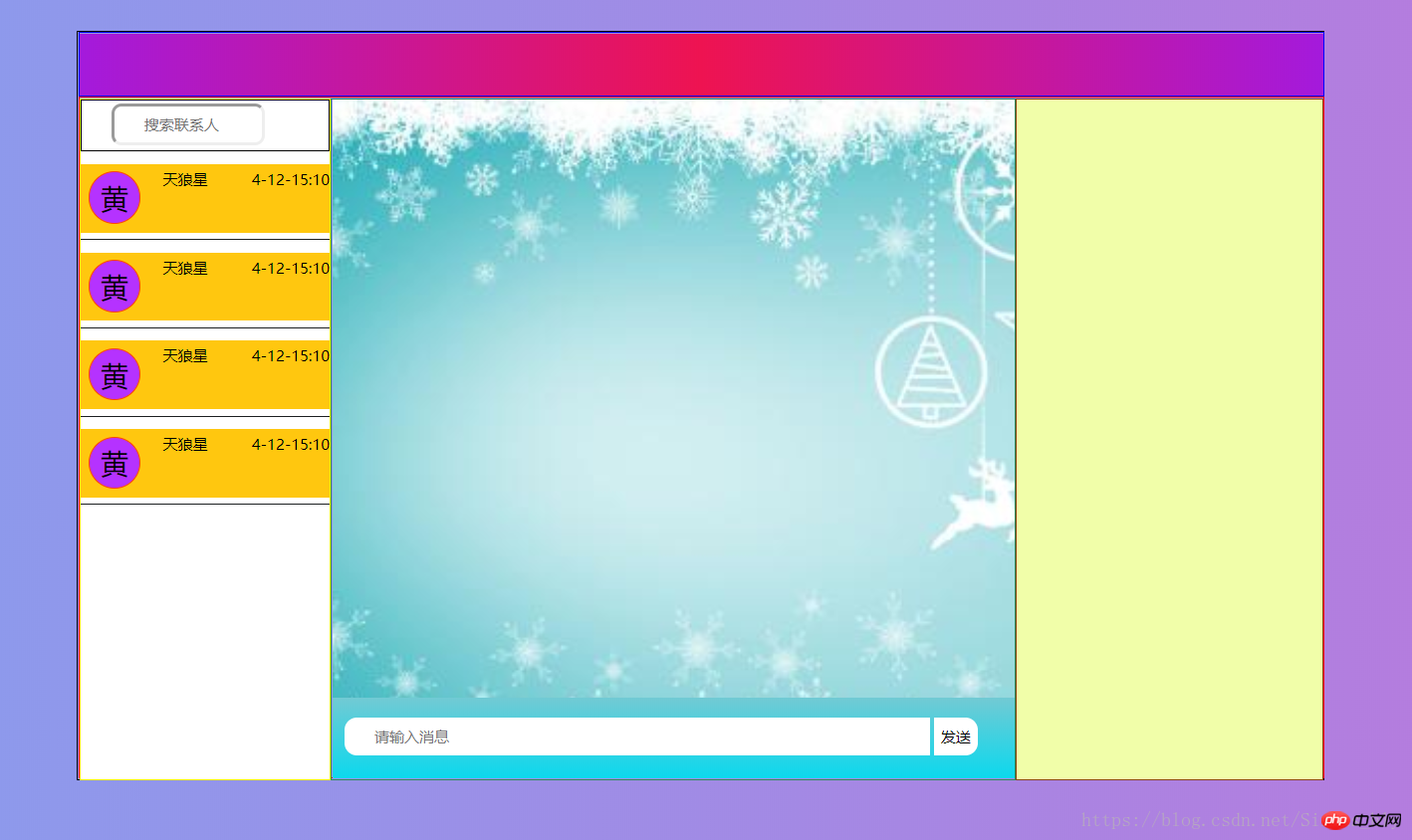

以上就是对的全部介绍,如果您想了解更多有关HTML视频教程,请关注PHP中文网。
立即学习“前端免费学习笔记(深入)”;




