



本篇文章主要给大家介绍用jquery实现表单提交验证即前台验证的方法。
表单提交验证是我们在项目开发中最为常见的一个实现功能。无论是web学习者还是网站开发上,都是非常重要的一个程序环节。那么表单提交验证包括前台验证还有后台验证,主要都是为了防止恶意留言、SQL注入。本节内容就主要给大家先介绍用jQuery实现前台验证的具体方法。
form表单提交验证的具体代码示例如下:
<!DOCTYPE>
<html>
<head>
    <meta http-equiv="Content-Type" content="text/html; charset=utf-8"/>
    <title>jQuery用户注册表单验证代码</title>
    <link href="css/jq22.css" rel="stylesheet" type="text/css"/>
    <script src="http://www.jq22.com/jquery/jquery-1.10.2.js"></script>
    <script language='javascript' src="js/jq22.js"></script>
</head>
<body>
<div class='body_main'>

    <div class='index_box' style='margin-top:20px;'>
        <div style="position:fixed;color:red;margin:70px 0 0 450px;font-size:16px;Z-index:100;display:block;"
             id="hint"></div>
        <div class='box_title'>
            <div class='text_content'>
                <h1>jQuery用户注册表单验证代码</h1>
            </div>
        </div>
        <div class='box_main'>
            <div id="register" class="register">
                <form id="form" action="check1.php" method="post" onSubmit="return check();">
                    <div id="form_submit" class="form_submit">
                        <div class="fieldset">
                            <div class="field-group">
                                <label class="required title">手机号码</label>
                                <span class="control-group" id="mobile_input">
                <div class="input_add_long_background">
                  <input class="register_input" type="text" id="mobile" name="mobile" maxLength="11" value=""
                         onblur="__changeUserName('mobile');">
                </div>
                </span>
                                <label class="tips">仅用于发送服务开通与到期提醒以及紧急故障方便联系到您,绝对保密</label>
                            </div>
                            <div class="field-group">
                                <label class="required title">邮箱</label>
                                <span class="control-group" id="email_input">
                <div class="input_add_long_background">
                  <input class="register_input" type="text" id="email" name="email" maxLength="50" value=""
                         onblur="__changeUserName('email');">
                </div>
                </span>
                                <label class="tips">请输入您常用的邮箱</label>
                            </div>
                            <div class="field-group">
                                <label class="required title">设置密码</label>
                                <span class="control-group" id="password1_input">
                <div class="input_add_long_background">
                  <input class="register_input" type="password" id="password1" name="password1" maxLength="20" value=""
                         onblur="checkPwd1(this.value);"/>
                </div>

                </span>
                                <label class="tips">请使用6~20个英文字母(区分大小写)、符号或数字</label>
                            </div>
                            <div class="field-group">
                                <label class="required title">确认密码</label>
                                <span class="control-group" id="password2_input">
                <div class="input_add_long_background">
                  <input class="register_input" type="password" id="password2" name="password2" maxLength="20" value=""
                         onblur="checkPwd2(this.value);"/>
                </div>

                </span>
                                <label class="tips">请输入确认密码,要和上面的密码一致</label>
                            </div>
                        </div>
                    </div>
                    <div id="div_submit" class="div_submit">
                        <div class='div_submit_button'>
                            <input id="submit" type="submit" value="注册" class='button_button disabled'>
                        </div>
                    </div>
                </form>
            </div>
            <script type="text/javascript">
                function __changeUserName(of) {
                    var username = $('#' + of).val();
                    if (of == 'email') {
                        if (username.search(/^[w.+-]+@[w.+-]+$/) == -1) {
                            showTooltips('email_input', '请输入正确的Email地址');
                            return;
                        }
                    }
                    else {
                        if (username == '' || !isMobilePhone(username)) {
                            showTooltips('mobile_input', '请输入正确的手机号码');
                            return;
                        }
                    }
                }

                function checkPwd1(pwd1) {
                    if (pwd1.search(/^.{6,20}$/) == -1) {
                        showTooltips('password1_input', '密码为空或位数太少');
                    } else {
                        hideTooltips('password1_input');
                    }
                }

                function checkPwd2(pwd2) {
                    var pas1 = $('#password1').val();
                    if (pwd2.search(/^.{6,20}$/) == -1) {
                        showTooltips('password2_input', '密码为空或位数太少');
                    }
                    if (pwd2 != pas1) {
                        showTooltips('password2_input', '两次密码不一致');
                    }
                }

                function check() {
                    hideAllTooltips();
                    var ckh_result = true;
                    // if ($('#email').val() == '' || !isEmail($('#email').val())) {
                    //     showTooltips('email_input', '请输入正确的Email地址');
                    //     ckh_result = false;
                    // }
                    if ($('#password1').val() == '') {
                        showTooltips('password1_input', '密码不能为空');
                        ckh_result = false;
                    }
                    if ($('#password2').val() == '') {
                        showTooltips('password2_input', '确认密码不能为空');
                        ckh_result = false;
                    }
                    if ($('#password2').val() != $('#password1').val()) {
                        showTooltips('password2_input', '两次密码不一致');
                        ckh_result = false;
                    }
                    if ($('#mobile').val() == '' || !isMobilePhone($('#mobile').val())) {
                        showTooltips('mobile_input', '手机号码不正确');
                        ckh_result = false;
                    }

                    return ckh_result;
                }

                function isMobilePhone(value) {
                    if (value.search(/^(+d{2,3})?d{11}$/) == -1) {
                        return false;
                    }
                    else
                        return true;
                }

                function isEmail(value) {
                    if (value.search(/^[w.+-]+@[w.+-]+$/) == -1) {
                        return false;
                    }
                    else
                        return true;
                }
            </script>
        </div>
        <div class='box_bottom'></div>
    </div>
</div>

</body>
</html>其中jq22.css代码示例:
body{margin:0;padding:0;background:url("../images/body_bg.png") repeat 0 0 #F2F2F2;width:100%;height:166px;color:#333333;font:12px/18px "tahoma","Microsoft YaHei","arial","SimHei","SimSun";}
html,body,ul,li,div,a{margin:0;padding:0;}
a.menu:hover{color: #ffff00;text-decoration: none;}
a.menu:active{color: #ffffff;text-decoration: none}
a.menu:link{color: #ffffff;text-decoration: none}
a.menu:visited{color: #ffffff;text-decoration: none}
img{border:0;}
label{margin: 0 5px 0 0}
a{color:#1F376D;text-decoration: none}
a:hover{color:#01B2FF;}
a.blue{color:#26A3CF;text-decoration: none}
a.more{color:#FFFFFF;text-decoration: none}
.footer *{color:#9B9B9B;text-shadow:0 1px 0 #fff;}
.footer a:hover{color:#555;}
input[type="submit"]{background:url('../images/buttom.png') no-repeat;font-size:15px;font-weight:600;color:#FFFFFF;border:0;font-family:"Microsoft YaHei","SimHei","SimSun";text-shadow:0 -1px 0 #535353;margin:5px 5px 0 0;padding:0 0 3px 0;display:block;width:106px;height:35px;text-align:center;font-weight:bold;line-height:33px;text-indent:20px;}
input[type="button"]{background:url('../images/buttom.png') no-repeat;font-size:15px;font-weight:600;color:#FFFFFF;border:0;text-shadow:0 -1px 0 #535353;margin:5px 5px 0 0;padding:0 0 3px 0;display:block;width:106px;height:35px;text-align:center;font-weight:bold;line-height:33px;text-indent:20px;}
input.button_button{background:url('../images/buttom.png') no-repeat;margin:0;width:106px;height:35px;border:0;font-size:15px;font-weight:600;color:#FFFFFF;text-shadow:0 -1px 0 #535353;padding:0 0 3px 0;text-align:center;font-weight:bold;line-height:33px;text-indent:20px;}
ol,ul{list-style:none outside none;margin:0px;padding:0;}
hr{color:#FF7700;width:200px;height:2px;float:left;}
textarea{font-size:12px;background-color:#ffffff;border:solid 1px #888888;}
fieldset{clear:both;padding:0 0 1em 1em;margin:0 0 30px .3em;border:1px solid #888888;}
legend{margin:0 0;padding:2px;font-size:10px;border:0px ;text-transform:capitalize;color:#000000;}
.clear{clear:both !important}
.bold{font-weight:bold !important}
.block{display:block !important}
/*index start*/
.body_main{margin:0 auto;width:992px;}
.index_box .box_title{background:url('../images/box_top.png') no-repeat scroll center top transparent;width:991px;height:80px;padding:0;}
.index_box .box_title .text_content{text-align:center;padding:20px 0 10px 0;}
.index_box .box_title .text_content h1{font-weight:normal;}
.index_box .box_main{border:solid #D0D0D0;background:#ffffff;border-width:0 1px 0 1px;width:988px;;min-height:50px;overflow:hidden !important;}
.index_box .box_bottom{background:url('../images/box_bottom.png') no-repeat scroll center top transparent;width:991px;height:7px;padding:0;}
/*Tooltips*/
.tooltips_main{position:absolute;left:0;margin:-5px 0 0 2px;z-index:999;}
.tooltips_box,.tooltips,.msg{display:inline-block;*display:inline;*zoom:1;position:relative;border-style:solid;border-color:#FF1F1F;}
.tooltips,.msg{border-width:0 1px;*left:-2px;background-color:#FFCFCF;}
.tooltips_box{border-width:1px;line-height:1.5;}
.tooltips{margin:0 -2px;}
.msg{margin:1px -2px;padding:0 6px;color:#2F2C2C;text-shadow:0 1px 0 #FFFFFF;font-size:12px;}
.ov{background:url('../images/tri.gif') no-repeat scroll 0 0 transparent;position:absolute;left:30%;overflow:hidden;width:15px;height:15px;margin:16px 0 0 0;display:inline;}
/*regist*/
.register{float:left;padding:25px 50px;}
.register .form_submit{float:left;border-bottom:1px solid #bfbfbf;width:888px;}
.register .form_submit .fieldset{float:left;}
.register .form_submit .fieldset .field-group{float:left;height:55px;}
.register .form_submit .fieldset .field-group .title{float:left;width:120px;text-align:right;margin:4px 0 0 0;font-size:14px;}
.register .form_submit .fieldset .field-group .control-group{float:left;width:350px;margin:0 10px;}
.register .form_submit .fieldset .field-group .tips{float:left;width:250px;color:#bfbfbf;}
.register .div_submit{float:left;width:875px;margin:10px 5px;}
.register .div_submit .div_submit_button{float:right;}
/*end regist*/
.fieldset .input_add_background{background:url("../images/input.jpg") no-repeat scroll 100% 100% transparent;background-position: center;height:30px;width:157px;float:left;margin:0 2px 0 0;}
.fieldset .input_add_background input.register_input_ot{background-color:#f9f9f9;border:0 none;color:#4F4F4F;font-size:12px;height:18px;outline:medium none;width: 145px;padding:1px;margin:5px;}
.fieldset .input_add_long_background{background:url("../images/input_long.jpg") no-repeat scroll 100% 100% transparent;background-position: center;height:30px;width:286px;float:left;margin:0 0 15px 0;display:inline;}
.fieldset .input_add_long_light_background{background:url("../images/input_long_light.jpg") no-repeat scroll 100% 100% transparent;background-position: center;height:30px;width:286px;float:left;}
.fieldset .input_add_long_background input.register_input{background-color:#f9f9f9;border:0 none;color:#4F4F4F;font-size:12px;height:18px;outline:medium none;width: 270px;padding:1px;margin:5px;}
.fieldset .input_text{display:inline-block;position:absolute;vertical-align:top;margin:6px 0 0 10px;z-index:2;font-style:italic;color:#BFBFBF;}
jq22.js代码示例如:
function trim(str){
return str.replace(/(^s*)|(s*$)/g, "");
}

/**** 是否为合法外网IP地址 ****/
function isIP(value) {
   var reg_ip = new RegExp('^[0-9]{1,3}.[0-9]{1,3}.[0-9]{1,3}.[0-9]{1,3}$');
    if ( ! reg_ip.exec(value) ) {
        return false;
    }

   var strs = value.split(".");
   if( strs.length != 4) {
      return false;
   }
   for (var i=0;i<strs.length ;i++ ) {
      if (strs[i].indexOf("0") == 0 && strs[i].length > 1) {
         return false;
      }
    else if (parseInt(strs[i])>255 || parseInt(strs[i])<0) {
         return false;
      }
  }
    if (value.search(/^192.168./) != -1 || value.search(/^172/) != -1 || value.search(/^127.0/) != -1 ) {
        return false;
    }
   return true;
}

/**** 是否为合法IP地址 ****/
function isAllIP(value, innerIP) {
   var reg_ip = new RegExp('^[0-9]{1,3}.[0-9]{1,3}.[0-9]{1,3}.[0-9]{1,3}$');
    if ( ! reg_ip.exec(value) ) {
        return false;
    }

   var strs = value.split(".");
   if( strs.length != 4) {
      return false;
   }
   for (var i=0;i<strs.length ;i++ ) {
      if (strs[i].indexOf("0") == 0 && strs[i].length > 1) {
         return false;
      }
    else if (parseInt(strs[i])>255 || parseInt(strs[i])<0) {
         return false;
      }
    }
    if (innerIP == false) {
        if (value.search(/^192.168./) != -1 || value.search(/^172/) != -1 || value.search(/^127.0/) != -1 ) {
            return false;
        }
    }
   return true;
}

/**** 是否为合法Email地址 ****/
function isEmail(value) {
    if(value.search(/^w+([-+.]w+)*@w+([-.]w+)*.w+([-.]w+)*$/) == -1)
        return false;
    else
        return true;
}

/**** 是否为合法的国内电话号码 ****/
function isTelphone(value) {
    if(value.search(/^(d{3}-d{8}|d{4}-d{7}|d{4}-d{8})$/) == -1)
        return false;
    else
        return true;
}

/**** 是否为合法的手机号码,为了兼容国际写法,目前只判断了是否是+数字 ****/
function isMobilePhone(value) {
    if(value.search(/^(+d{2,3})?d{11}$/) == -1)
        return false;
    else
        return true;
}

/**** 是否为合法的国内邮政编码 ****/
function isZipcode(value) {
    if(value.search(/^[1-9]d{5}$/) == -1)
        return false;
    else
        return true;
}

/**** 是否为合法的QQ号 ****/
function isQQ(value) {
    if(value.search(/^[1-9][0-9]{4,}$/) == -1)
        return false;
    else
        return true;
}

/**** 是否为数字串,length等于0不限制长度 ****/
function isNumber(value, length) {
    var regx;
    if(length==0)
        regx = new RegExp("^\d*$");
    else
        regx = new RegExp("^\d{" + length + "}$");
    if(value.search(regx) == -1)
        return false;
    else
        return true;
}

/*Error message Tooltips*/
$(document).ready(function(){
   /*点击隐藏错误提示,如果不想让提示点击消失,需要加上class='not_click_hide'*/
   $('.control-group input').not('.not_click_hide').focus(function(){
      hideTooltips($(this).parent().parent().attr('id'));
   });
});
/*
 *msgid:想让tooltips出现的地方的id
 *msg:提示的内容
 *time:自动消失的时间,如果不想让提示自动消失,则此参数不写
 */
function showTooltips(msgid,msg,time){
   if (msgid==''){ return; }
   if (msg==''){ msg='Error!'; }
   $('#'+msgid).prepend("<div class='for_fix_ie6_bug' style='position:relative;'><div class='tooltips_main'><div class='tooltips_box'><div class='tooltips'><div class='msg'>"+msg+"</div></div><div class='ov'></div></div></div></div>");
   $('#'+msgid+' .tooltips_main').fadeIn("slow").animate({ marginTop: "-23px"}, {queue:true, duration:400});
   try{
      if(typeof time != "undefined"){
         setTimeout('hideTooltips("'+msgid+'")',time);
      }
   }catch(err){}

}
function hideTooltips(msgid){
   try{
      $('#'+msgid).find('.tooltips_main').fadeOut("slow");
      $('#'+msgid).find('.tooltips_main').remove();
   }catch(e){}
}
function hideAllTooltips(){
   $('.tooltips_main').fadeOut("slow");
   $('.tooltips_main').remove();
}
/*End error message tooltips*/
check1.php代码示例:
<?php
var_dump($_POST);
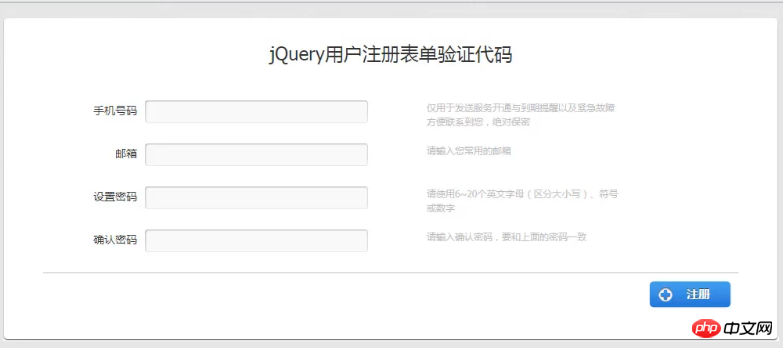
前台表单效果如图:

网人信息发布系统(WRMPS)
下载
详细介绍:WRMPS v6.1 to v6.2 功能更新:修正mapbar地图显示不完整修正店铺评论验证码不刷新的问题修正部分用户登录不成功的问题修正文章操作后返回提示出错的问题修正远程视频不能审核的问题修正推广易搜索直达的显示方式修正店铺已注册顶级域名不能绑定问题修正禁止频道时前台频道打开错误的问题...
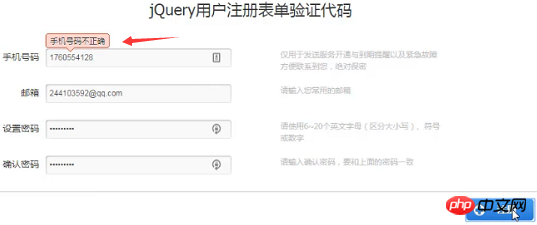
当我们输入不正确的手机号码后,就会出现如下提示:
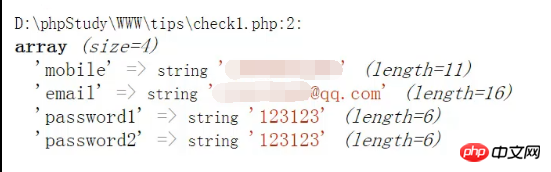
当我们都输入正确的信息,点击提交后,就会返回完整的信息如下:
那么由于文章篇幅的原因,本节内容就先介绍到这里。大家可以先复制这些代码在本地测试,在下一篇文章中,我们再继续为大家详细介绍代码部分,希望对需要的朋友有所帮助!
想要了解更多前端相关知识,可以关注PHP中文网jQuery视频教程 、JavaScript视频教程、Bootstrap教程等等相关视频教程,欢迎大家参考学习!




