



settimeout()方法将在以毫秒为单位指定的时间后调用函数,settimeout方法需要2个参数:对回调函数的引用和以毫秒为单位的延迟,本篇文章我们就来看一下settimeout方法的具体用法。
我们先来看一下setTimeout的基本语法
setTimeout(function, milliseconds, param_one, param_two, ...)
要停止setTimeout并阻止执行该函数,需要使用clearTimeout()方法。
setTimeout()方法返回一个可以在clearTimeout()方法中使用的ID。
我们来看一个简单的示例
代码如下
<!DOCTYPE html>
<html>
<body>

<script>
  var sampleVar;
  function sampleFunction(){
    sampleVar = setTimeout(alertFunc, 2000);
  }
  function alertFunc(){
    alert("Two seconds have passed!");
  }
  sampleFunction();
</script>

</body>
</html>
以上代码在2秒后会打开弹窗。
示例2
此示例将每2秒(3次)更改元素的文本。为此,必须将某些HTML元素的ID设置为“counter”。
代码如下
<!DOCTYPE html>
<html>
<body>
<p>单击下面的按钮。输入字段将显示经过2、4和6秒。</p><div class="aritcle_card flexRow">
<div class="artcardd flexRow">
<a class="aritcle_card_img" href="/xiazai/code/11197" title="起航点卡销售系统"><img
src="https://img.php.cn/upload/webcode/000/000/003/176527980152273.jpg" alt="起航点卡销售系统" onerror="this.onerror='';this.src='/static/lhimages/moren/morentu.png'" ></a>
<div class="aritcle_card_info flexColumn">
<a href="/xiazai/code/11197" title="起航点卡销售系统">起航点卡销售系统</a>
<p>欢迎使用“起航点卡销售系统”销售程序:一、系统优势 1、售卡系统采取了会员与非会员相结合的销售方法,客户无需注册即可购卡,亦可注册会员购卡。 2、购卡速度快,整个购卡或过程只需二步即可取卡,让客户感受超快的取卡方式! 3、批量加卡功能。 4、取卡方式:网上支付,即时取卡 ,30秒可完成交易。 5、加密方式:MD5 32位不可倒推加密 6、防止跨站</p>
</div>
<a href="/xiazai/code/11197" title="起航点卡销售系统" class="aritcle_card_btn flexRow flexcenter"><b></b><span>下载</span> </a>
</div>
</div>
<button onclick="timedText()">Display timed text</button>
<input type="text" id="text">
<script>
function timedText() {
var x = document.getElementById("text");
setTimeout(function(){ x.value="2 seconds" }, 2000);
setTimeout(function(){ x.value="4 seconds" }, 4000);
setTimeout(function(){ x.value="6 seconds" }, 6000);
}
</script>
</body>
</html>浏览器上显示效果如下
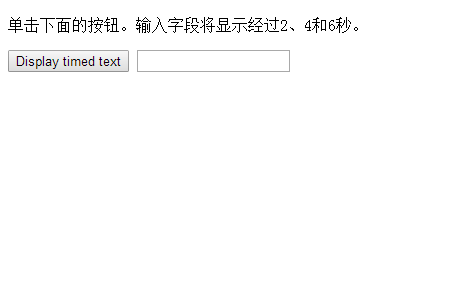
当点击左侧按钮,就会在文本框中显示经过了2、4、6秒
如果在计时器用完之前调用“samplestopfunction”,则此示例将停止“timeout”。
代码如下
<!DOCTYPE html>
<html>
<body>

<p>等待3秒钟后,单击第一个按钮显示“Hi”。</p>
<p>单击第二个按钮以阻止执行第一个函数<br>(必须在3秒钟前单击它)</p>

<button onclick="sampleFunction()">Try it</button>
<button onclick="sampleStopFunction()">Stop the alert</button>

<script>
var sampleVar;

function sampleFunction() {
 sampleVar = setTimeout(function(){ alert("Hi") }, 2000);
}

function sampleStopFunction() {
 clearTimeout(sampleVar);
}
</script>

</body>
</html>
浏览器上显示效果如下
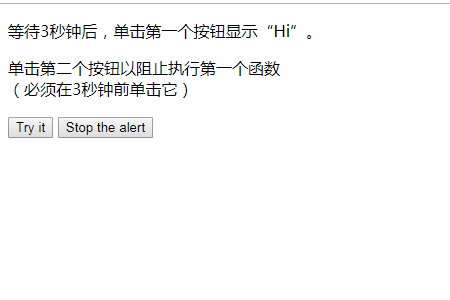
本篇文章到这里就全部结束了,更多精彩内容大家可以关注php中文网相关栏目教程!!!




