



本篇文章给大家带来的内容是关于react组件通信的介绍(代码示例),有一定的参考价值,有需要的朋友可以参考一下,希望对你有所帮助。
最近闲来无事自学React框架,自学过程中所有的问题经验都会在此记录,希望可以帮助到学习React框架的同学,废话不多说上代码。
首先是父传子:
import React, { Component } from 'react';
import Com1 from './componments/com1'

class App extends Component {
  constructor(props){
    super(props)
    this.state = {
      arr: [{
          "userName": "fangMing", "text": "123333", "result": true
      }, {
          "userName": "zhangSan", "text": "345555", "result": false
      }, {
          "userName": "liSi", "text": "567777", "result": true
      }, {
          "userName": "wangWu", "text": "789999", "result": true
      },]
    };
    this.foo = "我来自父组件"  //这个也是父传子方法,可能初学者有点迷,刚开始我也用来和arr = {this.state.arr}做区分
  };
  render() {
    return (
      <div className="App">
        <header className="App-header">
          <img src={logo} className="App-logo" alt="logo" />
        </header>
        <Com1 age="大卫" arr={this.state.arr} fn={this.foo}/>
      </div>
    );
  }
}
export default App;
子组件:
import React, { Component } from 'react';

class Ele extends Component{
    constructor(props){
       super(props)
    };
    render(){
        return (
           <div>
               <h1>Hello, {this.props.age}</h1>
               <p>{this.props.fn}</p>
               <ul>
                    {
                        this.props.arr.map(item => { //这个地方通过this.props.arr接收到父组件传过来的arr,然后在{}里面进行js的循环
                            return (
                                <li key={item.userName}>
                                    {item.userName} 评论是:{item.text}
                                </li>
                            )
                        })
                    }
                </ul>
           </div>
        );
    };
}

export default Ele;
结果显示:
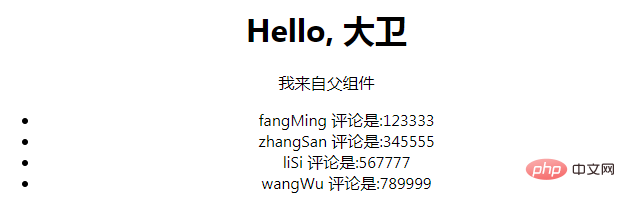
以上是父传子的方法,主要还是使用props传值,下面看看子传父.
子传父:
首先是子组件:

import React, { Component } from 'react';

class Ele extends Component{
    constructor(props){
       super(props);
       this.state = ({
            childText: "我来自子组件"
       })
    };
    clickFun(text) {  //定义触发的方法
        this.props.pfn(text)//这个地方把值传递给了props的事件当中
    }
    render(){
        return (
           <div>
                {/* 通过事件进行传值,如果想得到event,可以在参数最后加一个event,
                这个地方还是要强调,this,this,this */}
                <button onClick={this.clickFun.bind(this, this.state.childText)}>
                    传值
                </button>
           </div>
        );
    };
}

export default Ele;
父组件:
import React, { Component } from 'react';
import Com1 from './componments/com1'

class App extends Component {
  constructor(props){
    super(props)
    this.state = {
      parentText: "现在是父组件",
  };
  fn(data) {
    this.setState({
        parentText: data //把父组件中的parentText替换为子组件传递的值
    },() =>{
       console.log(this.state.parentText);//setState是异步操作,但是我们可以在它的回调函数里面进行操作
    });
  };
  render() {
    return (
      <div className="App">
        <Com1 pfn={this.fn.bind(this)}/> {/*通过绑定事件进行值的运算,这个地方一定要记得.bind(this),不然会报错,切记切记,因为通过事件传递的时候this的指向已经改变 */}
        <p>text is {this.state.parentText}</p>
      </div>
    );
  }
}
export default App;
以上是父子组件传值的方法,有不对的地方还望指正
还有兄弟组件传值还没学到,兄弟组件传值学到会更新上来
【相关推荐:React视频教程】




