




Java实现发送天气功能(附代码)
不知不觉,又到了雨季,你对象是不是经常忘记带伞呢,这个时候写一个自动定时发送邮件的程序,提醒她带伞,会不会对你崇拜有加呢,当然,如果你对象是一位攻城狮,当我没讲~

技术栈
Spring Boot 2.3.1
Jdk 1.8
立即学习“Java免费学习笔记(深入)”;
Maven
快速创建实例
前往 https://start.spring.io/ 如下所示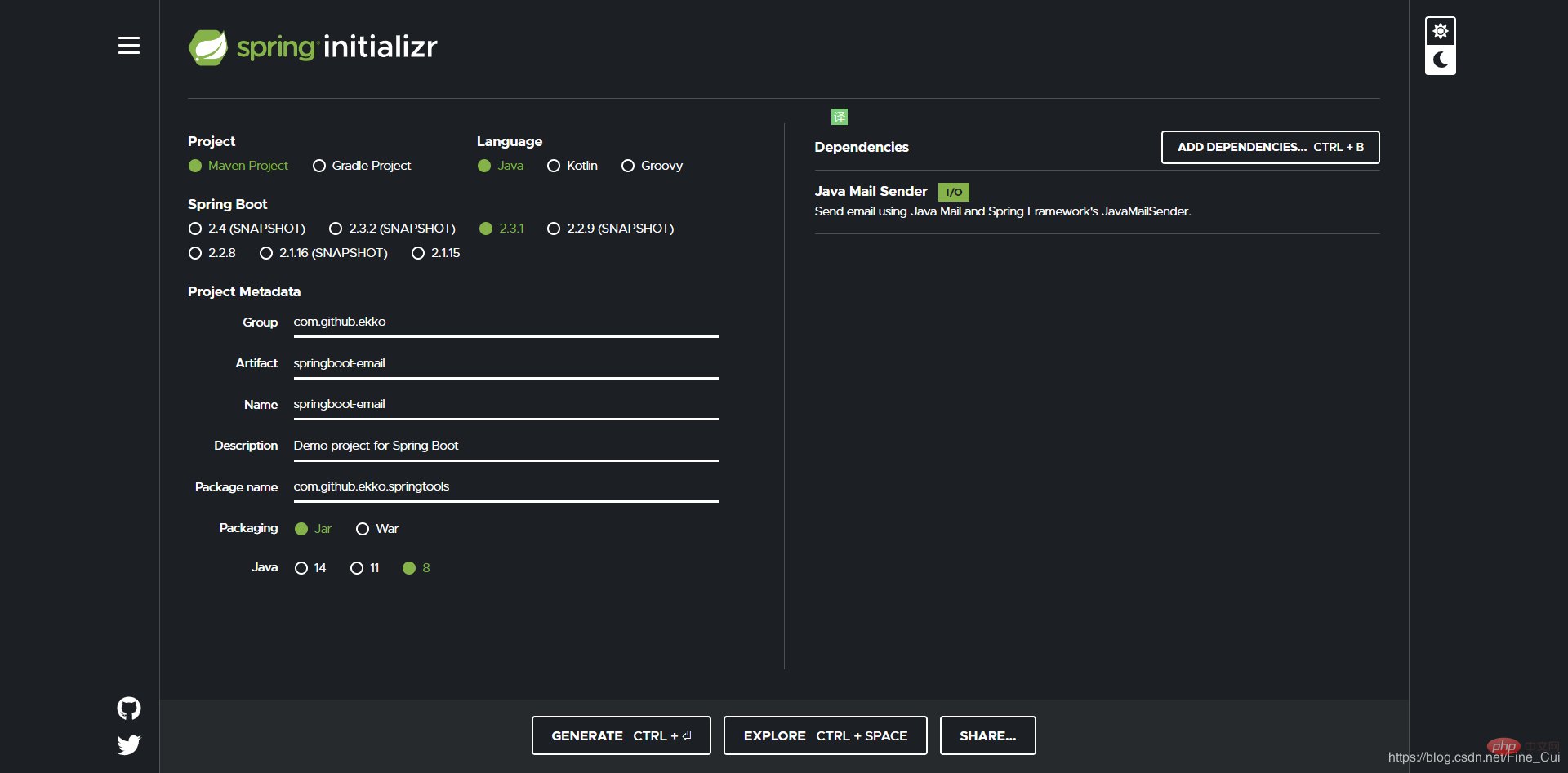
点击GENERATE生产一个zip解压导入idea即可
pom.xml 文件
<?xml version="1.0" encoding="UTF-8"?><project xmlns="http://maven.apache.org/POM/4.0.0" xmlns:xsi="http://www.w3.org/2001/XMLSchema-instance"
         xsi:schemaLocation="http://maven.apache.org/POM/4.0.0 https://maven.apache.org/xsd/maven-4.0.0.xsd">
    <modelVersion>4.0.0</modelVersion>
    <parent>
        <groupId>org.springframework.boot</groupId>
        <artifactId>spring-boot-starter-parent</artifactId>
        <version>2.3.1.RELEASE</version>
        <relativePath/>
    </parent>
    <groupId>com.github.ekko</groupId>
    <artifactId>springboot-email</artifactId>
    <version>1.0.0</version>
    <name>springboot-email</name>
    <description>Demo project for Spring Boot</description>

    <properties>
        <java.version>1.8</java.version>
    </properties>

    <dependencies>
        <dependency>
            <groupId>org.springframework.boot</groupId>
            <artifactId>spring-boot-starter-mail</artifactId>
        </dependency>
        <dependency>
            <groupId>cn.hutool</groupId>
            <artifactId>hutool-all</artifactId>
            <version>4.6.1</version>
        </dependency>
        <dependency>
            <groupId>com.alibaba</groupId>
            <artifactId>fastjson</artifactId>
            <version>1.2.70</version>
        </dependency>
        <dependency>
            <groupId>org.projectlombok</groupId>
            <artifactId>lombok</artifactId>
            <version>1.18.12</version>
            <scope>provided</scope>
        </dependency>
        <dependency>
            <groupId>org.springframework.boot</groupId>
            <artifactId>spring-boot-starter-web</artifactId>
        </dependency>
        <dependency>
            <groupId>org.springframework.boot</groupId>
            <artifactId>spring-boot-starter-test</artifactId>
            <scope>test</scope>
            <exclusions>
                <exclusion>
                    <groupId>org.junit.vintage</groupId>
                    <artifactId>junit-vintage-engine</artifactId>
                </exclusion>
            </exclusions>
        </dependency>
    </dependencies>

    <build>
        <plugins>
            <plugin>
                <groupId>org.springframework.boot</groupId>
                <artifactId>spring-boot-maven-plugin</artifactId>
            </plugin>
        </plugins>
    </build>
    <repositories>
        <!--阿里云主仓库,代理了maven central和jcenter仓库-->
        <repository>
            <id>aliyun</id>
            <name>aliyun</name>
            <url>https://maven.aliyun.com/repository/public</url>
            <releases>
                <enabled>true</enabled>
            </releases>
            <snapshots>
                <enabled>false</enabled>
            </snapshots>
        </repository>
        <!--阿里云代理Spring 官方仓库-->
        <repository>
            <id>spring-milestones</id>
            <name>Spring Milestones</name>
            <url>https://maven.aliyun.com/repository/spring</url>
            <releases>
                <enabled>true</enabled>
            </releases>
            <snapshots>
                <enabled>false</enabled>
            </snapshots>
        </repository>
    </repositories>
    <pluginRepositories>
        <!--阿里云代理Spring 插件仓库-->
        <pluginRepository>
            <id>spring-plugin</id>
            <name>spring-plugin</name>
            <url>https://maven.aliyun.com/repository/spring-plugin</url>
            <releases>
                <enabled>true</enabled>
            </releases>
            <snapshots>
                <enabled>false</enabled>
            </snapshots>
        </pluginRepository>
    </pluginRepositories></project>
新建接收天气api的实体
Weather.java
package com.github.ekko.springtools.model;import lombok.Data;import lombok.NoArgsConstructor;import java.util.List;@Data@NoArgsConstructorpublic class Weather {
    private String day;
    private String date;
    private String week;
    //天气情况
    private String wea;
    private String weaImg;
    private String air;
    private String humidity;
    // 空气质量 优
    private String airLevel;
    // 空气质量描述:空气很好,可以外出活动,呼吸新鲜空气,拥抱大自然
    private String airTips;
    private String tem1;
    private String tem2;
    private String tem;

    private List<Whours> hours;}
Whours.java
package com.github.ekko.springtools.model;import lombok.Data;import lombok.NoArgsConstructor;@Data@NoArgsConstructorpublic class Whours {
    // 14日20时
    private String day;
    //中雨
    private String wea;
    //28℃ 实时温度
    private String tem;
    //无持续风向
    private String win;
    // 风速 3-4级
    private String winSpeed;}
天气接口
用的是https://www.tianqiapi.com/index
也没给我推广费,也作为我白嫖它这么久的回报吧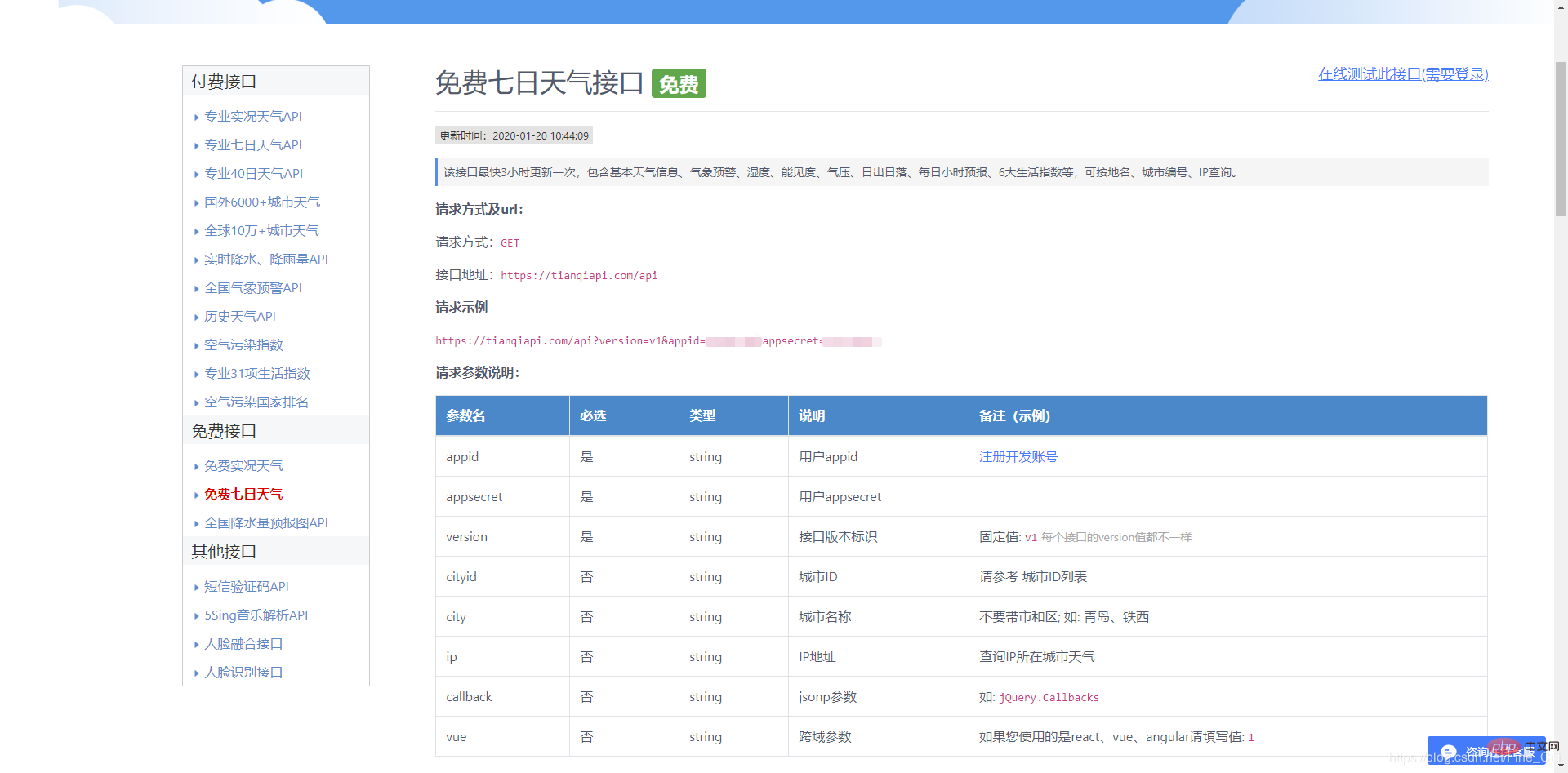
封装的天气api简单演示
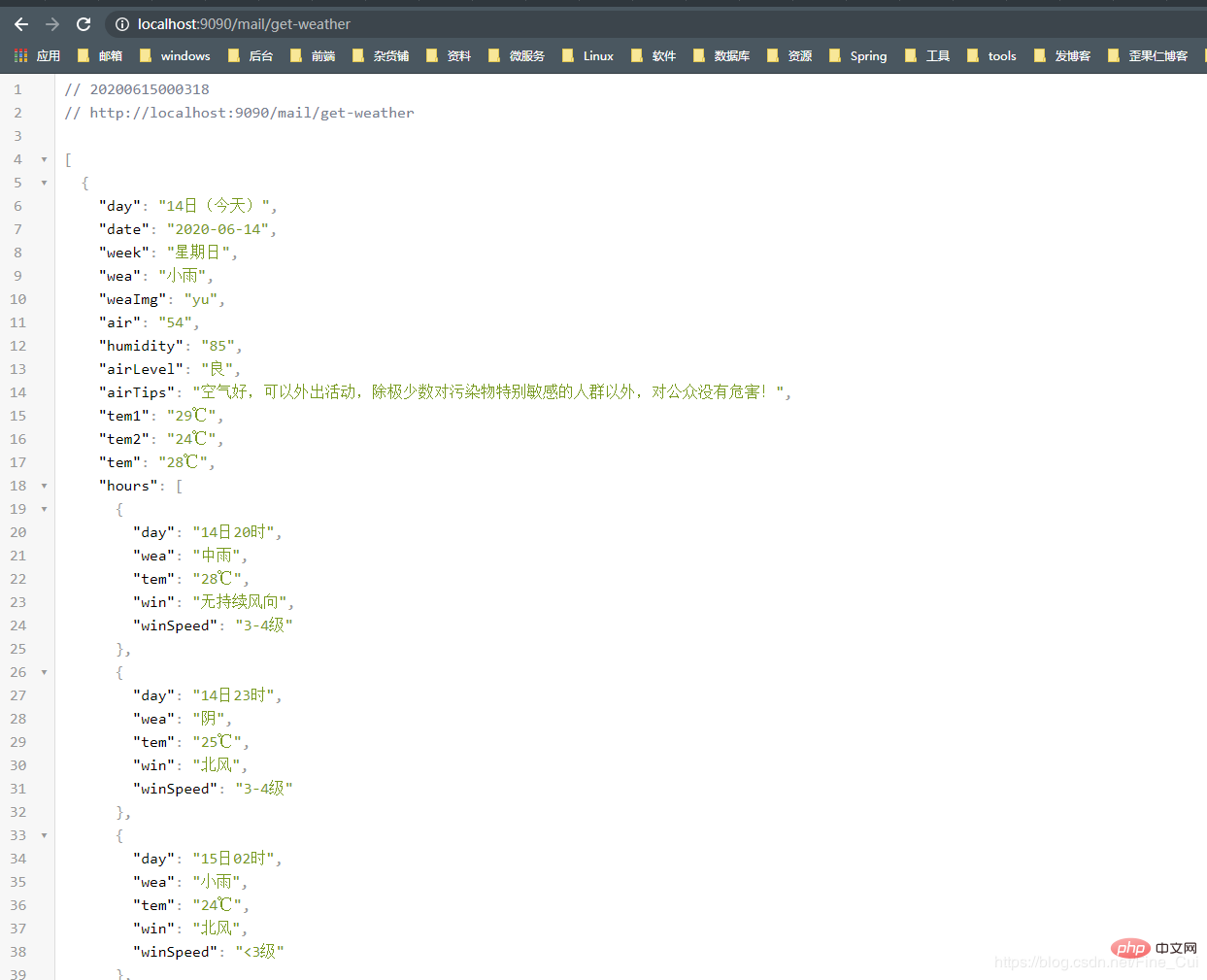

获取天气api与发送邮件的逻辑
新建EmailService.java接口
package com.github.ekko.springtools.service;import com.github.ekko.springtools.model.Weather;import java.util.List;public interface EmailService {
    boolean sendSimpleMessage();

List<Weather> getWeather();}实现EmailService接口
package com.github.ekko.springtools.service.impl;import cn.hutool.http.HttpRequest;import cn.hutool.http.HttpUtil;import com.alibaba.fastjson.JSON;import com.github.ekko.springtools.model.Weather;import com.github.ekko.springtools.service.EmailService;import org.springframework.beans.factory.annotation.Autowired;import org.springframework.mail.javamail.JavaMailSender;import org.springframework.mail.javamail.MimeMessageHelper;import org.springframework.stereotype.Service;import javax.mail.internet.MimeMessage;import java.util.ArrayList;import java.util.List;import java.util.Optional;@Servicepublic class EmailServiceImpl implements EmailService {
    private final static String FROM_MAIL = "你的发送邮箱,和配置文件中相同";
    private final static String TO_MAIL = "接收人邮箱";
    private final static String APPID = "你申请的天气api的appid,自行替换";
    private final static String APPSECRET = "你申请的天气api的APPSECRET,自行替换";

    public JavaMailSender emailSender;

    @Autowired
    public void setEmailSender(JavaMailSender emailSender) {
        this.emailSender = emailSender;
    }

    @Override
    public boolean sendSimpleMessage() {
        try {
            MimeMessage message = emailSender.createMimeMessage();
            MimeMessageHelper mimeMessageHelper = new MimeMessageHelper(message, true);
            mimeMessageHelper.setTo(TO_MAIL);
            mimeMessageHelper.setFrom(FROM_MAIL);
            mimeMessageHelper.setSubject("今日份天气到了~~");
            mimeMessageHelper.setText(buildHtml(getWeather().get(0)), true);
            emailSender.send(message);
        } catch (Exception e) {
            e.printStackTrace();
            return false;
        }
        return true;
    }

    public List<Weather> getWeather() {
        HttpRequest httpRequest = HttpUtil.createGet("https://www.tianqiapi.com/api?version=v1&" + "appid=" + APPID + "&appsecret=" + APPSECRET + "&cityid=101020100");
        String res = httpRequest.execute().body();
        Object data = JSON.parseObject(res).get("data");

        return JSON.parseArray(JSON.toJSONString(data), Weather.class);
    }

    private String buildHtml(Weather weather) {
        StringBuffer html = new StringBuffer("");
        html.append("<!DOCTYPE html>\n" +
                "<html>\n" +
                "<head>\n" +
                "<meta charset=\"utf-8\">\n" +
                "<title>文档标题</title>\n" +
                "</head><body>");
        if (weather.getWea().contains("雨")) {
            html.append("<h1>今日有雨,狗子请带伞!</h1>");
        }
        html.append("<hr/><h3>今日天气如下</h3><table><tr><th>时间</th><th>天气</th><th>温度</th></tr>");
        Optional.ofNullable(weather.getHours())
                .orElse(new ArrayList<>())
                .forEach(whours -> {
                    html.append("<tr><td>")
                            .append(whours.getDay())
                            .append("</td><td>")
                            .append(whours.getWea())
                            .append("</td><td>")
                            .append(whours.getTem())
                            .append("</td></tr>");
                });

        html.append("</table></body>" +
                "</html>");
        return html.toString();
}}代码中的APPID与APPSECRET
设置发送账号信息
这里以腾讯邮箱为例子 ,先获取发送邮件的授权码
查询其邮箱的SMTP地址 ,链接 ,可以看到
使用SSL的通用配置如下:
接收邮件服务器:pop.qq.com,使用SSL,端口号995
发送邮件服务器:smtp.qq.com,使用SSL,端口号465或587
账户名:您的QQ邮箱账户名(如果您是VIP帐号或Foxmail帐号,账户名需要填写完整的邮件地址)
密码:您的QQ邮箱密码
电子邮件地址:您的QQ邮箱的完整邮件地址
配置appliction.properties
server.port=9090
server.servlet.context-path=/mail
spring.mail.host=smtp.qq.com
spring.mail.port=465
spring.mail.username=你的邮箱地址
spring.mail.password=刚刚获取的授权码
spring.mail.properties.mail.smtp.auth=true
spring.mail.properties.mail.smtp.ssl.enable=true
spring.mail.properties.mail.smtp.starttls.enable=true
控制层
声明 @EnableScheduling定时任务
给指定方法设置时间表达式@Scheduled(cron = "0 0 8 * * ? ")
package com.github.ekko.springtools.controller;import com.github.ekko.springtools.model.Weather;import com.github.ekko.springtools.service.EmailService;import org.springframework.beans.factory.annotation.Autowired;import org.springframework.scheduling.annotation.EnableScheduling;import org.springframework.scheduling.annotation.Scheduled;import org.springframework.web.bind.annotation.GetMapping;import org.springframework.web.bind.annotation.RestController;import java.util.List;@RestController@EnableSchedulingpublic class MailController {

    private EmailService emailService;

    @Autowired
    public void setEmailService(EmailService emailService) {
        this.emailService = emailService;
    }

    @GetMapping("/send")
    @Scheduled(cron = "0 0 23 * * ? ")
    public boolean sendEmail() {
        return emailService.sendSimpleMessage();
    }

    @GetMapping("get-weather")
    public List<Weather> getWeather() {
        return emailService.getWeather();
    }}
启动类
直接启动SpringbootEmailApplication即可
package com.github.ekko.springtools;import org.springframework.boot.SpringApplication;import org.springframework.boot.autoconfigure.SpringBootApplication;@SpringBootApplicationpublic class SpringbootEmailApplication {

	public static void main(String[] args) {
		SpringApplication.run(SpringbootEmailApplication.class, args);
	}}
效果
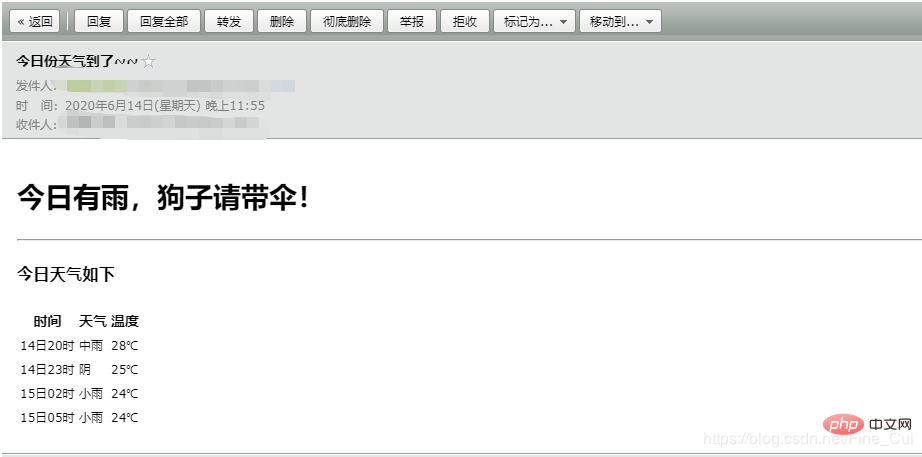
有点丑,将就用,自行美化
感谢大家的阅读,希望大家收益多多。
推荐教程:《java视频教程》





