



css实现圆环效果有多种方法,这里为大家分享五种方法:
(推荐教程:CSS教程)
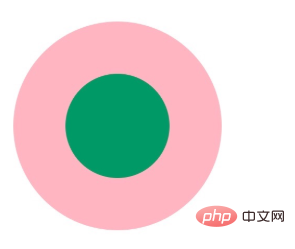
首先我们来看一下实现效果:
立即学习“前端免费学习笔记(深入)”;
接下来为大家介绍方法:
1、两个标签的嵌套

<div class="element1">
    <div class="child1"></div>
</div>
.element1{
width: 200px;
height: 200px;
background-color: lightpink;
border-radius: 50%;
}
.child1{
width: 100px;
height: 100px;
border-radius: 50%;
background-color: #009966;
position: relative;
top: 50px;
left: 50px;
}2、使用伪元素,before/after
<div class="element2"></div>
.element2{
            width: 200px;
            height: 200px;
            background-color: lightpink;
            border-radius: 50%;
        }
        .element2:after{
            content: "";
            display: block;
            width: 100px;
            height: 100px;
            border-radius: 50%;
            background-color: #009966;
            position: relative;
            top: 50px;
            left: 50px;
        }
3、使用border:
<div class="element3"></div>
 .element3{
            width: 100px;
            height: 100px;
            background-color: #009966;
            border-radius: 50%;
            border: 50px solid lightpink ;
}(学习视频推荐:css视频教程)
4、使用border-shadow
<div class="element4"></div>
.element4{
            width: 100px;
            height: 100px;
            background-color: #009966;
            border-radius: 50%;
            box-shadow: 0 0 0 50px lightpink ;
            margin: auto;
        }
<div class="element5">
  .element5{
            width: 200px;
            height: 200px;
            background-color: #009966;
            border-radius: 50%;
            box-shadow: 0 0 0 50px lightpink inset;
            margin: auto;
        }
5、使用radial-gradient
<div class="element6"></div>
.element6{
            width: 200px;
            height: 200px;
            border-radius: 50%;
            background: -webkit-radial-gradient( circle closest-side,#009966 50%,lightpink 50%);
} 




